Buy anything from 5,000+ international stores. One checkout price. No surprise fees. Join 2M+ shoppers on Desertcart.
Desertcart purchases this item on your behalf and handles shipping, customs, and support to Vanuatu.
❄️ Stay Cool, Stay Ahead: The Ultimate RGB Laptop Cooling Experience
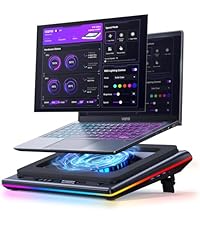
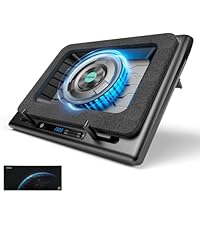
The llano RGB Laptop Cooling Pad is a powerful, quiet cooling solution designed for 15-19 inch laptops. Featuring a large 5.5-inch turbofan and brushless DC motor, it delivers a rapid 44℃ temperature drop within 90 seconds. Its customizable RGB lighting with 10+ colors and 4 modes enhances your setup’s aesthetic, controlled via an intuitive touch panel with an LCD display. Ergonomically designed with adjustable height, memory foam seals, and non-slip baffles, it ensures comfort and laptop stability. The integrated 36W power output and 1-in-3-out USB hub provide robust performance and connectivity, making it ideal for gamers and professionals seeking efficient cooling and style.


| ASIN | B0CLP3GVH1 |
| Best Sellers Rank | #1,883 in Electronics ( See Top 100 in Electronics ) #6 in Laptop Cooling Pads |
| Brand | llano |
| Color | White RGB |
| Cooling Method | Air |
| Customer Reviews | 4.5 out of 5 stars 2,598 Reviews |
| Enclosure Material | Acrylonitrile Butadiene Styrene (ABS) |
| Item Dimensions L x W x H | 16.9"L x 12.9"W x 2.7"H |
| Item Weight | 2.13 Kilograms |
| Manufacturer | llano |
| Material | Acrylonitrile Butadiene Styrene (ABS) |
| Mfr Part Number | LJN-V15-US6 |
| Model Number | V12 White (RGB) |
| Number of Fans | 1 |
| Product Dimensions | 16.9"L x 12.9"W x 2.7"H |
| Warranty Description | 1 Year |
A**X
Very impressive
Was skeptical about buying this because of its size and price. I had a small, simple, usb powered 3-fan cooler that I was using which was fine. I don't know how effective it was but it was better than nothing, I suppose. I was worried about the hooks that grasp the laptop near my wrists being an issue. However, thanks to the replies of a number of other users, that is not a concern. I don't even use them as the memory foam gasket is sufficient to hold the laptop in place. This thing can move a ton of air. It can be noisy when you have it wound up, but I usually keep it at 500 rpm. You can hear it, but it's not offensively loud. It keeps the laptop cool during gaming with no concern whatsoever. It requires a DC jack which I didn't think about. It's not a concern for me, just something I did not consider. It's nice to have so many extra USB ports, even if I'm not really using them. It is thick, but the payoff is well worth the extra size. I should have bought this ages ago; it does a fantastic job.
A**.
Great Product, it fulfills its role
Good product, it does decrease the temperature in the computer, it is noisy (Normal) but if you don’t care about that, it is great!
R**N
Effective external cooling.
I'm one of those weirdos that likes to use a laptop on a huge monitor and when I'm not home I just take it with me. Laptops for a while now have had issues with cooling because they try to make them as thin as possible. Naturally this creates issues with cooling as you can imagine. I have a dell g15 5515 and it runs warm. It does not matter what kind of pads or paste I use, it just gets warm. Well I also live in the desert and thats an issue in its own right with the balming heat. So what's the solution? Well chill pads have come a long way since my 20's. They are no longer these basic plastic plates with 3 fans on them. We have THESE now. This chill mat is a pretty big evolution. It has a gusset that runs all the way around that creates a seal that forces air through the laptop. It's a very simple design that features just an ON button and a basic control knob that you can use to crank it up if you need to. It also features a USB hub that you can use if you so desire. So how does it function? Well it's pretty loud and you can hear the fan crank up. However, the temps are worth it. Normally my setup isles at 50. It's dropped it down to 37. Normally under max load I'm running at 77. It now sits at 55. Yea, the noise is worth it. It sports a pair of arms down at the bottom to hold your laptop up but if I lean my laptop on them I don't get a proper seal. It's not a big issue to me as it's up there pretty firmly and I don't believe that it's going anywhere anytime soon. I can't comment on how long it's going to last. It's only day 1 and only time will be able to tell what it's longevity is. It's worth the price I feel. If anything goes wrong it has a 1 year warranty.
B**X
Awesome for my Asus Rog Zephyrus G16
This cooler is loud but boy is it heavily efficient. The temperature drops around 25F degrees on my Asus Rog Zephyrus G16 & I'm thoroughly impressed with the amount of airflow. It's really cute in white & I would love to see more colors released if anything. This is my first laptop cooler & I struck gold. Perfect for 16" laptops.
C**E
Provides powerful airflow and excellent dust protection
I had been hesitant about buying this cooling pad, but a recent promotion convinced me to give it a try. After using it, I know it's really worth it. - Cooling Performance I tested it with my ROG Strix G16 and Alienware X16, and the results were excellent. The fan speed reaches up to 2800 RPM, and when playing Valorant, I set my laptop to gaming mode and maxed out the cooling pad’s fan speed. With this setup, my keyboard stayed completely cool, whereas without the cooling pad, the keyboard and metal casing would get uncomfortably hot. - Dust Filter – [My Favorite Feature] One of the standout features for me is the dust filter at the air intake. It prevents dust from being drawn into the laptop, which is a huge plus. I regularly clean my laptop’s cooling system and know how dust buildup can impact performance. This filter reduces the need for frequent disassembly and cleaning, helping to maintain efficient cooling over time. - RGB Lighting & USB Hub The adjustable RGB lighting looks great—not a must-have for me, but definitely a nice bonus. The USB hub on the side also adds convenience by reducing the number of peripherals directly connected to my laptop. Downsides - Noise: At max 2800 RPM, the fan is quite loud. One night, I went downstairs to grab a drink and could still hear it from another room. However, powerful cooling comes at a cost, and I find it manageable by wearing headphones while gaming. - Portability: I often take my laptop to work or different locations, and this cooling pad isn’t very travel-friendly due to its size and thickness. If you need something highly portable, this might not be the best choice. If you're serious about keeping your gaming laptop cool and want to minimize dust buildup, this cooling pad is absolutely worth it. While the noise and portability might be drawbacks, the strong airflow, impressive cooling efficiency, and dust protection more than make up for it.
E**Y
Top tier cooling system!
After 3 weeks of using this product. I would like to give it a 4 star, but understanding how machines with power work, it’s a 5! 😇 I’ve had several laptop cooling systems in the past, sure they all had RGB lights, but the power, space, and quality were no comparison. First, let’s talk about how this can connect with your laptop. (Note: I don’t use it in this form because I have a docker station, but I did test it to ensure the usb ports are working). The cooling system comes with a USB-C to USB-C connector that connects to your laptop (cable included). After connecting this piece, you can then connect a mouse and keyboard to the USB slots on the cooling system instead of your laptop, and boom, you can send the signal of both devices and use them as normal. Awesome! Next, the power of the fan. It actually cools my laptop by around 20-25 degrees Fahrenheit. It comes with a nice pad that you can place your laptop on so that the bottom does not get scratched. This was carefully thought of and well crafted to include. It also comes with a dust proof filter so that the fan underneath does not intake dust. This machine can blast cold air like no other. The trade off is that with lots of power coming from the fan, it will sound loud when it’s at max speeds. However, it’s understandable, it’s blowing powerful cold air. The RGB lights make it look pretty, and there are several types of settings you can use for the lights. It all depends on how you like your light settings to be, there are static colors and there are dynamic colors as well. I use the dynamic rainbow function of light settings, there’s no life without colors! To summarize it all together, this fan was well worth it. It’s a good weight, it’s durable, powerful and pretty. I have a MacBook Pro from 2019, 15 inch sitting right on top of the pad, and the cooling system gets the job done. ✅ If there are any questions about this cooling system, feel free to comment below. I am nerdy with tech and enjoy sharing my experience with others for the best recommendations.
J**M
This is the one to get for larger laptops, best buttons compared to IETS
UPDATE -- After having streamed with it, like the IETS 600, it's not a perfect solution my computer still runs pretty hot. I'd say maybe there's a 5-10% reduction in temps, I crank it up to about 1800 rpm for gaming/streaming. I do believe this fan is quieter than the IETS 600, another reason to pick this one up. Per the original review below, the power button is rather unpredictable to operate, it usually doesn't work, I'll live with it. Otherwise the color changing buttons are fun, but I can't turn the LEDs off, no key combo I can find does that. -------------- Original review: I had a "cheap" cooler over the years, but lately I'm trying to stream and play games on my laptop. It's a gaming laptop, and it ran really hot, certainly hot enough to get CPU throttling at times, though I never tested for that. We're talking Core Temp reporting peaks of 100 degrees and average temps in the 80s-90s. At rest, with the Llano fan at 1000 rpm, my Laptop 3060 GPU is reporting 37 degrees, as opposed to 48 degrees on the old cooling stand. (the old one is a Thermaltake you can't get anymore) I haven't gamed/streamed yet with the Llano cooling pad, I'm mostly writing this review to constrast this with the IETS 600 cooler using the same MSI Pulse GL76 laptop. BUTTONS -- the plus The reason I returned the IETS 600 cooler, it was working (not as well as the Llano at idle, though). But the button drove me crazy! They are "solid state buttons" meaning there's no movement in the button. It's just sensing your fingertip. On the IETS 600, all three buttons are like this. You'll read below why my laptop was overhanging these buttons, but it was frustratingly impossible to make the buttons do what I wanted on the IETS600. Much improved design is on the Llano cooler pad here, yes the on off button is a bit tricky and honestly as I write this I can't turn the thing off. But the fan control is a roller button, it's great! I can control the fan speed exactly where I want this running, no fuss, no frustration. Honestly I can live with the power button I'll just turn the fan down to 300 when the laptop is off, if I can't get the power button to work. And I have had issues with iPads in the past where at most angles my finger isn't recognized, so maybe I'm weird and the buttons will be fine for you. FIT - a minus on both cooling pads, but you can make it work Here's the real problem with these coolers and they can't really "fix it" unless they make a new foam piece for different laptops. Before you buy this, check out the bottom of your laptop. Do the cooling vents come to the edge of the base of your laptop? Then let's hope it's only on one edge, otherwise this cooler won't work for you. Basically, you set your laptop on the foam base and it makes an air seal. That means ideally there's at least about a 1/2" edge with no cooling vents around the base of your laptop. In my case, on the left side, the vents come right to the edge. In the back, they are within 3/8" of the laptops "rear edge" (the rear base is not a straight line on these MSIs). So this seems to work, I have the laptop barely sitting on the foam in the back, not at all sitting on the foam on the left side (just butted up against the foam to make a seal) and the bulk of the weight is on the right and front edges of the base. But your mileage may vary and you may find you can't use this type of cooler, depending on how funky your laptop base is. RISK -- don't blow up your built in fans If your laptop is anything like mine, apparently the fans are regular maintenance item, like brakes on your car. You just expect them to go out. Mine did after two years, and I replaced them recently. Now think about what this cooling does, it forces air into your laptop. If you force air into your laptop at a high enough rate, you create positive air pressure (higher than ambient pressure). If you are pushing air into your laptop so fast that there's positive pressure, then you're probably making your laptop's fans race along faster than they want to go. I would assume there's a point where the air being moved through the laptop, at higher rpms, will be too much. Bottom Line... So bottom line I strongly recommend this model even with the issues related to funky laptop bases where the cooling vents come to the edge. It cools my laptop a bunch at idle, I'm sure it will work as well as the the IETS 600 or better, but I'll maybe update this once I stream/game with this setup.
C**E
Works really well!!
I have a Dell G7 15. They are known for getting super hot, like burn you fingers hot. Even after getting new cooling gel for it. I did try a couple other cheaper ones, but they didnt help too much. I initially passed up this one because I was worried about wasting money. This is worth every penny! My laptop is cool to the touch and I can turn the graphic up without it over heating! So happy I got this! I don't mind it being kindah loud because I know its working! I have dropped it a couple times and its still fine! It has been working great for the 5 months I have had it too! This is a great cooling pad!
Trustpilot
1 month ago
2 months ago