Buy anything from 5,000+ international stores. One checkout price. No surprise fees. Join 2M+ shoppers on Desertcart.
Desertcart purchases this item on your behalf and handles shipping, customs, and support to Vanuatu.
🎨 Elevate Your Artistry with Precision, Power, and Panache!
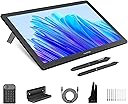
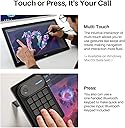
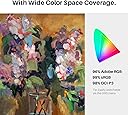
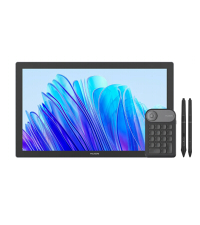
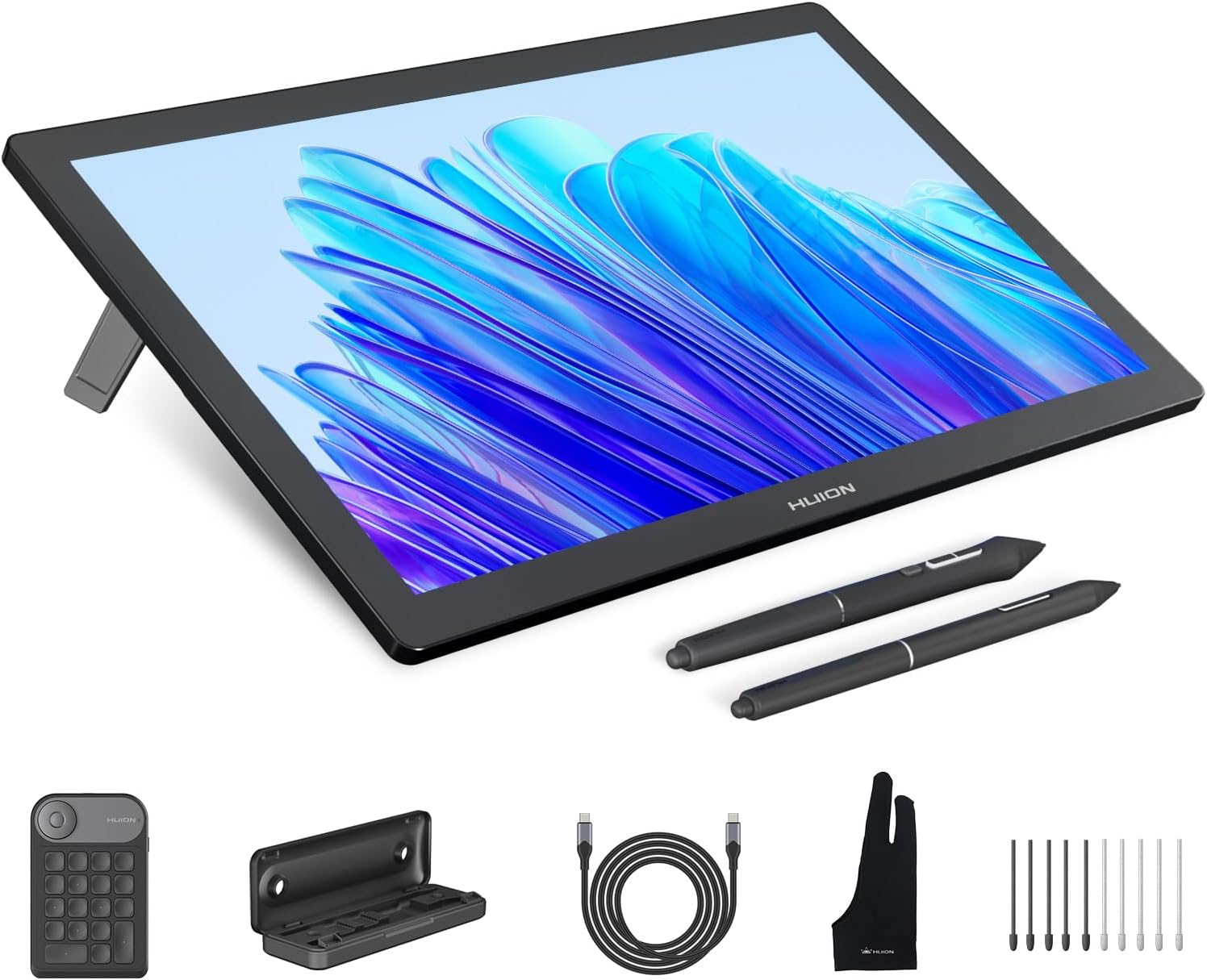
The HUION KAMVAS Pro 19 is a professional-grade 18.4-inch 4K UHD drawing tablet featuring 96% Adobe RGB color accuracy and 1.07 billion colors for stunning visuals. Equipped with the advanced PenTech 4.0 PW600 stylus offering 16,384 pressure levels and tilt support, it delivers precise, natural drawing experiences. Its anti-glare laminated glass screen mimics paper texture, while the Bluetooth programmable Keydial Mini enhances productivity. Compatible with Windows, Mac, Linux, and Android, this lightweight yet durable tablet is designed for digital artists, designers, and animators seeking high performance and seamless connectivity.


| ASIN | B0CPF3KWS2 |
| Active Surface Area | 16.1 x 9.06 inch |
| Additional Features | 16384 Levels of Pen Pressure, 60° Tilt Support, Anti-Glare Canvas Glass 2.0, Full Lamination, Multi-Touch Screen, Programmable Press Key |
| Best Sellers Rank | #66 in Computer Graphics Tablets |
| Brand | HUION |
| Built-In Media | 3-in-2 Cable, Full-featured USB-C to USB-C cable, USB-C to USB-C Power cable,PD Power Adapter, Bluetooth Express Key Keypad, Kamvas Pro 19 4K Drawing Monitor, PW600/PW600S/Pen Case/Felt Nib*5/Normal Nib*5, Palm Rejection Glove, Cleaning Cloth, Quick Start Guide |
| Color | Dark Grey |
| Compatible Devices | Desktop, Laptop, Smartphone, Tablet |
| Connectivity Technology | 3-in-2 cable, USB-C to USB-C cable |
| Customer Reviews | 4.4 out of 5 stars 1,911 Reviews |
| Display Type | LCD |
| Item Dimensions L x W | 17.67"L x 10.72"W |
| Item Weight | 4 Kilograms |
| Manufacturer | ShenZhen Huion Animation Technology Co., LTD |
| Model Name | Kamvas Pro 19 |
| Model Number | GT1902 |
| Native Resolution | 3840x2160 |
| Operating System | Android devices that support USB3.1 GEN1 and DP1.2, Linux OS(Ubuntu 20.04 LTS), Mac OS 10.12 or later, Windows 10 or later Operating System Android devices that support USB3.1 GEN1 and DP1.2, Linux OS(Ubuntu 20.04 LTS), Mac OS 10.12 or later, Windows 10 or later See more |
| Pressure Sensitivity | 16384 Levels |
| Screen Size | 18.4 Inches |
| Special Feature | 16384 Levels of Pen Pressure, 60° Tilt Support, Anti-Glare Canvas Glass 2.0, Full Lamination, Multi-Touch Screen, Programmable Press Key Special Feature 16384 Levels of Pen Pressure, 60° Tilt Support, Anti-Glare Canvas Glass 2.0, Full Lamination, Multi-Touch Screen, Programmable Press Key See more |
| Specific Uses For Product | 3D Modelling, Designing, Painting, Drawing, Animation, Writing, E-Signature, Editing, Online Education, Remote Work, Teaching |
| Target Audience | 3D Modeler, Game animator, Photographer, Professional Designer, digital artist |
| Warranty Description | 1 year warranty |
D**)
Reliable, Sturdy, Great alternative
For an alternative to Expensive Drawing tablets, This was one of the best purchases I made. I've been wanting a Drawing tablet with a screen for so long now. I had a Wacom Bamboo and was using that for the longest time to do digital drawings. It would take me hours to get used to the hand eye coordination needed to do anything. This would lead me to leaving my tablet plugged into my computer and not drawing anything. After a while it became harder and harder to go back to digital drawings when I was having a much better time doing physical work. I was gonna change that by getting a Tablet with a Screen and was Initially gonna go for a WACOM Cintiq DTK1300, cause I thought that was the standard I should get that. But at $800 it was gonna be a long time before I saved up enough to get that. My friend told me there was a review on Youtube for the Huion GT191 and once I watched that I was convinced and said I would give it a shot. I AM NOT DISAPPOINTED $300 Less than a 13 inch tablet. this one is 19 inches and its the perfect size of a computer monitor. That disconnect I had with digitally drawing something is gone. I bought this a month ago and its taken me hours less to Line, Color, Shade, and Shine a drawing. I can complete a drawing in a 1/4 of the time it took me to draw something on my wacom. (this is more to encourage any artists that are wanting to go for a screen tablet and they feel like they are losing touch with digital drawings to go for it.) This tablet feels fluid, it feels natural to draw the way I want to. The install is a bit finicky but now that I look back on it, it wasn't so bad. (Just follow the instructions as best you can and if all else fails contact their customer service they have been very helpful.) The pen has to be charged up, which doesn't take long, and the charge holds For...... I dunno how long it hasn't gone out yet.(Mind you I've completed a couple drawings here and there.) (Plus this comes a second pen.) Screen is the perfect size in my opinion, no delayed responses. The program that comes with it to configure the tablet and pen is amazingly simple and effective. The whole thing seems very sturdy and tough (Please don't test by throwing it at something.) I was worried that weight was gonna be a bother to the screen but it has been resilient (Arm weight). So far the only quick select buttons, are on the pen stylus, two buttons to configure how you want. (Though I have never configured quick select buttons to be honest.) The stylus pen is awesome, the pressure and sensitivity feels like how much pressure you would use on an actual pen, which can be configured to your preferences of pressure sensitivity. This has been one of the best purchases I have made, I would have still been waiting to get a Wacom, This is a great Alternative it has all I need no extra features that seem useless or unneeded. I've used Clip Studio Paint and Paint tool Sai and they have both worked perfectly. Also remember when installing, UNINSTALL YOUR OTHER DRAWING TABLET DRIVERS! I can't stress that enough. I love this Tablet and I'm glad that there are reliable alternatives, I think I might stick with Huion for some time now.
C**N
Revisiting the Huion GT-191
This review reflects years of use, speculation, and finally, testing of a variety of products that led me to this purchase decision. The Decision: After hearing about the Wacom Cintiq in 2013, and testing various models of drawing tablets and screens, I knew that one thing meant the most to me: Does it work? Does the device support what do with my style of art? Does the device make sense for me to purchase? In other words, will my experience with the Intous Pro that I have used for so long transfer flawlessly to this new type of device? Does it fit my budget? Does me using this equipment for my everyday work justify the cost of the device, or do what I have already (Intous Pro in this case) adequate to do my work as a digital painter? The Crit of the Intous Pro 16 vs Huion GT-191: I was pleasantly surprised to see alternatives to the much critically acclaimed Wacom Cintiq years down the line in the middle of my research. But I was "comfortable" with what I had, which led me to buying Cintiq Pro 15.6" (or whatever size it is), to which I was very underwhelmed when I saw the low contrast, and oddly enough, the same feel as using the Intous Pro. I guess I was really expecting that grain texture of the surface of the screen, But those things didn't dampen my taste in the device, it was the price. Even for a refurbished model I could not justify the cost for an experience I've had once before for a whooping $1303.45. I returned it. (There was also a defect in the device that left one of the leds to shine brighter than the rest of the screen) It wasn't long, but for a concentrated period of time I overhauled on my research into getting not just Huion but Ugee, XP-Pen, and many others and weighed out the benefits of each device. What was most important to me? What will I do if this purchase doesn't pan out? What were other people saying? Those questions put me over the threshold. I made the purchase once a saw a repeat review for the same device the Huion GT-221 which I also considered purchasing. With the bad taste left in my mouth by a Wacom fanboy, I decided on this device because it had been out the longest. and therefore much more feedback and support. Whats the verdict? Contrast. Even with adjustments in Nvidia Display Adapter, got the colors looking good, but can't quite get those high and low darks you would expect from a normal monitor. Calibration. A pain at first, but once you determine hand placement for each point you calibrate your pen to where hand lays naturally when you draw, you should be golden. The Build. Freaking Awesome, no complaints. I'm a 360 lb man drawing on this surface and it does not budge. HOWEVER: (Fixed) The software is EXTREMELY finicky, often times overwriting my pen pressure settings which forces me to unfortunately reinstall the Huion software. After having the device for less than a week and having to do this twice is making it quite tempting to go back to my Intous Pro. JUST SAYING! I will be contacting Huion over this and I will update this review. UPDATE 7/3/18: Three days ago I tried using Adobe Illustrator, and to my horror the pressure sensitivity doesn't work. I've been hearing that there is a temporary fix using an Wacom driver, but I've yet to find out which one, and if its true or not. I've been trying to make contact with Huion, but to no avail. Getting in contact with them is almost like playing a game of cat and mouse unfortunately, but I will give them the benefit of the doubt, I have been contacting them in the wee hours of the night. Unfortunately, this product is moving from 4/5 to 3/5 stars because of it's lack of support over this specific issue that other users are also having. This is an investment, and a company that sells these kinds of products, even as a cheap alternative, need to understand that the user base is paying attention when they don't respond to these kinds of issues with their investment. UPDATE 7/4/18: I received a response this morning from Huion, but I was again disappointed by their lack of support for their own product. I was told to run in "administrator mode" and "turn windows ink" off in the pen settings, assign "switch brush" to one of my pen buttons, and update to a new driver, which I already had, which they would've known if they were paying attention to my messages. UPDATE 7/5/18: They just got back to me this morning with an updated driver that wasn't available on their website, and that seemed to do the trick. 4/5 stars again. Conclusion: (Updated 7/17/18) My overall user experience/customer service experience with this device has been nothing short of amazing. Aside from a few small hiccups with the driver not working properly with Adobe Illustrator CC, and it being bit of a chore to calibrate the screen with the new driver, I cannot recommend this device more for the artist that wants to break into the drawing monitor scene. I will be giving this a 5/5, because in the end, Huion did reach out to me EVERYTIME I had a problem, and were proactive to solving my issues correctly. My one comment would be for the new 14.5.0 driver to come up with some sort of guide as to get the best results possible without having to reverse engineer the calibration process (see attached link). ~Christopher Ahearn 11/22/2019 After a long time with this machine, I am underwhelmed by the whole drawing tablet experience. I've since now switched to my Intous Pro that I got back in 2013, and I am glad to say I am much happier with the free desk space. It wasn't a bad experience. It was something that left to be desired with all the re-calibrating until I got that settings that felt just right. Overall it didn't feel natural to me in a confined space like I had, and the screen size and resolution also left something to be desired. My workflow changed, it worked, and then some personal stuff happened to me throughout the year and it felt the setting up to paint became a drudgery instead of an experience I was hoping to get out of this device. It's good for it's purpose, but honestly painting for me was never about the tool, but whatever I could create out of my surroundings. I still support Huion because Wacom is just too damn expensive for an experience that concentrated more about the technology than what you could get out of it. In other words, the experience a pen tablet could be to someone with different tastes and needs could lead to an epiphany of creative juices to the same man or woman can get out of an pencil an paper. I really wanted this to work out. But on a side note, I tried the Apple Pencil and Ipad Pro and that to me felt like a better experience.
O**E
Yes, it's a great tablet
I've only had it for a couple of weeks but so far I'm a very happy camper. While I had originally planned to use it strictly as a drawing tablet, after a few days it became my primary display. It's like I have a 19" laptop on my desk for everyday tasks that can also be tilted down for drawing. Graphics pros will probably want to adjust the colors, contrast, et al to their liking, but to a retiree's eyes it actually looked pretty good with the factory presets. Ditto for the display's parallax -- I don't consider it an issue but I suppose an art pro with better eyes or more experience might disagree. I will however echo the many voices advising you ditch the screen protector. As to the physical configuration, I had no problems drawing with the stand set on the lowest notch (24 degree slope) although I've found I'm personally more comfortable drawing on a steeper incline. My guess is that those users reporting problems getting the angle lower than 45 degrees might be using the thickish HDMI cable Huion includes -- I needed a 10-foot HDMI cable for my desk setup and I've had no issues using a thinner HDMI cable: PERLESMITH 2-Pack 10 Feet Ultra-Slim HDMI Cables 3D & 4K Rated with Ethernet - Bonus a Right Angle Adapter and 3 PCS Cable Tie Driving the display with a GTX-1080 Ti video card via that thin HDMI cable I haven't seen ghosting or other issues. No problems in viewing 1080p movies or in playing games. Admittedly I haven't stress tested the tablet with recent top-end games, but if you're a serious gamer you're probably not looking at a 1080p device as your next display purchase anyway. I was a little concerned by reported software compatibility questions mentioned on the Reddit Krita forum, but I've had no problems. Given that I'm using the month-old June 2018 V2 driver for Windows from Huion's website, it's quite possible the previously noted problems were fixed in the latest driver. So far my noodling (technical term) with SketchBook and Krita has revealed no issues. I did have to crank up the sensitivity a couple of steps in the Huion configuration app to make brushes work to my liking, however. Final verdict: this is a great value at the current price and a bargain if you catch it on Cyber Monday or a similar deal. I'm happy with it as a drawing tablet and was pleasantly surprised by its performance for other computer uses. Again, I'll grant that art/graphics professionals might object to some fine points I'm not catching, but as an amateur artist I absolutely love it. Enough so that it replaced my old 22" display on the desktop.
S**Y
Not perfect, but pretty darned good.
EDIT 4/27/2018: In case anyone's curious, I just want to say that several months later, I still love this tablet. I've had a couple minor issues which I'll address briefly, and one major issue. As far as the minor issues, I found that the cabling was a royal pain - the awkward angle of the cables can stress them out - and I already lost an HDMI/Displayport adapter because of this. My solution has been simple - tape the everloving crap out of the cables so that they don't have room to move or bend any further. Simple enough. Another minor issue is that the driver constantly causes windows to lose focus. This may have already been addressed in newer driver software and perhaps I could update, but if you open up the driver window and move it off screen, it no longer pops up and causes windows to lose focus, so again Simple enough. Now for the major issue. The pen battery life has gone to crap in less than a year. I initially got *easily* a month out of my pen batteries initially, and in less than a year I've gone from a month plus to about a week and it seems to be rapidly trending downwards. I don't use the tablet every day, and when I do it's for maybe a few hours, so I find no excuse for this. Really disappointing going from excellent battery life to pretty poor battery life. The mitigating factor here is that two pens are included, but still, this is pretty lame and I expected better. ... Other than that, I still recommend this tablet, just take note of the issues I've addressed in this update and happy arting people of amazon! ---- Obviously this product is a new release, and information about it is in relatively short supply (at time of writing). I want to first very quickly just say that yes, this is a great drawing tablet and if you are interested in purchasing it, I would say the short answer is go ahead, it's worth it. Also please understand that this is my first screen-based drawing tablet, so I have no other screen-based tablet experience to compare to. However, I used an Intuos 5 pro medium for ~2 years (before it broke) and a Wacom Bamboo before that. Anyway, a lot of good things have been said about this product, so I am going to review this by addressing the bits and pieces that stand out to me. - The included screen protector has a nice papery finish that is enjoyable to work on - however it distorts the image and I after days of trying to get used to it I've decided it's just not for me. You can just draw directly on the glass, but there is a compromise you have to make here. Texture vs picture quality. I'm used to the glass already and it's not so bad. There were initially some rough spots but it seems fine now. Oh yeah, one last note - I read that the screen protector was 'pre-applied' in factory, but there's nothing particularly special about that. It is adhered by four little sticky tape pieces. It's not bonded to the screen in any special way. - Driver issues: The device itself functions fine, and although the driver options are a bit limited they are certainly sufficient... However - and this could just be an isolate incident with me - for some reason, the driver loads something every 10 minutes and if I'm typing or something, it causes me to lose focus of the window. Very peculiar problem indeed. I contacted Huion and they suggested I reinstall the driver. We'll have to see if that fixes it. In the meantime, it's not a very big deal just to quit the tablet program when I'm not using it and load it back up when I need it. - The build quality is... Decent. I wouldn't say it's exceptional. I've got mine mounted on an Amazon Basics adjustable arm mount (rebranded ergotron) and while it's mostly fine, there are some very discomforting creaking noises when I move the panel around and adjust it into place. I've noticed the inner bezel poking out at the edges of the monitor sometimes when I adjust it. I have since adopted the policy of adjusting it as carefully and as infrequently as possible, and I assume it will be fine... However, it is just something to bear in mind. I have other monitors I've mounted on similar arms, and they never creak when I adjust them. - On to the screen quality - I'd say it's good. It is irrelevant to me as I only intend to use this screen for art & art related things, but moving objects on it quickly will reveal a lot of ghosting. The colors, however, are good as you would expect. You're not going to use it for gaming or as a main monitor probably, but it is definitely going to work for your art related pursuits. - The pen. It is nice. I like to use the pen. It's a bit lighter than my old wacom pen and it lacks the rubberized finish, but it is a pen and it does pen things. It's good. There's two of them. - The anti fouling glove is nice if you're going to be drawing on the tablet without the screen protector on. - I don't notice the 8,192 levels of pressure any more than I noticed the 2,000+ levels of pressure on my last tablet. Which is fine. The old tablet was good, this new one is good. - Lastly, as someone who has drawn on screenless tablets for multiple years, I just have to say that drawing on this thing is just so damned fun. It's really a blast. I don't know if it is necessarily better than a standard graphic tablet, but it is a fantastic feeling to feel connected to my art again. I always felt that disconnect with a standard graphic tablet, and though I got used to it, that thing has never been as much fun as this new tablet is now. In the end, I might get a replacement standard tablet and switch off between that and the screen. However, if you're interested in this device - particularly if you've never used a screen tablet before and want to try it, I have to highly recommend it. I think that about sums it up. The only reason for the missing star is due to the questionable build quality. Seeing the screen bezel stick out when it's adjusted is just a little worrying!
J**N
This is a legitimately great tablet
EDIT: So I finally gave in and got an Ergotron arm for this. Do yourself a favor and get one. Seriously. Best purchase I've ever made for my computer. I love being able to grab the tablet and rotate and tilt it around in front of me while I work. And it also completely solves the wobbley stand issue :P Also over a year later of heavy daily usage, meaning 18 hours a day, 7 days a week (I am working two full-time art jobs from home). This thing is still going strong with no issues. Not sure why this comes with so many extra nibs, though. I'm still on the first nib and it's showing no signs of degradation. Also to note, I am getting ~ 3-4 weeks of solid use per pen on a charge. It's easy to rotate them out and keep charging the one that isn't in use so there's no downtime. I was reading all of the negative reviews, and I'm sorry if any of those were bought based on my glowing review. Computers are funky and can get mixed results, but I had no problems getting this thing set up. It took maybe 5 mins and has been working great since. ***************** Just for some personal background, I have been working professionally as a 3D Artist for the past 7 years and have used Cintiqs at work and have an Intuos 4 at home. I've been wanting a Cintiq at home but could never justify the cost, despite the fact that it would help my career. It's just WAY too much money. I primarily use a tablet for sculpting in ZBrush and texture painting in Substance Painter. Translation: High color accuracy isn't top priority. So after doing plenty of research on all kinds of different Cintiq alternatives over the years, I finally settled on the Huion GT-191. And boy, am I happy! I did not need to calibrate the color on the tablet at all (which honestly could also mean the color on my main monitors are off, too. But hey, at least it's consistent!). The color difference in the picture is simply due to viewing angle. I assure you it looks exactly like my primary when you're looking right at it. Parallax is about on par with the Cintiqs I've used. No complaints there. And I'm not even going to list the lack of express keys as a downside. If you understand what kind of tablet you're buying, this should A) not come as a surprise and in which case, is irrelevant... and B) you should be comfortable with alternate methods of hotkey control. ie. keyboard, separate hotkey controller, 3d mouse (pictured on left of keyboard), etc. The screen protector is meh, but I prefer the glossy screen anyway. Keep in mind, when you take off the protector, it leaves this really weird residue on the screen. It feels like the nib randomly slips and grabs when you move it around the screen. I fixed this by spraying the screen down with Windex and wiping it dry with paper towels. It was silky smooth afterwards. The #1 biggest downside this tablet has is the dreaded cable placement. Every youtube reviewer mentioned it, but they never actually showed the problem. So I thought "pshh, I bet they probably didn't try to feed the cables through the hole in the stand." I can confirm that this will NOT solve the problem. In fact, when attempting to lay the tablet completely flat with no cables attached at all, the tablet would wobble. This is a result of the back of the tablet protruding past the stand legs when folded completely down. THAT SAID, I never work at that angle. Ever. Generally, 40-45 degrees is optimal for me, and this has no problem handling that. I will most likely purchase an Ergotron arm at some point just because of increased flexibility and the ability to move it off to the side to free up desk space, but I can deal with it fine until I do. I did not have any driver issues, and it has worked flawlessly in every program I've tried it with. Specifically: ZBrush 4R8, Substance Painter, Photoshop CC, Marmoset Toolbag 3, Modo 11, 3ds Max 2017, Mari, Paint.NET, and Sudoku. To sum up, this thing is a gem. I love it! (Note: I added a picture of my work to show you that it does indeed work for 3D painting)
Z**L
Bad hardware, bad drivers.
The tablet is, functionally, great. It has some driver issues, though. I also can't conceive of how they're unable to figure out how battery-less styli work, since Wacom has been doing it for decades. Some software requires you to manually run the driver software as Administrator in order to work properly, or the stylus just stops working while the program is active. Some major software is also not supported, which is exacerbated by the fact that they do not seem to have a list of supported software. I found out after getting it, for example, that it does not work with Maya. It's functional, but works like an ordinary mouse; you have no pressure sensitivity when painting weights or using sculpt tools. I had to contact support directly to find out it was not officially supported by them. Luckily, it does work with everything else I need (ZBrush, Substance Painter, and all 2D sketch software I've tried). Another minor concern is that the driver has no proper update feature; you have to occasionally go to the site, compare the newest driver version against the one you have to see if it's newer, then download and install it as if you were doing it for the first time. Now like I said though, the hardware is great. It's big, cheap, good resolution, good colors, good sensitivity, negligible lag and parallax, doesn't heat up. It doesn't have express keys, but I rarely made good use of those anyway with 3D work, since the sheer number of keys needed forces you to make heavy use of the keyboard regardless. It doesn't have an eraser on the back, which is a bit annoying. The things you can bind to the stylus' buttons are a bit limited as well. For example, you can't choose if you need to both press and touch the screen to activate it like a Wacom. It always activates immediately, while still hovering. You can basically only bind mouse or keyboard keys to them, with no fancy controls beyond that. Despite the problems, I would still recommend it to almost anyone over Wacom due to the sheer unreasonable cost of a Cintiq. If you're filthy rich enough not to care about that, then a Cintiq is definitely superior. -Update- After using it for a while, I can confirm what others have said about the colors being bad. The actual color balance seems okay on mine, but no matter what settings I use the contrast is far too low. The glare is also so bad I can't even use it with a light on. This only gets vastly worse with the protective cover removed. Without it the screen is practically a mirror. I've also found that it actually does have a heat issue like old Cintiq models if you use it for too long (around 6+ hours). It can get bad enough that I have to shut it down and let it cool. This doesn't speak well to the longevity of the hardware. The drivers are even worse than I originally thought as well, because they provide literally no support for any 3D software. ZBrush works fine for me purely by chance, but virtually everything else I've tried has bugs, and support basically told me they don't care about those software.
A**R
Great Product and I am glad that I bought it
I watched tons of review videos before I bought this product. The main purpose was trying to figure out why this one is way cheaper than Wacom products. Back to my Art school period, I used Wacom pen tablet a lot, and now I work with one Intuos Pro at my work place everyday. So I was intent to buy a Cintiq but this price made me hesitated. After seeing many artists are happy with GT-191 and it seems work very well, I made my decision. I've been using it for one week. So far I can say I made a very smart decision. Everything works perfect to me of this product. 1. Installation was easy on my Macbook Pro 2017. No driver problems since I uninstalled the Wacom driver first and downloaded the Huion driver from Huion's website instead of use the CD.(I have no CD rom anyway.) 2. I didn't do color adjustment, color seems pretty right to me. Can't see any weird part. 3. I was afraid of the pen is low quality and feel cheap because I'm so get used to Wacom pen. No, they are not. I use Wacom at work and use Huion at home, two different pens haven't give me uncomfortable feeling. 7 days and 3 hours usage per day, I still haven't recharge it yet. I'm fine with the pen has no eraser, I don't use it anyway. 4. I'm also very comfortable with this product has no expresskeys, I use keyboard all the time, never use the expresskeys on my Wacom products. 5. The parallax is fine. Hardly feel it when I drawing. 6. The only thing that really bother me is, right, the texture screen protector. I really like the texture surface, makes me feel like drawing on a piece of paper. But, it does have some kind of rainbow effect, makes me difficult to see what's behind the protector. I only did some line drawing practices this week, and when I focus on the drawing, I can ignore the negative effect in some ways. But I think when I'm ready to do some color works, it would gives me some troubles. I might need to give up the paper texture feeling and work on the glass. After all, the product is still very worthy. I'm glad I bought it.
C**A
Good for the price if you're on a budget
I really wanted to love this and to be able to give it 5 stars because of all the positive reviews I've read about it and the positive reviews I've seen on YouTube. I know for the great price I really shouldn't complain, but I have to say that the screen on this tablet is lackluster. Even with the screen brightness and contrast adjustments, the screen has a very hazy appearance to it overall. In fact, the contrast setting on the screen doesn't actually adjust the contrast at all--it simply adjusts the brightness more. There is absolutely no way to adjust the clarity of the screen on the device itself, and I have no intention of adjust the settings on my CPU to compensate for what the device lacks. Since I have very bad eyesight, the colors on the screen and the clarity of the screen are a very important factor for me. Because I have read and seen so many rave reviews of this product, I was very surprised that the screen clarity was so disappointing. I went ahead and ordered a new iPad Pro just to compare. I know for $500 (the price I paid for the Huion tablet) comparing against the iPad Pro ($949) just isn't a fair comparison, but since I am the one who is going to be drawing on my tablet every day I want to make sure that I am using the product that suits my needs the best. That being said, there are some things I really do love about this tablet. For one, I was relieved to see that the pen responded so well when I was drawing. I have read and seen reviews that raved about the smoothness and responsiveness of the pen strokes, but I was still concerned that I might not have the same great experience, so it is a great relief to have such a good drawing experience. Another thing I loved was the pressure levels. Are there really 8,192 levels of pressure sensitivity? I don't know and couldn't begin to know how to measure such a thing, but for the drawing that I've been doing, the pressure levels are phenomenal. In short, this tablet functions as promised, but if you are a person of particular idiosyncrasies like I am, then this may not be the tablet for you. Overall, if you are on a budget and can't afford something like a Wacom or one of the bigger iPads, I highly recommend this tablet. If you are a beginner to digital art, this tablet is a worthy short-term investment (short-term as in a couple of years). As for me, I am still not sure if I am going to keep this tablet or if I am going to return it. I'm not crazy about the 8% re-stocking fee they charge for a return, but if I truly don't think this is going to work for me in the long run then I'd rather pay the 8% fee instead of having to tolerate a device I'm not 100% satisfied with--just some food for thought. Pros: -Huion comes with all the cables you need for setup, so you won't have to be digging a spare HDMI cable out of a drawer somewhere in your house. -You download the latest drivers directly from the Huion website, so if your CPU doesn't have a DVD drive (like mine doesn't) then you don't have to go to any extra trouble to get the tablet working properly. -VERY GOOD pen response and sensitivity. -GREAT pen pressure levels Cons: -No pen tilt -Too many cords; I have three cords coming out of this thing (power cord, HDMI, and USB) and it's just too troublesome and too much of an eyesore. -Screen clarity--even with the brightness and contrast adjustments, the screen is very hazy and there is nothing you can do to adjust the clarity.
M**R
Awesome drawing tablet for the price. Worth double the cost
I see others complaining about lag etc... honestly you can't expect $1500 performance from $250 price tag used or $600 new product. Depending on the brush size and the size of the canvas you will see some lag when using very small brushes while also moving the pen slowly accross the screen. It makes some getting used to. There is a learning curve. If you want performance that mimics using a real brush then you are going to have to pay 4 times as much for the display and also pay for a gaming computer. This display and pen coupled with the huion keydial keypad for use with CAD softwares like FreeCAD or AutoCAD/SolidWorks is more than adequate and comparable to much more expensive alternatives. The most time consuming process is setting the keypad short cuts for each h individual program and also configuring the keys on the edge of the screen that will best suit your workflow. Even not set up properly for my needs yet and I can already see the benefit of buying both items for my 3d modeling. They will increase my efficiency and speed at getting things done to more than justify the expense. If you buy budget equipment you have to accept that there will be a compromise with performance.
A**Z
Good quality
Very nice and met my expectations, good looking and user friendly !
ع**ل
جودة رائعه
تجربتي بعد تجربة اجهزة الواكم وسأقرن بينه وبين الواكم تحصل على مسند للجهاز مضاف له قفاز يمنع البصمات على الشاشه ومنديل لتنظيف الشاشة، القلم جيد ولكن ليس بمتانة اقلام واكم مع ذلك يؤدي الغرض. الشاشة الوانها واضحه وطبيعي تختلف عن الوان الجهاز المرفق يحتاج توصيل بالكمبيوتر وتوصيل بالكهرباء في نفس الوقت، الشاشة حجمها كبير جدا ومنطقة الرسم كبيره ايضا وكافيه من اجل الرسم، تحتاج طبعا لضبط اعدادات المحركات الخاصة بهويان يوجد بار لمس من اجل الزوم على الطرف والمسند جيد ولا ينزلق، الجهاز نحيل ومسطح جدا ووزنه خفيف مقارنة بحجمه، قد تصد حراره خفيفه من جهه التوصيل في يمين الشاشه عند الاستعمال المطول. اشكر شركه هويان السعوديه على إتاحة منتجاتها عبر امازون السعوديه بطريقه سهله وبأسعار مناسبة.
D**Z
Fiyatından daha yüksek bir kalite
İnanılmaz keyifli bir kullanımı var, senelerdir wacom kullanan biri olarak gerçekten bu fiyata bu performans muazzam tatmin etti beni. Wacom yerine ne alsam diyorsanız hiç düşünmeden huion alın geçin memnun kalmama şansınız yok
A**R
Worth the upgrade
Brilliant piece of gear. I am very happy with my decision to upgrade from the kamvas pro 24 2.5k to the kamvas pro 19 4K the drawing experience is better and I prefer the 19 inch to 24 inch display. The difference in the the new pens is noticeable.
Trustpilot
3 weeks ago
2 weeks ago