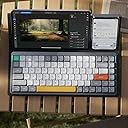
⌨️ Elevate your desk game with the Air75 V2 — where style meets unstoppable wireless power!
The nuphy Air75 V2 is a portable 75% mechanical keyboard featuring a premium aluminum frame with a translucent bottom shell, multi-mode wireless connectivity (Bluetooth 5.1, 2.4G, USB-C), and compatibility across Windows, Mac, Linux, iOS, and Android. It boasts over 21 customizable RGB lighting effects with side light bars for status indicators, a long-lasting 4000mAh battery offering up to 220 hours of use without backlighting, and high-quality Grey-Gateron Wisteria switches with durable PBT keycaps for a refined typing experience favored by professionals and gamers alike.


| ASIN | B0CMZ7PPNB |
| Batteries | 1 9V batteries required. |
| Best Sellers Rank | #3,203 in Video Games ( See Top 100 in Video Games ) #268 in PC Gaming Keyboards #327 in Computer Keyboards |
| Customer Reviews | 4.2 4.2 out of 5 stars (636) |
| Date First Available | November 9, 2023 |
| Item Weight | 1.15 pounds |
| Item model number | Air75 V2 |
| Manufacturer | nuphy |
| Product Dimensions | 12.44 x 5.2 x 0.53 inches |
R**A
Keychron K3 Pro vs Nuphy Air75 v2 - Only one CLEAR winner: Air75 v24
TLDR Between the K3 Pro and Air75 v2, I much prefer the Nuphy Air75 v2 because of its superior build quality, better typing sound, reliability, and overall typing experience. With the Keychron K3 Pro, I found myself wondering if there was another keyboard that had a more refined typing experience. I am completely satisfied with the Air75 v2 after almost a month of use, and would definitely recommend this to anyone in the market for a new wireless mechanical keyboard. It’s a pleasure to type on and you won’t regret it! Background: I was in the market for a new mechanical keyboard, and my criteria were: (1) Smaller footprint for portability and to save room on my desk (2) Must provide great typing experience both in terms of tactile feedback and sound (3) Must have good battery life (4) Must have reliable bluetooth/wireless connection (5) Aesthetically pleasing to look at This review compares the two 75% layout keyboards I have tried: Keychron K3 Pro vs. Nuphy Air75 V2, and why I ultimately decided on keeping the latter. I ordered BROWN switches for both keyboards. BUILD QUALITY Both keyboards are well built, with an aluminum base/housing. Both the K3 and the Air75 come with PBS keycaps, which feel and sound much more substantial than ABS keycaps which feel and sound like cheap plastic. - K3 features a floating keycap design with no bezels on the board, meaning the keys are quite exposed. Picking up the K3 keyboard to move it makes me feel uncomfortable, as my fingers are pulling up at the sides of the keys, making me feel like it could damage the mechanisms overtime. The Air75 V2 has an aluminum housing featuring a thin bezel around the keyboard, which feels much better to pick up. - Key rattling is minimal on K3 but present, and it makes it feel just a little cheaper compared to the Air75 V2, which has no obvious key rattle. I’m sure the rattle on the K3 can be addressed by reapplying lube to your switches, but if you are looking for something with good sound and typing experience fresh out of the box, you’ll find that in the Nuphy Air75 v2. SOUND & TYPING EXPERIENCE If you are switching from a cheaper consumer keyboard like the Apple Magic Keyboard or other budget-friendly mechanical keyboards, you will find it a pleasant upgrade to both the K3 and Air75. However, comparing the two keyboards side by side, the Air75 sounds better to me and the difference was immediately obvious. K3’s sound compared to the Air75 is brighter, more hollow, and less refined. Because of there is a little play on some of the keycaps, there’s a slight rattle here and there, making the keys sound brighter and cheaper. Air75’s sound is solid, thocky, and solid. For the most part, the keys don’t have any real discernible rattle, so you’re not hearing anything else when you type besides that solid keystroke. Because the rattle really comes from the switches themselves, it is impossible to get a prelubed keyboard that’s “perfect”; you are bound to find a key or two that has just a little bit of rattle here and there, but nothing significant. If you happen to find a key that sounds off or doesn’t give the right kind of feedback, I suggest either reapplying lube to the switch, or switching out the actual switch itself for another (quick fix) and the problem can be resolved easily. I did not expect the typing sound and experience to be that drastic between Nuphy’s Air75 v2 and Keychron’s K3 Pro, but it really was apparent and made for a much more pleasant typing experience on the Air75. WIRELESS CONNECTIVITY This one is huge. The K3’s bluetooth capability was not reliable at all. Out of the box on Day 1, I was experiencing connectivity issues where the keyboard would suddenly disconnect, and would take a minute before it would reconnect again. It was interfering with my Apple Magic Mouse, which was also connected wirelessly to my MacBook Pro via Bluetooth. The Air75, however, has not given me any issues via Bluetooth at all, and has been consistently reliable through hours of use. WAKE-UP TIME FROM SLEEP MODE Similarly, the K3’s wakeup time took longer after it automatically went into sleep mode, which means your initial keystrokes are not recognized as quickly. Over time, this presents a productivity issue if you have to consistently wait for the keyboard to wake up before you start working. The Air75 wakes up immediately upon the first keystroke, which is a much more pleasant experience and it means I can get to work quicker. It has never had issues waking up and being connected wirelessly via bluetooth. SWITCHES I ordered BROWN switches for both the Keychron K3 Pro and the Nuphy Air75, which in theory should give the same typing experience. However, there is a more noticeable “bump” and tactile feedback from the brown switches on the Nuphy Air75 V2. Nuphy also ships with a collection of their different switches for you to try. After trying the other switches out, I find myself gravitating towards the Aloe switches, which are quieter and feel much more weightless. I ended up ordering a batch of Aloe switches directly from Nuphy, which I am excited to receive in a few months (the long shipping times directly from Nuphy is because they ship from China). The Gateron Browns feel good with a solid sound and gentle but noticeable bump/tactile feedback, but I feel like I will enjoy an even quieter and linear typing experience for faster typing speeds. LIGHTING EFFECTS The backlights on the K3 were decent, but mine was the white-color only. The backlights on the Air75 are brighter, and came in RGB, which I have been enjoying. The colors are rich, saturated, and the transitions are buttery and smooth. I like that there are two LED indicators on the side of the keyboard, which are multi-functional and indicate whether Caps Lock is engaged (left), connectivity (left) and keyboard battery status (right).
A**G
ABSOLUTELY AMAZING KEYBOARD!!! | Sturdy, High Quality, Transportable and Aesthetic.
First, a little backstory. Prior to this keyboard, I had only ever used small sized keyboards. My personal laptop is a surface which has an exceptionally small keyboard. And my old Bluetooth keyboard is a very compact size one. I wanted a higher quality, more sturdy keyboard, and dust began to search to find a very quality one. I spoke to a friend, who has the 100% version of this exact keyboard. I immediately fell in love with the back keys, the clickiness, an overall aesthetic appeal of this keyboard. However, I still wanted a smaller version as it was too big for me. So, I opted for the 75% version. There is a smaller one, but that one does not have the function keys, which were essential to me. This one does, and thus is perfect. The size is still a bit big for me. I have very big hands, but my fingers type close together. The only issue I faced with this keyboard, is that because of its size and my newness to the keyboard, I make constant typing errors. However, this is a very individual level problem, and there are no actual defects or manufacturing issues with the keyboard. The keyboard is definitely a bit pricey, but it feels great, looks great and works great. It is a bit heavy, but not to the point where it’s hard to carry by hand or bag. I charge this keyboard once when I first got it and never since. I used it decently regularly, and always made to turn it off after use. But, it also has an auto off feature. It has not died yet and battery is still going strong. Keyboard overall is very easy to use. Connect to my laptop and PC instantly once I turn it on. Backlit LEDs and very bright, especially at night - video doesn’t do justice. I especially love that it has multiple LED cycle options. I chose the one that lights up on individual keys that are pressed. Overall, I’m very pleased and happy with this keyboard. I would recommend to anybody else that might be looking for a high-quality keyboard.
M**E
Great Keyboard, with some surprise letdowns
My use case is very specific. I have a small office (spare bedroom) where my PC is on one side and my gaming TV is behind me, with my gaming chair in the middle. I wanted a small wireless keyboard that I could use on my lap, when I'm gaming on the TV. For that purpose, this does the job well. That said, lets start with the negatives. The keycaps are not "Shine Through", so the RGB backlighting is between the keys only. I knew this going in though. This is NOT as user friendly as I hoped. In order to use the VIA website to configure it, the firmware needed to be updated. (Unable to connect to VIA using the firmware it shipped with). This was a multistep process that involved multiple pieces of software. Some from Nuphy, some from other websites. I'm pretty competent technically, so I was able to get through the Reddit walkthrough I found in about 30 mins. Once connected to VIA, I was surprised how little was customizable. Basic key remapping and macro creation are there, yes. However, changing the color of the RGB backlight is applied to the whole board. You CANNOT ASSIGN COLORS TO INDIVIDUAL KEYS. Also, unless you choose red, any other color chosen will have some red bleeding because of the key switches (Cowberry on mine, see pic). I wanted white with red WASD, but alas this was not possible. So, I went will all white backlighting, but swapped out the keycaps with two different styles. I purchased both the black and white sets of the Womier Low Profile Shine Through Keycaps, which are excellent and pop right on. It got me close to the effect I was shooting for, albeit not the RGB colors I wanted. The positives are all of the ones pointed out in the other reviews here. It feels VERY good to type on, sounds great and the connectivity is rock solid, with no lag using the USB dongle. Definitely recommended, just know what you're getting into and it's limitations.
D**D
Ottima tastiera un pò cara, però la consiglio a chi cerca una tastiera compatta, ma cha ha tutte le funzionalità.
B**E
J'ai deux ordinateurs, et utilise un Keychron K3 sur mon PC, j'en suis très content mais avait lu beaucoup de bien du Nuphy, que j'ai donc voulu tester pour mon mac. Le Nuphy "sent" beaucoup plus qualitatif, tant le boitier que le rendu sur les touches qui est beaucoup plus agréable. Idem pour le bruit, alors que j'ai pris des brown switch pour les deux. Bref je préfère largement le Nuphy. Le seul hic est qu'il n'existe qu'en option Qwerty, et contrairement à Keychron qui met les touches de remplacement Azerty pour pouvoir choisir, chez Nuphy y'a air (oui le jeu de mots est voulu). Du coup on peut remplacer les lettres entre elles mais pas les touches de ponctuation et les alphanumériques. Soit vous devez connaitre leur disposition de tête, soit acheter des stickers sur Amazon pour ajouter les indications sur les touches. C'est dommage j'enlève une étoile pour ça, ça couterait pas grand chose à Nuphy de rajouter ces touches dans la boite.
M**O
Tastiera meccanica estremamente piacevole da usare, packaging molto bello, ottima struttura. Gli switch (cowbell) hanno un suono molto appagante e i keycaps si adatto benissimo alle dita. Tante opzioni per la configurazione della retroilluminazione. Ottima risposta con Bluetooth e connessioni a più device. Venditore assolutamente consigliato, tempi di consegna garantiti e confezionamento ineccepibile
I**O
O teclado é fantastico. No meu caso no entanto a bateria não funciona. Apenas consigo usar ligado ao cabo
K**C
The perfect companion for my Mac Mini. Sounds much better in real life than any of the voice samples I've heard on the internet, including those from Nuphy themselves. Actuation force on the moss switches is a smidge above the ideal for me, but I had to make a choice, nevertheless, typing speed and accuracy increased instantly.
Trustpilot
3 weeks ago
1 month ago