Buy anything from 5,000+ international stores. One checkout price. No surprise fees. Join 2M+ shoppers on Desertcart.
Desertcart purchases this item on your behalf and handles shipping, customs, and support to Vanuatu.
🚀 Double your GPU power, halve your worries!
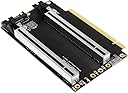
The JMT PCI-E 4.0 x16 1 to 2 Expansion Card is a high-performance bifurcation adapter that splits a single PCIe x16 slot into two x8 slots, supporting Gen3 and Gen4 protocols. Designed with enhanced 5U gold finger plating and a CPU4P auxiliary power port, it ensures stable, reliable connections and power delivery. Its 20mm slot spacing and LED power indicator make it ideal for compact builds and professional multi-GPU setups, provided the motherboard BIOS supports PCIe bifurcation.
| ASIN | B0CRR77TB2 |
| Best Sellers Rank | #192 in Internal Computer Networking Cards |
| Brand | JMT |
| Compatible Devices | Personal Computer, Laptop |
| Customer Reviews | 3.6 out of 5 stars 26 Reviews |
| Hardware Interface | PCI Express 3.0 |
| Item Weight | 2.4 ounces |
| Manufacturer | JMT |
| Mfr Part Number | F47986 |
| Model Number | F47986 |
| Number of Items | 1 |
| Operating System | Windows, macOS, Linux |
| Style | Classic |
| Style Name | Classic |
| Warranty Description | 1 |
K**R
Works great in an ITX case with cramped quarters!
With the addition of a x16 riser, this works great with my Z490 Phantom Gaming-ITX/TB3 motherboard. My ITX case (Nanoxia Project S Mini) came without a riser and to make matters worse, the pcie slots are oriented backwards (card end connector away from motherboard). This bifurication card allowed me to securely mount a single slot Nvidia Quadro card and a four port Elgato capture card. Initially I used a riser cable from another brand as it was the only one I could find that would tolerate a complete 180 turn and still fit without unsafe bending. I had issues with the PC locking up using that setup. Switching to the "JMT PCIE 4.0 X16 Extension Cable...", although pricey, fixed the crashing issues. I definitely recommend keeping the whole chain JMT brand, even if its going to cost you a bit more.
J**.
Doesn't work as intended
Does not split - passes all the data through to a single card.
M**A
Works well for my use case.
setup: MITX pcie4.0 bus to bifurcation X8X8 gen 4 for sff pc. Split for rtx4070super and sound blaster AE9. Plug and play on Asus and Asrock after bios setting. Works flawlessly from mother board bus to riser to this splitter. No divers issues. Recommended for this use.
J**.
Works a treat!
Connected with a 16x riser cable to a mATX mobo capable of 8x/8x bifurcation. Fits in 2U case next to mobo and works a treat. I get my full 2x 8lane PCIe slots after all.
B**L
mine could not negotiate beyond gen 1, on one port.
mine could not negotiate beyond gen 1, on one port. Other than that it seemed nicely built. However I returned it. Another style worked fine. I wanted this wider style but didn't try again. Bad luck?
M**H
Motherboard support
It works well! Just make sure your motherboard supports it.
A**J
Poor QA, PC only boots without it plugged in. Fails to work.
Mine did not work. The PC would not boot with it plugged in. The SATA power port and PCI-E x16 Slots were very loose. I believe the soldering job was poor and losing contact. Wasted $45. I wouldn't recommend this product.
R**R
Perfect. Does exactly what I need
Pcie 4 bifurcation works. Easy to install and use.
M**G
Gen3 card spliter..
Stated 4.0 but read on from the title. As i think the lister of the item is trying to hit search results. This is for Gen3 and as such it will ever not work, like in my situation, or you will have slower speeds.
N**N
efficace et très utile
J'ai une carte mATX pour construire mon DIY NAS. Je n'ai qu'un port PCIE x16 sur cette carte mère. - il y a un port X4 pour une carte intel 2 ports RJ45 10Gb/s - un port nvme transformé en port PCIE x4 pour une carte SFP+ 10Gb/s Pas besoin de carte graphique, donc j'aimerais utilisé ce port (16 lignes) pour autre chose. 1 carte HBA (4X4 ports SATA) pour les disques, c'est bien, mais c'est une carte x8 et n'est pas optimal pour du disque en miroir. 2 HBA seraient plus utiles, mais il faut 2 ports x8. Et ben voilà, cette carte est exactement fait pour ça : diviser x16 en x8 + x8. bien sûr, il faut activer la bifurcation dans le BIOS en fonction du résultat voulu : ici 2 fois x8. j'ai essayé le 4 fois X4, mais d'après mes lectures, certaine puces intel ne permettent que x8x4x4. Sur les photos, on voit (CPU watercoolé): - cable rizer pour brancher cette carte de bifurcation pcie - 2 carte HBA SAS sur cette carte de bifurcation - NAS boitier fermé à moins de 30° en vitesse de croisière.
Trustpilot
1 month ago
1 month ago