Buy anything from 5,000+ international stores. One checkout price. No surprise fees. Join 2M+ shoppers on Desertcart.
Desertcart purchases this item on your behalf and handles shipping, customs, and support to Vanuatu.
โจ๏ธ๐ Elevate your mobile workspaceโpower, precision, and portability in one sleek lapdock!
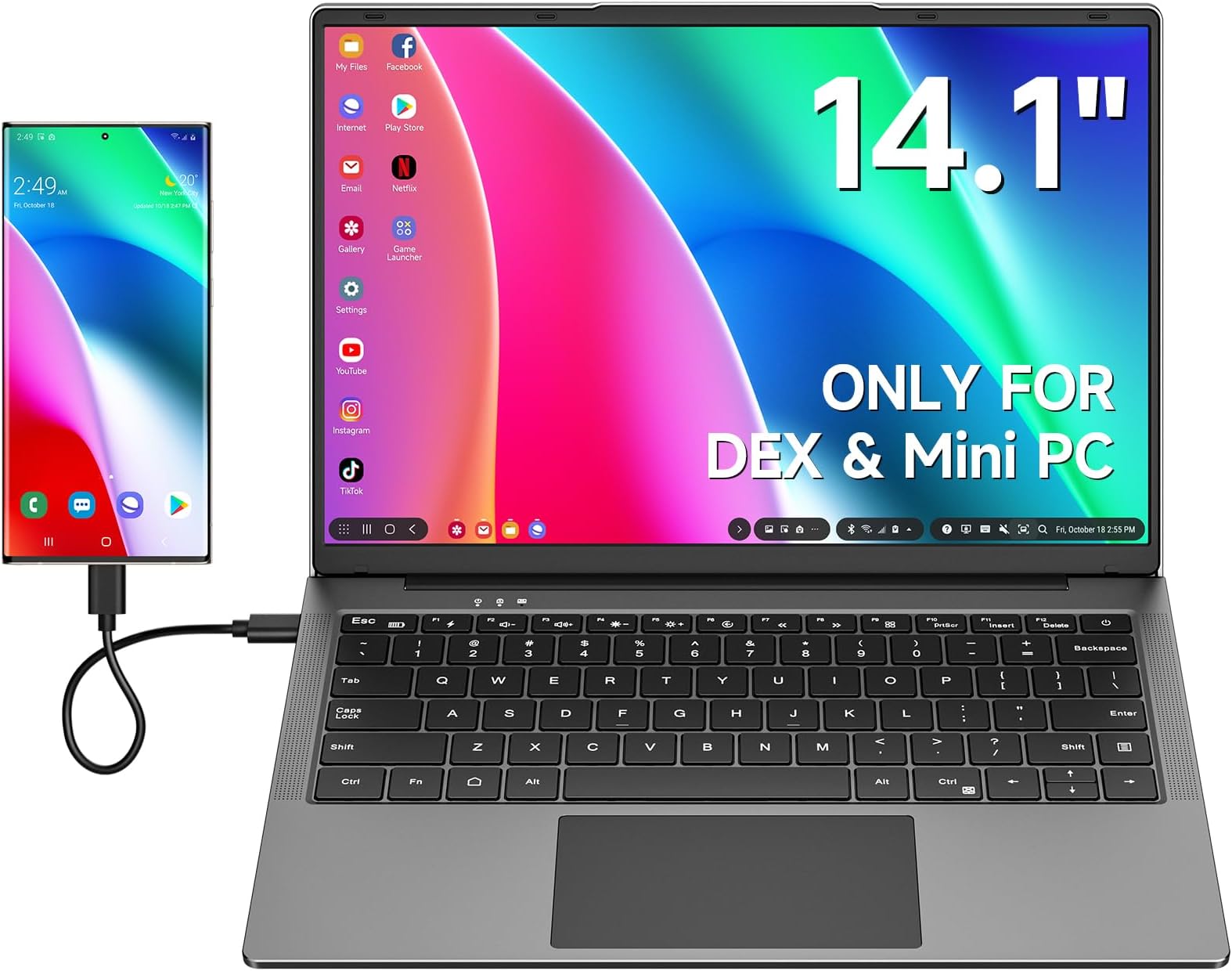
This 14.1-inch portable monitor with built-in keyboard and 5000mAh battery offers a 1920x1200 HDR IPS display with 178ยฐ viewing angles. Compatible with USB-C and HDMI devices including laptops, Steam Deck, Nintendo Switch, and Samsung DeX, it enables plug-and-play productivity without drivers. Lightweight and travel-ready, it supports over 6 hours of use and can charge connected devices, making it the ultimate on-the-go workstation solution.


| ASIN | B0CSSRVW8G |
| Adaptive Sync | FreeSync |
| Additional Features | Monitor with Keyboard & Battery |
| Aspect Ratio | 16:10 |
| Best Sellers Rank | #58,609 in Electronics ( See Top 100 in Electronics ) #1,405 in Computer Monitors |
| Brand | Dopesplay |
| Brightness | 250 cd/mยฒ |
| Color | Black-14.1inch with Keyboard&Battery |
| Color Gamut | 45 |
| Compatible Devices | Laptop, Nintendo Switch, Samsung Dex, Smartphone, Steam Deck |
| Connectivity Technology | USB |
| Contrast Ratio | 1000:1 |
| Customer Reviews | 3.9 out of 5 stars 131 Reviews |
| Display Resolution Maximum | 1920 x 1200 Pixels |
| Display Technology | LCD |
| Display Type | LCD |
| Hardware Connectivity | HDMI, USB |
| Has Color Screen | Yes |
| Image Contrast Ratio | 1000:1 |
| Item Dimensions D x W x H | 12.4"D x 8.66"W x 0.59"H |
| Item Weight | 2.7 Pounds |
| Manufacturer | Dopesplay |
| Model Name | DR1461 |
| Model Number | DR1461 |
| Native Resolution | 1920x1200 |
| Number of Component Outputs | 1 |
| Picture Quality Enhancement Technology | HDR |
| Processor Count | 1 |
| Refresh Rate | 60 Hz |
| Resolution | FHD 1200p |
| Response Time | 3 Milliseconds |
| Screen Finish | Glossy |
| Screen Size | 14.1 Inches |
| Screen Surface Description | Glossy |
| Shape | rectangular prism |
| Specific Uses For Product | Business |
| Total Number of HDMI Ports | 1 |
| Total Usb Ports | 1 |
| Unit Count | 1.0 Count |
| Viewing Angle | 178 Degrees |
| Voltage | 12 Volts |
| Warranty Description | 1 year manufacturer |
| Warranty Type | Limited |
J**R
If you have a phone with an system like dex or ready for it is worth it
It does what it says. Image is great.sound is good .it will charge your phone too. Great for the ready for wired. Seems like no lag doing work or playing games. Only draw back is it's not touch screen. That was a lot more. Typing is ok not a bad key board mouse has a good response. The only complaint I have is the power brick is cheap. But it has different plugs for different country's. It is very portable ,light weight. Will make it Easter to use your phone to work. I am very happy I bought this lapdock.
A**R
Nice addition for Samsung DeX, but with lackluster touchpad, speakers, and phone charging speed.
This is a great way to use Samsung DeX when on the go. The screen: It's a sharp display with acceptable color reproduction. Being a 1920x1200 resolution though, a setting tweak is needed to enable the option to support the native resolution. Galaxy Store > Good Lock > MultiStar > Enable "high resolutions for external displays". Screen brightness doesn't have quite as wide of an adjustment range as I'd like. The keyboard/touchpad: The keyboard is as usable any keyboard on budget laptops. The function keys allow changing various functions of the screen and charging capabilities. The touchpad is a bit more disappointing. Pinch to zoom is not as responsive as using the phone's touchpad mode instead. Two finger scrolling jumps quite a bit and is seemingly locked to upwards swipe scrolls down, Galaxy DeX's settings has no affect on this. Thankfully there's a hotkey to disable the touchpad and prevent accidental presses while typing. I prefer using a wireless mouse with this. It's a plastic build and feels like a budget laptop with a similar weight. The built-in speakers are somewhat rough. It's nice that they exist as they are slightly better than the phone's built in audio but they are somewhat muffled. Usable, but headphones or Bluetooth speakers are a better option. The USB-C cable it ships with is about two feet in length. It is very stiff and has a right angle plug on one end. Charging speeds to the phone seems pretty slow, but it can also trickle charge the phone while off and connected to AC power. Overall, not a bad addition to mobile computing. I use it daily while traveling for work, writing reports and watching downloaded YouTube videos on the plane.
J**Y
OK for certain use cases.
The cool factor is high with this one. I will highlight the good things about it. There is almost no boot time. It's quiet and cool. It doesn't get hot or have any fan noise. You never have to update the OS, it updates automatically every time you get a new phone. This item meets my use case very well. It's almost used exclusively when the power goes out. I keep this keyboard charged up and my Internet router on a battery backup. If the power goes out, not only does it have a long battery life, but it actually charges your phone while you use it. It excels at watching videos. It's OK at light web browsing. That's about it. Samsung Dex, as cool as it is, is not ready to be a daily driver. The negatives are just too annoying. The last time I used it, some apps were lacking vertical scroll bars, and it was hard to navigate in the apps. The track pad is awkward to use. The palm of my hand touches one corner and interferes with its use. If you want to something to watch videos on when the power goes out, this is your device. If you think you are going to replace a laptop with Samsung DeX, you are in for a lot of pain and suffering. I do think they may pull it off someday. Unfortunately, between purchasing this device and now, my opinion of the Android operating system has fallen some. I'm not exactly sure I would attempt to use it as a laptop replacement even if it worked better. Thanks Google.
N**S
Works great for Samsung Dex
I recently purchased the Dopesplay Portable Monitor with Keyboard, and I have been extremely impressed with its performance. The 14.1-inch lapdock monitor is the perfect size for on-the-go use, and the built-in 5000mAh battery ensures that I can use it for extended periods without needing to constantly recharge. The 1080P HDR IPS display is crisp and clear, providing vibrant colors and sharp image quality. It works seamlessly with my Samsung Rex laptop, allowing me to easily extend my screen real estate or mirror my display when needed. The keyboard is comfortable to type on and is a convenient addition for when I need to do some light typing on the go. I have also used this portable monitor with my Nintendo Switch and Windows laptop, and it has worked flawlessly with both devices. The versatility of this monitor makes it a great investment for anyone who needs a portable display for multiple devices. Overall, I highly recommend the Dopesplay Portable Monitor with Keyboard. It has exceeded my expectations in terms of performance and functionality, and I have found it to be an essential tool for my work and entertainment needs.
D**K
Don't do it.
Just received my Dopesplay and immediately did not like it. Cons: Not touch screen (My model... didn't realize that when I ordered) Speakers are utterly garbage You have to charge via proprietary charger (No usbc charging) The shift key is tiny (messing up a lot just typing this review) Device feels very cheap Pros: It does what its supposed to do, which is mirror a device... but especially if you plan on using an android device, leaving out touch screen is a big nono.... For the price, pay a little more for something better.
M**K
Very good value for the money!
So far I'm impressed with the mini laptop. The device feels very well built for the price and then some. Keys are soft touch, no click, which I'm ok with, but others that like a more tactile feel might not. Screen is very bright, good resolution. Has a FN button to lower/raise volume, increase/decrease brightness, and a few other laptop like buttons. It does include a battery, but I haven't tested longevity as of yet. I did try plugging 1 external hd into a usb, and it was not read. I can plug that same drive directly into my phone and get it to work, but I have to reboot the phone with it plugged in to get it to recognize, so I may have to do the same here, but haven't ried as of yet. It does come with a micro sd slot as well, so if you wanted to move files from your phone to the sd card, it would be easy to do. Everything connected fine and is very easy to use.
R**Y
Display over USBC suddenly failed, only had the device a week or two
Display over USBC failed, on multi devices at the same time, confident it's the lapdock that failed, HDMI still works, but that's useless for my intended use.
T**H
Great price. Functional, not awesome.
First things first, this device does everything promised. Plug it into a computer via USB-C and you've got a monitor, keyboard, TouchPad, hdmi port, USB A ports and a micro SD slot in a package that looks like a high end ultrabook. Looks can be deceiving though. It's a very flimsy feeling, plasticky device. Imagine someone took one of those fake laptops they have in furniture store displays and made it work. It's very light, the keys are spongy and wobbly, the trackpad visibly flexes when you click it, and the speakers are tinny and reedy. The power supply is a generic 12v wall wart with a barrel plug - no USB-C charging here - either of the dock OR the device you plug into it. You've got to power your computer separately. (The monitor is actually pretty good though.) Make no mistake, it's a pretty amazing device for $170, but it feels exactly like a $170 laptop. I'm going to carry it with my ROG Ally X and use the heck out of it for as long as it lasts - I'll probably just complain a lot while I do it. :D
V**Z
No signal ??
Desde que la encendรญ asรญ esta la puse a cargar pero sigue igual .. vaya servicio Estoy esperando mi reembolso, ya mande el artรญculo hace 1 messssss
U**.
Great alternative to a laptop if you own a samsung phone with Dex!
I came across this product when I was looking to get rid of my extra devices and I was nothing short of impressed. I have been using it mostly with my samsung for its dex and the combined functionality of this lapdock and samsung dex has pretty much made my laptop obsolete for me. I am planning on going back to school and thinking of other alternatives to upgrading my old laptop which would be costly, since I recently upgraded my phone already. This turns out to be the best option for me! I could use google docs, collaboraoffice or even microsoft office apps without losing much functionality compared to a windows laptop. Pretty much all other android apps work well (probably more will be supported in the future). If you are thinking of buying one, I will list the pros and cons to this device with some tips to address them, Pros: Very affordable price compared to a laptop. Good battery life (around 6hrs with typical use) Decent display quality Performance upgrade every time you upgrade your phone!! -you already carry a very capable device in your pocket, why not make more use of it? Keep all your data organized in one device. Great for travel- no need to worry about losing your data if lapdock gets stolen/lost. Doubles as a battery pack- charges your phone while docked. Can simultaneously be plugged to power source and your phone. No need for extra pheripherals (keyboard, trackpad, sound built-in) Looks and feel like a regular ultrabook. 3.5 mm audio port- I keep a regular wired earbuds in the lapdock case to use in a pinch if my wireless ones die, eg- while flying. Your phone is fully functional as a seperate device (for calls, apps, camera etc) while plugged in. Cons: Touch pad sensitivity somewhat inconsistent, (esp with gestures) have to get used to it at first but you can always use your phone as touchpad or plug in a wireless mouse. Barrel plug for power supply, having to carry an additional bulky adapter (I was able to use a usb C PD to barrel plug adaper from amazon that works great, so now i only need to carry my USB PD adpter for all my devices)- Can be plugged in to a PD capable battery pack with the said adapter to expand the battery on-the-go. Limited IO- only one usb C port - for display only, none for data transfer (I havent found a USB c dock that works for this yet) Laptop sound quality not that great but tolerable. No webcam- you have to prop up the phone to use front camera for video calls. No dedicated battery indicator for lapdock - the fn key only works when plugged into phone. Web browser not fully optimized yet and sometimes have minor glitches (my fault for using Edge browser) Defaults to opening apps that are not fully optimized yet instead of web pages (amazon, banking apps etc)- this is a Dex problem. However, I find this a solid buy despite of these drawbacks (hopefully most will be fixed with software in the future) Hope this helps with your decision.
J**Y
Working from one device though the lapdock is very useful and portable.
This is a decent lapdock, light but well made. The only thing I would go for if I got another one would be touch screen, on a normal laptop it doesn't bother me but for some stuff, being made for the phone, it would be helpful..but not essential. To have a keyboard and a bigger screen and a few apps open to work from is so much easier than working off the phone but keeping all your info in one place on your phone and using the lapdock is very convenient.
C**A
Works perfect as a KVM console
Overall: worth to buy for my use scene (as a KVM console) The display: not very good but not bad, but quite acceptable. The keyboard: it seems they come all with US keyboard, even in Japan. It is fantastic for me (considering the fact that it is not easy to buy a US keyboard in Japan) , but might not a good news for those who want a localised keyboard, such as JIS. The trackpad: a little disappointing, but usable. it does not mean too much to me, since I usually works on text mode Linux. And it also comes with a USB hub, not very fast but convenient as a KVM console. Though not mentioned, the USB alt mode also works with iPad Pro (M2). It would be better if it comes with aluminium body. If you also have a Raspberry Pi, a home server, or other headless computer, this is probably the best KVM console for home or home office use you can find at the time.
Y**Z
Good way to turn other devices into laptops
Works great for Steam Deck but lacks USB-PD passthrough, so doesn't charge the host device fast enough. Decent size and very light to carry around, display quality is good too with no issues with visibility.
Trustpilot
1 week ago
1 month ago