Buy anything from 5,000+ international stores. One checkout price. No surprise fees. Join 2M+ shoppers on Desertcart.
Desertcart purchases this item on your behalf and handles shipping, customs, and support to Vanuatu.
๐ Elevate your home network to WiFi 7 supremacy โ because buffering is so last decade.
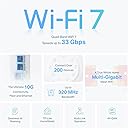
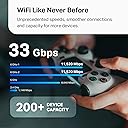
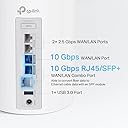
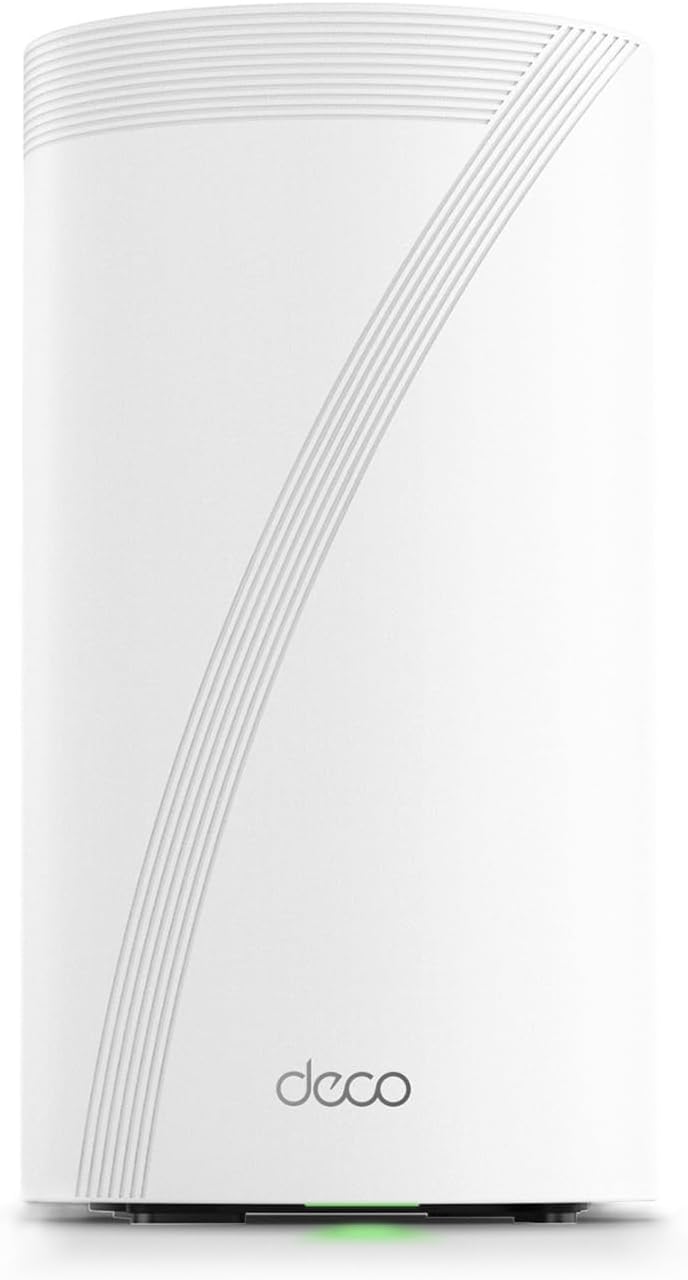
The TP-Link Deco BE95 is a cutting-edge WiFi 7 quad-band mesh system delivering up to 33 Gbps combined speeds with 16-stream technology. Featuring dual 10G WAN/LAN ports, 12 high-gain antennas, and simultaneous wireless plus wired backhaul, it supports over 200 devices with AI-driven seamless roaming. Enhanced by TP-Linkโs HomeShield security suite and voice control compatibility, it future-proofs your home network with premium performance, robust protection, and effortless management.


| ASIN | B0CD9QCPS5 |
| Antenna Location | Home |
| Antenna Type | Internal |
| Best Sellers Rank | #9,074 in Computers ( See Top 100 in Computers ) #31 in Whole Home & Mesh Wi-Fi Systems |
| Brand | TP-Link |
| Built-In Media | 1 Deco BE95 unit, 1 Power adapter, 1 RJ45 Ethernet cable, Quick Installation Guide |
| Color | White |
| Compatible Devices | PC, smartphone, game console, intelligent TV |
| Connectivity Protocol | Wi-Fi |
| Connectivity Technology | Wi-Fi |
| Control Method | Remote |
| Controller Type | Voice Control |
| Coverage | Home |
| Customer Reviews | 4.4 4.4 out of 5 stars (65) |
| Data Transfer Rate | 11520 Megabits Per Second |
| Frequency | 2.4 GHz |
| Frequency Band Class | Quad-Band |
| Has Internet Connectivity | Yes |
| Has Security Updates | Yes |
| Is Modem Compatible | Yes |
| Item Dimensions L x W x H | 12.8L x 12.8W x 23.6H centimeters |
| Item Weight | 1.5 kg |
| LAN Port Bandwidth | 10 Gbps |
| Manufacturer | TP-Link |
| Maximum Upstream Data Transfer Rate | 1148 Megabits Per Second |
| Mfr Part Number | Deco BE95(1-Pack) |
| Model Name | Deco BE95 |
| Model Number | Deco BE95(1-Pack) |
| Number of Antennas | 12 |
| Number of Ports | 4 |
| Operating System | [Proprietary Operating System] |
| Other Special Features of the Product | Access Point Mode, Guest Mode, QoS, Remote Access, WPS |
| Router Firewall Security Level | Advanced |
| Router Network Type | hybrid |
| Security Protocol | WPA2, WPA3 |
| Smart Home Compatibility | Smart Home Compatible |
| UPC | 840030706899 |
| Unit Count | 1 Count |
| Wi-Fi Generation | Wi-Fi 7 |
| Wireless Compability | 802.11.be, 802.11ac, 802.11ax, 802.11g, 802.11n |
G**Y
Last update: I have removed the BE95 from my office and put back the Asus ET12. The final straw was the network activity reporting that can not be turned off, I tried. The CCP will have one less users data to exploit. In the end the only GOOD part of the BE95 was the 10G and 2.5G ports. I'll just get a switch. I was amazed yesterday while giving the mobile app one more try, having to maneuver through ads trying to sell me poor VPNs, extra security that should be included, their "AI" assistant (right) etc. to again try and turnoff reporting, I couldn't. I know Orbi and others do similar antics. If the future is supplied hardware and their subscriptions software with useless garbage software offerings, I'll pass. My journey: Over the last weeks I have done multiple updates to this review. After a back and forth with TP-Link support, here is a snippet of their final response to me, "Thank you for your valued feedback about Deco BE95." Deco BE95 router is designed for clients who want to configure the Internet directly and quickly. Many advanced settings are enabled by default and have not opened to change." I will be replacing the BE95 and waiting for the ASUS ZenWiFi BQ16 Pro BE30000. I have also passed on implementing a very large system in my main house. Unfortunate, very good hardware but everything else is awful. All your data ends up in their cloud with no way of turning it off. SECURITY, PRIVACY? If I can access my router over Mobile or other Wifi networks, so can others. BTW, I received a report on my network usage from TP-Link yesterday through the app on my phone even though I have all reporting turned off. If they are reporting on my usage to me, what do you think they're doing with my and others data? Real missed opportunity. If you would like to read my journey, it's enclosed below: I'm an old network type involved in one way or another for 30 years. I have the ASUS ET12 mesh in my house and separate office which for the most part it's been good. Only faults are updates are not very regular (last one was April) and Parental controls are not great. Since Wifi 7 is on the horizon, I decided to take the plunge. To test I bought the single BE95 for my office with the intent of replacing the ASUS mesh if it worked out. I've learned a couple of things in the last four days using it in my separate office. First the good: - VERY fast by my measurements - My normal workload as a measurement, videos, large data sets etc. - Has been rock solid - Updates work as advertised - Ports are great - Hardware is fast and very good next gen The Bad: - I can still break anything. The installation was not as easy as the reviews I've seen. - More than one mobile client - Not as configurable as the ASUS (not even close) with configurable features in strange places - Weird bug trying to access from a Web browser. Yes I tried forums and reaching out to support, through their Chat and Phone and no response. I plan on trying again today. - Subscriptions for common features that should just be supplied. GREED Overall, I'm leaning on replacing the ET12s with the one stumbling block, web access. I will post an update when I get that resolved and more time with the BE95. Update: I've been using the BE95 for a week and here's where I am: Pros: - Still VERY fast - Happy with the hardware - Support is good and interesting (more on this later) Cons: - The WEB interface is a total joke and useless. No feature parity with the mobile version. - Always connected to their cloud, PRIVACY? - Features, like those common with other platforms are missing so not configurable - UI/UX is AWFUL with the features they have (very limited) in places they shouldn't be. - Support OK I contacted support on a couple of features, usability issues I was having and it was a mixed bag. First, don't go through the phone, takes too long. I used the chat function and support was quick. I asked three questions and received answers that were incomplete or wrong. Now the interesting part of this. The interactions were reviewed by other support engineers later and I received correct answers plus follow up, I liked this and set my expectations. I was also asked two days later by support what features I'd like to see. Since I'm a network type and coming off ASUS, I of course was used to being able to configure EVERYTHING and this is what I asked for. we'll see where this goes. The UI/UX issues are IMO mostly show stoppers for the normal user putting this into their home, unless the goal is just doing a vanilla setup and leaving it. Even then it's leaving potentially exploitable functionality on the table. Overall if you've made it this far; I'm now going to wait and see where they take the configurability and UI/UX before I replace my main system. Don't get me wrong, the speed and hardware are great but there is so much more potential being left on the table.
L**L
The TP-Link Deco 7 Elite BE95 Quad-Band WiFi 7 BE33000 Whole Home Mesh System works exactly as advertised for me. I'm getting access to the Internet from a Bell Fibe 3 Gbs Gigahub modem, which is installed in the garage of my new home in the Montreal area. Because of its location in the garage, the Bell Fibe's WiFi is not strong enough to cover my whole home and the Bell pods have not worked consistently enough to be relied upon. Fortunately, the Bell Fibe modem is linked to a few outlets in the house through Cat 6 Ethernet cables. I'm using the TP-Link router as a wired WiFi Access Point located in my living room. This router is easy to install as an access point and being a quad band modem, it allows me to setup a separate network for IoT, in addition to a regular WiFi network and a guest WiFi network. The WiFi throughput and coverage of this router is impressive and consistently fast. I'm very happy with this purchase.
S**W
Needed to extend my existing wireless network and wanted to try out wifi 7 for two desktops while I was at it. Very pleased overall with how well this tp-link works. Installation was extremely straight forward. Not overly found how it requires an app on your phone in order to install and configure. Even after setting it up, the built in web page doesn't allow configuration - only monitoring and firmware update. Phone app recognized and walked me through configuring in very short time. I decided to try all the options available just to see how well it performed. Performance so far has been very good. I have 1GB up/down with my ISP and on a few PCs I have connected via wifi 7, I'm getting my full speed, which surprised me. I'd read about others experiencing issues and from what I could tell, one of the firmware updates resolved most issues, so I had updated that first to head off potential issues. I have around 15 devices connected and none have shown any issues yet. I'm primarily using two host networks so far. One is wifi 7 for my pcs and other is the IoT, which isolates communication. With chromecasts, google tvs, therms, vacuums and several other things all connected, everything has been working very well. I have this set up in access point mode behind an ASUS wireless router. The ASUS was working fine, although limited to 5GHz. I do have an increase in rated bandwidth on the new wireless, although I can't say for sure that I'm realizing any true increase in speed since I'm not pushing things that hard all the time. Cost seemed a bit high and I can't say for sure it's worth the price of admission. It does work, so considering the issues most access points experience, maybe we're at a point you have to consider paying more buys you more luck with success.
E**E
What a change. I use this as my main satilite and use my other x55 for the rest of my home.
M**8
You're probably looking at tbis debating between the deco and netgear's orbi. You are at the right place. I purchased a single unit to see how it would perform compared to my two orbis...at under 1/3 of the price. The orbis were boxed up and sent back within minutes. Can't say i have a lot of cons other than i would like to be able to make more ssids, but that's understandable. Pros: - Faaaaar better coverage. A single unit tucked in my laundry room (where the internet ingress is) provides full coverage of the home (2100sf), even in a suboptimal location. There's only one room where the signal appears to degrade, but it's full strength, otherwise. - The app is orders of magnitude better and doesn't do the stupid "help" thing that Netgear does by literally sitting there and preventing you from moving forward in the app just because you plugged it in beforehand. Seriously, Netgear's designers and developers should flat out be fired for that. I do this for a living - that is completely unacceptable. - Obviously the price is drastically less. I'm at better performance with a single node than with two orbis. Further. There isn't the garbage of only one being a router and the other being a satellite. Just buy the unit from TP-link and you're good. This is sadly more of a "why not orbi" vs "why deco" review, but just buy it - it's objectively the right choice.
Trustpilot
1 day ago
1 month ago