Buy anything from 5,000+ international stores. One checkout price. No surprise fees. Join 2M+ shoppers on Desertcart.
Desertcart purchases this item on your behalf and handles shipping, customs, and support to Vanuatu.
๐ Upgrade to the Samsung 990 EVO โ where speed meets smart power and cool confidence.
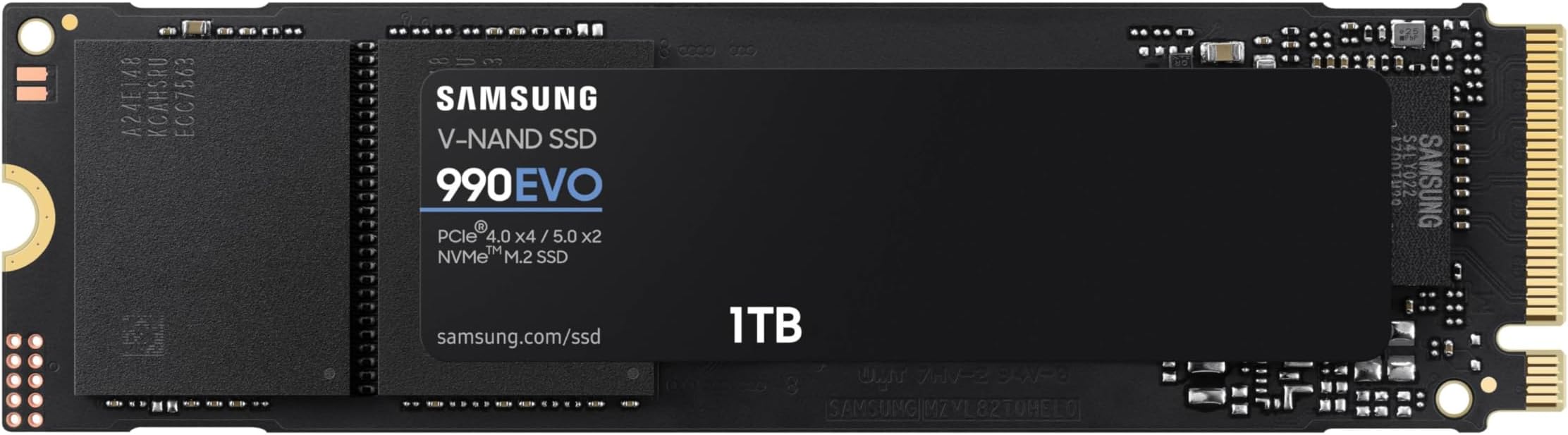
The Samsung 990 EVO SSD 1TB is a cutting-edge internal NVMe drive featuring PCIe Gen 4x4 and Gen 5x2 interfaces, delivering blazing read/write speeds up to 5,000/4,200 MB/s. It offers 70% improved power efficiency over previous models, smart thermal control to prevent overheating, and seamless updates via Magician Software. Ideal for professionals and gamers seeking ultra-fast, reliable storage that keeps pace with the latest tech.


| ASIN | B0CRCC9863 |
| Additional Features | Backward Compatible, Hardware Encryption |
| Best Sellers Rank | #17,609 in Computers ( See Top 100 in Computers ) #162 in Internal Solid State Drives |
| Brand | Samsung |
| Built-In Media | SSD |
| Cache Memory Installed Size | 1 |
| Color | Black |
| Compatible Devices | PC, Laptop |
| Compatible Video Game Console Models | Sony PlayStation 5 |
| Connectivity Technology | PCIe |
| Customer Reviews | 4.8 4.8 out of 5 stars (2,295) |
| Data Transfer Rate | 5000 Megabytes Per Second |
| Digital Storage Capacity | 1 TB |
| Enclosure Material | Nand |
| Form Factor | M.2 2280 |
| Hard Disk Description | Solid State Drive |
| Hard Disk Form Factor | 2.5 Inches |
| Hard Disk Interface | PCIE x 4 |
| Hard-Drive Size | 1 TB |
| Hardware Connectivity | Solid State Drive |
| Hardware Platform | PCI Express 4.0 |
| Installation Type | Internal Hard Drive |
| Item Dimensions L x W x Thickness | 7.9L x 2.3W x 0.3Th centimeters |
| Item Weight | 0.02 Pounds |
| Manufacturer | SAMSUNG |
| Media Speed | 4200 megabytes_per_second |
| Mfr Part Number | MZ-V9E1T0B/AM |
| Model Name | 990 EVO |
| Model Number | MZ-V9E1T0B/AM |
| Number of Items | 1 |
| Read Speed | 5000 Megabytes Per Second |
| Specific Uses For Product | Gaming, Personal |
| UPC | 887276812519 |
| Unit Count | 1 Count |
S**V
purchase installed and enjoy overall performance
Excellent performance and satisfied
B**E
Upgraded my SSD in my desktop seems to be slightly faster ..
G**F
I got the 990 EVO SSD to swap out the old smaller SSD that was in my desktop motherboard. Just finished the swap a couple of hours ago and after a series of checks, I can't believe how easy it was and that the boot up with the new drive was flawless. I actually did a "Properties" check just to confirm that the new SSD did the boot... it was that seamless. "Very Easy" means that you know how to open your desktop or laptop case and access the motherboard. If not. there are lots of You Tube videos to show you how. If you are doing an upgrade swap like I did, I would suggest investing $15.00 in a M.2 SSD exterior enclosure. That way you can download the Samsung Magician Software and initialize the drive and perform the cloning before you even open the case. And of course backup your files, just as a precaution. With the Magician, the process is as simple as copying a file to a memory stick, except it takes a lot longer, depending on the capacity of your old drive. The one thing they don't tell you is that the software probably won't recognize the new drive until you do a Disk Management setup to give it a Drive Number. That''s easy enough, but if you don't know how, just do a quick search. My cloning transfer took about 5 hours, and they suggest not using the computer during the transfer, just to avoid the possibility of a glitch. After the "Transfer Complete" message, turn the power off and pull the plug. Open the case and swap the old drive for the new one. It's worth watching a You Tube video on this, just to avoid any surprises if you haven't done something like this before. You may also want to watch the process for your specific brand and model of computer, because you may have to remove a couple of components to get access to the slot on the motherboard. Reassemble any parts you removed, put the cover back on, plug it in and turn on the power. Voila... the boot was flawless. It even renamed the new SSD as Drive C. I was just sceptical enough that I did a "Properties" check to ensure that it was the new drive. It couldn't be that easy... but it was.
C**N
Muy buen rendimiento
C**D
Got it on sale. Been using EVO 960 and EVO 970 in other builds, and they're fast and fantastic. On a mini PC I have, the OS was on an 2.5" SSD. I slapped an M2 SSD in, and could replicate the OS to it no problem. But, wife's laptop had a 125GB M2 SSD as only drive. Didn't have a 2.5" SSD. Got this 1TB EVO 990 as a nice replacement. Saw vids showing how to use an M2 enclosure to easily replicate a laptops old M2 OS drive to the new replacement. But, that would cost $30, I had a 2.5" SSD + 2.5" enclosure already, and I was being cheap. So, I replicated the OS drive to the 2.5" external, tore apart her laptop, installed the blank 1TB EVO 990, and tried booting from external 2.5" SSD. Laptop DID NOT want to boot. Kept going into Windows Recovery like the Windows install was corrupted. Spent 2 days messing around with options. FINALLY.. just popped $30 to buy an M2 enclosure (like I should have from the start). Ripped her laptop apart again, put the old 125GB M2 SSD in, booted.. got into Windows. Put the 1TB EVO 990 into the M2 enclosure. Plugged in, recognized as external drive. Replicated OS drive to it. Tried booting from it, but laptop acted like it was corrupted again. At this point, I figured the laptop was just prima donna and had issues booting from external drives. So, on a leap of faith I ripped apart her laptop AGAIN and slapped the cloned 1TB EVO 990 in. After putting it all back together AGAIN, it booted just fine into Windows, and now she has TONS of drive space left. So, if you're getting this as a replacement for a laptop's M2 drive... don't be stupid like me and waste a bunch of time. Just buy an M2 Enclosure and make replication easy on yourself. I ran some winsat times on my old EVO 960 vs EVO 990, and the 990 is getting ~1000 MB/s on random 16 vs the 960 ~1400 MB/s. So, the 990 seems slower there. But, on the 64 bit read/write, 990 is getting ~3200 MB/s on BOTH, while the 960 is getting ~3000 on the read and ~1800 on the write. So, the 990 is blazing along. It's also newer than the 960 I have, which may be seeing wear-n-tear impact performance. So, I may eventually get one of these to replace my 960, too. like 3200 MB/s on
C**D
I needed a backup solution for my old photos, i plan to make this as a Photo memory Vault from my old phones that i dont touch for 20 years. I was comparing the Crucial P3 and This SAMSUNG 990 EVO, in the end i chose SAMSUNG 990 EVO over the Crucial P3 because of the write speed.
Trustpilot
1 week ago
5 days ago