Buy anything from 5,000+ international stores. One checkout price. No surprise fees. Join 2M+ shoppers on Desertcart.
Desertcart purchases this item on your behalf and handles shipping, customs, and support to Vanuatu.
๐ Triple your productivity, not your clutter!
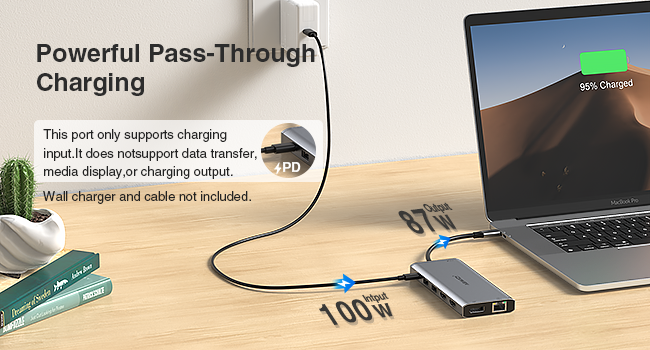
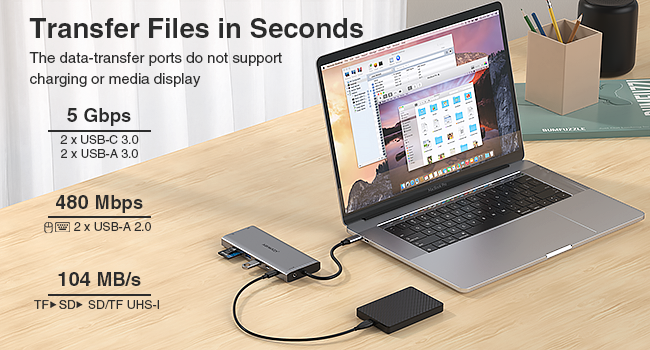
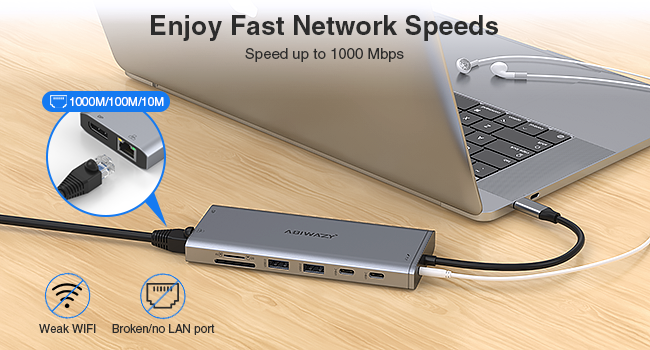
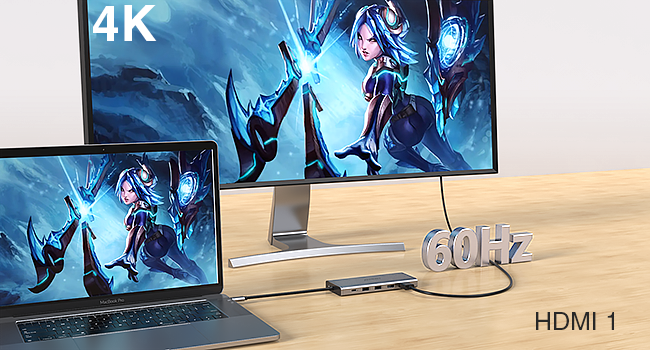
The ABIWAZY 14-in-1 USB-C Docking Station transforms a single USB-C or Thunderbolt port into a powerhouse hub featuring dual 4K HDMI, DisplayPort, 7 USB ports, Gigabit Ethernet, SD/MicroSD card readers, and 3.5mm audio jack. Designed for professionals using Dell, HP, Lenovo, and Surface laptops, it supports triple monitor setups, fast 87W charging, and ultra-fast data transfers up to 5Gbps, making it the ultimate all-in-one productivity booster.


| ASIN | B0D8HX861F |
| Best Sellers Rank | #145 in USB Hubs |
| Customer Reviews | 4.4 4.4 out of 5 stars (776) |
| Date First Available | July 7, 2024 |
| Item Weight | 5.6 ounces |
| Manufacturer | ABIWAZY |
| Package Dimensions | 6.26 x 3.19 x 0.75 inches |
J**R
Easy plug and play
Very nice product it gets the job done
K**Y
Abiwazy Docking Station
Worked as advertised. I was able to mirror my HP laptop display on a large monitor.
S**H
Very nice docking station
This is a very nice docking station and I like they have USB ports on both sides. Sturdy and I recommend this!
S**R
Requires a compatible USB-c port for Windows PCs for Display Inputs to work. Otherwise, works fine.
The product works as described, however, as mentioned in the instructions, in order to plug dislays into the HDMI ports, the hub must be plugged into a USB-c port on your Windows PC that supports this. My PC has one (aside from the power input) but it is being used for something else. Plugging the hub into a USB port using a USB-c to USB adapter might not work for you because some of these regular USB ports won't support adapters. In order to use the HDMI display input ports on the hub, you must plug the USB-c plug on the hum into a USB-c port directly on your PC that supports the displays.
L**N
Just plug in and it works. Full 3-screen setup for laptop.
No setup or drivers needed on Windows 10/11. I took an old laptop, plugged this hub into the USB C port, and plugged 2 big monitors into the HDMI ports. Windows instantly mirrored my laptop screen to the 2 monitors. Pushed the display configuration key in Windows and selected "Extend". It gave me 3 independent screens to work with. Full-screen video ran smoothy on one while I worked on the others. No lag. No glitches. Audio ran through the speaker on the external monitor, too. This hub can be powered by the computer, or can provide power to the computer through the USB C port (if the computer is USB C power capable) with an external USB C power supply.
T**T
Works as advertised
Works great
S**L
Poor Performance
Disappointed with the performance of this Docking Station. The wireless mouse and keyboard did not function well when I used the docking station. I will return and look for a replacement
T**L
The station meets our needs.
Its connections has everything for our home office. Is working great.
O**N
It does the job it has been designed for. Works with 2 monitors - extended display. Didn't notice flickers or lags. It gets a little warm sometimes - but I guess that's expected. The cable size however could be little longer.
V**L
Doesnโt work for too long. Maybe 3 weeks at max.
L**N
Liked: > the build quality is good, if not very good. It feels good in the hand but is not premium. > very compact, this is important for me. > My Dell 9310 has only two C-ports leaving me to buy a lot of peripherals to make it useful. This one adapter can be used to connect multiple components without having to remove the USB C over and over. I normally keep all 3 of the USB-A ports on the side occupied with a pointing device, a drawing tablet and a mouse and they all work nicely! Disliked: > For simultaneous connections of several components at a time, the hub is ONLY good for components requiring a low data transfer rate, such as a mouse, a pointer, an LED lamp etc. If you wanted to connect a high-data-transfer device (such as HD video over the HDMI) while using 2 or more of the other ports, it struggles (explained below). Recommend? Absolutely! However, if you are a teacher like me, the scenario under which you I should be fine using this hub is: 1. You are doing a slideshow on Powerpoint with mostly static slides (no animation or video) via the HDMI, and 2. You are using a slide changer connected via a USB-A, and 3. You are using a drawing tablet connected via a second USB-A, and 4. You are using a mouse connected via the third USB-A. Which is, pretty good for a HUB at this price! I have not used the SD or the microSD slots yet, and probably never will! So, cannot say anything about them. Hopefully, this helps as a buying guide.
P**S
I must admit that it has substantially increased my connectivity options and greatly improved the convenience of my life. Based on my personal experience, I've provided a thorough assessment of the multiport adaptor below. Design and Construction: The multiport adaptor I bought has a svelte and small design. It is portable and lightweight, making it simple to bring with me everywhere I go. The construction quality is superb, with solid materials that seem long-lasting and durable. Connectivity Options: The increased connectivity that a multiport adapter provides is one of its main advantages. The connections on this particular adapter include USB, HDMI, SD card slots, and more. Performance: The multiport adaptor has had great performance. I've had no problems with data transfer or connectivity, and all the ports work perfectly. The USB ports offer quick and reliable data transfer rates, making it possible for me to quickly attach peripherals like external hard drives, keyboards, and mice.
A**A
i am using the adapter on my Brand New Dell computer that cost me over $2300. and they do not come with extra ports anymore, I was going to buy an adapter from Dell, but found this one on Amazon, and it was cheaper than what I could buy form Dell, ( I really felt like I spent enough money on my laptop), I was surprised at how small it was, as I had seen other adapters and they were a lot bigger, so I was nervous, but to tell you the truth, it take up no room and now after using it, I wonder why would you want a big one when this small one does the same thing? So yes, I am happy with it, takes up a lot less room on my coffee table, it has all the extra ports i need, so i do highly recommend for home use, I am not sure for business use, but I do feel it is perfect for home use.
Trustpilot
3 weeks ago
2 days ago