Buy anything from 5,000+ international stores. One checkout price. No surprise fees. Join 2M+ shoppers on Desertcart.
Desertcart purchases this item on your behalf and handles shipping, customs, and support to Vanuatu.
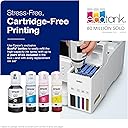
🖨️ Elevate your home office with cartridge-free power and pro-quality prints!
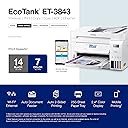
The Epson EcoTank ET-3843 is a wireless all-in-one printer designed for the modern home office, featuring a cartridge-free refillable ink system, fast 14 ppm print speed, ultra-high 4800 x 1200 dpi resolution, and versatile scanning and copying capabilities. It supports both Wi-Fi and Ethernet connectivity, includes a user-friendly color touchscreen, and offers duplex printing with a 250-sheet capacity, making it a cost-effective, high-performance solution for professionals seeking reliability and quality.


| ASIN | B0BSN151MD |
| Additional Printer Functions | All In One |
| B&W Pages per Minute | 14 ppm |
| Best Sellers Rank | #61,369 in Computers ( See Top 100 in Computers ) #133 in Ink Tank Printers |
| Brand | Epson |
| Built-In Media | EcoTank ET-3843 all-in-one, manual, power cord, 1 bottle of 502 Black (127 mL) and 1 bottle each of 502 Cyan, Magenta, Yellow (70 mL) |
| Color | White |
| Color Depth | 24 |
| Color Pages per Minute | 7 ppm |
| Compatible Cartridge | T502 |
| Compatible Devices | Laptops, Smartphones ESS Files EARINGS |
| Control Method | App, Voice |
| Controller Type | Android |
| Customer Reviews | 4.1 4.1 out of 5 stars (1,683) |
| Display Type | LCD |
| Dual-sided printing | Yes |
| Duplex | Automatic |
| Hardware Interface | Ethernet, USB |
| Initial Page Print Time | 7 seconds |
| Ink Color | Color |
| Item Dimensions D x W x H | 50.3D x 41.7W x 25.4H centimeters |
| Item Type Name | Inkjet Printer |
| Item Weight | 14.8 Pounds |
| Manufacturer | Epson |
| Maximum Copy Resolution Black and White | 1200 dpi |
| Maximum Copy Resolution Color | 4800 x 1200 dpi |
| Maximum Copy Speed Black and White | 14 ppm |
| Maximum Media Size | 8.5 x 14 inch |
| Maximum Print Resolution Black and White | 4800 x 1200 Dots Per Inch |
| Maximum Sheet Capacity | 250 |
| Maximum print Resolution Color | 4800 x 1200 Dots Per Inch |
| Model Name | EcoTank ET-3843 |
| Model Number | C11CJ61205 |
| Model Series | EcoTank |
| Number of Ethernet Ports | 1 |
| Number of Trays | 2 |
| Other Special Features of the Product | Auto Document Feeder, Auto-Duplex, Energy Star, Refillable Ink Tank |
| Output sheet capacity | 250 |
| Paper Size | 8.5 inches |
| Power Consumption | 12 Watts |
| Print media | Paper (plain) |
| Printer Connectivity Type | Ethernet, USB, Wi-Fi |
| Printer Output Type | Color |
| Printer Type | Inkjet |
| Processor Count | 1 |
| Resolution | 4800 x 1200 |
| Scanner Type | Flatbed, Sheetfed |
| Specific Uses For Product | Home or professional office |
| Total USB 2.0 Ports | 1 |
| Total Usb Ports | 1 |
| UPC | 010343971035 |
| Warranty Type | limited warranty |
| Wattage | 12 watts |
G**N
After 5 years, my HP home printer died. It had a good run, so I tried the similar level of HP. What a piece of junk that was! The HP didn’t work right from the get go and all the parts were so cheaply made. I returned that and decided to spend a little more to get the Epson ET-3850 after reading the reviews. I liked the idea of not having to pay a gazillion dollars every time you turn around on ink. The HP I had purchased because I liked the instant ink program I was on. It had its pros/cons.. Yes, I paid more for this printer, (I think it was $399) but it has a lot of ink that will last me for a while vs. paying a monthly instant ink membership of 5.99 - 9.99 a month. The Et-3850 was SOOOOO easy to set up. Super intuitive app that worked so easily with the printer. I set it up using my tablet and eventually added the printer to my husband’s phone, his tablet, and my phone. All easy peasy. I’m very impressed with the quality of the printer itself. The hardware of it seems well made; far better than the junk I got with the HP. The HP drawers were so rickety and always said they were open… (It was brand new and no, it wasn’t opened). I love the smaller footprint of it so it doesn’t take up valuable desk space. It allows me space to use my label printer too. I wanted one with the top multiple paper feeder; so again the ET-3850 fit the bill. I use that rarely to scan multiple pages (perhaps to a legal or financial professional) so I did still want that vs. raising and lowering the platten multiple times to copy each page. So far, I’m really impressed. I’m hoping this printer serves me well for at least another five years. I DO highly recommend it.
K**R
So far, day 2... post setup and test, great. It is a little lighter than my previous Epson Workforce, but I wouldn't describe it as flimsy. Well, with the exception of the paper loading tray side rail. That sticks and seems dangerously flexible. It was a joy to watch the ink bottles fill their reservoirs. It actually is a clean and drip-proof loading process... a little scary to invert that bottle of ink and stick it in the receptacle, but it worked! The important thing about the setup is to use their guided smartphone system and follow each step meticulously. I found it was smart to "measure twice cut once". It's tempting to decide you know where they're going and move ahead. Don't do it! Follow each step stupidly and mechanically. It told me the software was up to date immediately. Later, it decided it needed to download an update. Just be patient and follow its laborious thinking process. It gets there eventually. Overall the setup was easy. Print quality, as you would expect, is excellent. I also printed a photograph on plain paper. It was, as you would expect, a little on the muddy side. It objected to using plain paper for photograph, rightfully so. I inserted some glossy photo paper in the supply tray, and it did a good job. Again, the photograph was a 9 out of 10, but this is a home printer. Some reviewers dislike the display. I find it eminently usable. I chose the tile option, and the controls work intuitively, with drop-down menus at each step. Set up of my Android smartphone, my wife's iphone, and my laptop were all pretty straightforward. Again, there was a little confusion about whether my software was actually up to date or not, but it figured that out by itself. The apps work fine. Overall, it seems to be well-designed and high quality. It is quieter than I'm used to. I like the automatic document feeder, the paper supply tray being on the front rather than the back and, of course, the high capacity ink tanks. So far, I'd recommended it. Update: day 4. I spent an hour yesterday on the phone trying to install their computer app on my computer. It was very difficult to communicate with both of the technicians in customer service. They were distracted and didn't seem to be listening when I'd say something. The spoke good English. For example, the easy set up process from day two doesn't get you the latest software. You have to download a package which they don't tell you about. In trying to set up a password, the printer kept refusing. The technician and I kept ending up on a screen that was generated when Epson created one of those long 16 digit passwords. I didn't want to use that, I wanted to generate one I could remember. I explained that and she said tap okay and go to the next screen. When I did, the next screen asked me for my password. Of course, this was the password that was displayed on the previous screen that she told me not to copy. It turns out that when people do copy and paste they sometimes include an extra blank and that slows the whole process down. Instead, they want me to write down a 16 digit password with no errors and then copy it, again with no errors into the next screen. Their software programmer is a little dense. The software also asked me at least seven times for my email address. I got very tired of retyping it over and over again. You would think that, like most software on the internet these days, it would remember my password the first time I typed it and it would auto fill it. No such luck with Epson. The next day I wanted to scan a document to my computer. It kept giving me an error message on my computer that the scanner was busy, even though it had finished scanning. When I called tech support it took 20 minutes to figure out that you shouldn't scan from the display on the scanner/ printer; you should go to your computer and install their Epson scan software and scan using that. In order to get to this conclusion it took us numerous tries to try to get my computer to talk to the IP address on the scanner. It turns out that if you have any other programs open on your computer at the same time it can't do it. Executive summary: the printer/scanner seems to be a good product. The software is unfinished and buggy. It is 15 years behind the times in terms of usability. Good luck!
J**P
An excellent product has all the features at a reasonable cost if you're not looking for a heavy duty office machine this is a perfect home use with fax capabilities. Two thumbs up for this product.
K**A
ME GUSTO, PERO ES LENTA PARA IMPRIMIR Y SE TARDA AUN MAS CUANDO ES A DOBLE CARA.
F**N
Simple à installer et économique Coût de l’encre ridicule Et 3 bouteilles avec Je suis bon pour 4ans L’application avec le téléphone est pratique pour ma facturation
Trustpilot
2 months ago
1 week ago