Buy anything from 5,000+ international stores. One checkout price. No surprise fees. Join 2M+ shoppers on Desertcart.
Desertcart purchases this item on your behalf and handles shipping, customs, and support to Vanuatu.
🚀 Elevate your home Wi-Fi game — never settle for buffering again!
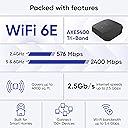
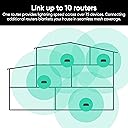
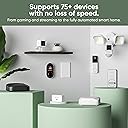
The Wyze AXE5400 Tri-Band Wi-Fi 6E Mesh Router Pro 2-pack delivers cutting-edge mesh networking with blazing 5.4 Gbps speeds, expansive coverage up to 8000 sq.ft. (expandable to 20,000 sq.ft.), and support for over 150 devices. Designed for modern smart homes, it features seamless roaming, wired backhaul support, and robust app-based controls including parental settings and device prioritization. With automatic security updates and easy setup, it replaces legacy routers to future-proof your home network.


| ASIN | B0B1F9BTXR |
| Antenna Location | Business, Gaming, Home |
| Antenna Type | Internal |
| Brand | WYZE |
| Built-In Media | 2 x Wyze Mesh Router Pro, Quick Start Guide, 3' Ethernet Cable, 2 x Power Adapters 12V 2A |
| Color | Black |
| Compatible Devices | Personal Computer |
| Connectivity Protocol | Wi-Fi, Ethernet, Bluetooth, USB |
| Connectivity Technology | Bluetooth, Ethernet, USB, Wi-Fi |
| Control Method | App |
| Controller Type | App Control |
| Coverage | Up to 8000 sq. ft. (2-pack), expandable up to 20,000 sq. ft. |
| Customer Reviews | 4.0 4.0 out of 5 stars (78) |
| Data Transfer Rate | 5.4 Gigabits Per Second |
| Frequency | 6 GHz |
| Frequency Band Class | Tri-Band |
| Has Internet Connectivity | Yes |
| Has Security Updates | Yes |
| Is Modem Compatible | No |
| Item Dimensions L x W x H | 13.8L x 13.8W x 4.8H centimeters |
| Item Type Name | Wyze Router |
| LAN Port Bandwidth | 10/100/1000/2500 Mbps |
| Manufacturer | Wyze |
| Maximum Upstream Data Transfer Rate | 2500 Megabits Per Second |
| Mfr Part Number | WF6ETBMRS |
| Model Name | Wyze Mesh Router Pro |
| Model Number | WF6ETBMRS |
| Number of Antennas | 6 |
| Number of Ports | 2 |
| Operating System | ZyNOS |
| Other Special Features of the Product | Access Point Mode, Guest Mode, Remote Access |
| RAM Memory Installed | 1 GB |
| Router Network Type | Mesh |
| Security Protocol | WPA2-PSK, WPA3-PSK, WPA-PSK |
| UPC | 810083470825 |
| Voltage | 12 Volts |
| Wi-Fi Generation | Wi-Fi 6E |
| Wireless Compability | 802.11ax |
R**R
I gave a long winded detailed review below, but for those that just want it short & simple: Wyze Mesh Pro 6E (2 pack) exceeded every expectation I had, was extremely easy to setup, it works very well & I am beyond happy! As a former Network Engineer I've been through countless numbers of Router models & manufacturers. I already had a Wi-Fi 6E router, the problem I had was the amount of devices being used, which was causing random slowdowns and/or buffering, minor issues with channel crosstalk from neighbors Wi-Fi & very minor signal strength issues in one area of the house. The Wi-Fi 6E router I already had, did support Mesh Networking, but to add another unit was near $250-300.00USD! I happened upon this Wyze Mesh Pro Wi-Fi 6E (2) Pack on sale for Cyber Monday. The price was very reasonable & it had very good ratings. The package arrived yesterday & within less than 20 minutes if that, the old router was removed, the Wyze Mesh Pro #1 & #2 were both installed & working great! Now 20 mins might sound like a long time, so allow me to layout the setup process. Unboxed, unplugged & removed old router, rebooted modem, connected Wyze Mesh Pro #1 & using the Wyze smartphone app I simply followed the prompts & answered the questions (the questions are not overly technical or confusing at all), when I got to the final step I had 2 options 1) Add Another Mesh? or 2) Finished. I still had Wyze Mesh Pro #2 to setup, so I chose "Add Another Mesh?". The app prompted me to take the next box to the area it was to be placed & plug it into power. After it booted up the app again asked the same questions as before & then I ended up on the same last screen & I chose "Finished". The app then synced the mesh network, rebooted itself, asked if I wanted to get the latest firmware & I chose "yes" so it downloaded the new firmware, then updated Wyze Mesh Pro #1, then Wyze Mesh Pro #2 & rebooted itself again. After that everything worked like it always had, only considerably better! Now there are no slowdowns and/or buffering anywhere, the mesh network automatically distributes the device load based on distance to the nearest box & the amount of devices already in use on that box. There are absolutely zero signal issues of any kind! It will automatically adjust the 3 channels to the most optimal channels available to avoid interference etc. Lastly, I have 1GB (1,000Mbps) Internet, with the old router I usually got around 800-850Mbps & that would drop the farther away from the router you went, but I could get 980Mbps standing next to the router. With the new Wyze Mesh Pro I'm getting 1,150-1,275Mbps regardless of where I am in the house! That's with just (2) of the Mesh Pro boxes, the system supports up to (10).
F**Z
I upgraded to this from another mesh system due to my previous system being out and outdated. I’ve been a huge fan of Wyze for awhile and decided to give this a try. I thought for sure I would more than two due to the size of my home (2400sqft) but based on the locations that I put these (each side of the house) it covers my entire property perfectly fine. I have front and back exterior cameras and I haven’t had any connection issues. Furthermore, I have 5 cameras, thermostat, sprinkler system, along with the standard home internet supported items (TVs, video games, etc) and I haven’t had any connection issues, I am running 1gb DL speed as a reference. The WiFi is strong in all areas of my house.
J**S
I wanted to like this router from the product videos touting the power. Wyze marketed their router as from a “little guy” but with great engineers compared to the big network companies. What I bought was a device with hardware failures that couldn’t be fixed after being bounced around between many entry-level support agents who knew less about wireless infrastructure than I did. As the Wyze Mesh Router Pro main unit and satellite would on the daily restart themselves and drop connection for all devices for a minute or two (status LED turns orange), I went back to our Verizon FiOS WiFi router rental which I thankfully hadn’t returned yet. The Verizon router did not have the range of the Wyze Mesh Router Pro but it never dropped devices. So many emails asking rudimentary questions like if I was using devices that use WEP. (If my devices only support WEP and the router was setup with WPA, they couldn’t even connect!) The incompetence of the support agents was infuriating. I asked for a replacement unit and was asked to use the Wyze app to send a support log for engineering to review. I had already done many hard resets by holding the paperclip in the back for 15 seconds, and setting the router up again which is a very slow process. But when the connection was dropped again I sent the log right away and was given once again requests to modify some settings… yet I had set the device up with essentially the default settings. Were the device settings not included in the logs or did just nobody review them? I started to think that if the Verizon FiOS router worked perfectly maybe it was my house, so I broke down and bought a Netgear Orbi mesh WiFi system which I’ve been using now for weeks without a single drop. The Netgear main router and satellite are in exactly the same positions as the Wyze were. It sucks I’m out a couple hundred bucks because of a company that has such poor support that I went out of the return policy yet they won’t support and replace a router which is only two months old. Avoid this product for the poor support alone.
D**G
Great router , but the best part , it’s so simple to setup and now I have owned it for 7 months and never had 1 problem
S**H
After reading the reviews people made it out to be that this would be a difficult task. No offense to them, I feel like they probably had never installed a WiFi router in their life. The Wyze Router Pro install was simple and took a total of about 15 minutes for both devices. I truly don't get why folks had any trouble installing especially if they already had any type of Wyze product. There were a few "glitches" setting up but I account that to updates and pairing to the app. I have a unique 2500+ sqft two story house with a downstairs garage. I was able to install the two routers and the coverage is perfect everywhere and now I can have all 30 connected devices operating with no trouble. Also, the speeds are 300+ up and down while on Wifi so I am quite satisfied. Don't be scared by the other folks as the set up was simple. I have only had one day, but if something comes up I be back and update you all.
Trustpilot
2 weeks ago
1 week ago