


Desertcart purchases this item on your behalf and handles shipping, customs, and support to Vanuatu.
๐ฎ Elevate your handheld gaming HQโdock, charge, and dominate in style!
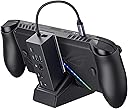
The JSAUX 6-in-1 Docking Station HB0609 is a premium accessory designed for ROG Xbox Ally X (2025), ROG Ally, Steam Deck, Legion Go, and similar handheld consoles. It delivers crisp 4K@120Hz HDMI output, reliable Gigabit Ethernet, multiple USB 3.2 Gen 1 ports, and robust 100W USB-C charging. Its modular design offers flexible use as a dock or stand, enhanced by anti-slip silicone pads and customizable front cover inserts. Ideal for professionals and gamers seeking seamless connectivity and fast charging in a sleek, compact form.
| ASIN | B0DBLP2438 |
| Best Sellers Rank | #256 in Computers & Accessories ( See Top 100 in Computers & Accessories ) #29 in Laptop Docking Stations |
| Brand | JSAUX |
| Color | Dock Only (Black) |
| Compatible Devices | ROG Xbox Ally X (2025) , ROG Xbox Ally (2025), ROG Ally X, ROG Ally, Steam Deck, Legion Go, Legion Go S Compatible Devices ROG Xbox Ally X (2025) , ROG Xbox Ally (2025), ROG Ally X, ROG Ally, Steam Deck, Legion Go, Legion Go S See more |
| Customer Reviews | 4.3 out of 5 stars 1,057 Reviews |
| Hardware Interface | Ethernet, HDMI , USB 3.0 Type A, USB 3.0 Type C, USB Docking Station , USB Type C |
| Item Dimensions L x W x H | 3.35"L x 1.93"W x 4.92"H |
| Item Weight | 0.27 kg |
| Manufacturer | Shenzhen Wuyishi Technology Co.,Ltd |
| Model Number | HB0609 |
| Number of Items | 1 |
| Number of Packs | 1 |
| Number of Ports | 6 |
| Product Dimensions | 3.35"L x 1.93"W x 4.92"H |
| Total Number of HDMI Ports | 1 |
| Total USB Ports | 4 |
| Total Usb Ports | 4 |
| Unit Count | 1 Count |
| Warranty Description | 18 Month Manufacturer |
| Wattage | 100 watts |
W**M
This is awesome.
Now I can use my xbox ally as a PC and a console on my tv. It looks great and it was very easy to connect and to set up. It doesn't come with a power cable/charger but you can just use the one that comes with the Xbox ally. My console has a rubber case there forr the base didn't fit but with out it it fits just fine. You can also connect a mouse and keyboard with the USB ports and works flawlessly.
A**R
Exactly what I was looking for
After doing extensive research to find a good quality affordable dock for the rog ally I was brought here. Have been using for a few days and have had no issues whatsoever. I did get a 100w usb-c laptop charger to use with it so that I could use turbo mode, which works no problem. It does everything I need it to do. The hdmi even supports high fps and 4k. Although only 2 usb-a ports isn't much, it supports usb splitters as well!! I've got a monitor, keyboard & mouse, and external ssd all connected with no issues at all. The instructions mentioned how to do a firmware upgrade, but I found that I did not need to and it was pretty much plug and play. Very happy with my purchase. -Tip for users trying to turn their handheld into a pc; go to display settings and set it to only show the monitor. This will make everything look normal rather than large like it is on the handheld.
H**K
Best out of 5 tried on asus rog ally
For asus rog ally Best one so far gets turbo if you get the proper charger
M**Y
A dock finally works for me!
Before this purchase, I've only ever gotten one HDMI input/output device to work consistently on my LCD Deck, and it was a VAVA hub (awkward, no stand). I'm happy to report that with a bit of tinkering, this one worked for me! As many have said, the dock has a serious lack of sturdiness, with the base being quite narrow and easy to tip over + the two parts can easily be detached when the console *isn't* on the base. I'd compliment this since it can be good for travel and ventilation, but on the other hand it's obviously made like this to be accessible to more types of handheld PCs at once and can easily tip over and hurt your device if it falls in just the right way (even when plugged in or on sturdy ground). You may want a case, but definitely care for the screen, maybe cover it up with the cover included with the JSAUX or Dbrand modcases or apply a protective screen. Also, a plus for including a card slot to customize. After plugging it in the dock's video output it should be responsive in ~4 sec. If not, try playing with your decks display settings and try again -- it may glitch out or not display initially, but that even happens with the official dock. I have used it with a SD card reader and dongles, no issues so far... besides the USB slots being very close. One of my dongles is old and big (white Targus pictured) and that one can't fit well with a normal USB next to it :( Fortunately, you can just use a USB adapter. Apparently you should be able to charge the Deck and appears to do that in gaming mode, but it sometimes doesn't show that way in Desktop mode (not "discharging" but instead "not charging" so there may not be enough power for mine). If you turn off the deck or put it in sleep it definitely charges (plug the cord into the bottom most USB-C with the lightning picture). Troubleshooting: When I first got my picture to display, certain games didn't work properly and I couldn't understand why. At first, games wouldn't launch at all when docked, which usually has to do with resolution or refresh rate, so that was my hint (I ended up starting the game in handheld mode and replugging it in when booting). After messing with settings and testing a few games I had an issue with Wobbledogs, which only worked until logging into a profile. While in any profile, any input whatsoever (directly from the Deck or from a mouse or external controller) would result in the HDMI connection severing completely. In case anyone else has a similar issue, this is what I set my LG Ultragear to in Gamemode: โ Gamescope resolution set at 1280x720@60 (my 1440p native monitor always becomes a black screen w/ any 2650x1440 options) โ Automatically scale on โ HDMI CEC on โ Magnifier was 150% โ Max game resolution set to 2560x1440 โ External display safe mode on โ HDR was on Afterward, there were still rare occasional glitches (vertical line across the screen that shows briefly in desktop mode) but no glitches stayed for long. I also feel the need to tell those who don't know about JSAUX's notices: there may be a pamphlet in the box that mentions optional firmware updates... but firmwares on their website were delisted and are no longer an option due to community feedback (took me like 30 minutes to find that info but it's just on the general FAQ option at the bottom of their website lol). I mention this because at first my Deck/dock weren't cooperating at all and I had hope after reading that pamphlet that I would be able to fix the situation. Overall, my advice is to just keep playing around with the resolution and refresh rate, especially on LG monitors which historically had issues).
A**T
Good untill it broke from light use... BUT Got a new one sent right away
worked well, I believe it worked as it was supposed to. got it July 2025 dont use it very much and i was just sitting here and it suddenly disconnected. after an hour of trying to get it to work because i thought it was my portable monitor I realized my rog ally x was not charging as docked or my keybord being connected to it. it was the dock, just suddenly no more. for anyone wondering i take good care of my things, i dont toss them around, drop them, use them when it is too hot, ect..... sent a few emails back and forth on April 9th and a new one showed up at my door on April 11th. 8 months later from my original order my dock broke from normal use and they still sent me a new one. yes it sucks but it happens, some units of a product are faulty but when the seller knows that and sends a new one that's 5 stars to me. I'll update if anything happens to this one. today is April 11th 2026.
L**E
Does not charge as well as promised, but plug and play docking is good.
TL;DR: If you play low-intensity games, shorter gaming sessions, or just want to watch a movie or stream TV from desktop mode, you'll probably be fine with this, but it's not for heavy duty gamers. EDIT Sep 16th 2025: JSAUX reached out and offered me a refund. The dock component does work and I have still been able to use it for lightweight games with adequate charging, so I declined the refund. That part of the product is rock solid and JSAUX has been a good quality product for me in the past until this one item. For this reason, I have opted to raise my 2-star review to a 3-star. A company willing to stand by their product and refund displeased customers without being asked to do so is worth an extra star. I'll be looking to them when I'm ready to upgrade to a more long-term docking solution in the future. REVIEW It works and plays to the TV with super easy plug and play, but was this thing supposed to come with a charger to supply extra power? It absolutely does not charge my Steam Deck while playing high graphics and power games. That's fine if I'm only playing for an hour or two, but I will not be having marathon sessions on the TV with this dock. I don't know anything about watts this or performance that, but this thing is not charging as it claims. I know the end result of that is my battery dying mid-session. I also have major concerns about stability since it has two pieces that don't even latch together. One swipe of the dog's tail and the deck is hitting the, well, deck. (EDIT: I went back and looked for this silicone mat the listing images mention and never found it in the packaging.) For now it's worth 2 stars because it does put the game on the TV, but the charging promise was the main reason I picked this one. I'll stick with it since it was cheap and I don't really play on the deck that much right now. When I finally get some of the new games that are coming out over the next year, I'm splurging on something that actually powers my device as promised.
C**N
Exactly Right
This does exactly what it should do exactly like I hoped it would. Zero lag or latency issues, seamless media streaming from device --> TV/Monitor, it's essentially perfect guys. The stand it comes with is an upgrade to the standard Ally X Rog stand as well, bonus.
G**L
Stopped working. No support.
Trash. Completely stopped working after 4 months with minimal to medium use. Tried to reach out and got thats its simply not eligible for replacement. Didn't even want money back but no worries. This device is trash buy something else.
G**Y
Best Dock for ROG Xbox Ally X
Made for ROG Xbox Ally X. The docking is really fast and reliable also. Highly recommended!
M**O
Aanrader
Het werkt heel goed alles doet het zoals het hoort en goed in streaming heel goed ben er blij mee
R**A
รtimo produto
Atendeu bem, funciona perfeitamente
A**.
Buona docking
La docking funziona perfettamente con ROG Xbox Ally X. Peccato che non ci sia il caricabatterie in bundle.
H**Y
Mycket bra
Super bra docking station och bra prisklass
Trustpilot
2 weeks ago
2 days ago