⚡ Dominate your game with Philips Evnia – where speed meets stunning visuals!
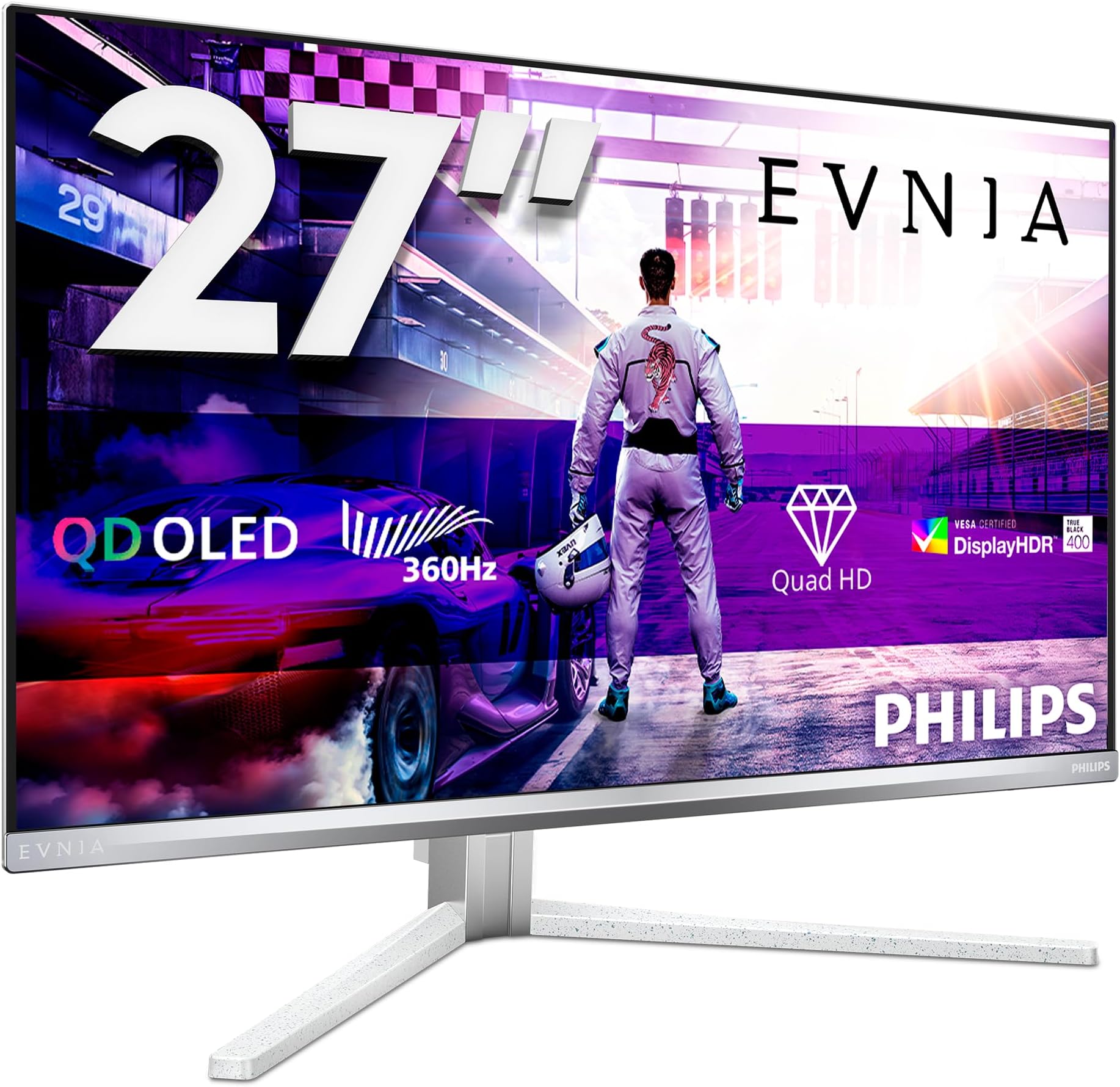
The Philips Evnia 27M2N8500 is a 27-inch OLED QHD gaming monitor boasting a blistering 360Hz refresh rate and ultra-low 0.03ms response time for elite-level performance. Featuring HDR400 TrueBlack for exceptional contrast and Ambiglow ambient lighting, it combines eye-friendly tech with versatile connectivity including 2x HDMI 2.1, DisplayPort 1.4, and a USB hub. Designed for immersive, lag-free gaming with AMD FreeSync Premium and G-Sync compatibility, it’s a premium yet affordable choice for serious gamers and professionals alike.


| ASIN | B0DBM1CTLM |
| Adaptive Sync | FreeSync Premium |
| Aspect Ratio | 16:9 |
| Aspect ratio | 16:9 |
| Best Sellers Rank | 3,896 in Computers & Accessories ( See Top 100 in Computers & Accessories ) 78 in Monitors |
| Brand | Philips |
| Brand Name | Philips |
| Colour | White |
| Compatible Devices | [INF] Gaming consoles, high-performance desktops, laptops with HDMI 2.1 or DisplayPort 1.4 support |
| Contrast Ratio | 1.500.000:1 |
| Country of Origin | China |
| Customer Reviews | 4.1 out of 5 stars 534 Reviews |
| Display Technology | OLED |
| Display Type | OLED |
| Global Trade Identification Number | 08712581806309 |
| Hardware Connectivity | DisplayPort |
| Has Color Screen | Yes |
| Image Brightness | 1000 cd/m² |
| Image contrast ratio | 1.500.000:1 |
| Item Dimensions D x W x H | 27.5D x 60.9W x 51.4H centimetres |
| Item Weight | 9.6 Kilograms |
| Item height | 51.37 centimetres |
| Manufacturer | Philips |
| Maximum Display Resolution | 2560 x 1440 |
| Model Name | 27M2N8500/00 |
| Model Number | 27M2N8500/00 |
| Mounting Type | Desk Mount |
| Native Resolution | 2560x1440 |
| Network Connectivity Technology | DisplayPort |
| Picture Quality Enhancement Technology | True |
| Pixel Pitch | 0.31 |
| Power Consumption Size | 83.7 Watts |
| Processor Count | 1 |
| Product Features | Adaptive Sync, Blue Light Filter, Flicker-Free, Height Adjustment |
| Product Warranty | 3 year manufacturer warranty |
| Refresh Rate | 360 Hz |
| Resolution | QHD Wide 1440p |
| Response Time | 0.03 Milliseconds |
| Screen Finish Type | Matte |
| Screen Size | 26.5 Inches |
| Screen size | 26.5 Inches |
| Screen surface description | Matte |
| Shape | Flat |
| Specific Uses For Product | Gaming |
| Total HDMI Port | 2 |
| Total Video Out Ports | 2 |
| Viewing Angle | 178 Degrees |
| Warranty Type | 3 Years Manufacturer Warranty |
S**U
Nice 27 inch for gaming - and well worth the money
I've had the monitor on now for about 2 hrs. It's a lovely sharp 1440p native resolution. It immediately detected that I could use the Variable Refresh Rate option of my AMD graphics. Nice screen colours, sturdy stand. Takes up quite bit more desk space than my previous iilyama 24 inch monitor and so it's a fair bit closer, making the screen look very big. Since I've bought it for immersive gaming this is all good. Its initial height when the stand is attached is perfect for me, so I wont need to adjust that. To attach the stand (with the monitor laying flat on a towel), first connect the base to the vertical arm (tighten with twist-tighten screw handle) and then its just a simple aligning of the vertical stand with the clasp socket on the monitor and carefully push until you hear a soft click. Two HDMI ports, one DP. Excellent options in the menu. It comes with a HDMI lead and a Display Port lead. Excellent refresh rates - really a perfect gaming monitor in my eyes though I'm no expert! Value for money - absolutely!
A**R
No regrets, so far.
Of the three monitors in this class, competing with the Alienware and the Samsung, the Philips is priced far cheaper and at similar spec. This made me a bit wary as I got it for £570 which is nearly half the price of a undiscounted Samsung G7. However, I'm really impressed by the Philips. It was packed well and comes with all the cables you would need for any setup and includes a vesa adaptor which fit easily to my desk arm. Only downside is that it's a little wobbly of your desk is unstable. The build quality and finish makes it looks and feels like a quality product and I like the gloss film on the display. It's white too so goes with my all white setup. The brightness can be quite dark in some games and it took time for my eyes to adjust to the change. Still unsure if this is just an OLED thing or if I need to tamper with settings more. Either way, most games look great and the depth of blacks was hugely noticeable coming from ips displays. I never paid a huge attention to response times however I've not really noticed much of a difference. Dunno if that's good or bad but I don't play a huge amount of FPS games anyway so I don't really have the eye for it. I was expecting a dip in frames due to the increase in resolution from 27 inch 1440p but everything I've played to date has had no real noticeable drop in performance. The panel care software which prompts a pixel refresh every 4 hours is nowhere near as big a problem as folk make it out to be. Takes a few minutes and you can pause and reactive it whenever it suits you. Overall it's been great and has drawn me back into gaming. If I had bought a £999 Samsung and got similar/mildly better results I think I'd be suffering from some real buyers remorse but at the price point I got the Philips it for, I really have no complaints.
D**D
Beautiful display but let down by poor mounting bracket.
This is my first OLED monitor and my first high res monitor and it looks amazing compared to my previous screens. It's also my first curved monitor which I was initially unsure about but it's been good, and feels very natural. Overall, the display is great. I quite like the ambient LEDs on the back too, although they are quite subtle. The issue which takes it from a 5 star to a 2 star review for me is the mounting bracket at the back and the customer service. Rather than have a standard VESA mount on the back, for some reason they went with a custom mount. This mount clips into either the stand that comes with the monitor (a decent, solid stand), or clips into a custom VESA plate. I have a monitor arm to free up desk space, so naturally, I opted for the VESA plate. I fitted this as per the instructions and mounted it to the arm. When I tried to change the angle of the monitor, the tiny retaining clip (pictured in the photo) snapped off immediately, causing the monitor to fall off the arm. I managed to catch it, so the monitor survived. On closer inspection, the design of this clip is really poor. It's a small plastic clip, which has two screws through it, leaving the clip with some bad weak points. This clip then evidently takes some strain when you're moving the monitor around, and frankly, isn't up to the task. The weak point is where the plastic clip snapped. You can see from the photo how small the clip is. There's only 3-4mm of plastic at the weak point. I got in touch with Philips to ask for a replacement part and after a few days, they got back to me saying it was user error, and therefore was not covered so I would have to buy a replacement part. I don't think I'll be buying a part though as at this point, I don't trust that clip at all. I've bodged together a replacement myself, which does a better job than the clip. Do I like this monitor? Yes Would I buy this monitor again? No I would find a monitor with a standard set of VESA mounting holes on the back (tried and tested). I would be a bit more forgiving if Philips' response wasn't so disappointing, so I'd advise buying their products as I wouldn't trust them to remedy problems, certainly not with this monitor and its design flaw. EDIT: I'm dropping this down to 1 star sadly. I really can't recommend this monitor. After using the monitor for a few weeks now, I'd say there are a couple of issues on top of the above review. As an OLED monitor, it can get burn-in and needs frequent 'pixel refreshes'. A pop-up appears after 4 hours prompting you to perform a pixel refresh. If you do the refresh, the screen is black for (according to the manual 6-15 minutes). During this time, the power LED flashes. Once the refresh is complete, the monitor powers off. It also says that if the monitor is in standby for 2 hours, that Refresh will recognise this and run automatically. However, when I have done this and started the computer up again, it prompts to do a pixel refresh sometimes after only a few minutes. My thought was to run pixel refresh before shutting down so I tried this, but shutting down interrupted the pixel refresh and it did not complete. I tried running a refresh and walking away, but my computer put the monitor to sleep during the middle of this time, and interrupted the refresh. I tried initiating the refresh once the computer was already shut down, but it's not possible to do this from the OSD. I understand that it's necessary to do these refreshes to prevent burn-in, but they have made things a lot more effort than they should be, unless you don't mind just being interrupted in the middle of what you're doing for 6-15 minutes. At the moment, I've adjusted the computer settings so that it waits 20 mins before putting the monitor to sleep and when I'm going to go and make a cup of tea or something, I set the refresh going. This involves 16 separate actions on the OSD controller. 16. Every time. The manual says that you can program the monitor to run the refresh at convenient times, but there's no instruction on how to do this and I can't find any way of doing this using the OSD. Basically, they've made some crazy design choices with this monitor, making the user experience one quite poor. The only thing going for the monitor really is the picture quality, but everything else, sadly, is poor. Avoid this one to save yourself some frustration.
B**T
Beautiful
This review relates to the 34", curved screen display. I'll get straight to the point. This screen is stunning. If you're reading this, you must be considering an OLED screen as an upgrade to an LCD screen and the only reason to do that is if you want a beautiful display. This monitor will not disappoint you. It uses the same (Samsung) panel as a number of OLEDs but it's significantly cheaper than the rest. You probably know the benefits of OLED (perfect blacks, eye-popping colours, massive brightness, beautiful HDR, fantastic response times). This monitor ticks all those boxes. Games look wonderful, with instant reactions to mouse/keyboard (or controller) inputs. But "normal" stuff also looks good. Windows looks great, as do Windows apps like Word, PowerPoint and Excel. This monitor is Windows-HDR compliant and enabling HDR in Windows makes everything look great. I use my PC for entertainment (which OLED is ideal for) but also work. I was a little worried that it wouldn't be as clear (for work) as my previous (LCD) display but it's fine. I adjusted one of the profiles to turn down brightness, increase sharpness, etc. and everything looks fine. It has the usual OLED downsides, the main one being that you have to do more maintenance to prevent screen burn-in. No OLED monitor is "plug and forget". They all require maintenance. I think Philips implement this quite well. Basically, when you turn off the display (hold down the power button for 3 seconds) it will ask to do a pixel refresh if you haven't done one in the last 4 hours. If you let it (i.e. do nothing) it will run the refresh for a few minutes before turning off the screen. If you decline (you have to intervene or the refresh will run) then you can do that four times (up to 16 hours of use) before it does it anyway. It's really not a problem once you understand this. One other thing is that this display does not have a KVM switch (a switch the permits you to share your keyboard/video/mouse with two computers). But it does have a USB upstream connection that allows you to connect keyboard and mouse to the monitor (via USB A) and then run a single cable (USB B) to your PC. I found a work-around for this by buying a very cheap USB B splitter (£10 from Amazon) that allows me share my keyboard and mouse to my (personal) desktop PC and my (work) laptop. I've given this screen 5 stars because it's a beautiful, fast, relatively cheap OLED display. Highly recommended.
T**M
Great value when on sale
Had this monitor for a few months now (and is my first OLED monitor) : It's amazing playing games and doing work with the extra added pixels, and with the 175Hz refresh rate it's very good for the casual to mid-serious gamer. I used to daily drive an alienware 27" monitor at 280hz and can feel and see the difference but once I got used to it felt natural and smooth enough. The OLED Screen hoenslty is a game changer coming from using IPS displays, deep blacks and high contrast with colours and whites. The sharpness of the pixels aren't too bad, and leaving them on default values is near perfect. The built in speakers are a nice addition and are your typical 5W speakers, but lacks base and can feel washed out compared to my dedicated speakers, but hey it's not terrible. Setting up with a monitor arm was no issue, but the monitor is quite heavy so you will need a strong monitor arm, and holy crap the given monitor stand is massive, literally nearly used half my desk space just for the stand so definitely get a monitor arm when you can. Oh yeah before I forget, the LED lights at the back are amazing for ambient lighting, used to buy Led strips but this just saved me the hassle, vibrant and has nice diffusion wiht no noticeable "hotspots" or bright spots. Now this is great value when you get it on sale, I got mine for half the msrp price and that's very rare for these classes of monitors, so that's the best time to get the monitor. The main issue, and yes I have updated the drivers and firmware manually with the software from the official website, is I'm starting to get the known issue with this monitor and that is the fans internally (to keep the panel at a lower temp) just turns on and off many times, like 2 seconds off and then it's back on then off again after 5 seconds and repeat. Not sure what's causing this and I've set the setting to be Auto, putting it to quiet does help but makes the monitor hotter than usual (I HIGHLY ADVISE AGAINST 'off' MODE). And this issue is what put it down to 4* instead of 5. Using dedicated speakers and headphones mitigates this issue and is barely/not audible - Will try reinstalling the firmware fingers crossed it works I will probably update this once I hit the 6 month mark but overall this is one of the best values for OLED ultra wide monitors when on sale. Props to Phillips for making a good monitor since I've never heard of these guys making monitors until I saw this.
M**E
Fabulous OLED ultra ultra wide monitor
I bought the 49" 144hz OLED version, which replaced my 8 year old Acer Predator 34". Firstly, the vesa bracket for wall mounting works great, and I have this sitting on the wall. The ambilight isn't Philips usual one so it doesn't change colour with what's happening on the screen, but that's a gimmick anyway, and the backlighting is a nice touch (if somewhat muted, although it's worth noting my wall is grey so nothing will really stand out). The image quality is stunning, and it's great for both desktop work and for gaming. For desktop I use Fancyzones to split the screen into 3 zones which maximises productivity for me, and gaming is just jaw dropping (Escape from Tarkov on this screen is incredible). The sound is good for a monitor, although windows notifications are a bit jarring and rattly, but overall very good considering this is just a monitor. What swung it for me in terms of buying the Philips over the Samsung (I paid £679 for this on Black Friday...the samsung was only £30 more) is the burn in warranty. OLEDs are susceptible to burn in, and the fact that this is covered by Philips gave me peace of mind. One thing to bear in mind - you need to run pixel refresh reasonably frequently, which will switch the panel off for 10 minutes...it will force you to do this after (I think) 14 hours of use between refreshes. I usually do it manually when I'm making a coffee during the middle of the day. It's a bit annoying, but inevitable if you have an OLED (and want to keep the screen pristine for years to come). Highly recommended (and it's not too big despite thinking OMG when I first opened the box).
J**Y
Philips Evnia 34M2C8600 – The Overlooked OLED Gem
The Philips Evnia 34M2C8600 is a brilliant OLED monitor that gets unfairly ignored by top gaming and tech reviewers in favor of Alienware, ASUS, and other big-name brands. The problem? Those alternatives often come with higher price tags, fewer features, or missing essentials like built-in speakers. This monitor deserves far more recognition, especially as a first entry into OLED gaming displays. Why It’s Perfect for First-Time OLED Buyers If you’re making the jump to OLED, this is one of the best value-packed options out there. Unlike many competitors, it balances premium features without unnecessary markups. You get: ✔️ Stunning QD-OLED visuals with perfect blacks and vivid colors ✔️ 175Hz refresh rate & 0.1ms response time for ultra-smooth motion ✔️ Built-in speakers (missing on many competitors) ✔️ USB-C & multiple ports for easy connectivity Gaming Performance – A Visual Treat I’m running this monitor with a Gigabyte WINDFORCE OC GeForce RTX 4070 12GB and a Ryzen 7 5800X CPU, paired with a Gigabyte B550 AORUS Pro AX motherboard. With this setup, games look absolutely stunning, and performance is buttery smooth. Some standout experiences: 🎮 Cyberpunk 2077 – Neon lights and ray tracing look breathtaking 🎮 Red Dead Redemption 2 – The landscapes feel richer and more immersive 🎮 Rainbow Six Siege – Smooth, fast-paced action with no ghosting Perfect for Multiplayer & Competitive Gaming For those into multiplayer shooters, MOBAs, or esports, the high refresh rate, low input lag, and G-Sync/FreeSync support make this monitor a top-tier choice. The ultrawide 21:9 aspect ratio also gives you a wider field of view, which can be an advantage in competitive gaming. The Verdict – An Underrated Powerhouse ✅ Pros: ✔️ Best OLED for the price – cheaper than Alienware & ASUS ✔️ Perfect for single-player & multiplayer gaming ✔️ Great for first-time OLED buyers ✔️ Built-in speakers & solid connectivity options ❌ Cons: ❌ OLED burn-in precautions still apply ❌ Overlooked by major reviewers (unfair bias)
M**Y
Great monitor with some serious flaws.
Great monitor with superb picture quality and connections but is let down by poor speakers and really poorly designed stand connection. If you plan to use the monitor with you own stand be aware that the supplied VESA connection is very poorly designed and is very wobbly. The monitor slips into the connection and is secured by a very flimsy plastic tag that is easily damaged. Also I encountered speaker distortion at 40% volume
Trustpilot
2 months ago
3 weeks ago