Buy anything from 5,000+ international stores. One checkout price. No surprise fees. Join 2M+ shoppers on Desertcart.
Desertcart purchases this item on your behalf and handles shipping, customs, and support to Vanuatu.
🔥 Level up your game with the ultimate curved powerhouse!
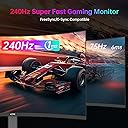
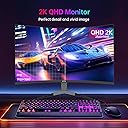
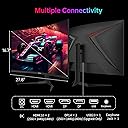
The KTC 32 Inch 240Hz Curved Gaming Monitor delivers a professional-grade gaming experience with its 1000R curvature that matches the human eye, ultra-fast 240Hz refresh rate, and 1ms response time. Featuring a sharp 2K QHD 2560x1440 resolution enhanced by HDR and 122% sRGB color accuracy, it offers vivid, immersive visuals. Multiple HDMI and DisplayPort inputs support seamless multi-device connectivity, while ergonomic tilt adjustment ensures comfort during long sessions. Perfect for competitive gamers and creative pros seeking speed, clarity, and style.


| ASIN | B0D9N5ZR43 |
| Adaptive Sync | FreeSync |
| Additional Features | Adaptive Sync, Curved, Frameless |
| Aspect Ratio | 16:9 |
| Best Sellers Rank | #1,192 in Electronics ( See Top 100 in Electronics ) #44 in Computer Monitors |
| Brand | KTC |
| Color | Black |
| Connectivity Technology | DisplayPort |
| Contrast Ratio | 4000:1 |
| Customer Reviews | 4.5 out of 5 stars 1,599 Reviews |
| Display Resolution Maximum | 2560 x 1440 Pixels |
| Display Technology | LCD |
| Display Type | LCD |
| Hardware Connectivity | DisplayPort, HDMI |
| Has Color Screen | Yes |
| Image Contrast Ratio | 4000:1 |
| Item Dimensions D x W x H | 7.28"D x 32.08"W x 21.06"H |
| Manufacturer | KTC |
| Model Name | H32S25E |
| Model Number | H32S25E |
| Mounting Type | Wall Mount |
| Native Resolution | 2560x1440 |
| Number of Component Outputs | 4 |
| Picture Quality Enhancement Technology | HDR |
| Refresh Rate | 240 Hz |
| Resolution | QHD Wide 1440p |
| Response Time | 3 Milliseconds |
| Screen Finish | Matte |
| Screen Size | 32 Inches |
| Screen Surface Description | Matte |
| Total Number of HDMI Ports | 2 |
| Unit Count | 1.0 Count |
| Warranty Description | 3 Year |
C**N
Fast, good quality
I had two 27" Dell curved gaming monitors before this. I now work from home and needed two flat, smaller monitors that are easier to view and that can change direction more easily. These worked out perfectly and have a great screen. I didnt realize how different it would be going from curved to flat screen, but it will make working so much easier. Setup was easy- i didnt even glance at the instructions. The DC cables they came with are much more easy to manage than the bulky power cables im used to from monitors. Also I wasnt expecting the DP cables to be included so that was a nice surprise. Great monitors at a great price.
P**O
Great display, unbeatable value
This miniLED monitor is phenomenal, and gives you a lot of functionality and picture quality for a relatively low price. If you use your PC for a mix of work and gaming, this is a great alternative to OLED options that can be at risk of burn in. The HDR looks great, the dual mode resolution switch works very well and saves all of your options, and the usb-c 60w port is very useful for plugging in laptops, and charging phones. Some have said that the local dimming could be better, but I think that is only a problem when looking at the screen from an angle. When facing the screen forward, the local dimming does a great job of keeping the dark colors dark. I've seen some complaints of dead pixels, and bad packaging, but mine was packaged very well, and as of now, there are no dead pixels or black spots that I can see. Everything looks and runs well right out of the box, and I don't have any complaints. Are there better options out there? Of course! But for the price, its really hard to beat what this display has to offer, especially if you are upgrading from a 1080p setup. This manages to do so much, and I think the pros heavily outweigh the cons.
K**E
A great, budget friendly extra monitor!
A good second monitor I run off my motherboard. I have a 30” curved 1440 180hz monitor on my gpu, so I run this vertically as my secondary 🤷♂️ good color, picture and serves a purpose 🤷♂️ can’t miss with this. Just know that I have my monitors mounted and I can’t speak for the provided monitors stands.
C**E
Excellent monitor with some tweaking read full review
Excellent monitor, but a little too saturated on default settings out of the box. For the best experience, either use sRGB mode with low local dimming at 75% or 100% brightness, or, like I do, and use DCI-P3 color mode with low local dimming at 100% brightness, and it looks really accurate and great! As for HDR, it's a mixed bag. In order to get the best brightness and bang for your buck, you shouldn't be using this monitor with Windows HDR or macOS. If you want true 1:1 HDR, it is much better with a console that has proper HDR settings and out of the box tuning. But if you want to use it with a PC or Mac, it is still mostly fine, but I would calibrate the HDR using the built-in calibration in Windows. The refresh rate is also a mixed bag. If your computers GPU or console doesn't support the latest DP 1.4 and/or HDMI 2.1 standard, then you won't be able to do more than 120Hz at 4K without display compression, and it looks and feels horrible when compression is on and visable at 160hz. My recommendation is this setup for PC: Use the DCI-P3 color mode for the best color accuracy across HDR and SDR, but if you don't plan on using HDR and use exclusively SDR, then stick to sRGB mode for the best accuracy for SDR content and gaming. 100% brightness for the best brightness and hitting the advertised HDR brightness claims. Note this may be too much for the average person, so if that's the case, stick to 75%, which still hits a respectable brightness. For HDR calibration in Windows: set to 1930 nits (small window) and 1600 nits (full screen), as those are the official rated numbers. Use exclusively 120Hz at 4K and the standard preset for overdrive, as any other preset has overshoot and ghosting and any refresh rate above 120hz is pointless if you get display compression and not that noticable or helps much in gaming. As for the 320Hz dual-mode operation, it does not support native scaling, so you just get a blown-up 1080p image with no scaling, and it looks very blurry and unclear on the 4K display. It does hit its advertised 320Hz, but it is unusable in my opinion due to the blurriness of the picture from the lack of proper image display scaling. I also think they are slightly overdriving the pixels more than usual because even on the standard preset, there is still a lot of visible ghosting and overshoot on the monitor. I had to fully turn it off to get rid of it, but that defeats the point of the 320Hz mode, as it introduces more input delay for a clearer, smoother image. If you bought this monitor purely for the 320Hz mode and don’t plan to use 4K, you would be better off with a monitor that has native 320Hz support. This is clearly more of a 4K monitor than a 320Hz 1080p one. In conclusion, if you are looking for an excellent 4K monitor with really bright colors and overall brightness for viewing content and gaming in HDR, then this is it. But if you are looking for the best response times and don’t want to tweak settings out of the box, then maybe look for something else, as this monitor is clearly aimed at MiniLED enthusiasts and people who know what they are buying and how to properly set it up for the best experience. If you want a great MiniLED thats for beginners I recommend the AOC Q27G3XMN 27" for a better entry point to gaming with a MiniLED as it's 1440p and doesn't need any tweaking out of the box for a great experience if you want to try out MiniLED without eating away $500.
Q**O
Great value, incredible picture
Very pleased so far! A very nice, large wide screen monitor for the price! I use it for video/content editing and occasional video watching. The colors seem great to me compared to my older Samsung 27”. The screen feels very immersive. I haven’t used to game yet but I look forward to trying it out soon. Obviously I’m not a huge gamer or pc nerd so I can’t comment on its refresh rate or gaming performance but it far exceeds any monitor I’ve ever had before.
J**P
Exceptionally Good Gaming Monitor - Considering the Price!
I got this for $279 during Prime Day, so far, I'm exceptionally happy with it. I had it running in DCI-P3, there is very slight color shifting on this monitor more so than my other non-OLED monitor, the Samsung G7 Faker Edition. I’ve found that keeping the panel on native, black level at 50 and OD setting on off or dynamic and this issue is pretty much resolved. The OD settings leave a lot to be desired, the only manageable ones I've come across is dynamic and off, all of the others cause a degree of blurring or overshoot-undershoot in the image response times. Initial Pros and Cons: Pros: -Everything works as intended, no issues out of the box, do dead pixels, backlight bleed, etc., looks great. -Stand is actually fairly decent, for the price point. -Crystal clear image, the AG used is fantastic, I have 34GS95QE, AW3225QF and Samsung G7 Faker Edition, and in many ways, I prefer the image quality of this monitor, great flexible gaming capabilities. -Tremendous number of settings, what I've found that works the best, Brightness 38, contrast 50, preset, user, color natural, response - dynamic, professional - screen native, blue light at 25%, local dimming set to auto, this IMO, is the best you can get this monitor at settings wise. HDMI upscales PS4 Pro and Xbox Series X to 4K 60hz and the latter also at 1440P 120hz. -Screen uniformity, exceptional. -Has a more natural look than OLEDs due to their constant blue light push, it's the technology, this monitor in the right settings, reminds me of a CRT, in some ways. -Recommend setting the black equalizer to 50, anything lower introduces black crush, higher image washout, at 50, it helps in the overall response times, look and feel, had this set to zero and the image was ghosting a lot when scrolling, panning. -M27T6 is significantly better than AOC's offering, the (Q27G40XMN) which I bought and returned from a different seller, IMO, the two shouldn't even be considered comparable. That monitor has two big issues, DP 1.2 and you can’t defeat the brightness settings when using local dimming, it locks to 100% brightness. -Able to do full 10-bit at 180hz over DP 1.4 connection. Cons: -Image shifting noticeable, used to OLEDs, instant response times, it's better than most, though still noticeable. -local dimming greatly reduces brightness, though you can easily up the brightness to offset this issue. -DCI-P3 and BT. 2020 look great, for very specific games-apps, otherwise, your much better off with screen native, it provides a much more natural look. -Over Drive settings introduce a lot of panel response time issues, blurring and overshooting, this monitor works better after it's been on for 15 minutes or so, it needs to warm up, literally. I’ve found off or dynamic OD settings work the best. -HDR on Vesa IMO looks the best, in FPS type of games, though strategy games and such, AOE, CIV, etc., Game HDR looks more natural, you're able to change a lot of settings with HDR, which most monitors lock you out of, don't believe this unit is truly capable of the specs, HDR-1400 etc., though played a few games last night, IMO, they looked pretty good in HDR. NBA 2k25, Oblivion, Baldur's Gate 3 and others look tremendously good with HDR enabled, this monitor does a great job with 1152 dimming zones and creating a colorful and detailed HDR image for gaming or even media content, such as Netflix. -Dirty screen effect when shifting your sight from side to side, nothing major, though I've noticed it more than I would prefer, there is an ever so slight grainy effect, only noticeable in certain situations. For the price and what's offered, I can't recommend it enough!
B**S
Top quality for a crazy low price
KTC is an unknown top brand because they were only making parts for displays of all kinds for all kinds of manufacturers such as ViewSonic and Samsung and only just started making their own line of monitors for the market. They even do the giant screens on buildings so you know anything you buy from them will be resilient and this monitor shows it, there's almost no heat that comes off this thing. Quality of the plastic isn't over the top which probably helps with it's low price but it's more than enough for what is needed for a monitor. Colors and the picture look really good as well. I have had this monitor for over a year and had zero problems with it. I have only noticed a single flicker one time but that was when I had overdrive on so that's to be expected with any monitor but compared to other brands it doesn't do it nowhere near as much. Can't believe how cheap this brand is for what you're getting. Any other brand would be two and three times as much for the same application, quality and capabilities. This is my new favorite and trusted brand. The first brand of monitors to have both.
C**S
Fantastic Ultrawide Upgrade – Worth Every Penny (Even Over "Big Brand" Options)
I first picked up this KTC 34-inch curved ultrawide (3440x1440, 180Hz, H34S18S) for my son's gaming PC, and I liked it so much that I ended up buying one for myself too. It completely replaced my old Dell 27-inch office monitor (1080p), and the difference is night and day. The size alone is immersive—going from a standard 27" to this 34" curved panel feels like a whole new workspace and gaming experience. The jump to 3440x1440 resolution is sharp and detailed compared to 1920x1080, and (for me) the colors pop with great brightness and contrast right out of the box. HDR support adds nice depth for movies and games, and the 180Hz refresh rate keeps everything buttery smooth—no tearing or stuttering in fast-paced stuff. I was hesitant about going with a lesser-known brand like KTC instead of paying a premium for one of the big names, but after seeing how well this performs, I'm convinced many of those expensive monitors are using similar (or the same) panels anyway. This one delivers flagship-level visuals at a much better price. Setup was easy—plenty of ports (HDMI, DisplayPort), full ergonomic adjustments (tilt, swivel, height, pivot), and VESA mount compatibility if needed. The only minor quirk I've noticed is that it takes a couple extra seconds to wake from sleep mode compared to my old Dell, but it's such a tiny inconvenience that it doesn't bother me at all. My son, who's a serious gamer, spent some time dialing in the color calibration to his liking (the base settings were already great for me—no tweaks needed), and once he got it tuned, he says it looks incredible. That's the main reason I'm going with 4 stars instead of 5—out-of-the-box calibration might not satisfy everyone who's picky about color accuracy for gaming or creative work, but it's easily fixable with a little effort. Overall, this has been one of the best monitor upgrades I've made. Highly recommended if you're looking for a high-refresh ultrawide without the big-brand markup. 4 stars—excellent value and performance!
A**R
False advertising, specs are not true.
Not a 400hz monitor, max is 360.
A**O
Mi primer MiniLed
Mi primer monitor Mini led me gustó mucho tiene mucho brillo a veces demasiado que hasta lastima mi anterior monitor no tenía ni hdr 400 este me sorprendió mucho y más por el precio en el que lo encontré necesita una buena configuración que podrán encontrar en YouTube y que por cierto este monitor solo lo recomiendo si vez antes todas las reseñas en español porque si tiene algunos puntos malos como que de la nada se le baja el brillo aunque eso a mi no me molesta se ve fantásticos en juegos de campaña como Metro Exodus y Call of duty Modern Warfare 2019 o juegos como Fortnite o Arc Raiders .
O**N
Perfecto
Muy buen artículo me encantó ,se los recomiendo 👌🏻👍🏻👍🏻
G**.
Excelente compra
Excelente imagen… el sonido es limitado pero con una bocina bluetooth se soluciona. Quedó perfecto para lo que lo necesito: una smart tv y monitor de muy alta resolución
A**N
Excelente monitor, control de calidad cuestionable.
Me había gustado este monitor bastante, lástima el mío llegó con varios píxeles muertos y lo tuve que devolver, pero a primeras el monitor es súper ULTRA brillante si eres una persona que le gusta tener todo brillante es excelente, aparte el HDR se veía muy bien, el SDR nada fuera de lo común pero recomiendo usarlo sin local dimming. Este monitor es una joya si lo encuentras a un buen precio y si te llega con 0 píxeles muertos.
Trustpilot
1 month ago
3 days ago