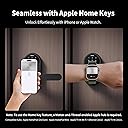
🔐 Unlock the future of smart security—because your door deserves the smartest welcome.
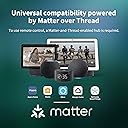
The Aqara Smart Lock U300 is a premium biometric and keypad smart lock featuring Apple Home Keys integration and Matter over Thread connectivity for seamless multi-platform smart home control. It supports up to 25 fingerprints, multiple unlocking methods, and customizable security modes, all housed in a durable, water-resistant zinc alloy body with AES encryption and up to 10 months of battery life. Designed for modern homes, it offers both convenience and robust security with emergency USB-C charging and broad ecosystem compatibility.


| ASIN | B0D496H9YV |
| Additional Features | Fingerprint |
| Best Sellers Rank | #203,511 in Tools & Home Improvement ( See Top 100 in Tools & Home Improvement ) #655 in Deadbolts |
| Brand | Aqara |
| Brand Name | Aqara |
| Color | Black |
| Connectivity Protocol | Thread |
| Control Method | App, Remote, Touch |
| Controller Type | Apple HomeKit |
| Customer Reviews | 3.7 out of 5 stars 363 Reviews |
| Finish Types | Painted |
| Included Components | Smart lock unit, Mounting hardware, USB-C cable (for backup power) |
| Item Dimensions | 5.51 x 2.99 x 2.8 inches |
| Item Weight | 2.5 Kilograms |
| Item dimensions L x W x H | 5.51 x 2.99 x 2.8 inches |
| Lock Type | Biometric, Keypad |
| Manufacturer | Lumi United Technology Co., Ltd |
| Manufacturer Part Number | AD030USG02 |
| Material | Zinc |
| Material Type | Zinc |
| Model Name | Smart Lock U300 |
| Model Number | DL-D02D |
| Number of Pieces | 1 |
| Recommended Uses For Product | doors |
| Shape | Oval |
| Smart Home Compatibility | Smart Home Compatible |
| Special Feature | Fingerprint |
| Style Name | Contemporary |
| UPC | 192784001639 |
| Unit Count | 1.0 Count |
R**.
The Feature-Packed Smart Lock You've Been Waiting For!
I have been anxiously waiting for this lock since it was announced earlier this year and after finally getting my hands on it, I am impressed. This lock is packed with many features that make it not only a great lock but also allow it to be future-proof for newer technologies, such as Matter and Thread connectivity. Having owned various Aqara products, it’s clear that Aqara continues to go above and beyond with their products, and I’m also happy to see them develop locks for the United States market - I’ve always been a bit jealous that their other smart locks have only been available outside the United States, until now! * Overall Impressions * The lock is packaged very well and the hardware itself looks and feels premium, it has some heft, and the materials appear to be high quality. The lock has a touch screen with numbers that disappear when not in use, making it look like a high-end door lock that blends in with any other door locks you may have and doesn’t look out of place - other smart looks look like smart locks and they don’t match more contemporary or modern homes, but this lock is sleek and modern without overdoing it. This lock is also packed with newer features, like it supports the newer Matter standard, which allows you to easily pair the lock not only to Aqara’s ecosystem, but also supports systems like Apple HomeKit, Home Assistant, Google Home, and Amazon’s Alexa - just be sure you have the proper controllers in place (see my installation tips below). I installed this lock on my home office door, but I am planning on buying additional locks for my garage entry door and a few other doors that would benefit from easy keyless entry. * Digital Installation Guides * Although the kit itself does come with some basic getting started instructions including a physical installation template, Aqara is following suit with other modern companies in that they are mostly paperless. Although the lock doesn’t come with a traditional full paper manual, they have a lot of resources on their website such as installation videos and digital user manuals - I highly recommend reading through these free resources to familiarize yourself with the lock and its features and to ensure a successful installation. * Pros * This lock can be unlocked using so many different options like a fingerprint, a PIN code, using your iPhone or Apple Watch, an NFC tag for those who may not want to use their phone, and through the Aqara app using Bluetooth or Matter over Thread. If you’re more of a traditional key user, it even has a neatly hidden away keyhole underneath the fingerprint scanner. I like that Aqara doesn’t limit this lock to their own system and they have clearly been working hard to make it compatible with other smart home systems like Home Assistant, which is rarely heard of by other major manufacturers, and gives you a choice in the smart home system you want to use. You also don’t have to worry about being locked out if your batteries run out - this lock can be easily charged through a USB-C charging port, so you can easily give it enough juice so you can get back inside - I love that they included one on both sides, so no matter how you install your lock, you can easily charge it back up in an emergency. * Cons * I’ve noticed some reviews may not be happy with the auto-locking feature - you can easily work around this by enabling Passage Mode. I feel it’s important that Aqara kept security in mind given that it is a door lock, so although not a con for me, it’s worth noting that this feature may take some adjusting to. The passage mode feature can also be customized in the app, such as how long it stays unlocked, including indefinitely. Additionally, when installing the lock, it can be a bit tricky to align the plate to the door at first glance and determine how to best stuff the cable back into the door, but I highly recommend watching their installation videos which will help you get a perfect fit - don’t try to force anything. * Installation Tips & Suggestions * To fully utilize this lock’s features, you’ll need to ensure you have a compatible Matter controller with Thread capabilities, such as an Aqara M3 Hub, an Apple TV 4K, or an Apple HomePod Mini. The lock will still work without a controller, but adding a compatible controller will allow you to use additional features like remote unlocking and remote PIN management for your guests. I also highly recommend using the Aqara app and exploring all the settings and features of the lock - there are a lot of customizations you can do in the app such as muting the sound for a quieter household, customizing how long passage mode stays unlocked for (including permanently, until you relock the lock), and even locking the lockout entirely, for when you’re not expecting any guests, such as night for greater security. * Matter & Thread Support * Matter and Thread are newer kids on the block, and these features are still evolving. This lock supports Matter over Thread, and as long as your smart home supports both, you can unlock this lock’s potential. Since Matter supports multiple “fabrics”, I can have this lock not only paired to my Aqara M3 Hub but also have it linked to Apple Home using my Apple TV and Home Assistant, which also support Matter and Thread devices. Matter and Thread can take some getting used to, so I recommend reading up on how they work if you’d like to use these features. The Aqara app also makes it easy to use these features if you have a supported Matter hub like the M3, but it’s not required if you don’t want to use those features or if you already have another compatible hub like an Apple TV or HomePod Mini. * Aqara Support * Having owned other Aqara products, I’ve always had a great experience with their support team. They’re also very open to feature requests and suggestions. If you run into issues or have any ideas on how to improve their products like this lock, shoot them an email and hopefully, they can make it happen.
M**I
Defective lock
The lock worked fine for about 45 days, but then I got an error message saying the latch malfunctioned. I could not open the door from the outside. Luckily, it was in my garage, so I was still able to get in. I escalated to Aqare support, which was an absolutely horrendous experience. The rep first asked me to send an image of the error message. I did. They then asked me to check a few items and to send them videos of the lock malfunctioning so I did. I included videos of the latch not working when attempting fingerprint entry and even using the key. The rep only told me that I installed it wrong. The next day the lock wouldn't open from the inside either. The latch was clearly defective as it started falling apart. I asked the rep to send me a replacement device and they just ignored my message for over a week. I ended up setting up a replacement via Amazon. Ok product if it was just a defective device but it seems this is a common issue. Support is terrible. I would not recommend this to anyone.
G**E
Feels like a lock Apple would build
I've owned several smart locks over the years. The Aqara U300 is my favorite of them all. PROS - 1) Simple installation - if you use HomeKit it integrates into Apple Home easily without need for a separate WiFi hub, the Aqara locks were built for HomeKit so this feels like the closest thing to an Apple built smart lock. 2) Sleek design - no bulging battery pack on the inside, small footprint for the equipment on the outside, hands down this is the best looking smart lock I've ever seen. 3) Fingerprint scanner is very quick - sets up a lot like a fingerprint ID on an iPhone 4) Apple HomeKey is incredible - HomeKey is added to Wallet on iPhone (of all Household members of your Apple Family who have access to Home) automatically when the lock is added to Home. Just tap your iPhone or Apple Watch on the outside display and the lock opens immediately, you don't even need to turn on your iPhone or Watch, just tap and open the door. CONS - 1) No WiFi connection to Aqara APP - only connects via Bluetooth. Which isn't too much of a hassle, because once setup through Apple Home, remote operation (locking and unlocking) is available. But you need the Aqara app to setup additional users, their passcode and their fingerprint scan, all things that need to be done close to the lock, so lack of a WiFi connection on the app is not a deal breaker. But just be aware, if you are adding additional users, you need the Aqara APP, and you need to be very close to the lock. 2) It RE-LOCKS very quickly. When you unlock this lock you have a very short time to open the door, or it will re-lock. I understand wanting to keep the house secure - but there are times when a 10 minute delay re-lock would be helpful - like bringing in your groceries from the garage, your hands are full it's not convenient to be trying to put your thumb on the fingerprint reader, or trying to tap your Apple Watch on the display. There is a setting in the Aqara APP called PASSAGE MODE - I set that to 10 minutes. To activate PASSAGE MODE, you need to push a button on the top of the inside portion of the lock, and verify with a passcode, fingerprint or Apple Watch / iPhone bump on the outside portion of the lock. That then stops the lock from re-locking for the set amount of time - IF you remember to hit that little button. It would just be easier to have the 10 minute delay activate every time. Lots of PROS for this lock - and a few CONS - but a HIGHLY recommended smart lock!!
R**D
Fantastic Door Lock with horrible installation instructions that lead to potential issues
I consider it a miracle that I was able to successfully install this Aqara U300 lock on the first try. Others may not be so lucky. I am a bit of a novice when it comes to changing our door handles and locks. I have done it in the past with success but with the advent of smart locks, the process has become steadily more difficult. The problem here is that Aqara gives you a large handful of different-sized screws and tells you nothing about which ones to use at various points. Being a Chinese company, the included paper instructions are a mass of small text, no diagrams, and of little use. Using the installation video on the Aqara app or, in my case, YouTube, offered some help but gave no indication regarding the usage of included screws. Additionally, one is supposed to measure the edge of the door to the middle of the handle hole to determine the latch setting, but one needs to convert inches to metric to figure out the proper setting. The installation was a complete guessing game based on poor instructions. I had to guess which strike plate size to use (they are very similar). The video shows an additional inner strike plate install whose part is not included, so I skipped installing it. It took some testing to figure out which screws to use. In the end, it somehow came together. Then there was the connecting of the lock to Apple Home. Initial tries failed. Doing some Internet research, I found that you need to open the Apple Home app, add an accessory, and manually type in the matter code located on the side of the lock. Scanning the QR code does not work. Of course, why would Aqara not properly detail this? The entire installation process involved having to Google why this and that wasn't working and finding real-world users answering while confirming that Aqara's instructions were useless. All that aside, let me talk about the lock itself... This is a beautiful well-constructed lock. The quality is fantastic. It's very solid and it looks like a premium product. That being said, Aqara cut corners by adding plastic pieces that easily broke. For instance, one of the locking clips on the plate that goes over the lock (covering the battery) got damaged during installation. It was just flimsy. I have to contact Aqara to get a replacement, though the plate is still usable. The instructions poorly detail how to add a fingerprint to the lock. Once I found out all that could be done through the Aqara app, the process was simple. I have another matter door lock (Schlage Encode) in my home, and I was pleased that the passcode from that lock and its custom automation were automatically transferred to this Aqara lock through Apple Home during installation. The lock works wonderfully, I can walk up to the door and have it read my fingerprint to open. I can use a passcode. I can place my iPhone or Apple Watch directly against the keypad. All those methods unlock the door. However, here is the other huge issue... There is no way that you can disable the auto lock and keep your door unlocked during the day. That's a huge problem that to date, the company has not addressed. The door will lock every time it is closed. There is a "passage mode" that allegedly allows you to keep the door unlocked for a certain period, but research I did shows that users are complaining that it's cumbersome to use and that the door should have a simple setting to keep itself unlocked until programmed otherwise. I hate to give 3 stars to this lock. It's a 5-star lock, no doubt. I highly recommend it. However, the paper and video instructions are so poorly detailed that novices are going to have a tough time. Those who have more experience with these kinds of things will probably breeze through installation. There is also the issue of not being able to keep the door unlocked during the day. In the end, I would still recommend this door lock. I think its the best of its kind, but there are some serious issues that Aqara needs to address.
W**B
Great lock for Apple Home
I've only had this a couple of weeks, so I can't speak to reliability or battery life. Physical installation was almost as easy as a basic door handle -- about as simple as something like this could be. Physical operation is smooth and solid. Initial configuration was slightly confusing at first since it is not initially obvious which steps (in Aqara app) require an Aqara bridge (which I do not have), but after initial setup in Aqara app (with first fingerprint, etc.) I added the device to Home app, and the Home Key appeared in the Wallet app automatically. Other home members were prompted to create a Home Key as well -- easy! Operation of the "Passage Mode" button on the inside is perfect. When you press the button a voice says "To enable Passage Mode, verify with fingerprint, NFC, or passcode" then if you do one of those it says "Passage Mode Enabled". Then when you press the button again to turn it off it says "Passage Mode disabled". What could be more clear than that!? I can add a a user (in Aqara app) and give them a passcode ahead-of-time, then can add a fingerprint to their User ID later (if desired). I can unlock the door from anywhere in the world using the Home app on my phone (since the lock is within range of my AppleTV, which is my home hub). Even without an Aqara hub this lock works great. Good job, Aqara!
S**N
Good lock but terrible support
The U300 appears to be a good lock, however their technical support is the worst i have experienced. I have two U300 locks that are reporting the same MAC address. They will work just fine if they are on different Thread networks, but if they are on the same Thread network, communication with Home Assistant is with one or the other but never both at the same time as can be seen in the history in HA. Also, if you try to change a device that has ever been connected to an Aqara hub M3 to another thread network you cannot simply reset the connection and relink, you have to do a complete factory reset, which will lose all you user data, or the lock will continue to look for the M3 even if the M3 is no longer in use. So if you plan to use these locks for multiple units in an Apartment complex, especially if you use multiple Eero's for you border routers, stay away from the M3 hub. As of now it is not possible to use multiple locks on the same Tread network, at least I can't because my 2 locks show the same MAC and even though MAC is not used beyond the Border Router, it is used from device to device in the Thread network. I have tried to work with technical support for weeks and although they respond fast, their knowledge seem to be non existent when it come to network issues. I am not sure they even understand why having 2 devices with the same MAC is a problem. I would love for these locks to work. They appear to be the best lever lock solution out there. I have one on a mail room that is used 100's of time a day and has never failed but I cannot move forward for apartment doors when you cannot put 2 locks on the same Thread network. So if you only need one, I would suggest you give it a try, but if you want to use several, move forward with caution. Update: Aqara sent a replacement lock which allowed me to test and evaluate. Here are my finding. First: If the lock is ever placed on a Aqara hub you will not be able to move it to another thread network such as provided by Eero, even if the Aqara hub is no longer in use. Even after a complete factory reset, if you try to bring it into home Assistant, it will always look for the Aqara thread network and refuse to use another available TBR even though there is a different thread network set as preferred in HA. Second: In home assistant, the MAC address shows as 38:ee:01:20:e3:de:02:08 for any of the three Aqara locks I have tested. This is most likely a problem in HA and not in the Aqara lock. Third: It is not possible to pair the lock to another TBR by simply doing a reset and new pairing. You have to always go to a full factory reset, which blows away all user data to move the lock from one TBR to another. Fourth: If you intent to use an Eero network as the TBR don't ever let the lock pair with an Aqara Hub and it is easier to set it up with Matter on Alexa and share the lock with HA through Matter than to try to set it up directly in HA. This is particularly disappointing since Aqara is supposed to be a "Work with Home Assistant" partner and the user base of Home Assistant is growing rapidly. Fifth: the Application is only fully functional if you have an Aqara Hub such as the M3. You cannot setup users unless you are in Bluetooth range without their hub. This may work for a home user, but if you intent to use these locks in a Multi-unit building, it is less that convenient. The App is a nice App, but it would be much more usable if it would allow you pair the lock with any available Thread network so you could manage users remotely. If you do use the lock on Alexa or HA on a Eero thread network, you can't share it with the Aqara App to have full control of users remotely. If you use this lock in a HA setting without using their Hub, then you can only manage users if you are near the lock. You can't manage users from HA.
C**.
I like Aqara but it requires hubs to maximize the features
The Aqara U300 works great! I really love the passcode, fingerprint, and Bluetooth access. My house is about 2,200 sq ft, and I’m able to control the lock via Bluetooth throughout the entire house without any issues. If you want NFC or Apple Wallet features, you do need to purchase an Aqara Hub, but overall the user interface and functionality are excellent. Installation was easy for me since my garage door already had a handle-style lock. It is definitely more expensive compared to other smart lock systems, but in my experience, it’s worth it. I previously used an August lock, and the connection was very inconsistent. The Aqara U300 feels much more reliable and polished in comparison.
S**H
Loose exterior handle (received ANOTHER BAD lock from Aqara Customer Support)
UPDATE 2: Received and installed the replacement lock a few months back, and now the handle of the new lock is also becoming loose (it is about as loose as was the previous handle, just before it fell off.) There is nothing special about this door, or how the handle is used. I asked Aqara Support to review the issue with the engineering team. If the issue has been fixed, perhaps by simply using thread sealant on those tiny screws, I would be happy to try another handle but for now I unfortunately have to rate this product with one star. Aside from this issye it's a good lock, but this is a complete deal breaker. UPDATE 1: Aqara Customer Support did eventually respond to my concern with the loose exterior door handle. I imagine the issue described below still exists so bumped the review to four stars, hoping Aqara will after this issue and more securely attach the handle in a product update. ORIGINAL REVIEW: The exterior handle came loose about two months after installing and moderate use. Contacted Aqara support multiple times and received nothing but questions and irrelevant video links clearly meant to deter me from pursuing having the door handle repaired or replaced. After asking for a resolution, Aqara Support stopped responding altogether. I am very disappointed with the quality and lack of support. DO NOT BUY FROM THIS COMPANY. There are plenty of other great product from reputable businesses! The door handles look ok and I like the idea of Matter + Thread support, but it is not worth investing in a product that breaks and where no support if provided by the company.
A**Z
Todo perfecto
Todo ha sido perfecto: el envío, el producto y la entrega se ha realizado antes de lo previsto.
M**L
Excelente producto
Excelente calidad, funciona muy bien
C**E
Funciona perfectamente
Funciona perfectamente, la instalación es fácil siguiendo las instrucciones además se puede usar Apple Homekey
G**R
Close the perfect smart lock
Exceptional build quality, highly responsive and reliable. Thread and HomeKit integration are seamless! Bought a total of 3 because they work so well.
V**C
mala compra por pésimo servicio post venta
tenía un cable suelto dentro del aparato y dejó de funcionar a las pocas semanas. el problema principal es que NO TIENE NINGUNA GARANTÏA. Ni el vendedor ni el fabricante se quisieron hacer cargo
Trustpilot
3 days ago
2 weeks ago