Buy anything from 5,000+ international stores. One checkout price. No surprise fees. Join 2M+ shoppers on Desertcart.
Desertcart purchases this item on your behalf and handles shipping, customs, and support to Vanuatu.
🔥 Elevate your battlestation with LG UltraGear OLED — where speed meets stunning visuals!
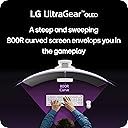
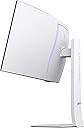
The LG 34GS95QE is a 34-inch ultrawide OLED gaming monitor featuring a dramatic 800R curve, 3440x1440 WQHD resolution, and an ultra-fast 240Hz refresh rate paired with a 0.03ms response time. It supports NVIDIA G-SYNC and AMD FreeSync Premium Pro for smooth, tear-free gameplay, enhanced by DisplayHDR True Black 400 and a 1.5M:1 contrast ratio for vivid, lifelike colors. Designed with gamer-centric ergonomics including height, tilt, and swivel adjustments, plus HDMI 2.1 and DisplayPort 1.4 connectivity, this monitor delivers an immersive, professional-grade gaming experience that’s as sleek as it is powerful.





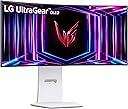


| ASIN | B0DCWMS4HC |
| Adaptive Sync | G-Sync Compatible |
| Additional Features | Adaptive Sync, Anti Glare Screen, Height Adjustment, High Dynamic Range, Tilt Adjustment |
| Aspect Ratio | 21:9 |
| Best Sellers Rank | #6,374 in Electronics ( See Top 100 in Electronics ) #235 in Computer Monitors |
| Brand | LG |
| Brightness | 275 Candela per Square Meter |
| Built-In Media | Display Port Cable, HDMI Cable, Monitor, Power Adapter, USB A to B Cable |
| Color | White |
| Color Gamut | 98.5 |
| Connectivity Technology | HDMI, USB |
| Contrast Ratio | 1.5M:1 |
| Customer Reviews | 4.3 out of 5 stars 91 Reviews |
| Display Resolution Maximum | 3440 x 1440 Pixels |
| Display Technology | OLED |
| Display Type | OLED |
| Hardware Connectivity | DisplayPort, HDMI, USB Type C |
| Has Color Screen | Yes |
| Image Contrast Ratio | 1.5M:1 |
| Item Dimensions D x W x H | 10.97"D x 30.87"W x 23.06"H |
| Item Weight | 20.5 Pounds |
| Manufacturer | LG |
| Model Name | 34GS95QE-W.AUS |
| Model Number | 34GS95QE-W.AUS |
| Mounting Type | Wall Mount |
| Native Resolution | 3440x1440 |
| Number of Component Outputs | 2 |
| Picture Quality Enhancement Technology | DisplayHDR™ True Black400 |
| Pixel Pitch | 0.23 |
| Power Consumption | 48 Watts |
| Refresh Rate | 240 Hz |
| Resolution | QHD Ultra Wide 1440p |
| Response Time | 0.03 Milliseconds |
| Screen Finish | Matte |
| Screen Size | 33.9 Inches |
| Screen Surface Description | Matte |
| Shape | Curved |
| Specific Uses For Product | Gaming |
| Total Number of HDMI Ports | 2 |
| Total USB 2.0 Ports | 3 |
| Total USB 3.0 Ports | 3 |
| Total Usb Ports | 3 |
| UPC | 195174091524 |
| Viewing Angle | 178 Degrees |
| Warranty Description | 2 Years of Parts and Labor |
| Warranty Type | 2 Years Manufacturer Warranty |
A**A
Beautiful for gaming
I bought this monitor to replace an old LG Ultragear 34" ultrawide IPS that my movers lost. I took a chance with this OLED, but it's really only good for gaming and not work. The text fringe is horrible. I wish I had gotten the super ultrawide IPS monitor instead, but the DCI-P3 color gamut was not as good as this one. However, this monitor arrived with no dead pixels. Works beautifully out of the box. It has better height adjustment than my old monitor, as well as swivel, so it gives me more desktop space. The curve is stronger than my old monitor, but I'm growing to like it. I'm giving this five stars because it's my fault for not buying an IPS panel for my motion graphics/vfx work. Text fringe is a huge no-no for my career. Luckily I have spare monitors I can use for work (albeit not as good as my old monitor) and can dedicate this one for gaming when I want to use mouse/keyboard at a desk instead of my LG C2 with a controller. Windows shows the refresh rate at 144 hz, but the monitor settings and game settings show it at 240 hz. A little odd, but seems to be working despite what Windows says. This was a steal at $730, so I really can't complain.
R**T
Best experience
Honestly, this is the best purchase I've made in the last year. I've been using it for almost a year now and I still can't stop enjoying it. It fully justified the budget; I'm so glad I invested in this (got it at a great discount) instead of more expensive PC parts I wouldn't have fully used. This is my first ultrawide, and it's amazing. The screen real estate is perfect for fitting multiple windows for work, or for gaming while having something playing on the side. The colors and contrast are top-notch! HDR games and movies look stunning! Plus, 240Hz is a whole new experience for gaming. I was worried about burn-in, but I've had zero problems. The monitor automatically runs a pixel care cycle when turned off, which gives peace of mind. On top of all that, it just looks beautiful.
E**.
Can’t go back to 27in
I upgraded from a 27 qd oled 360hz and I will not be going back. The HDR doesn’t work that well with amd cards I think, but the hdr in my qd oled was better. Dont matter though since the sdr on this already looks so good. The curve can be a tad aggressive but not a deal breaker, I actually like it. The white color of the monitor is the cherry on top, even the cables included are white. Performance wise this monitor is fast and responsive, the image quality is amazing also, the colors are really accurate, and the brightness is really good. The 240hz is perfect.
E**A
Acer Nitro 5 Laptop and LG 34 OLED curved Monitor do not play well together
The reason for this 1 star is the frustration this OLED monitor caused me yesterday. I bought this LG 34-inch Ultragear OLED Curved Gaming Monitor for my daughter's birthday. She has an Acer Nitro 5 laptop with Windows 11. It has a NVIDIA GeForce RTX 3050 Ti GPU with one HDMI port. She was using another LG 27 UltraGear Gaming Monitor with this Acer laptop. It was working fine! But she was able to convince me she needed an OLED one : ) My problem is this new LG OLED monitor does NOT work with her Acer Nitro 5 laptop. It has been a puzzle for me why it doesn't work. Believe me, I have tried everything I could think of. Here are the facts: 1- This new LG OLED monitor (same HDMI cable) works with another Acer laptop but with Win 10 and older NVIDIA GeForce GTX 1660 Ti video card 2- This new LG OLED monitor (same HDMI cable) works with a third Acer laptop with Win 11 and integrated graphics card (Intel) 3- As I said earlier my daughter's Nitro 5 works with a LG 27 monitor (non OLED) using the same HDMI cable that comes with LG 34 OLED 4- I have reinstalled Win 11 in the Nitro 5 and the same thing: LG 27 works but new LG 34 OLED does NOT work. By work I mean Win 11 would not even recognize the monitor is connected through HDMI cable 5- I have updated NVIDIA driver to latest version and still no luck What puzzles me is both devices are working in my opinion (Nitro 5 and LG 34) but they do not play well together. I even connected the Nitro 5 laptop with our TV and it works as soon as I plug the HDMI cable. And this LG 34 monitor also easily works with other laptops w/o any extra step. Just plug and play! I have contacted LG customer support and they responded to me right away, but they were also not able to help me with this problem. Still not sure if I will return or not because my daughter loved the white color of this monitor.
I**W
Amazing with my RTX 5090
Best monitor I've owned Makes Star Citizen look amazing, so much better than I had experienced before. SO FAR ALL Gʻ
M**O
LG
Excelente producto se los recomiendo pero ya no lo necesitaba
R**S
Productivity!
Excellent monitor at an excellent price. I wanted a "dumb" monitor (no microphone, no camera) with a crystal clear and extra wide display. This fit the bill -- it's plug and play and was easy to set up on a VESA monitor arm so it's positioned right where I want it. I like that it does the image cleaning process (whatever that is) by itself, but I could do it manually through the button controls if I wanted. And I like that it automatically goes into sleep mode after a while -- I think that's an adjustable setting too. And I love having 2-3 documents up side-by-side, making work more efficient.
A**R
Requires Windows/Graphical/Text Tweaking to make this 5 star
Spectacular monitor. I thought the 800R would be too aggressive, but its not. Please google 'mactype dark tint text profile oled' and follow the instructions to make your text appear much much sharper. Without this I don't know if I could have used this monitor for anything but gaming. Use the Windows HDR calibration tool. Keep peak bright setting at low, high can cause 'crush'. If you get bizarre vertical lines while adjusting monitor settings just run the image cleaner. Happened to me and I started freaking out. Came back after the cleaning and it was fixed. Turn your monitor off when not in use and never unplug as this will prevent it from doing the image cleaner. For gaming make sure you adjust the brightness settings individually, and enable HDR in Windows. Lastly if you watch tons of YT videos download an 'ambient light' extension for your browser. This will help prevent image retention. I hope my review helps someone.
I**A
Jaw-Dropping Visuals and Smooth Gameplay – The Ultimate Gaming Monitor!
The LG UltraGear 34" Curved OLED Gaming Monitor is an absolute beast — a true game-changer for any serious gamer or content creator. First off, the OLED panel delivers stunning visuals. The colors are incredibly vibrant, blacks are deep and rich, and the contrast is simply unbeatable. Combined with the curved 34-inch ultra-wide screen, the immersion is next-level — whether you're playing fast-paced shooters or diving into cinematic RPGs. I recommend it! The best for gaming.
A**I
Dyf
Nice
Y**N
You can't ask for more
This monitor is perfect the size is just right, and the build quality is excellent. Setup was easy. As for the display itself, I’ve never used a QD-OLED before, but this WOLED panel is fantastic. I have zero complaints. The colors are vibrant, and the brightness is much better than I expected. I mainly play in a dark room, the monitor nearly blinded me on HDR lol, but even in a well lit room, It's still bright. Funny story when I first turned it on, I thought it wasn’t working. I was sure it was plugged in why isn't it turning on!! until I realized my desktop wallpaper was a black screen.. I only noticed it when I saw the mouse cursor moving on the screen. at that moment I realized that I couldn't be happier with this monitor! on a side note tho, get a monitor stand or something if u are planning to use other monitors with it, 800R Curve is crazy so it'll cover the other monitors if they were all close
A**N
تستاهل بس فكر
سعره عالي مره بس يستاهل كل ريال دفعته اذا انت تدور شاشة تقعد معك سنين ف هذي الشاشة اللي تستاهل كل ريال عليها لا تفكر تروح بعيد بس: - تحتاج PC مع متطلباته عاليه عشان يشتغل بشكل نظيف و سلسل - اذا طلبتها ب تجي معه توصيلة امركيه ف تحتاج تشتري توصيلة اوربية او سعودية فكر كثير قبل ما تشتري لانه استثمار عالي و لازم يكون هدفك قريب من شاشة لانه شاشة جدا جميلة و سعرها عالي
M**R
تقييم
المعروف لايعرف شاشة غنية عن التعريف أشتريتها وكانت قد التوقعات وجميلة جدا تقنية OLED فيها رائع ومبهر حصلتها في أسواقنا المحلية بفراق سعر كبير جدا استغرق التوصيل ١٠ ايام من امازون
Trustpilot
3 weeks ago
3 days ago