Buy anything from 5,000+ international stores. One checkout price. No surprise fees. Join 2M+ shoppers on Desertcart.
Desertcart purchases this item on your behalf and handles shipping, customs, and support to Vanuatu.
๐ Elevate your workspace with pro-grade clarity and speed โ donโt just keep up, lead the pack!
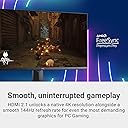
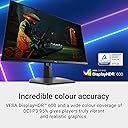
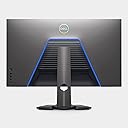
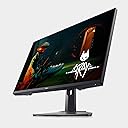
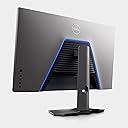
The Dell G3223Q is a 32-inch 4K LED monitor combining professional color accuracy (99% gamut), a blazing 144Hz refresh rate with FreeSync, and a sleek minimalist design. Ideal for multitasking professionals and gamers alike, it offers versatile resolution scaling and HDR600 brightness for vivid, sharp visuals. While it ships with HDMI 2.0 cables, it supports HDMI 2.1 for future-proof connectivity. Backed by a 3-year warranty, itโs a top-tier value under $600 for those demanding both performance and style.


| ASIN | B0B1319VJ4 |
| Adaptive Sync | FreeSync |
| Aspect Ratio | 16:9 |
| Best Sellers Rank | 149,304 in Computers & Accessories ( See Top 100 in Computers & Accessories ) 2,489 in Monitors |
| Brand Name | Dell |
| Colour | Black |
| Colour Gamut Value | 99 |
| Compatible Devices | computers, gaming consoles, laptops |
| Contrast Ratio | 2000:1 |
| Customer Reviews | 4.0 4.0 out of 5 stars (122) |
| Display Technology | LED |
| Display Type | LED |
| EU Spare Part Availability Duration | 3 Years |
| Hardware Connectivity | DisplayPort, HDMI, USB |
| Has Color Screen | Yes |
| Image Brightness | 400 |
| Item Dimensions D x W x H | 24.7D x 72.5W x 45.9H centimetres |
| Item Weight | 6.01 kg |
| Manufacturer | Dell |
| Maximum Display Resolution | 1920 x 1080 |
| Model Name | G3223Q |
| Model Number | G3223Q |
| Mounting Type | Wall Mount |
| Native Resolution | 1920x1080 |
| Network Connectivity Technology | HDMI, DisplayPort |
| Picture Quality Enhancement Technology | FreeSync |
| Pixel Pitch | 0.18 |
| Power Consumption Size | 33.7 Watts |
| Processor Count | 4 |
| Product Features | Low response time |
| Refresh Rate | 60. |
| Resolution | QHD Wide 1440p |
| Response Time | 1 Milliseconds |
| Screen Finish Type | Matte |
| Screen Size | 32 Inches |
| Shape | widescreen |
| Specific Uses For Product | Gaming |
| Total HDMI Port | 1 |
| Total Video Out Ports | 2 |
| UPC | 884116417156 |
| Viewing Angle | 170 Degrees |
| Voltage | 240 Volts (AC) |
A**J
This is a fine 32 inch 4K monitor for my 2024 Mac Mini Pro, and a very good value at under $500. I'm used to the Apple iMac 27 inch 5K screen. I did not want a monitor with speakers, having desktop studio audio speakers. The G3223Q's screen has a variety of selectable resolutions and color parameters - colors are accurate. It is marketed as a "gaming" monitor and I can't comment on that as I'm using it as a "desktop" monitor so far. I did like the advertised 144 hz refresh rate for gaming. Most 4K monitors only offer 60 hz refresh rates. Something I find interesting as a non-technical person is when I experiment with selecting various available resolutions under Apple's System Settings/Displays, I like 3008 x 1692 better than the default 3840 x 2160, which is actually 4K resolution. This 3008 x 1692 resolution looks sharp and with it applications when opened seem a good choice/compromise for size on the screen. I'm not sure if I'll stick with it because with 3008 x 1692 the 120 hz refresh rate is the highest available. At 3840 x 2160 I can "make larger" Safari web pages (Command + key shortcut) and that pretty much takes the webpage browser's size to where 3008 x 1692 opens Safari, leaving more monitor space for other applications. But I will mostly want those applications to be larger too - so reading smaller fonts isn't a strain. Anyway, the monitor is versatile. One negative, which I should keep in perspective but is a true Dell marketing decision head-scratcher, is the monitor ships with an HDMI 2.0 cable - actually with four different cables. This is nice - hence keeping my perspective as some monitors don't ship with any cables. But the G3223Q monitor has an advertised HDMI 2.1 as a major selling point. Supposedly the monitor must be connected with an "Ultra Fast" HDMI 2.1 cable to achieve its full capability spec of 4K and 144hz, not the 2.0 cable they provide customers. I bought an HDMI 2.1 cable (from Crutchfield - a short one was about $20 - and is of nice quality). I did this because the 2024 Mac Mini Pro supports HDMI 2.1. It may be the provided 2.0 cable does the trick and for reasons I'm unaware of and despite what I read about 2.1 bandwidth/speeds the supposed 2.0's lesser bandwidth/speed capability doesn't actually apply to this monitor. Or, maybe, the monitor isn't actually 2.4? Something seems askew because I didn't see any differences under the Apple System Settings/Displays offered resolutions or refresh rates between the two HDMI cables. Make of that what you will. I did call Dell to complain about the provided cable not matching the advertised speed of the monitor and they acknowledged the paired cable with the monitor isn't 2.1. They also said, "Sorry, this is what is supposed to ship with the monitor. We are in the process of going through our cable inventory." So, not going to send me the right cable even though the Dell.com website sells a 2.1 cable for about $15. Nevertheless I am very pleased overall and would definitely buy the Dell G3223Q monitor again. It is great for games and desktop uses.
T**U
As the headline states, it really might be. I've had it a little over a month now and honestly couldn't be happier. At a price point of 500-600, this is totally worth it. Recently upgraded from a 1440p BenQ gaming monitor and it's a huge difference. Was looking for a monitor that I could use for color accurate work with my Macbook, but also something that I could use to get the most out of my Series X. It's a bit tricky to find something to do both well, but this is the best I have come across. Color gamut is great and very accurate out of the box with a calibration report. Using a monitor calibrator isn't necessary, but fine tunes it even more if you need to. The selection of ports is really nice, OSD is simple enough, brightness is more than enough (especially compared to other LED gaming monitors), HDR is better than other monitors within this category (HDR 600). Overall the panel is nice and crisp with excellent picture quality no matter what you're doing. The matte coating isn't TOO strong and doesn't degrade the picture quality nearly as much as others. I tried the BenQ EX3210u and one of the LG monitors that's comparable and this came out a clear winner for a lot of different reasons (despite the BenQ advertising wider P3 gamut coverage). Yes, OLED monitors are going to be superior to this - but that jumps you into a different category all together (including price, which is literally double the cost of this). This also looks the sleekest out of the gaming monitors - no dragons or unicorn vomit on the back of unit which makes it suitable for professional settings as well. Overall - get it. Especially if you need it to do more than just game on it and need color accuracy. No risk of burn in compared to OLED, color accurate, great gaming experience for consoles, sleek design and a 3 year replacement warranty from Dell. At this price point, certainly the best value on the market.
J**Z
The Dell G3223Q impressively fulfills the role as a hybrid gaming professional monitor. When I was shopping for a monitor, I was looking for a "no compromises" monitor that could do everything perfect in a non-OLED format, and the G3223Q comes as close as I could find that can meet that criteria. For a 32' 4K high refresh rate panel, the build quality and image quality is exceptionally good compared to the absurdly low standards most IPS monitors are subjected to. Out of the box, Dell did a fantastic job to hide most of the brightness uniformity issues around the edges, unlike LG's UltraGear monitors which suffer horrendously from bad edge brightness uniformity issues. When you look at the edges, it reminds you more of a VA/OLED which is excellent. However, it isn't without its flaws out of the box, just because the edges are more normally lit, doesn't mean there isn't brightness uniformity issues everywhere else. Dell traded one type of non-uniformity for another, as a result, most of the brightness non uniformity extends more towards the center of the monitor. As a result, only a small portion of the center of the monitor is actually at the monitors max brightness. However the brightness gradient is small, so this non-uniformity will only be mostly visible on white text and white backgrounds. HOWEVER, you can fix this by enabling Brightness Uniformity Compensation in the Creator profile's sub-menu. This fixes ALL brightness uniformity issues PERIOD. Enabling this will give you OLED like brightness uniformity. Dell even sends you a calibration factory report that tells you not only the color accuracy, but what level the monitor passed in the brightness uniformity test. Dell's benchmark target is anywhere between 97% and 102% brightness, but my specific model managed to come with a perfect 100% brightness score on every single part of the screen. That said, color accuracy isn't 100% perfect. If you really (and i mean REALLY) pay attention, slight differences in color temperature can be seen on the edges of the screen. At least for my unit. But again, its not bad at all and NOTHING compared to the brightness issues out of the box. The only thing i wish was that brightness compensation mode could be enabled outside of the Creator profile which limits you to sRGB and DCI-P3 color profiles. This means that you loose a bit of contrast and some of the color "pop" that the default mode provides, but its barely an issue if you already want realistic looking color accuracy in the first place. This monitor with its compensation mode is about the best IPS hybrid gaming monitor you'll find in my opinion. As someone who works with white backgrounds and text all day long, this was a top priority for me. I can confidently say with my unit that Dell nailed what it did with this monitor, with compensation mode on mind you. I only knock one star off because the colors aren't perfect, but if I could rate it 4.5 stars I would. Beyond raw image quality, variable refresh rate works phenomenally well on this panel. It works right down to 20Hz and provides virtually no noticeable image flickering. Enabling the Super Fast response time profile also brings down the pixel response times and makes them very good. As for longevity, sadly i have not had this monitor for long, so I cannot say if my unit will live longer than a year before dying. But its worth mentioning that the physical material looks a lot more durable than say LG's Ultragear monitors, and it comes with a 3-year warranty. It completely boggles my mind that we are at a point in time where IPS brightness uniformity issues are prevalent everywhere, and only 1-5% of monitors actually have perfect image quality. This is why people play the "monitor lottery" and return 5-8 monitors just so they can get the "perfect" one. It is completely absurd that we have to live to these low IPS standards. But it is what it is. I complement Dell for their fantastic work on the G3223Q and its ability to work with crappy IPS panels and massage them into something that's close to being perfect.
U**R
The monitor itself was fine for about 13 months. Then the backlight completely failed with no warning. What followed was the worst customer support experience I have ever had. If you are considering this monitor, factor in that the "3-year warranty" means refurbished, heavily used replacements from unchecked inventory that may arrive with defects, and two+ weeks of your life wasted, if something goes wrong. I contacted Dell, spent 2 hours in chat. They issued a "replacement" under the 3-year warranty. A few days later the replacement arrived, and it was not a new monitor. It was a visibly used, refurbished unit, not in the original packaging, all covered in dust, with a worn, greasy stand and multiple dead pixels straight out of the box. I then spent another 2 hours with Dell support, who told me to ship the defective replacement back. I had to pay out of pocket for a taxi and packing tape to return the 26 lb box the same day. What followed after was two weeks of Dell repeatedly confusing the two monitors (broken original and returned defective unit) in their system, sending me an incorrect $1,239.51 bill for "nonreturned parts" for the monitor that I already owned and paid for! Asking me to complete an ownership transfer that was already done multiple times, and ignoring my direct questions in emails. Multiple Dell agents, including a Technical Support Supervisor, lied to me, told me in writing that a new replacement "is subject to approval," implying it was possible. Two weeks later, Dell's Advanced Resolution team told me that it will not be possible, and the only option is another refurbished unit. They also refused a full refund for a broken original monitor. I am absolutely done with Dell, their products, and their abysmal customer support. I will never purchase another Dell product, ever.
N**E
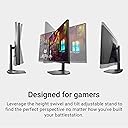
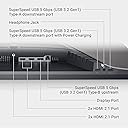
My initial evaluation of this monitor is excellent., having purchased it Feg 25, 2025. I must reduce the brightness, or it is too bright. Variable refresh rate, with a max of 144Hz works well. The menu buttons have a lot of options. (See owner's manual) With my old eyes, I must keep the magnification at 150%. The price has since been reduced. I am operating it via DP, which does an great job. I've not yet tried HDMI. The screen easily changes height, and swivels easily, as well as moderate tilt. One con - the sockets for video and USB are on the bottom, and not easily accessible, at least for me. I had to use a mirror to insert the appropriate cables. That said, the connections are good. One caveat. This is, apparently, and "international" model. When II checked my warranty with Dell, it had initiated 2-1/2 months before my purchase in Costa Rica. I was able to "transfer ownership" from me in Costa Rica to me in the USA with no issues. To confirm, I purchased a 2 year extended warranty (5 years total), with no issues. Dell does not sell this specific model in the US, but rather a G3223QE, for about twice the price. As I investigated monitors, this was one of the very few that had mostly 5-stars, (87% in 4 and 5). It was also one of the very few that had a 3 year exchange warranty. This tells me that Dell is confident of the quality. This replaces an 2011 HP (made by LG?), which has dimmed over the last 14 years. (Duh!). I have hopes of both my monitor and me lasting that long again. Further updates as the years progress.
Trustpilot
2 months ago
5 days ago