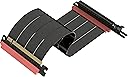
⚡ Elevate your GPU game with the ultimate PCIe 5.0 riser cable!
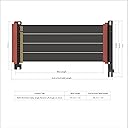
The LINKUP PCIe 5.0 Riser Cable delivers full Gen5 x16 128GB/s bandwidth with advanced shielding for zero signal loss. Designed for vertical GPU mounts in ITX, SFF, and tower cases, it supports next-gen GPUs like RTX 5090 and RX 9070 while maintaining backward compatibility. Its flexible 27cm length and multiple connector angles enable clean, cool, and visually stunning builds. Backed by expert support and warranty, it’s the future-proof choice for high-performance PC builders.


J**.
Not Magic
It seems a lot of people buy these expecting a miracle. There are lots of things to consider.PCIe, especially Gen5, is particularly finicky about signal integrity. While longer options are offered, what cable length you can get away with will vary wildly by a few factors.1) Your motherboard / chipset quality, manufacturer, and CPU brand.2) The slot you pick (huge), as closer to the CPU has shorter traces, and the bottom slot is often controlled by the chipset, which is less reliable.3) PCI generation. If you're buying this, I assume you want 5, which is harder to stabilize than 4, which is harder than 3.Generally, you might be able to get away with 20-25 cm on the top PCIe slot. On the bottom, you might be lucky to get 10 cm to work. Video is more robust, among other reasons because it has error detection and retry to smooth over signal integrity issues. On the other hand, audio out from the GPU is notoriously flaky. While you may get video working, audio may be borderline or outright broken.Audio is a real-time, isochronous stream. Packets have to arrive on time and do not have recovery mechanisms. Your GPU will receive the information and process it itself, not on a different chip on the board. The GPU brand and generation could easily influence how reliable this is.The audio may be more or less reliable depending on the source. Browser audio, such as Bandcamp, will constantly re-negotiate and sync with a smaller stream buffer. This can cause serious audio cutouts if the PCIe connectivity isn't ideal. Something like a locally installed app, such as MusicBee, will be more reliable, but not necessarily perfect.What can you do to prevent problems?1) Use the minimum generation PCIe setting you can without running out of bandwidth overhead. Not every use case will require the bandwidth to saturate gen 4, making gen 5 have no benefit while being harder to drive.2) Use the PCIe slot closest to the GPU, where able. Sometimes you can't because of the lane configurations. Use GPU-Z to check if you're seeing the right lane distribution among your devices. Read your motherboard manual and ask an AI how much bandwidth you need for your monitor's resolution and refresh rate.3) Measure twice, consider required bends, and buy the shortest possible cable. Even small differences in length mean huge attenuation benefits.4) Consider if you need HDMI / DP audio out. If so, you need to be stricter.5) During install, prevent any strain on the cable. Keep them as straight as possible. Gentle bends and nothing sharp to damage them. Straighter cables are more reliable.As far as operating system / driver / BIOS changes:1) Disable PCIe link power state management.2) Disable PCIe power saving features in BIOS.3) If using the chipset lanes, make sure to check for any chipset settings in BIOS that may impact it, particularly power-related.4) Use the lowest audio format you need for your equipment and source files. No 24-bit, 192k if you only need 16-bit, 48k.5) Consider turning off AMD ULPS in the registry for the GPU, if using AMD.6) Also on AMD, turning on audio noise suppression can mitigate flaky audio. This forces a continuous, buffered stream and can prevent the GPU audio processing from idling between packets, smoothing over minor drops.
C**.
Perfect upgrade!
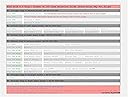
This riser cable is of exceptional quality. My Lian-Li Dan A4-H2O came with a cheap PCI-E 4.0 riser of dubious quality, and since I was building an all-PCI-E 5.0 system, it made sense to upgrade the riser as well. Thankfully it was easy to select the correct cable using the chart provided, and this one by LinkUp is an even better fit than the one it replaced. I was initially skeptical of the cable being shorter than the one that came with my case, however the recommended length was perfect. It installs without any slack, which should result in lower latency and less signal degradation. The shielding is much more stout, and I confirmed with HWiNFO that the riser is indeed running at full PCI-E 5.0 speed. Aside from function, it just looks like a much nicer part, which is important when you are building a new system with the highest quality components. A properly made riser cable should function seamlessly, and this one does just that. Highly recommended for any new build.
J**H
Expensive but reliable
Order took a while to arrive but it helps my 5070 rum buttery smooth with no driver issues. I can run the racing sim and multitask with zero issues. Quality product 👌
D**.
Single Reverse Left Angle 24cm version does not fit Terra case as advertised
Just in case anyone needs to know this. The Single Reverse Left Angle 24cm version of this riser cable does not fit the Terra case even if at the time of my writing this it is advertised as being able to work with that case in the title and description.The part of the Terra case they refer to as the spine which holds the motherboard and GPU bracket has a slot for cables to go through and this cable is either too wide or not flexible enough to accommodate that without cutting the metal on the case. The length is not the issue, it is the width mostly, the metal on the case would dig into and damage the cable on the side closest to the back of the case if placed in the only place the case had for riser cables to run. Also the holes for the screws do not line up either.The only way to get this to run the same way as the original cable is to cut the metal on the case for the cable itself and drill new holes for screws on the GPU bracket.
D**
Great riser for Ncase T1
Works great! Bought it to replace the riser that came with the Ncase which was DOA and Ncase refused to replace.Thanks for selling a quality product Linkup
M**R
IT IS exactly as advertised! True Gen5 spec and full 16 lanes. A TRUE GLASS CANNON.
The media could not be loaded. If anyone has ever heard the term glass cannon and knows what it means you will understand what this thing is. It is not to be tinkered or fk'd with. Look at the instructions, figure out which hole set it yours, install it, and leave it alone! Make sure you anchor your card down properly with the screws into the vertical mount, do not let the weight of the card rest on the riser without that support.Well, when I connected the GIGABYTE AORUS GeForce RTX 5090 32GB GDDR7 PCI Express 5.0 ATX Graphics Card GV-N5090AORUSM ICE-32GD to the GIGABYTE X870E AORUS PRO ICE AM5 motherboard it was glitching because I have a Gen 5 NVME in slot 1 and a gen 4 NVME in slot SB. Technically that should have left me 16 Gen 5 lanes for the GPU but I couldn't get it to work. Then I plugged in this riser and BAM Instant fix on all devices and all lanes! Be careful the device and the cable is delicate but damn it hauls data!! THIS THING FCKING SCREAMS ON DATA SPEED! But, please for the love of all things digital, please exercise some critical thinking on installation. We DO NOT HAVE a lot of gen 5 riser options out there and despite this thing being delicate it has the flexibility and versatility to do what most of need while actually giving us a full 16 lanes of gen 5! Yes, they need to make it more durable but lets not frack this up for everyone else. We need access to riser cables like this!
Trustpilot
2 months ago
3 weeks ago