Buy anything from 5,000+ international stores. One checkout price. No surprise fees. Join 2M+ shoppers on Desertcart.
Desertcart purchases this item on your behalf and handles shipping, customs, and support to Vanuatu.
๐ฎ Elevate Every Keystroke โ Command, Comfort, and Color in One Pro Keyboard
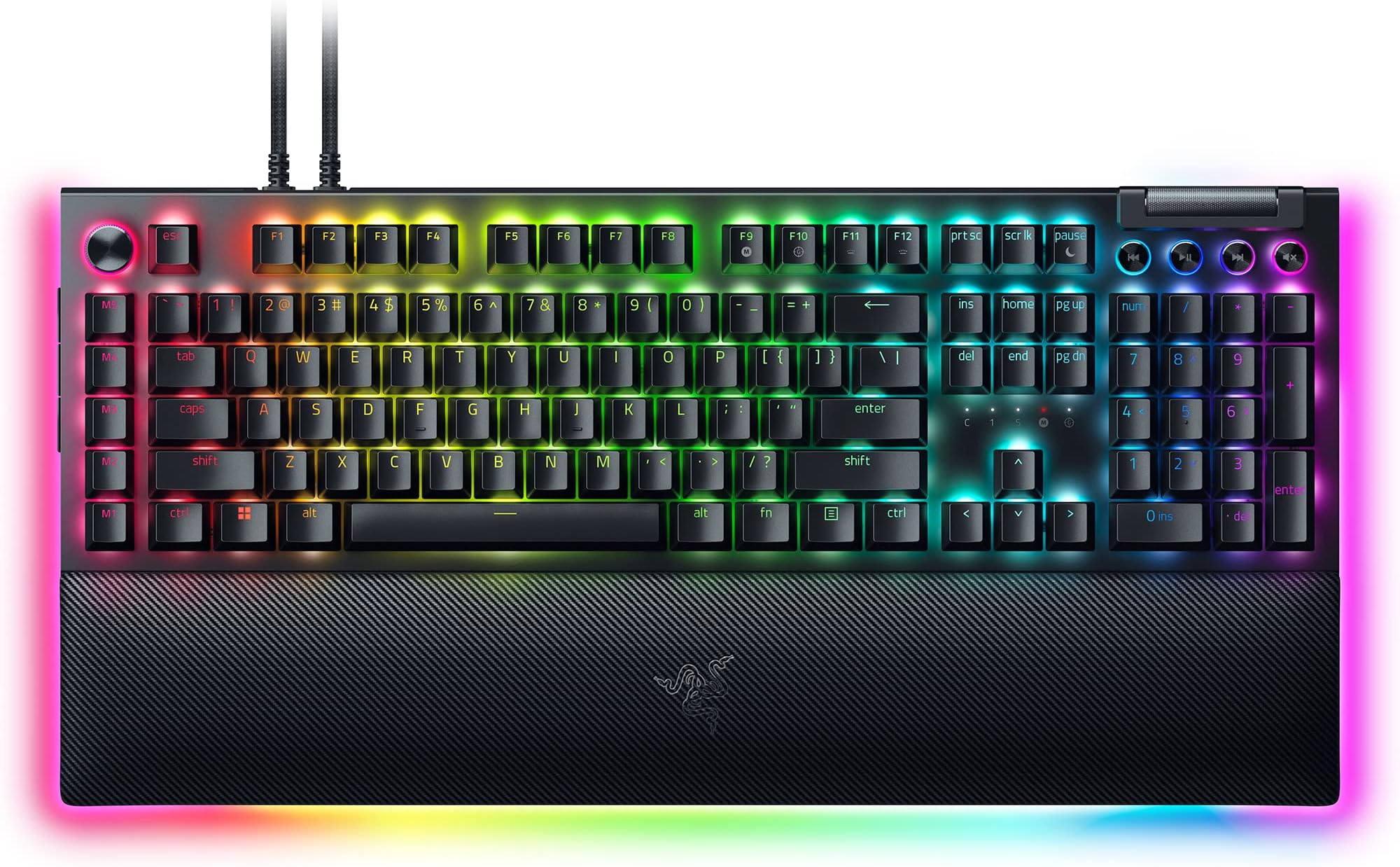
The Razer BlackWidow V4 Pro is a premium wired mechanical gaming keyboard featuring tactile and quiet Orange switches, customizable Command Dial with 8 macro keys, and vibrant per-key Chroma RGB lighting with underglow. Designed for professionals and gamers alike, it includes a magnetic leatherette wrist rest for ergonomic support and doubleshot ABS keycaps for durability. This keyboard blends advanced control, immersive lighting, and comfort to enhance both productivity and gaming experiences.


| ASIN | B0D4NMMFXB |
| Additional Features | Chroma RGB, Command Dial - 8 Dedicated Macro Keys, Doubleshot ABS Keycaps, Orange Switches Tactile & Quiet, Wrist Rest |
| Antenna Location | Business, Everyday Use, Gaming |
| Best Sellers Rank | #1,069 in Videogames ( See Top 100 in Videogames ) #89 in PC Gaming Keyboards |
| Brand | Razer |
| Built-In Media | Wrist Rest |
| Button Quantity | 19 |
| Color | Black |
| Compatible Devices | Laptop, PC |
| Connectivity Technology | USB-A |
| Customer Reviews | 3.8 3.8 out of 5 stars (82) |
| Enclosure Material | Plastic, leather |
| Generation | BlackWidow V4 Pro |
| Hand Orientation | Ambidextrous |
| Item Dimensions L x W x H | 44.5L x 16.6W x 3.9H centimeters |
| Item Weight | 2.25 kg |
| Keyboard Backlighting Color Support | Single Color |
| Keyboard Description | Gaming |
| Keyboard Layout | QWERTY |
| Language | English |
| Manufacturer | Razer |
| Mechanical Keyboard Switch Model | razer_orange |
| Model Name | BlackWidow V4 Pro |
| Model Number | RZ03-04683500-R3M1 |
| Number of Keys | 104 |
| Number of Sections | 1 |
| Power Source | USB Powered |
| Series Number | 4683500 |
| Style Name | BlackWidow V4 Pro |
| Switch Type | Mechanical |
| Theme | Gaming |
| UPC | 840272907313 |
| Unit Count | 1 Count |
| Water Resistance Level | Not Water Resistant |
R**M
This keyboard is worth every penny you'll drop on it. The soft sound is nice and quiet and you can feel every click cleanly. The lights are gorgeous and the amount of customization available is awesome. 3 buttons on the side, media buttons with a scroll wheel for volume. Button next to escape key has 4 swapable modes optimizing the ability to work quickly and efficiently, or for gaming purposes, and even a nice zoom feature for artists. M1-M5 for customizable macro... this keyboard has it ALL. It also includes a soft wrist rest that connects magnetically and also lights up. Easy to take off or put on. I replaced most of the keys with some custom ones and they fit like a glove. Easy to swap keycaps or even the key switches if you are a keyboard enthusiast. It containes a usb slot on the back as well which makes it easy to integrate my razer mouse with the keyboard freeing up a usb port on my computer. Razer keeps it all together making life nice and simple. So once again... worth EVERY penny.
C**W
When I first got this keyboard, it felt sleek and high quality... until a few months in, one of the keys started not always registering when typing. Then over the course of a couple months, another key, and then another, and so on. I determined that it was not a software issue with the Razer app and instead something to do with the build quality? I have never owned a keyboard that has had this issue, let alone one that costs $230. When I tried using the warranty contacting Razer themselves, I found that someone had scratched off the serial number on the back... and I had had the keyboard for too long that I couldn't return it through Amazon (this is more on me for taking too long to contact Amazon, because their return policies are already pretty generous. I just thought to mention it). I do not recommend this keyboard.
K**Y
I didn't know about the side buttons on the left hand side till I accidently hit then and my computer changed screens on me. It was a laughable moment, but this has been a fantastic keyboard. I love the tactile feel of the keys, though thise side buttons unless you disable them will get you into trouble while gaming if you have a cat.
D**N
9 Months into owning this keyboard and the tab key started working intermittently. Sometimes it won't register a press, sometimes it registers it as a double press. That's a big issue for me because I do a lot of spreadsheet work as well as alt-tabbing while gaming. Turns out the keys on this keyboard are soldered, I wish I would have reserached that before buying it, I wouldn't have bought it. Sometimes the RGB lighting resets to the default rainbow effect, I have to restart the software to fix it. The software is also just obtrusive and obnoxious generally speaking. They keys do feel really nice while they work though, and the media controls are handy! I have a razer headset as well that I bought around the same time, that is giving me a whole other set of issues. I'm about done with razer, going to try to get a warranty repair on this and sell it to some poor soul on marketplace. I've already bought a new keyboard.
W**S
I like the look. I like the key feel, I like the lights. I don't like whatsoever that the media keys don't work. This problem has existed for more than one version, possibly back to v2 (from their support web site). That's tough to stomach and the problem with the Razer software suggests incompetence in their engineering department (I am a software engineer). If you have the problem, you fix it. I do know mine worked until I installed the razer software (it is needed by several devices including the custom Basilisk mouse settings). So get with it, Razer and fix this. I want to pause or silence music when a call comes in, I don't want to screw around answering the call, then going to the media player to pause it. It's a ridiculous thing to have to do. No excuse at all for it. I'm paying for it to work, I expect it to work. Mapping those keys doesn't work either, readers need to know that. I need functional media keys much more than I need macro keys. I don't use this for games, I use it as an engineering workstation. The lighting is much better (no half lit keys) than my older Cherry MX Brown one from Corsair - that is a limit of those switches. The similar (typist stile) orange keys on this keyboard have all keys fully lit up across the characters, period. Once you get into this price range it seems like that should be expected but these orange keys are better than the Cherry ones for lighting (the MX keys are a decent feel, it's that the symbols are not evenly and completely lit, they fade about 75% of the way across the symbol/letter). I have some silicone O rings I will be installing to make things a little quieter when the key is completely pressed - I've done this before and it's worth the few dollars it costs for a kit with O Rings and a key puller (just always pull straight up, not at an angle). I like to listen to classical music while a work so quieter keys are nice, but I like the tactile keys that aren't totally silent (Orange for Razor, Brown for Cherry). The O rings don't make them totally silent but most of the noise is gone. I use a big 43" 4K Dell IPS monitor so the work environment is "see everything" at once and a nice keyboard goes a long way. Install the Synapse SW after you have your critical stuff installed (Office, browsers, basic utilities and media stuff), and I'd say don't bother with the Axon and other things - just install Synapse (which controls the 5 mouse speeds and any key mapping, which doesn't apply to me) and let it install Chroma (the RGB color part for mouse and keyboard). The install is pretty easy and if you set up an account to store your profile, even if you have to uninstall the SW or replace a critical component like a motherboard, the Razor cloud will save your settings and everything comes back quickly on re-install. I've had a Samsung NVMe drive fail and take all that with it, so getting these small settings saved is nice. Most software will not export the settings (I'm thinking of MS Office). This does. Another FWIW is that you can get, for about $10 each, RGB USB cables, but they are only USB 2 (480 Mbps) speed - but it is a nice adjunct to RGB human interface devices since they don't need bandwith (likewise Levethian and the mouse pad). I use an affordable mouse hub for that, under my big monitor to save all the cables being run all the way to the computer (a full tower Phanteks NV9 on top of the desk area). For all the wires, the color is nice and it's still tidy if you have a kit of colored small zip ties. I originally got the zip ties to attach security badges at the gov places where I've worked, but found the small zip ties (finger length) to have other nice uses. Small diagonal cutter snips off the excess.
Trustpilot
3 weeks ago
1 week ago