






GuliKit Joysticks For Valve Steam Deck OLED(Not for LCD),Hall Effect
Product ID: 688015649
🎮Hall effect tech for anti-drift
⚙️One-key joystick calibration
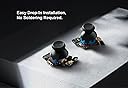
🛠️No-soldering, easy install
Desertcart purchases this item on your behalf and handles shipping, customs, and support to Vanuatu.
🎯 Elevate your Steam Deck OLED game with precision that never quits!
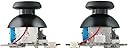
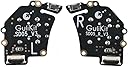
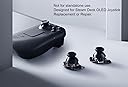
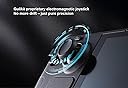
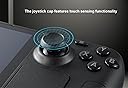
The GuliKit OLED Thumbsticks SD05 are electromagnetic joystick replacements engineered specifically for the Steam Deck OLED. Featuring hall effect technology, they provide enhanced anti-drift performance, touch sensing, and a longer lifespan. Installation is hassle-free with no soldering required, and a one-key calibration system minimizes dead zones for superior control. Designed exclusively for Steam Deck OLED, these joysticks deliver a seamless upgrade to your gaming experience.


| ASIN | B0DP61XVJP |
| Country of origin | China |
| Customer reviews | 4.5 4.5 out of 5 stars (203) |
| Guaranteed software updates until | unknown |
| Item model number | SD05 |
| Language | English |
| Product Dimensions | 4.06 x 2.03 x 3.05 cm; 30 g |
| Release date | 29 Oct. 2026 |
A**G
Excellent Stick Replacements! Easy to Install!
My OEM sticks never had drift, but they had a kind of lazy return to 0,0 sometimes which I found was getting more and more annoying, so I gave these a go. You open the back, unscrew the old ones, plop these in and you're basically good to go. The calibration button on the back is incredibly small, but I just used the tweezers I was already using to remove and insert the sticks ribbon cables. Then you do an almost entirely automated calibration in desktop mode to really centre the sticks. Easy. They feel practically identical to the OEM ones, they maintain the capacitive touch functionality and I don't have to worry about any drift issues in the future...hopefully. I also had an issue with the OEM sticks where they would "leak" black dye into any silicone thumbsticks I applied (orange Skull & Co's). While the jury is still out on whether these do they same, I'm hopeful they won't since they're an entirely different manufacturer 🤞 Great product though and a good price. Well worth checking out if you want to fix drift, or just take a proactive approach to avoiding it.
G**G
Simple easy upgrade for Steam Deck.
Easy to fit with phone repair toolkit. Unscrew the 8 screws. ( dont forget to remove the micro sd before removing the back as I found out it snapping when changing the NVMe card last time) 3 screws and the old pops out after removing the connector and cable. Put the new in slightly to the right and swing in as the top button switch is on the end of the pcb. Screw down and same for the other . Leave back off turn on and press buttons and recalibrate easy enough then screw back on and put card in . Its really that quick and easy. Centres better than oem and feels slightly more feedback on motion. Once calibrated and gyro reset the jitter goes and zero spot on. Will how long they last but so far, spot on.
D**R
10/10
Works amazing, simple to replace. My stock Oled sticks had drift but these bad boys are amazing
N**N
Good but fiddly
Installing them is easy, they are fiddly to calibrate the little button is hard to press. Make sure you move the little cable when installing them otherwise it can catch and make noise. You also need to go into desktop mode and calibrate them there too using the console command thumbstick_cal Got my dead zones down to about 3400 couldn't get them fully centre but I think that's coz I didn't take loads of time to get them perfect
M**N
better than the handdiy version
initially i bought and fitted the handdiy hall effect joysticks .. but for some reason they felt off .. when i replaced them with this i realised then oh boy were they off ... these are far far superior more accurate way easier too set zero point .. fantastic feeling and don't have the weird unwillingness is the only way i can say it im glad i swopped out for these .. brilliant buy
R**0
Good but not perfect
They are good came packaged well and deliver was fast install was easy when I watched you tube video. The only complaint I have is the left stick is slightly out of allingment but it is not noticeable when playing but It shows up in the allingment tool in the steam OS.
K**E
Incredible upgrade and replacements to original steamdeck hardware
Super easy installation and great quality. I bought these out of necessity from accidental damage to my deck but I am very pleased with these. They're an upgrade to the original hardware that works perfectly with the steam deck oled. Pair these with a simple ifixit kit and you've got an incredibly easy (14 screw) upgrade to you're steam deck.
W**E
Quick and easy to install
Context: I have repaired electronics in the past and have replaced a few shells for switch and PS4 controllers, as well as replacing the shell of my steam deck at the same time as installing these sticks. These upgrades were super easy to install, fairly non-intrusive, almost plug and play. Calibration is quick and painless in desktop mode, simply following ifixit tutorials made this mod a breeze. Highly recommend for any nerds like me who enjoy playing games on deck
J**A
ÓTIMO PRODUTO...
ÓTIMO PRODUTO... RECOMENDO O VENDEDOR!!!
J**Z
10/10
Una maravilla
D**D
Parfait pour remplacer ceux du SteamDeck
Remplacement idéal des Joystick de base du SteamDeck OLED, en effet, la techno Hall garantie qu'il ne drifteront jamais. Le remplacement est relativement simple (il faut quand même démonter le Steamdeck, mais ça n'annule pas la garantie si vous faites attention en le faisant), pas de soudure à faire pour récupérer le fonctionnement capacitif du joystick puisqu'ils sont livrés avec leurs propre pad.
R**E
love it
great
D**8
1. Easy to Install 2. BETTER than the orginals 3. THE REPLACEMENT if your old sticks need replacing
I own a DAY ONE release Steam Deck OLED from November of 2023. And the other day my right thumb stick side grip and stick just crumbled into tiny pieces! I've heard of GuliKit on YouTube and went straight to Amazon for a replacement. *If you're reading this and you have a Steam Deck OLED, you're in the RIGHT PLACE!* Summary - was EASY to install took only 15 minutes being careful and not including the post-install testing. As long as you have a micro tool set with star bits you're good to install these as soon as they arrive. ONE MAJOR NOTICEABLE THING that surprised me: The sticks are SMOOTHER and LIGHTER than the originals! I remember reading an Amazon review that did mention this and I was skeptical. The BEST way to notice this is when you pull the old stick out, just wiggle it while its out of the machine alongside the Gulikit ones and yeah...you'll see for yourself. My sticks had this "stickyness" when pushed to the sides and this was for BOTH old sticks. The Gulikit was buttery smooth. Also I noticed the Gulikit just seems to have slightly better materials, especially with the plastics. IF YOU NEED TO REPLACE YOUR STICKS, DON'T EVEN HESITATE, JUST GET THESE. MY TIPS FOR YOU: - For installation, YouTube search "gulikit steam deck oled joystick replacement" and follow both iFixit and Ghoststrats videos. - 8 screws to remove for the rear plate, 3 screws holding each joystick. YOU DO NOT NEED TO REMOVE the heat plate. - BE VERY CAREFUL with the ribbon cable and the ribbon cable holders. The holder - it simply flips up and snaps down very subltely you can barely notice. When reinstalling the ribbon on the new Gulikit sticks, be sure to push in the ribbon firmly but gently forward to flush before flipping down the holder. - DO NOT PUT BACK ON THE REAR COVER UNTIL you've tested the sticks on the Steam Deck controller settings! I messed up on the rear ribbon being flush *See tip before this one* on one stick and readjusted and both sticks work gorgeously. Hope this review helps. Install and enjoy your Steam Deck!
Trustpilot
3 weeks ago
1 week ago