Buy anything from 5,000+ international stores. One checkout price. No surprise fees. Join 2M+ shoppers on Desertcart.
Desertcart purchases this item on your behalf and handles shipping, customs, and support to Vanuatu.
🌱 Cut the lawn, not your time—meet the smartest mower on the block!
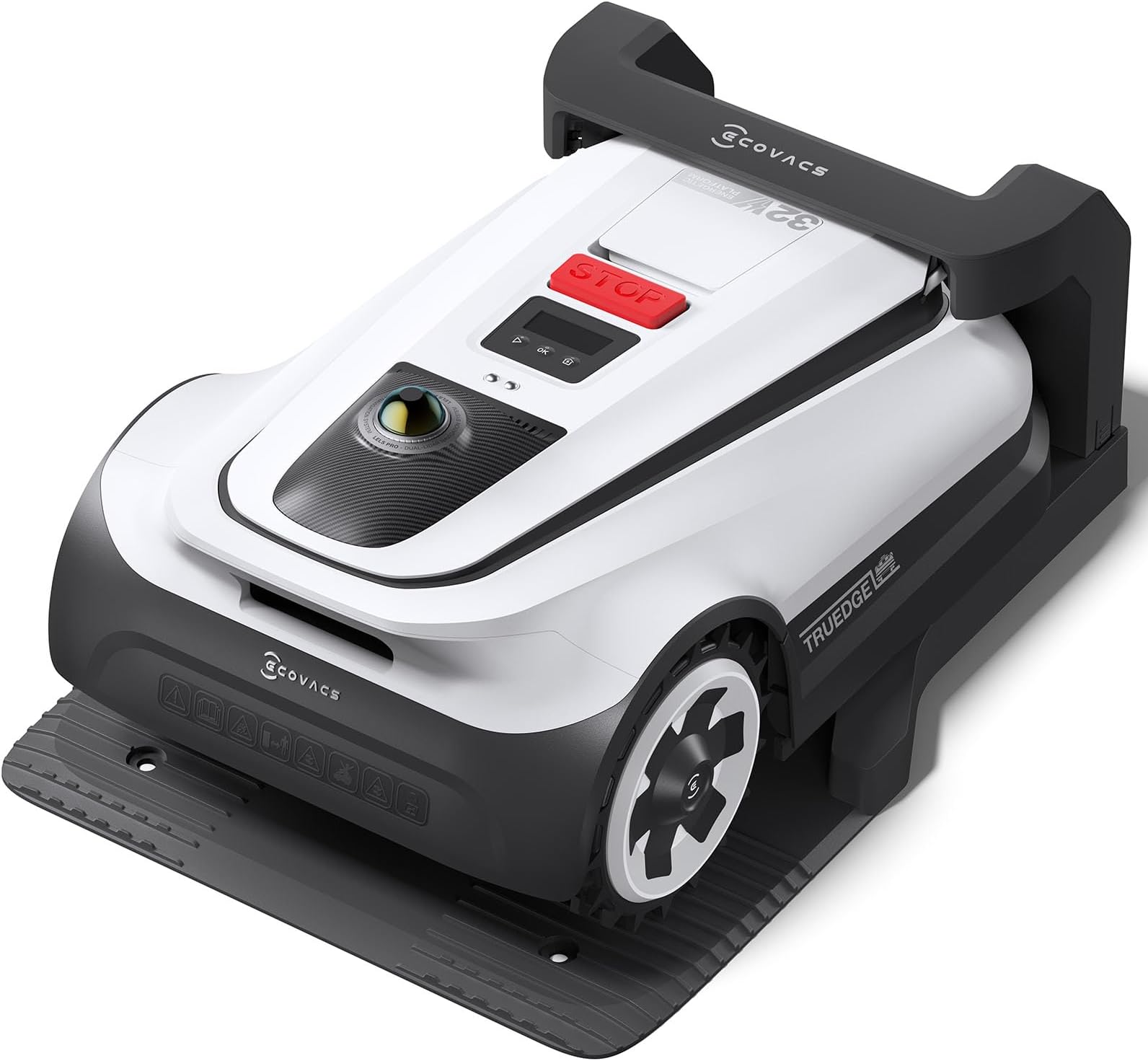
The ECOVACS GOAT A3000 is a premium robotic lawn mower designed for large gardens up to 3/4 acre. Featuring dual 360° LiDAR and front ToF sensors, it offers wire-free, ultra-precise navigation with AI-powered obstacle detection. Its 13-inch dual blades powered by a 32V 5Ah battery mow efficiently at 0.7m/s, covering up to 400m² per hour. With TrueEdge technology, it achieves near-edge cutting within 5cm of boundaries. The mower recharges in just 45 minutes, maximizing lawn care productivity. Ideal for professionals seeking a smart, hands-off solution to maintain a pristine lawn with minimal intervention.


| ASIN | B0DRFY1BDV |
| Battery Average Life | 1.18 Hours |
| Best Sellers Rank | #18,888 in Patio, Lawn & Garden ( See Top 100 in Patio, Lawn & Garden ) #2 in Robotic Lawn Mowers |
| Brand | ECOVACS |
| Brand Name | ECOVACS |
| Color | White |
| Customer Reviews | 3.5 out of 5 stars 68 Reviews |
| Cutting width | 12.99 Inches |
| Item Dimensions D x W x H | 29.13"D x 11.73"W x 21.26"H |
| Item Type Name | Robot Lawn Mower |
| Item Weight | 36.16 Pounds |
| Manufacturer | ECOVACS |
| Manufacturer Part Number | GOAT A3000 LiDAR |
| Manufacturer Warranty Description | Warranty included |
| Material | Stainless |
| Material Type | Stainless |
| Maximum Adjustable Cutting Height | 3.54 Inches |
| Minimum Adjustable Cutting Height | 1.18 Inches |
| Model Number | GOAT A3000 LiDAR |
| Number of Positions | 24 |
| Operation Mode | Automatic |
| Power Source | Battery Powered |
| Required Assembly | No |
| Smart Home Compatibility | Smart Home Compatible |
| Style | High-Tech |
| Style Name | High-Tech |
| UPC | 850066858172 |
| Unit Count | 1.0 Count |
L**Z
3 Weeks since delivery and not a regret - it does a great job mowing.
It's been 3 weeks since I took delivery, and I've run it nearly every 3 days just to keep the grass consistent. After over a year of deliberation and research (and getting the grass to grow after a new build), it was time to buy a robot mower. I looked at every robot mower I could find and even watched over the last year as more than one startup failed. Even today, I wonder if the market has "settled", and I think there may still be more robot mower companies than will survive over the next few years, but I am hopeful that ECOVAC is in for the long haul. ECOVAC has a few mower sizes, but for my sized yard the A3000 and the A2500 were the contenders. I opted for the A3000 to avoid the need for the RTK base station or the need to locate the base station where it would be ensured to get the satellites needed – There just wasn't a good out-of-the-way spot with a good sky view and easy access to power (in spite of the generously long power cables). Our lot is a little over one-half acre and flat to gentle slope, and for the purposes of mowing, broken into four areas (see map picture). The front has a narrow strip on the west side that runs alongside the driveway and garage, up to a gate to the back. This gently slopes to the street, but part of it is a cliff to the neighbor’s yard, bordered with a concrete surface about 1 ft wide. The larger part of the front yard is gently sloping to the street with what is effectively a no-curb transition to the street and wraps around the house on the east side. Alongside the house is another gate from front to the backyard, which is fully fenced in. The fourth area is behind the backyard where the city has a large utility right-of-way, which is adjacent to another street. Unlike the front yard, the stretch of yard along this street is about 18-inche wide and about an 18-inch steep drop to the street. Key factors I considered included: lot size – cutting time, 2/4 wheel / tracks, cutting blade type, RTK antenna vs none, other online reviews, and absolutely no perimeter ‘wire’. Out of the box experience ========================= I don't have much to say about the grand opening of a packaging box. From my side, I see no need to praise a super fancy “experience” box that you throw away. That said, everything was well packed and came out easily – even w/o paying attention to the instructions. Assembly was easy as most things were completely obvious, and I only reviewed the guide to ensure I did not miss any important steps. Locating the Docking Station ============================ I had a couple of preferred places to choose from, one with a very convenient electric outlet, but crowding a walkway, and another that wasn't in a walkway but without convenient power. I chose the latter as the walkway is used a lot. And the long power cord (on each side of the power brick) was generously long – so much of it coiled up. The place I chose puts the dock on a concrete pad (so the stakes used to drill into the ground to hold it in place could not be used). I actually haven't done anything yet (after 3 weeks) – but have thought about laying down a bead of silicon caulking to stick the docking station down (see picture). The other aspect about the chosen location – it might not conform to the guide for the open space on 3 sides. But as I've watched it work its docking magic, it always succeeds. Mapping each Area ================= I started with the auto-mapping option. In the fully fenced in area, it might have succeeded just fine, but the grass was quite tall. I had ignored the instructions recommending mapping after mowing the old-fashioned way, which would give the mower a better view of the terrain. With the tall grass, it occasionally wanted to take a diversion around one spot or another. I did try some manual intervention to back it to correct it, but in the end, I just mapped it all manually and I think I came out with a better map. And with three areas that had no clear boundary with the neighbor’s yard, I think I made the right call. The area behind the backyard fence was the next challenge, and I'll admit, I struggled here for a couple of reasons. Taking the second challenge first – setting up a path to this area was a struggle. I guess I didn't practice the path procedure enough to have it work well for me. Back to the first challenge, my concern was about how busy this street is. The steepest part of my yard is also the last stretch alongside the street. I wanted to manually map above that roll-off area (aka 'small cliff') so the mower wouldn't find itself playing frogger in the traffic. I'll just run the weed whacker on that edge from time to time, as grass doesn't even grow there very well. Even my walk-behind often tried to tip over on that edge. There was one other problem – after I mapped the backyard, and the area behind the fence, the app "joined" those two areas. But I wanted them kept separate. I added a boundary where the fence was, but that didn't seem to convince the app that these were two areas, so I added a second boundary nudged over just a tiny bit and then called the narrow strip down the middle a no-go zone. The vision system would have kept it from hitting the fence anyway – so really this was a small inconvenience in the mapping. Mowing Performance ================== But what about the mowing performance? I can say it is doing great! I mentioned the grass was quite tall to begin with and even setting it up to the maximum height, it was still "work". The main area of the backyard required a charge cycle about 1/2 way through it, and because the grass was so tall, it left wind rows. I changed the mowing direction and immediately ran it again, and that helped, knocking down the wind rows. But after the first week of keeping the grass at a shorter height, running it every few days, all evidence of that is gone, and it is doing a fine job. Even the area behind the fence is working well. The first few times I worried about it – so parked a lawn chair where I could just sit back and watch. Cars whizzing by as it drives toward the street, turning where I put the manual boundary. I've begun to trust it well enough to not have to sit and watch. But it does make some odd turns, like it is unsure which way to go – and this isn't so comfortable to watch – and hoping it doesn’t make a bad move and end in the street. Once I got the lawn under control, it mows the full backyard in a single charge. And it mows the two areas in the front on a single charge. I have to open the gate for it to get outside the backyard, and I've usually better things to do that wait on it, so I generally just mow one area at a time, manually starting it. With this usage pattern, it always gets a chance to top off its charge. When it is mowing alongside the fence, it does a great job of hugging it pretty close, dodging out just a hair to swing around each fence post and then tucking back in along the panel sections. Connectivity ============ Some have expressed challenges with Wi-Fi connectivity, but for me, it has surpassed my expectation. My signal isn't very strong at the extremes of my yard, and yet when sitting in the house, I not only see it moving on the phone-app map, but I can pull the video stream too, and it comes out quite clean – until just after dusk when it is quite grainy – but I easily forgive that. I didn't expect that much reach, and that's in all directions around the house, yard, and fence. Cleanup ======= I don't have much to say about this, it is water resistant, and I've hit it with a garden hose both topside and bottom side to keep it clean. With two dogs, the wheels needed a bit of additional attention - but all in all it was easy to clean. What could it do better? ======================== I'd like it to drive into the corners better. It cuts the corners, perhaps so it doesn't have to back up. And some of the corners are not really corners – like a couple of areas bounded on three sides: a fence, the house, and a window well, or another spot between two window wells. Each is an area large enough for it to easily go into, if it backed out. I hope a future firmware update will give it that capability. And in two other corners, one is a 90-degree corner, and the other is even sharper – again if it could go into the corner and back out before making the turn that would reduce the trimming on my part. I'd also like to see it do a better job alongside the patio pavement. In the videos it will overlap the driveway and grass, and that is basically what I want here. But I haven't figured out how to convince it to do so, so it leaves a narrow grass strip. I'd like to see it improve in some turning actions. It is kind of like an indecision when making a 180 turn (see the video). Most of the time it does this well, just a simple turn to run the other direction on the next track. But there are times when it just doesn't seem to know which way to turn, so it turns partway one way and then spins the other way before it figures out how to finish the turn. When that's alongside the street, especially the busy street, it is a bit disconcerting. I'd really like it to make those turns more consistently. Straight lines are quite good, but it's like it 'drifted' a little over several days. Lines that were pretty much perfectly parallel to a fence were later on a few degrees off. The lines were still straight and parallel, so I'm confused on that. I did check how I had it set – and only to change directions weekly and not with any fractional angle. I would like more flexibility in the direction – sure, I can pick just about any direction, but there's two settings I'd like to change – one is in the area alongside the busy street, I'd like to set it to always mow that area parallel to the street – it won't worry me (or passing drivers) so much like when it headed straight for the street. And two, I'd like it to change directions more often than weekly. If each area could have independent settings for direction, change in direction, and how frequently, I think that would take care of this want. Automated gate opening/closing would be a great feature. I also recognize the difficulty of that with different gate styles, sizes, weights, and more. And of prime importance, it cannot let the dogs out. An alternative, in my case, would be automated garage door opening – I have an electric garage door at the front and the back and there’s a clear path between the two. This would have the convenience of the mower dock being in the garage (out of weather etc) and it would take the path it needed. But this doesn’t solve the escaping dog problem. Summary ======= It's only been three weeks since the A3000 appeared at my doorstep, but in that time it has performed very well. I'd say it has exceeded my expectation. This growing season is winding down, so it won't have too many more weeks before I move it into the garage for the winter. I'll need to read about the best practice for winter storage (in the garage, unplugged, ok, or does it need to be plugged in to keep the battery warm and healthy, and since I didn't stake the dock, will I have to map again next spring). I also didn’t get the garage, but I’m thinking of picking one up over the winter. The bottom line – This is a premium mower, but that comes at a premium price. I’ve been watching the market for well over a year, and while I have had only a brief hands-on with one other brand, I’ve read about them all, watched numerous videos, evaluated their yards vs mine, and ultimately, I selected the ECOVACS Goat A3000, and I’m happy with that choice. From my side – recommended.
M**O
Junk Product – Scam-Level Hype, Do Not Buy
It has never once completed a mow without failing. Constant “out of boundary” errors while sitting right inside the mapped area. It gets lost nonstop and demands human intervention every single time. I can’t even relax at work—every time it errors out, I get a pit in my stomach because I know I’ll have to drop everything and go fix it. A “robot” mower shouldn’t give you anxiety just for trying to use it. To make matters worse, the sensors overheated in the middle of mowing on sunny days. It would stop completely, sit there dead until it cooled down, and then still refuse to continue without me babysitting it. Between the heat issues, the broken mapping, and the constant random failures, it’s useless. I remapped my yard 7–8 times, split boundaries to make it simpler, and even moved the dock station to three different spots. None of it helped—if anything, the performance got worse. At that point, it was clear: this product was never designed to work properly in the first place. I returned it and bought a zero-turn mower that actually cuts grass without driving me insane. This thing is not a mower, it’s a lawn ornament that cries for attention. Save yourself the stress and stay far away from this scam of a product.
N**R
It saved us a lot of time!
We have been using the Ecovacs Goat for a month now and so far its been great. Its been a big time saver and we were surprised at how easy it is to set up and program. For such a small unit it packs a punch and cuts well even through overgrown grass. Getting it paired to my Samsung phone only took a few minutes and was able to jump in and start creating the map immediately afterwards. With the app you can control the routines and settings (speed, length of cut, etc.) for the mower, as well as see diagnostics, previous mows, and battery life. You can also have it rotate the angle of cut, which after a few cuts really will make your lawn look great. If you have a very simple area to cut, the automatic programming works well, but if you have a more complicated plot of land with a lot of curves and obstacles, you will want to use the manual mode to create the map. The lidar system on the unit is very high quality and it has no problem at all detecting the world around it. This is especially helpful for going around trees, kids toys, and other objects that might be in your lawn when you mow. The Goat works best if there is not a lot of debris in your lawn (fallen leaves and branches) but even then it can still operate, although you would want to clear any heavy debris before mowing.
B**G
I enjoy the mower, but the Application needs a bit of help.
Good machine, Mows my .6 acre of land with no real issues. Unpackaged and charged up the unit. Bought the unit because of the size of my property. Setup with app on my Samsung phone. - Using the app went around my property to define the borders (i don't have fences). It wasn't hard, just walk and steer the mower along the edge of your property. - Afterwards, from the App, split one big area into 4 areas. (layout is similar to a horseshoe shape) It mowed the yard initially; it took 1 day to do the yard. When the battery ran low, it would stop return back and recharge, then go back out. Wifi was fine for me ( Netgear Orbi 3000 with 1 extender ) and the mower was able to complete the tasks. Negative: - Bad Application Programming! 1. In the app, cannot change the boarder of your property manually. You must REDO the whole property again. - so if you have one or two little spots that needs adjustment you can't do it. You must do it all over again. 2. Back to the Horseshoe shape, you cannot set a path between one leg of the horseshoe to the other because the initial setup one one big out line. 3. After dividing up the one big area in two 4 smaller areas in the map, you can cannot set a path to any of them because initially it's one big area, but in the application it is 4 areas, with properties set for each (height, speed, etc) 4. Called support on this and got the "Oh well it is what it is and nothing they can do". - not a support agent issue. but a corporate beaurocracy issues that doesn't allow for feedback on unit use. 5 Exclusion areas : aka Garden bed avoidence. You can clearly see in the application where the mower didn't go, and you cannot draw around that to stop the mower from sometimes climbing over the small boarder of the garden and entering in a doing the godzilla thing within it. You must manually steer the mower from the base to the area, then walk the mower around it. 6. To properly place a path between your two areas, you must create separate areas initially when setting up. It will not see the sub divisions that you created as separate areas. (real dumb) In other aspects of the Application it treats those seperate sections as "Areas" and even labels them as such, but to do this, require a fully reset of your initial layout. Would make a lot of sense to manually set this stuff in the application not redo your whole areas, etc.. Pros: Cut the yard about 3.5 inches initially (under delicate / slow speed). - left a mess of grass clipping, but I cleaned that up with my regular mower and bagged them all up. (not it's fault!) - For those who like lines in the yard, it does great at that. It looks very nice. - The quick speed setting is great and makes short work of doing the areas. Since the lawn in now down to proper size for the mower it's not really an issue with clippings. - Even with the short comings noted above, the application is pretty easy to understand and navigate. Overall I like the unit, it's such a time saver in my very busy day/week life. If anything, do a simple 20 walking around with a weed wacker to hit any of the edge areas it couldn't do.
Y**E
Good for enthusiasts, but not ready for general population (like me).
Read on if you want to know details, but the title summarizes it all. I have a yard with mix of flat open surfaces, trees, flower beds, slopes and a curb. I'll go over the good, the bad, and the worse part which is making me return the product. The good part: 1. Very easy to setup. No RTK antenna, so was a breeze to set the base. Found a spot backing the wall with 7ft open space in all directions. Downloaded the app, scanned the QR code on the mower, few clicks and done. Mower was ready to go. 2. Was easy to let mower map the area. It did failry well on auto map. 3. Did a good mowing on flat open surfaces. 4. Super quiet; you won't know blades are spinning until you hear the sound of grass getting clipped. 5. It stopped mowing at 8PM, as set in the app to avoid killing rodent or similar animals coming out in the dark. The bad part: 1. Scanning QR code on the quick start guide takes you to website in Chinese. Had to use Google translate to find app to download. 2. App notifications are in Chinese, though region and locale in app is set to US English. 3. Auto mapping has a lot of room for improvement. It can't tolerate even 6 inches of dead space in lawn, it turns away and goes in different direction. 4. It struggles on slopes. I don't know the angle of my yard, but it is much lower than average slopes on most front yards. 5. Super annoying to hear "Blade disc activated" every couple minutes, and hear beeps when it backs off an inch or two. 6. Have to set the mowing height separately for each zone. The worse part: 1. Does a poor job on edges. Leaves 6 to 8 inches of lawn unclipped even on the one facing side walks. "True Edge" lable is misleading. 2. Wheels are made of hard material. This rips the grass out when backing off. Samething when it wants to turn while backing; only one wheel spins causing it to dig in the soil, and pull the grass out. 3. On attempt to steal the mower, all it does is sound the medium volume siren. No notification on the phone what so ever. When I went in the app, all I could see is error reporting wheels suspended. Not a hint that mower has left the yard. I am not up for watching mower mow a couple hours every few days.
R**.
More muscle but less brain.
I have a Goat A3000 and a Yuka 2000. I bought the Goat because we have an acre-sized lot, which appeared too much for the Yuka. The Goat is faster, which I attribute to its 30W motor, but I think it is not ready for prime time. It has more power than the Yuka but not the brains to use it efficiently. The Goats software offers only basic control, and the unique feature, lidar, is not an improvement, as the Yuka navigates much better. The Goat leaves strips and patches uncut. The Yuka covers everything. The Yuka also allows you to control much more and is more user-friendly. With the Goat, you have to remap everything if you move the charging station. The Yuka will enable you to move it without going through this. The Yuka also cuts your lawn in an efficient, orderly manner. There is no logic to how the Goat navigates your lawn, and it is not even close to efficient. The Goat strays out of its set perimeter and gets stuck in places because of it. The Yuka allows you to set different cut patterns, like a diamond or lateral pattern, which gives the lawn a cool look. The Goat also randomly loses the Bluetooth connection, which makes building your map extremely frustrating. In Summary, the Goat is mostly muscle with little brain, while the Yuka is the opposite.
C**L
BEST PURCHASE EVER!
I just bought a house with a good amount of land and I can’t keep up with the mowing situation. A friend of mine told me about this and decided to give it a try. I was a little nervous about the high price and first time trying something like this but it is worth every dollar! This machine is amazing. Helping and saving some much time. It was easy to set up a use straight out of the box. Fast connection to internet and Bluetooth. It has an auto mapping but since my area has a lot of obstacles the manual mapping it’s a huge help. Charging time is pretty quick (about 20-30 minutes to full charge). I’m able to add, combine, divide or delete maps. Create paths and no entry zones. Mowing setting are great, area, height adjustment, mowing direction, edging, rain sensor, animal protection. Has it all!! Scheduling option is great too. In my case I use it every other day to keep my lawn looking nice and at the right height for the mower to perform at it’s best. Cut quality is amazing and clipping are small enough you Can’t even see them on the ground after. Now I can seat on my porch and see how my goat mows my lawn!This is really one of the best purchase I ever made. Really happy with it and would definitely recommend to my friends
S**Z
Ecovac GOAT A3000 LiDar mower just works…
This is for the Ecovac’s GOAT A3000 LiDar robot mower (NOT their other models). I just have to say this thing has been phenomenal. I tried for weeks to get other mowers to work, but had to send them back because they would get lost, get stuck, or would not mow the map area like they were programmed to do. The GOAT 3000 can mow at the heights that we want our grass to be cut, can handle complicated yards as long as you’re willing to do the mapping process with pathways, and does things faster than any of the other robots I tried. It just works. If you are having problems with wire boundary robots or RTK satellite set ups, which I did, then this is probably worth your money. Amazingly this robot has cut a total of a half acre including the front and backyard without one hiccup. In addition to that I’m cutting my neighbors front yards too without a problem. I think boundary wires and RTK stations are dead. I would strongly recommend, if you can afford it, to just go with the LiDar systems for lawn mowing going forward. If you are in a more remote area that doesn’t have great satellite coverage, too many trees or a very complicated lawn then you’re gonna have to go with the boundary wire for your cheap option or go with a LiDar system like this one. I can’t say what the durability of this robot is, but we’re going on two months strong so far and it has done a couple dozen mowing cycles without getting lost, stuck or missing anything other than the occasional edge along a curb, but it only misses those edges because it doesn’t wanna fall off. It doesn’t do weed whacking yet, but it gets really close. There’s a bit of a learning curve for the app, but it is highly customizable.
Trustpilot
1 month ago
1 month ago