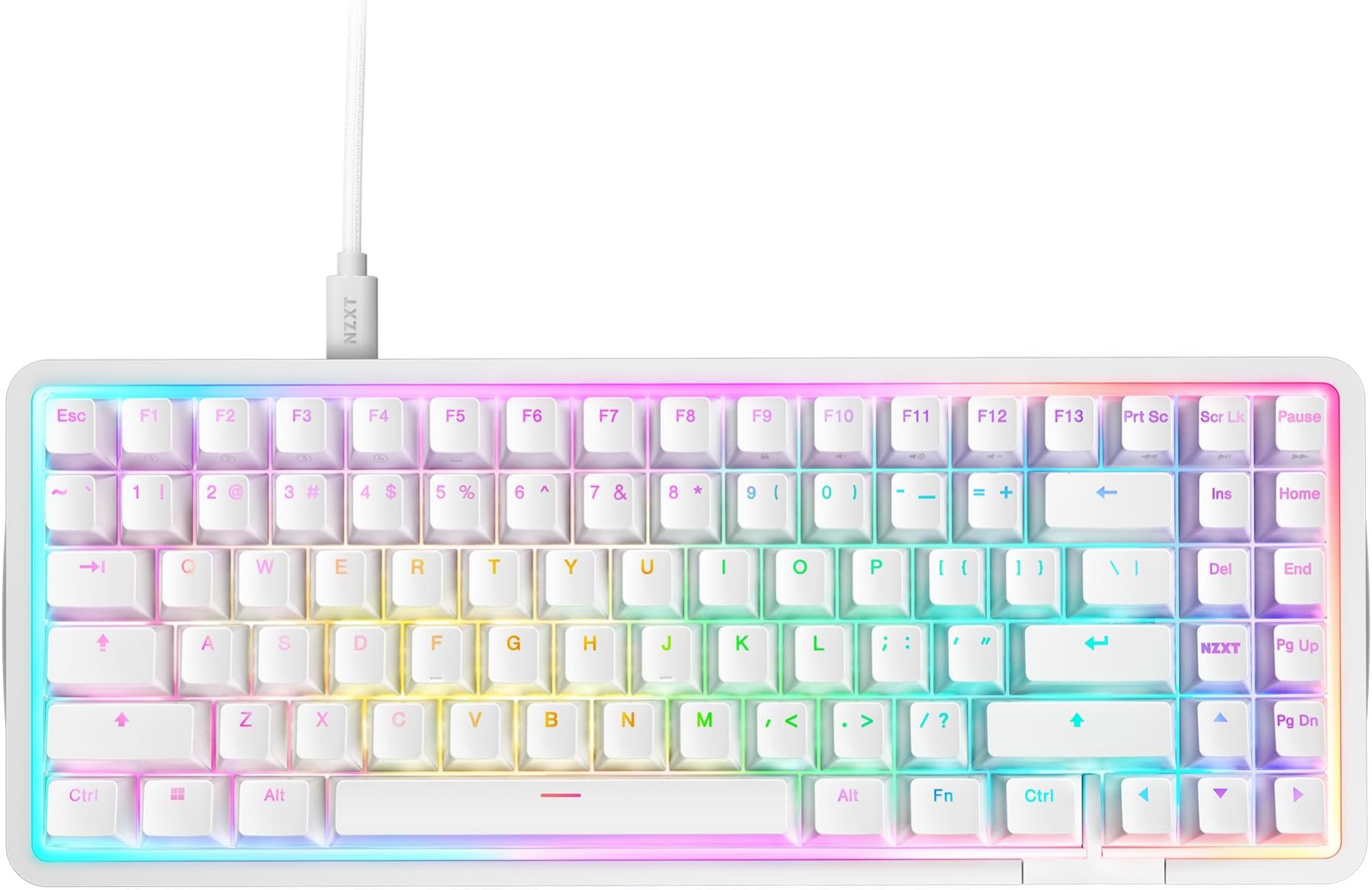
Pros: The switches are oh so very smooth. The metal frame is very nice, it feels MacBook-esque with its sort-of textured satin finish and visually sharp but not sharp to the touch edge, and it has this cool feeling smooth scalloped(?) protrusion on the left and right side that give some visual flair, and it's good that the bottom is some form of plastic rather than being full metal, the acoustics I'm sure benefit from not having full metal, and the board is still insanely hefty and solid. The lighting is very nice and well diffused, it's really great that they have a ring of light around the perimeter rather than just having the keys illuminated, it brings it together and looks really perfectly diffuse. The condensed TKL form factor is great, having the function row and arrow keys and delete, page up/down, etc. without gaps really makes the board look cohesive and put together, and complements the RGB nicely while taking up less space on the desk. It has one extra key compared to a standard TKL, well really it has two extra keys, an F13, and one labeled NZXT which seems to do nothing by default but you can remap it in software, but minus the menu or right windows key, for a total of one extra key. Being hall effect, you can customize the actuation point of the switches, deeper for avoiding typos for typing use or shallower for a snappier response for gaming, and it has rapid trigger functionality as well. Another benefit of the hall effect switches is reliability, hall effect switches use permanent magnets and contactless sensors that detect the magnetic field in each switch, so there is no metal on metal contact which exists in standard mechanical switches and wears out over time leading to missed or doubled keystrokes, something I've had happen to several of my Gateron Red switches (missed keystrokes) and Cooler Master SK622 TTC Low-Profile Reds (doubled keystrokes), which is why I'm so glad to have made the switch to hall effect, especially with this MiniTKL that has all the keys I need so this can really be my forever keyboard, I hope. It has storage for 4 onboard profiles so you can save your settings and switch between them without NZXT's software running. Compared to other software like Logitech G Hub, Corsair iCue, SteelSeries GG, and especially Asus Armoury Crate & Razer Synapse, NZXT CAM is simple, lightweight, and thoughtfully organized. Neutrals: It's subtle, but the keys require a bit more force than the Gateron red switches I've been using, some people may prefer this some may not, hence neutral, all up to personal preference whether that sounds good to you. The keyboard has almost all of the keys coolly thoughtfully laid out with no gaps but there is a small gap between the ctrl and left arrow keys, though I can't really fault it, there are a couple good reasons why it's there, it keeps the spacebar row using standard size keycaps and stabilizers so you can swap them if you wish, and having a gap is pretty good for finding the arrow keys by feel i suppose, and they integrated the gap into the design well, the gap is filled with white plastic like the keycaps so it fits in visually and the white plastic extends to the edge where they've put the NZXT logo, so it's kind of a cool contrasting piece in the metal casing that's purposefully placed. Cons: The screw-in stabilizers NZXT claims as a selling point are just okay, maybe a syringe of Krytox GPL205g0 would get them disappearingly good, but as it stands, out of the box they needed some amount of break-in to feel good, and they still make an unpleasant scratchy sound, it's not horrid, it's about what I'd expect from a big name brand keyboard, but NZXT claims their stabilizers as a selling point when they are decidedly average, and because they're screw-in type, replacing them would require serious time-consuming disassembly of the keyboard, compared to plate mount stabilizers which could just shimmy out after pulling off only the keycap and switch they stabilize. If you want a proper rainbow RGB you have to manually create a custom gradient with four evenly spaced steps, pure 255 red, green, blue, and looping back around to red, because NZXT's rainbow wave preset has extra lilac and added white, NZXT shouldn't be shoving their brand colors into the rainbow preset. The keyboard doesn't include a wrist/palm rest, and NZXT doesn't even make one to be sold separately. This is really disappointing especially for a non-standard sized keyboard, as finding a quality third party wrist/palm rest to match a non-standard sized keyboard is like finding a needle in a haystack, I've just been using a Cooler Master WR510, which is the perfect height for me but not as wide as the whole keyboard and unfortunately is discontinued, if you need a wrist/palm rest maybe try the one Wooting makes for their 80HE keyboard. This is just a nitpick, but, while the cable is pretty quality feeling, and the strain relief looks nice, it's very stiff, and it doesn't come out of the keyboard offset fully left or fully centered, it's an okay compromise functionally where it is I suppose but it does look kind of dorky, maybe if they had included a black cable with the white keyboard so it doesn't stand out on a black desk mat it'd be better in my opinion, also maybe this is a dying trend but I would've like to see a coiled cable instead. Overall Thoughts: I really like this keyboard and at the $80 I paid it's a fantastic value, for that price or close I can definitely recommend this keyboard but not at MSRP, and it looks like NZXT is killing it off because of that so I'd say scoop one up while you can, and maybe grab some Krytox GPL205g0 to go with it for the stabs.