We remain fully operational. Our teams are working around the clock to ensure your deliveries continue safely.

DOWNLOAD THE APP


Copyright © 2025 Desertcart Holdings Limited
DOWNLOAD THE APP





Buy anything from 5,000+ international stores. One checkout price. No surprise fees. Join 2M+ shoppers on Desertcart.
Desertcart purchases this item on your behalf and handles shipping, customs, and support to Vanuatu.
🚀 Elevate your workspace with 8K clarity and powerhouse connectivity!
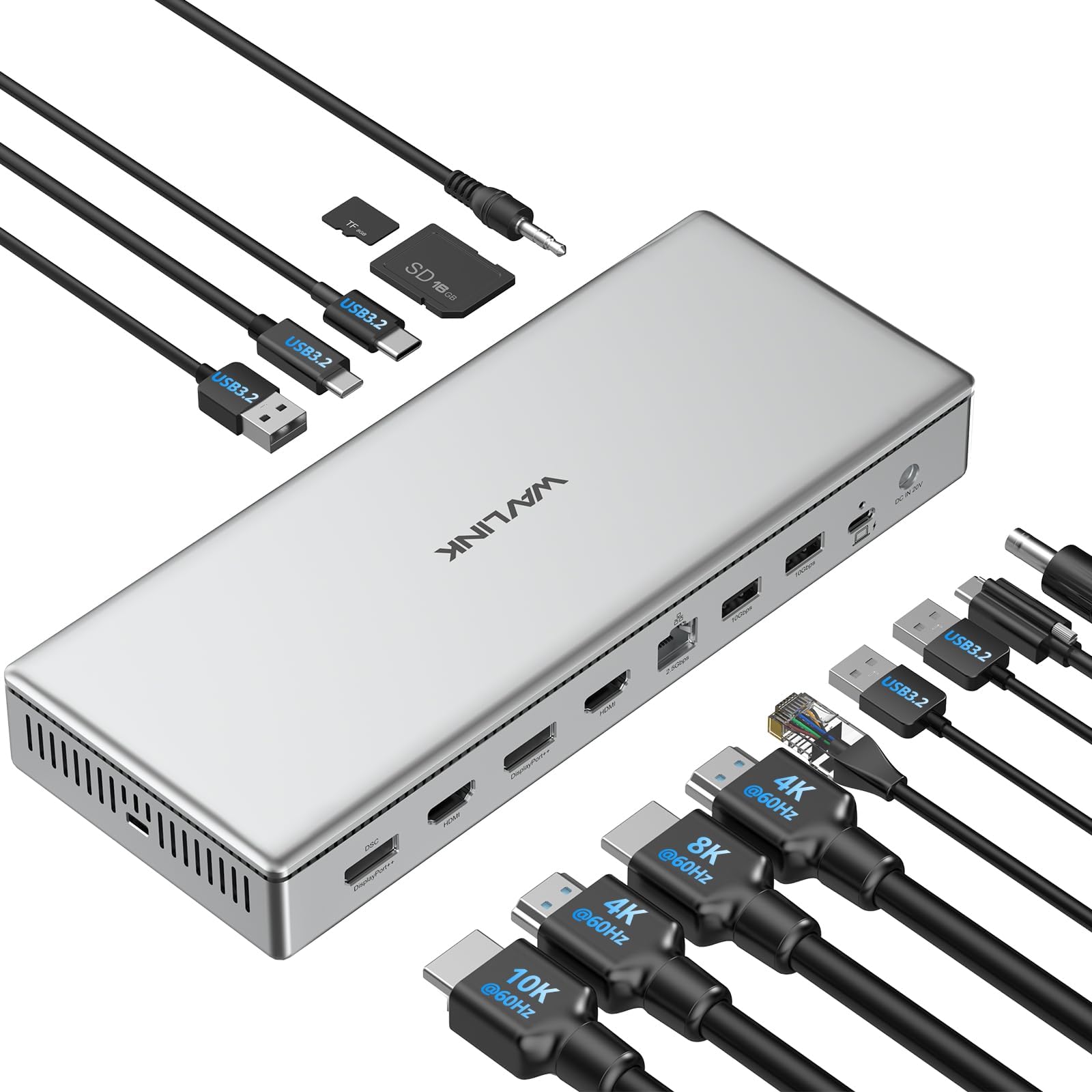
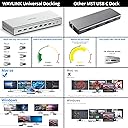
The WAVLINK USB C DisplayLink DL7400 Premium Docking Station redefines multi-monitor setups with dual 8K@60Hz or quad 4K@60Hz outputs, breaking Apple’s triple display barrier. Equipped with 15 versatile ports including 2.5G Ethernet and 100W power delivery, it ensures ultra-fast data transfer and reliable charging. Compatible with Windows and Mac M1/M2/M3 systems, this docking station is the ultimate productivity hub for professionals craving seamless, high-resolution multitasking and rapid connectivity.


| ASIN | B0DH1XC33Z |
| Best Sellers Rank | #148,593 in Electronics ( See Top 100 in Electronics ) #1,388 in Laptop Docking Stations |
| Brand | WAVLINK |
| Compatible Devices | Windows 10 / 11 & macOS 10.15.x and later, ChromeOS 100.x and later Supports full-featured USB-C, USB4, and Thunderbolt 3 / Thunderbolt 4 systems, including: M1 / M2 / M3 (M1 Pro/Max, M2 Pro/Max, M3 Pro/Max); Intel-based Thunderbolt 3 MacBooks (late 2016+) Dell XPS, Latitude, Inspiron series with full-featured USB-C, USB4, or Thunderbolt 3 / 4 Microsoft Surface Pro / Go / Book / Laptop models with… |
| Customer Reviews | 4.0 4.0 out of 5 stars (53) |
| Hardware Interface | USB 3.2 Gen 2 |
| Item Weight | 1.6 Kilograms |
| Manufacturer | Wistars Technology Limited |
| Mfr Part Number | WL-UG75PD1-DH2-US |
| Model Number | WL-UG75PD1-DH2-US |
| Number of Ports | 15 |
| Total Number of HDMI Ports | 2 |
| Total Usb Ports | 5 |
| Warranty Description | 2 year manufacturer |
| Wattage | 100 |
M**S
Excellent Docking Station!
Excellent docking station!! This solved all of my laptop hookup challenges and delivers flawless sound and video for my X-Plane 12 airplane simulator setup. I just added a USB splitter to connect some extra accessories. I literally pull up and plug in my laptop to a usb C cord and I am ready to go.
R**F
A Solid Device!
The device arrived as promised and was exceptionally easy to set up. I would purchase it again. The only downside that I expereniced is the need for 3 additional Thunder Bolt 4/5 ports.
T**2
Doing its job
This works for my needs. I have 4 monitors i needed to connect and I've had zero issues thus far.
K**N
4 outputs! Works Great
Works well - finally a dock that has 4 outputs. Only used a few days but so far so good.
D**Y
Very touchy install / unit was faulty
This model had impressive specs and a little pricy but that was OK for me. Display link was very touchy to load. After plugging in all my equipment I noticed (1) my mouse settings went crazy, (2) my external hard drive which use to run at lightning speeds was extremely slow and would disappear from windows explorer randomly and (3) the Rj45 connection was not working ... still had only WIFI. And in general my brand new LG Gram laptop just felt sick. Called customer support (they were very helpful by the way) and they determined the unit's programing had failed and to return it for a new one. One note ... after I disconnected the unit from my PC the system was still not as responsive as before Wavlink. I uninstalled Display link and it was a new machine ... supper fast again. I can't explain it, but those are the facts. For me I will buy another docking station but it will not use Display Link.
A**.
WAVLINK USB C DisplayLink (DL7400) Premium Docking Station
This docking station arrived intact and in new condition, adequately protected within a professional looking, branded box. The Quick-start Guide is detailed and understandable. The adapter and cords appear well made. The docking station itself is solidly manufactured. It works as described. Overall, I would recommend.
H**L
It's ok
I've had an opportunity to use this product for over a month now. No special software is required and it's plug and play. It works marvelously sans video function; at first it had no problems but then I could not resolve. I have no problems with it syncing with my laptop. It has a lot of connection points and looks great. I'd like to add it works better than an Anker dock that I bough elsewhere. I've tried so many things but I still cannot get this thing to work properly.
D**O
Reliable Docking Solution for Professionals
Finding a reliable docking station can be a frustrating experience, especially when dealing with multiple monitors and a variety of peripherals. Fortunately, this WAVLINK USB-C DisplayLink dock delivers a hassle-free setup with an impressive range of connectivity options. The build quality is solid, with a sturdy design that feels premium and durable. The inclusion of both HDMI and DisplayPort outputs ensures compatibility with different monitor setups, and the high-speed data ports make file transfers and peripheral connections seamless. Setting up the dock is straightforward, with Windows and macOS recognizing it instantly without any additional driver headaches. Performance-wise, this docking station shines in its ability to handle multiple displays smoothly, delivering crisp 4K resolution without flickering or lag. The high-speed USB-C and USB-A ports allow for fast charging and efficient data transfer, while the wired Ethernet connection provides stable and fast internet speeds. Whether using it for a home office or professional workstation, the dock integrates seamlessly, eliminating the need to constantly plug and unplug devices. Additionally, its ability to support up to four monitors makes it a powerhouse for multitasking professionals who need a well-organized and efficient workflow. While the price is on the higher end, the reliability and performance justify the cost. The dock consistently performs without overheating or connectivity issues, something that can’t be said for many generic alternatives. The only minor downside is the limited number of USB-A ports, which might require an additional hub for those with multiple peripherals. Despite this, the WAVLINK USB-C DisplayLink dock is a fantastic investment for anyone in need of a professional-grade docking solution that simply works. Rating: 4.8/5 Stars.
B**A
I have taken my time to review this item as I wanted to test it in various real world scenarios and I have to say that this is the best docking station I have every used. Yes it is expensive but you really do get what you pay for with this. The build quality is excellent and you really couldn't wish for any more ports. Charging up my iPhone 15 Pro max took no time at all with this and it was really convenient to have this on my desk rather that charging the phone on one of the shelves. Looks and works fantastically and as I say it is expensive but it will be the only one you need to buy.
D**S
Ich habe schon viele Dockingstationen ausprobiert – besonders für mein MacBook Pro mit M1-Chip war die Auswahl bisher immer etwas eingeschränkt, vor allem wenn es um echtes Multimonitor-Setup geht. Die meisten USB-C-Docks unterstützen maximal ein oder zwei externe Bildschirme. Mit dieser Dockingstation von WAVLINK wird das Limit gesprengt. Quad-Display-Unterstützung mit DisplayLink DL7400 Der größte Vorteil dieser Dock ist die Nutzung des neuen DisplayLink DL7400-Chipsatzes, der in der Lage ist, die bekannten Limitierungen von macOS (M1/M2/M3-Chips) zu umgehen. Damit kann ich problemlos vier externe Bildschirme gleichzeitig betreiben, jeweils in 4K@60Hz, oder auch zwei Bildschirme in 8K@60Hz. Die Bildqualität ist kristallklar, ruckelfrei, und besonders bei kreativer Arbeit wie Videoschnitt, Grafikdesign oder Softwareentwicklung ein echter Boost für den Workflow. 15-in-1 Anschlussvielfalt – Alle Ports, die man braucht Die Dockingstation ist mit einer enormen Anzahl an Ports ausgestattet: • 4 Displayausgänge: 2x HDMI 2.0, 2x DisplayPort++ 1.4 – das erlaubt viele Kombinationsmöglichkeiten (HDMI + DP oder vier gleiche). • 5 USB-Ports mit 10 Gbps: 2x USB-C und 3x USB-A – ideal für externe SSDs, Maus, Tastatur, Kameras. • 1x USB-C PD 100W: Für das Laden des Host-Laptops – mein MacBook wird zuverlässig mit voller Geschwindigkeit geladen. • 1x USB-C PD 30W (Front): Zum Schnellladen von Handy oder Tablet, ebenfalls mit 10 Gbps Datenübertragung. • 2.5G Ethernet-Port: Doppelt so schnell wie klassisches Gigabit-LAN – perfekt für schnelle Backups oder große Dateiübertragungen. • SD 4.0-Kartenleser: Lesegeschwindigkeit bis zu 312 MB/s – deutlich schneller als die meisten integrierten Slots. • 3,5 mm Audio-Kombi-Port: Für Headset oder Mikrofon, praktisch und stabil. • DC-In Anschluss mit 160W Netzteil: Starke Stromversorgung für alle angeschlossenen Geräte. Leistung im Alltag In der Praxis habe ich die Dockingstation an ein MacBook Pro M2 mit macOS Sonoma angeschlossen. Nach der Installation des aktuellen DisplayLink-Treibers (schnell und unkompliziert über die offizielle Seite) lief alles sofort rund. Ich betreibe daran derzeit: • 1x 4K Monitor in 144Hz • 2x 4K Monitore in 60Hz • 1x 2K Monitor als Vorschau-Display Zusätzlich habe ich mehrere USB-Geräte angeschlossen (externe SSDs, Kamera, Mikrofon), eine kabelgebundene Maus und Tastatur, sowie eine SD-Karte für den schnellen Foto-Import. Alles funktioniert einwandfrei und ohne merkbare Latenz oder Leistungseinbußen. Design, Kühlung & Verarbeitung Die Dock ist hochwertig verarbeitet, das Gehäuse besteht aus massivem Aluminium – optisch und haptisch ein echter Hingucker. Das Gehäuse wird bei Dauerbetrieb angenehm warm, aber nicht heiß. Lüfter oder andere Geräusche gibt es nicht, was mir als Home-Office-User besonders wichtig ist. Die Status-LED ist dezent und nicht störend hell. Wichtige Hinweise zur Nutzung • HDCP wird nicht unterstützt – das bedeutet, dass Dienste wie Netflix oder Amazon Prime Video über Apps (nicht über den Browser) eventuell nicht korrekt funktionieren, da sie Kopierschutz verlangen. • DisplayLink-Treiber ist Pflicht, sowohl unter Windows als auch unter macOS – ohne den geht keine Videoausgabe über die Dock. • Nicht geeignet für Gaming mit G-Sync/Freesync, da es sich nicht um native GPU-Ausgabe handelt. Fazit: Für wen ist diese Dockingstation geeignet? Diese Dockingstation ist meiner Meinung nach ideal für: • Professionelle Nutzer, die mehrere Monitore gleichzeitig benötigen (Trader, Entwickler, Videoeditoren, Fotografen). • Mac-User mit M1/M2/M3-Chips, die endlich mehr als 1 externes Display nutzen wollen. • Windows-Nutzer, die maximale Performance, Anschlussvielfalt und Ladeleistung suchen. • Power-User, die auf Performance, schnelles Laden und stabiles Multitasking Wert legen. Bewertung: 10/10 – Eine der leistungsfähigsten und zuverlässigsten Dockingstationen auf dem Markt. Sie ist nicht ganz billig, aber wer maximale Performance sucht, bekommt hier ein Premium-Gerät mit vielen Extras.
W**Y
Un produit magnifique en aluminium argenté qui ira à merveille avec un bureau pommé. La qualité de fabrication est de très haut niveau. L’appareil fonctionne dans un silence absolue et ENFIN la prise hôte est à l’arrière ! De nombreux ports, des lecteurs de cartes en façade, de l’ethernet 2,5 Gb/s… Quasiment un sans faute. Malheureusement à ce prix j’aurai aimé du Thunderbolt. Même si les possibilités de l’USB-C sont multiples et que les performances sont de haut vol, il m’est impossible de brancher mon écran Thunderbolt… C’est plus que dommage sur un produit de cette qualité avec un tarif premium. Néanmoins ça reste un excellent produit qui alimentera en plus votre ordinateur jusqu’à 100W. Je recommande ce produit qui répondra à de très nombreux usages
R**A
Excellente station d’accueil, bien pensée et très performante. Dès la sortie de la boîte, on sent la qualité avec un boîtier en aluminium robuste et élégant qui s’intègre parfaitement à un bureau moderne. L’installation est simple et rapide, et la connectique est ultra-complète : 2 ports HDMI, 2 DisplayPort, Ethernet 2,5 Gb/s, plusieurs ports USB-A et USB-C, ainsi qu’un lecteur de cartes SD. Idéal pour ceux qui ont besoin d’un setup multi-écrans allant jusqu’en 8K ou 4K selon la configuration. L’alimentation de 100W est un vrai plus, permettant de recharger un ordinateur portable tout en gardant une connexion stable avec tous les périphériques. La gestion des écrans via DisplayLink est fluide, et la compatibilité avec Windows et macOS est assurée, même sur les modèles Mac équipés de puces M1, M2 et M3. Autre point fort, l’appareil est totalement silencieux et bien ventilé, ce qui le rend agréable à utiliser au quotidien. Les nombreux ports sont bien disposés, notamment les lecteurs de cartes et certaines prises en façade, rendant l’accès facile. Le seul petit point négatif reste son prix, qui représente un investissement non négligeable. Cependant, au vu de la qualité de fabrication et des performances, c’est un produit fiable et durable qui simplifie vraiment l’organisation d’un espace de travail.
J**F
Diese Dockingstation wird in einem kleinen Pappkarton geliefert, der es in sich hat! Allein das Gewicht lässt vermuten, dass es sich um ein solides Stück Technik handelt. Öffnet man den Karton, wird die schlichte Oberseite der Dockingstation unter einer dünnen Folie sichtbar. Erst wenn man diese Schutzfolie ebenfalls entfernt, offenbart sich das champagnerfarbene Gehäuse in ganzer Pracht! Die Dockingstation liegt wertig in der Hand und alle Anschlüsse sind genau dort, wo sie hingehören, an der Seite eine kleine Öffnung um diesen "Goldbarren" mit einem Kensingtonschloss an die Kette zu legen. Im Karton findet man neben der mehrsprachigen Bedienungsanleitung, ein besonderes USB-C-Kabel und ein Netzteil. Das besondere am USB-C-Kabel ist, dass es mittels einer Schraube fest mit der Dockingstation verbunden wird und dient der Stromzufuhr für den Laptop und gleichzeitig als einziger Datenüberträger zwischen Laptop und Dockingstation. Netzteil mit Stromversorgen und den Powerstecker auf der Rückseite in die Dockingstation und schon könnte es losgehen. Aber nun kommen noch die ganzen Anschlüsse auf der Rückseite - 1x USB-C Anschluss für das Kabel zum Einschrauben 100W PD - 2x USB-A - 1x RJ45 (1GB) - 2x HDMI - 2x DisplayPort Vorne - 1x Audio/MIC - 1x SD-Card - 1x Micro SD Card - 2x USB-C (davon 1x mit 30W PD) - 1x USB-C 1x Netzschalter Es lassen sich über diese Dockingstation bis zu 4 Monitore anschließen (2x DP, 2xHDMI) und der Desktop lässt sich entsprechend erweitern. Ein "Must-Have" für alle die viele Daten bewegen und/oder aus anderen Gründen mehrere Monitore brauchen. Alles Weitere sollte eigentlich selbstverständlich sein und ist es auch! Alle angeschlossenen USB-Geräte, Headsets, Webcams, USB-Sticks usw. funktionieren anstandslos und die Netzwerkperformance ist ebenfalls top! Mein Fazit: Eine solide, hochwertige USB-Dockingstation, die den Laptop nicht nur mit ausreichend Strom versorgt, sondern über nur ein Kabel einen multifunktionalen Datenterminal für das erforderliche Zubehör eines Home-Office perfekt anbindet. Dank der Dockingstation WL-UG75PD1-DH1 brauche ich keine 15 Minuten mehr, um meinen mobilen Arbeitsplatz reisefertig zu machen oder wieder als Home-Office in Betrieb zu nehmen! Die Verarbeitung und Leistung sind gut. Den Preis halte ich persönlich für etwas zu hoch, aber das muss jeder für sich entscheiden ;)
Trustpilot
1 day ago
4 days ago