Buy anything from 5,000+ international stores. One checkout price. No surprise fees. Join 2M+ shoppers on Desertcart.
Desertcart purchases this item on your behalf and handles shipping, customs, and support to Vanuatu.
⚡ Power Up Your Network with Speed & Control — Don’t Get Left Behind!
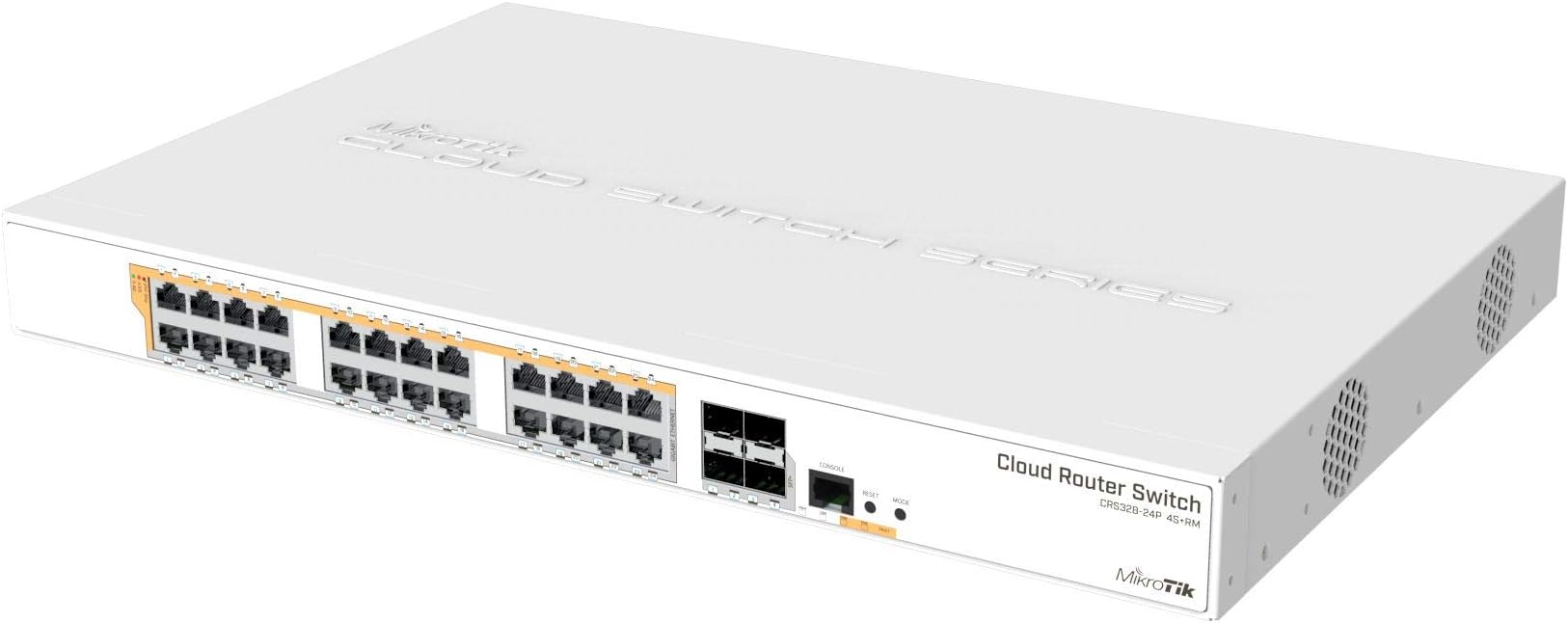
The Mikrotik CRS328-24P-4S+RM is a professional-grade 24-port Gigabit Ethernet switch with PoE output and four 10Gbps SFP+ ports, housed in a 1U rackmount chassis with a 500W power supply. It supports dual boot between RouterOS and SwOS, delivering flexible, high-speed connectivity and robust power management for demanding office or data center environments.
| ASIN | B07C657P7Q |
| Best Sellers Rank | #243 in Computer Networking Switches |
| Brand | MikroTik |
| Color | Multicolor |
| Compatible Devices | Desktop |
| Customer Reviews | 4.7 4.7 out of 5 stars (124) |
| Data Transfer Rate | 10 Gigabits Per Second |
| Global Trade Identification Number | 04752224002228 |
| Interface | PoE, SFP |
| Item Weight | 10.01 Pounds |
| Manufacturer | Mikrotik |
| Mfr Part Number | MT-RBCRS328-24P-4S+R |
| Model Number | MT-RBCRS328-24P-4S+R |
| Number of Ports | 24 |
| Switch Type | managed, layer 3, PoE |
| UPC | 708747435030 |
| Unit Count | 24.0 Count |
| Upper Temperature Rating | 60 Degrees Celsius |
| Voltage | 240 Volts |
| Warranty Description | No Warranty |
P**T
Best bang for my home network bucks
I bought this for several reasons. I had been using a large HP 2900-48G switch and a PFSense i7-7700K PC based router for my home network. They worked great, but...... The HP switch was large, LOUD, put out a LOT of heat and sucks down 200-300watts of power. It is a server 19" rack enterprise switch. The PFSense i7 CPU PC mini tower router is powerful, flexible but takes up lots of space and consumes another 100 Watts. I wanted something with four 10GBit links like the HP. I no longer needed more than 24 ports like I did last year. The Mikrotik also has a comprehensive GUI (WinBox). I don't manage routers and switches for a living so a GUI was a must for me. I have no desire to learn another command line interface. I have a couple of proper Win 2012R2 media servers and a Threadripper workstation I do most of my home based business and personal things on. I wanted to be able to move large multi gigabyte media files to the servers at HD speeds and not be limited to the roughly 115MB/sec of gigabit ethernet. I will also run the 4th fiber link to the media room to access content from the servers. In all honesty I do not need most of the features this device has (which are numerous). It was appealing that this device's router OS has a following and is often used in business environments. A plus. I'm sure that I can grow with this setup to do all those things I want to do. My next step is to eventually install proper access points and power those with the need for a wall wart in whatever house we move to soon. Currently I use an R7000 and a WRT1900AC running DD-WRT setup as access points only(no routing). I only took me a couple of hours to find some tutorials online for things like setting Static IP address, changing DNS servers, upgrading the firmware and setting up the DHCP stuff. This is all pretty basic stuff. Later I will find more information concerning best security practices and hardening of this box so I am not a target for hackers. I am very happy. My network speed is great. My power draw is 8x less and I no longer have 5 screaming fans from the HP to talk over. The Mikrotik only has 2 quiet fans and barely puts out any heat. I love it!!!! UPDATE: Important!!!! You MUST add some firewall rules and go through the Mikrotik Wiki to secure this router or it will be hacked!!! I installed mine, updated the router OS to the latest version and changed the ADMIN password. NOT ENOUGH!! After a week I was getting failed login attempts every second form multiple sources all over the world. Google "microtik essential firewall rules" and watch the youtube tutorial #29. This guy also has a web page with a script to add rules. Also google "securing mikrotik router". The first hit is the Mikrotik wiki. Follow this!!!! Turn off services from the Winbox CMD line that are not needed so this router doesn't become some hacker's plaything. Keep your router firmware up to date!!!!! VERY IMPORTANT!!!
R**N
Mikrotik CRS328-24P-4S+RM: A Powerful and Organized Network Upgrade
The Mikrotik CRS328-24P-4S+RM is an outstanding upgrade, successfully replacing my aging 15-year-old Netgear switch and immediately bringing noticeable enhancements to my network. The core benefit is the massive boost in speed and overall network stability. Data transfers are significantly faster, and I've experienced far fewer dropouts compared to the old hardware. The inclusion of four 10Gbps SFP+ ports was a game-changer for connectivity, allowing me to easily establish a 10Gbps uplink to my main Mikrotik router using a DAC cable. A major advantage of this device is the integrated PoE functionality on all 24 Gigabit Ethernet ports. This feature immediately improved my power management and organization, allowing me to remove almost all external PoE injectors from my rack, which is a massive plus. In terms of physical attributes, the size is standard 1U rackmount, fitting perfectly. The noise level is surprisingly low for a device with this level of functionality and PoE capabilities, which is excellent for an office or home setup. Regarding heat resistance, the unit has maintained stable operating temperatures, even under moderate PoE load. The only consideration for new users is the required setup; for those new to Mikrotik, be aware that it needs configuration before full deployment. So far, however, I have encountered no immediate cons, and the switch is performing exceptionally well. It's a robust, feature-rich device that vastly improves network performance and organization.
L**A
Quite surprised, it's a decent switch!
I'll start by saying that this is actually a decent switch and it does exactly what I wanted it to do. It does a LOT more than I was expecting or planning to use it for, but it does give me ideas on a future mikrotik purchase if I decide to. Coming from HP switches (and one dying recently), I decided to give this mikrotik switch a try and I'm glad I gave it a chance. If you're looking for something that will give you most if not all of the features you would want in a 24 port switch (such as VLAN's, LACP support, PoE), then you can't go wrong with this one. I've seen some reviews mention a noise level problem. This is fairly subjective. Someone's "quiet" is someone else's "loud". For me, it's not bad. I can sit in the lab room and work a full day and never notice it. Honestly, I hear the HP switch I still have left. For those who have never worked on Mikrotik devices, these are some things I think you should know: * Expect growing pains. You may have some problems with the configuration of the switch. Don't blame yourself nor the device. It's extremely confusing at first. * The CLI is not immediately understandable; it is NOT a cisco-like CLI. Consider using WinBox at first to get you started. It can connect to the switch via mac address. * The documentation has some good moments and also some bad moments. Read through it at least three times for the things you care about, and consider looking through the forums and perhaps a youtube video or two. * Don't confuse yourself with the "bridges" when you're configuring the switch. Leave a single bridge and do NOT add any more. You will thank yourself later. Other than those things (which I didn't think was worth docking a star for), it's a good switch and is serving me well with what I wanted it for.
E**Z
M**M
I'm not going to say much about the features, or os, or anything like that because there's plenty of full-length reviews elsewhere on the internet. Suffice to say, while they're loaded with L3 functions you don't want to use them as such without destroying forwarding performance. For me, I have a number of Mikrotik devices and while the CLI is "interesting", they do the job reliably, cheaply, silently, and while sipping the power. Replaced an equivalent Juniper switch with one of these and the difference in power consumption is amazing. This thing's going to pay for itself in under a year!
S**F
Steile Lernkurve, wenn man Trunks benötigt, aber sehr schönes OS und die Möglichkeiten sind vielfältig!
N**F
Super switch fourni de poe + sur tout ces ports Comme d’habitude mikrotik ne me déçois pas ! Point négatif : Livré abîmé.
C**L
Für den heimgebrauch super. Die Bedienung ist etwas umständlich und man sollte schon umfangreiches Netzwerk Verständnis haben. Für Otto Normal ist das nichts. MikroTik gibt einem alle Freiheiten nimmt einem das Denken und Verstehen aber nicht ab.
Trustpilot
2 weeks ago
4 days ago