Buy anything from 5,000+ international stores. One checkout price. No surprise fees. Join 2M+ shoppers on Desertcart.
Desertcart purchases this item on your behalf and handles shipping, customs, and support to Vanuatu.
🌍 Stay connected, secure, and ahead—your Wi-Fi passport to anywhere!
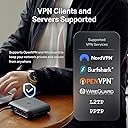
The TP-Link Roam 6 AX3000 Travel Router delivers cutting-edge Wi-Fi 6 speeds up to 2402 Mbps on 5 GHz and 574 Mbps on 2.4 GHz, combined with multi-gigabit 2.5 Gbps wired ports and USB 3.0 connectivity. Designed for travelers and remote professionals, it supports versatile modes including Router, Hotspot, and Repeater, with robust VPN encryption via OpenVPN and WireGuard for secure browsing on public networks. Compact and USB-C powered, it offers easy app-based management and advanced security features aligned with CISA’s Secure-by-Design pledge, making it an essential tool for seamless, secure connectivity anywhere.


| ASIN | B0DY8K122V |
| Antenna Location | Business, Home |
| Antenna Type | Internal |
| Best Sellers Rank | #1,225 in Computers & Accessories ( See Top 100 in Computers & Accessories ) #64 in Computer Routers |
| Brand | TP-Link |
| Built-In Media | Power Adapter, Quick Installation Guide, RJ45 Ethernet Cable, TL-WR3002X, USB Cable |
| Color | Black |
| Compatible Devices | Personal Computer, Security Camera, Smart Television, Smartphone, Tablet |
| Connectivity Protocol | Wi-Fi 6, Ethernet, USB Tethering |
| Connectivity Technology | Ethernet, USB, Wi-Fi |
| Control Method | App, Remote |
| Controller Type | App Control |
| Coverage | Extensive coverage for homes, hotels, and travel |
| Customer Reviews | 4.1 out of 5 stars 409 Reviews |
| Data Transfer Rate | 3000 Megabits Per Second |
| Frequency | 5 GHz |
| Frequency Band Class | Dual-Band |
| Has Internet Connectivity | Yes |
| Has Security Updates | Yes |
| Is Modem Compatible | Yes |
| Item Dimensions L x W x H | 3.6"L x 1.18"W x 4.13"H |
| Item Weight | 0.33 Pounds |
| LAN Port Bandwidth | 1000 Mbps |
| Manufacturer | TP-Link |
| Maximum Upstream Data Transfer Rate | 2402 Megabits Per Second |
| Mfr Part Number | TL-WR3002X |
| Model Name | TP-Link Dual-Band Wi-Fi 6 AX3000 |
| Model Number | TL-WR3002X |
| Number of Ports | 2 |
| Operating System | Linux |
| Other Special Features of the Product | Access Point Mode, Guest Mode, Internet Security, QoS, Remote Access |
| Router Firewall Security Level | Standard |
| Router Network Type | hybrid |
| Security Protocol | WPA/WPA2-Enterprise, WPA2-PSK, WPA3-Personal |
| Special Feature | Access Point Mode, Guest Mode , Internet Security, QoS , Remote Access |
| UPC | 840460600378 |
| Unit Count | 1.0 Count |
| Voltage | 5 Volts (DC) |
| Warranty Description | 2 Year Manufacturer |
| Wi-Fi Generation | Wi-Fi 6 |
| Wireless Communication Standard | 802.11ac, 802.11ax, 802.11b, 802.11g, 802.11n |
| Wireless Compability | 802.11ac, 802.11ax, 802.11b, 802.11g, 802.11n |
J**D
Great little travel router that really delivers peace of mind
Great little travel router that really delivers peace of mind. It’s compact, fast, and incredibly easy to use in hotels and on the road. The VPN setup is straightforward and once enabled, it automatically protects all your devices, which is a huge plus when connecting to public Wi-Fi. Performance has been solid and reliable, exactly what you want when traveling. The only thing I wish it had is a built-in internal battery. That would make it even more convenient in places like airports, especially during short waits when you’re trying to conserve laptop or phone battery and don’t want to plug in yet another device. Overall, a very well-designed travel router that does what it promises and does it well.
R**N
If you travel and use hotel wifi, don't leave home without this router!
Last summer (2025) my wife and I took a month and visited the Black Hills of South Dakota. I knew we would be staying in a hotel with wifi but I wanted more security for my laptop, so ... the tp-link AX3000. After the initial connection, through the hotel's wifi router, to the Internet I had a secure connection at streaming speeds. We were able to connect to our church's streaming services on Sundays as well as doing Internet surfing for things to do and places to go from Custer, SD. My laptop, my phone and my wife's phone were all able to connect at the same time (we didn't need to, but I had to test the unit to see if it really did as advertised! It did!). I've included a picture of the router with my Logitech trackball just for comparison. It's not very big so it doesn't take up much space in the luggage or computer bag. TIP: don't unplug the tp-link until you're ready to leave, otherwise you'll have to go through the hotel's router connection process all over again. That being said, the unit worked as expected and I highly recommend this little router if you travel and are concerned about hotel internet security. I even went to the extent of changing the default SSID to my liking so I could find it easily on each of my devices. Worked like a champ!
S**O
Less features more compatibility
I purchased the 3600 WiFi 7 version of this and it was to advanced for my home network. So I bought this one which is closer to the level of technology my home network uses my isp equipment. When I tested my 3600 my isp blocked an adware packet meant for a computer I was setting up. It worked like a charm but being WiFi 7 it could not transmit a single network name I don’t like seeing a 5g version of the same network. Like the 3600 this device is really exploitable during the initial set up but once updated and secured it’s not a problem. It is a lot light and the switch has eco mode and power mode with a balance mode so it is built to work with a battery. It has half the features but once updated it has all the features the 3600 comes with by default missing a few of the advanced ones. The usb port same as the other tether mode storage access. The micro sd card slot allows for streaming and even the box indicates how this is good for IOT devices. The speed is half that of the 3600 and still fast on a wifi6 connection. It doesn’t have the enterprise protocols of the 3600 either so everything in it will be wpa2/3 personal so it is much simpler and user friendly. The heat level depends on the amount of activity which impacts the performance and like 3600 I can connect devices via Ethernet and play all day and not worry. The interface is so simple I found a custom MAC address function so I can manually change the MAC address much easier. It does lack the same security as the 3600 so I wouldn’t take as many chances with it but no bridging, no having to go into my ISP router no pass through just client and connect. It’s so small I can see me using this more than anything else if I go out even with a mobile hotspot. Anything not WiFi 6 or 6E will use wpa2 only so it still works with most devices. As travel routers go this is the first 2 I setup successfully and the other high priced ones that had these same functions never lasted long enough to configure. Finally I have 2 devices that allows me to use internet in my home and public WiFi and in the future possibly a 3rd as a personal network with a hotspot from my phone when I upgrade it. The original blue mini tp link travel router Krack a key interceptor malware got it the grey upgraded version something from my computer got the first one and the second one I bought in 2023 worked when buying a 4th the 3600 appeared and I can’t believe they work. I even tried those other travel routers but this one had the functions I need and after I set it up I had an issue with it but fixed it. And fixing it convinced me to purchase the third model for comparison and learn how to use wiregaurd. Still a great buy.
R**G
Was going to buy the GL.inet and changed my Mind
Update: Oct 2025 About 3 months after buying the travel router WR3002X it died. I called TP-Link and they were actually very responsive. They told me I would have to pay $14 to have a replacement shipped to my house. I would get an email with a shipping label to ship the dead one back for free and lastly the one thing that I did not like. They would Pre Charge my credit card $120 for the new router and cancel the charge if the dead one arrived back to them within 25 days. My first question was why $120? That is nearly double the cost of the router on Amazon. They said it was MSRP value and basically take it or leave it. Anyway I went through with it and within about 10 days I had a new replacement and they had gotten back the old one. I am only out $14 so I guess I cannot complain. Original Review: Wow, I am very happy with this router and it's speed, I was not expecting anything near this speed at this price point. It's darn fast, I was getting the full 150Mb when Wifi Hotspot connected to my Starlink router on 5G. I was going to buy the GL.inet and I am so happy that I did not. This router is much easier to configure and I suspect based on reviews that it is faster. I logged into Express VPN with it and changed my location. Then used the App to just assign the connected device to use VPN. The Speed going through an OpenVpn connection was 80Mb Down and 10 Mb Up which was excellent for such an encrypted connection. The CPU in this router is fast! About the only issue I had with the Router was getting the VPN connection to work the first time. I put in the user and password info for ExpressVPN and the .opvn file they created for the info and it says connecting and stays that way. I kept changing stuff trying to figure out what was wrong and then just by chance I left it uninterrupted for about 2 minutes and it connected. I wish I has known it took that long to establish an OpenVPN connection. Once it is done once the connection is made much faster after that. Please note you need to add client devices to the VPN connection or they will just be connected without VPN. When your on the main screen and press VPN it will take you to the settings to put in a VPN provider. Once that is done and connected you will see at the bottom "Client List". Make sure the device is already connected to the routers WiFi and then hit + and select that device to be added to the client list. That device will now be added unless you remove it.
J**R
Terrible as travel router and app design is incompetent
I started traveling a lot for work and wanted something that would help connect my phones, steam deck, laptop, etc more simply. This seemed to fit the bill initially. I originally tested it at home as a WiFi extender and it worked quite well but that’s also where I ran into my first problem. When connecting a storage drive or NAS to this to “stream” media, it doesn’t actually stream anything. When attempting to stream, it downloads the file to your device which isn’t the end of the world but this is different from its normal download function, the streamed file goes into a cache that you can’t delete the file from. You have to delete the entire application or you’re stuck with the tether app consuming dozens of gigabytes of storage. That is completely unacceptable from a design perspective especially considering that you can’t access the file after the original stream, the only way you would even know it still exists on your phone is check storage your normal settings. The second problem is connecting to captive networks. I never once got the tether app to prompt to sign into the hotels network after connecting to it. I had to spoof the MAC address of the router using my laptop, sign in, reverse back out, and then reconnect the router for it work. This is a mainstream consumer product, 90% of the people who buy it aren’t going to know how to spoof a MAC address, let alone look it up. Other than those two glaring problems, it’s actually a pretty decent little router. Range is good enough for a hotel room or small section of your home. Speeds for WiFi and for the data transfer to/from storage directly attached are good enough for limited use. I’m a little leery of its longevity given its passive cooling set up, on large downloads (100 gbs or more) even in eco mode it gets very hot. Just having an aluminum chassis with some thermal pads rather than a plastic enclosure would go a long way to cooling this well. It’s pretty concerning when the plastic itself is hot to the touch.
A**H
Title: Powerful and Portable Wi-Fi 6 Travel Router – Perfect for On-the-Go Users
I bought the TP-Link TL-WR3002X for travel, and it’s exceeded my expectations. The compact size makes it super easy to pack, and the USB-C power option means I can use it with a power bank on the go. Setup was quick using the TP-Link Tether app, and switching between router, access point, or repeater mode is seamless. The Wi-Fi 6 performance is excellent — I got stable speeds for video streaming and work calls, even when multiple devices were connected. It also supports several VPN protocols (OpenVPN, WireGuard, etc.), which is a must-have when using hotel or public Wi-Fi. I love the extra features like the microSD slot and USB 3.0 port for media sharing. My only gripe is that it sometimes struggles to connect to networks with captive portals, and it doesn’t support SIM cards for cellular fallback. Overall, if you're a frequent traveler or need a powerful mini router, this is a great pick! Pros: Fast Wi-Fi 6 speeds Multiple operation modes VPN support Compact and travel-friendly USB-C powered Cons: No built-in cellular connectivity Occasional issues with public Wi-Fi login pages
G**N
Fast small great little travel router
I have not used it on a trip yet but have tried it at home as a primary router to see how it works with my PC and laptop .I was very impressed with the speed. There did not seem to be any drop off using it as a primary router with my internet service versus my home router. I also tried using my mobile data plan as the main internet source for this router to use it as a hotspot and also did not see any drop off in speed when using it with my PC or laptop to connect to the internet Some complain that it was hard to set up. I agree it was not intuitive but I found videos on YouTube that walk you through the process. Using the videos it was very easy to do. I definitely plan on using this when traveling for work and using public Wi-Fi.
N**T
Works well but with set up quirks
This will not be an in-depth review but will cover some highlights. Pros: This is small and light, which makes it easy to pack for trips. It also has decent speed and range. Now, it's range isn't very far -- on the 5GHz band I was down a bar in strength about 20 feet away, but the range is sufficient for travel use unless you are staying in a massive room or house. It was generally easy to use and set up was straightforward if you know what you're doing. If not, I can see it being a challenge to many people because there are no clear instructions included with it. Cons: Set up was not as easy as it could be. The Tether app helped but pulling up the captive portal never worked from within the app. I generally had to plug the router in, connect to it, add the hotel/public WiFi as the network, and then go on a different device to pull up the captive portal. If you've been dealing with routers and computers for some time, you'll figure it out, but otherwise, the process is much too convoluted. Overall, the router is good. I'm hoping it lasts some years. It really should be priced lower though as a WiFi 6 device. I know competition is scarce but at the 'normal' price there is a better option for a travel router. At the discounted price of around $50-$60 after credits and coupons that was available recently, it's fairly priced for the performance. I think $50 would be much more reasonable as a target price for this.
J**A
Tplink
Usefull for secure file sharing and very lightweight, easy setup
G**A
Lacks Kill Switch
An exceptionally good and easy to use travel modem. However it does not have a kill switch which is the basic point of having it for its vpn capability. Disappointing as I said it’s very easy to set up and seems reliable otherwise.
T**S
Easy to setup, versatile, easy to transport.
Fairly easy to setup and use out of the box. I first tried it using a LAN port on my home network and it created it's own subnet as expected. Then I plugged my Android phone into the type A port and it worked instantly too. In the default "balanced" power mode I was getting about 400-500 Mbit/sec over 5Ghz wifi (80MHz bandwidth mode) which is to be expected. I suggest adding a good short USB3.0 type A to C cable to the box (to tether your phone) and then it's a good "go box" for networking on the go. Comes with a 15W USB power supply and will charge your phone when plugged in for tethering. Didn't try any of the other features (VPN, TP-Link Tether, etc) but the basics I did test are solid and worked great. if TP-Link wants to improve on this they should ship it in a proper travel case (and include a type A to C cable). It's well packed in the compact box it comes in but a cardboard box will only last so long in your luggage :-).
F**O
Easy, powerful and reliable on the go router!
Incredibile product. I was impressed on how easy has been to set it up and manage the several options. It is a very compact but complete and powerful device. Definitely recommended for digital nomads or serious travelers, I can’t ask anything more. The VPN option is really a plus and it is really reliable so far. Price point is unbeatable so it is highly recommended.
A**R
Excelente producto
Probé varios productos hasta encontrar este que tiene lo que buscaba, seguridad y funcionalidad garantizado, además es muy compacto
Trustpilot
2 weeks ago
2 months ago