![[Wired] Kinesis Advantage360 [Kinesis Advantage 360] [KB360-GBR]](https://m.media-amazon.com/images/I/51jEVi2sHHL._AC_SL3840_.jpg)





Buy anything from 5,000+ international stores. One checkout price. No surprise fees. Join 2M+ shoppers on Desertcart.
Desertcart purchases this item on your behalf and handles shipping, customs, and support to Vanuatu.
⌨️ Elevate your typing game with ergonomic precision and tactile bliss!
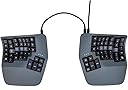
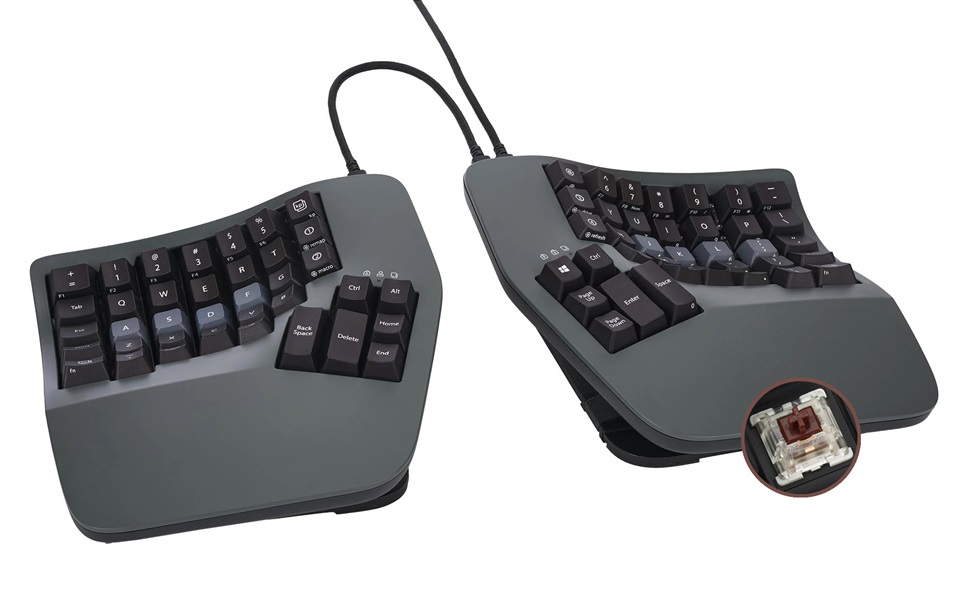
The Kinesis Advantage360 is a wired, mechanical keyboard featuring a unique bowl-shaped, split keyset design that promotes ergonomic hand positioning. Equipped with 76 tactile Gateron Brown switches, a built-in wrist rest, and USB-A connectivity, it’s engineered for professionals seeking comfort and efficiency during extended typing sessions.


| ASIN | B0BCHFHX6V |
| Additional Features | Ergonomic, Hotkeys and Media Keys, Split Keyset Design, Wrist Rest |
| Amazon Bestseller | #78,638 in Computers ( See Top 100 in Computers ) #1,158 in Computer Keyboards |
| Antenna Location | Office |
| Brand | KINESIS |
| Built-In Media | Bridge Connector, Extra key cap, Keycap Puller, USB Cable |
| Button Quantity | 104 |
| Color | gray (dark gray) |
| Compatible Devices | Laptop |
| Connectivity Technology | USB-A |
| Customer Reviews | 4.4 4.4 out of 5 stars (72) |
| Enclosure Material | Polybutylene Terephthalate |
| Generation | 1st Generation |
| Global Trade Identification Number | 00607998360002 |
| Hand Orientation | Ambidextrous |
| Item Dimensions L x W x H | 38.1L x 20.3W x 7.6H cm |
| Item Type Name | Keyboard |
| Item Weight | 1.45 kg |
| Keyboard Backlighting Color Support | Single Color |
| Keyboard Description | Mechanical |
| Keyboard Layout | QWERTY |
| Manufacturer | Kinesis |
| Mechanical Keyboard Switch Model | gateron_brown |
| Mfr Part Number | KB360-GBR |
| Model Name | Kinesis |
| Model Number | KB360-GBR |
| Number of Keys | 76 |
| Number of Sections | 9 |
| Power Source | Corded Electric |
| Series Number | 360 |
| Style Name | SmartSet (USB) | Tactile Switch |
| Switch Type | Tactile |
| Theme | Ergonomic |
| UPC | 607998360002 |
A**R
自分のタイピングについてしまっていた、ミスタイプの原因になるくせに気が付かされます。 正しい指でタイプしないと打てない、、という配置なので、慣れるまでは時間がかかりますが、正しい共生なので、それはいいとして。 ただし、強制が終わったとしても、最速でタイプできるかというとちょっと微妙です。 特に小指でタイプするキーは、私だとかなり指を伸ばさないと届かないのできつい。 そこだけ手首を返して薬指で打つ、としてもいのですが、結構厄介。 しかも、指に若干のマヒが出ている人だと、さらにきつい。 エルゴノミックは、ユニバーサルデザインとは別の概念なんだな、、と気が付かされました。 また、それ以外のキーも、結構しっかりと打ち込まないといけないので、指に力がかかります。 1日作業していると、結構指が疲労していることに気が付きます。 高いだけあって品質はいいのですが、自分に合う最適解かというとちょっと微妙かもしれません。 小指が長い人ならいいのですが。
J**S
Best purchase of my life. Solved my issue. And does so with outstanding quality and support. Even improving productivity by forcing better typing habits. The huge macro and mapping memory on the device make the work experience perfect(no need to bother IT for software as you can set it up off prem and bring it in with your setup stored on device!). You can really tell that a lot of RnD and thought has been put into this over the years! My wrist issue is pretty much all gone, thanks to this. If you aren't disciplined enough, like myself, and use the keyboard without hovering your wrists, I'd highly recommend also picking up the magnetic wrist rests. If purchasing to cope with a specific injury, you could diagnose the issue and get a keyboard that targets that specifically. Whereas this keyboard targets everything. No that it's a jack of all trades and master of none, it genuinely is perfect. Just rather pricey. Would buy again, regardless. And might if I ever also have to do any serious typing from home...
P**K
Sehr komfortable :)
S**E
Points positifs : - Son poids, oui il est posé sur mon bureau et ne bougera pas de sa position, même si les touches sont massacrées de toutes forces. - La programmation avec l'application SmartSet, pouvoir re-mapper les touches des charactères spéciaux des petits doigts pour les doigts les plus habilles avec le système de couche, c'est excellence. Surtout que la configuration est sauvegardé sur le disque dure du clavier, donc on se retrouve chez soi même si l'on change d'ordi. - Les touches ortholinéaires + le setup concaves et le split, allègent les efforts pour écrire, réduisent les mouvements de bras non nécessaire, maintiennent la bonne position des poignets et bras. L'ergonomie est làlà. - Le feeling du contact avec le plastique, qui vient avec le temps, surtout quand on trouve la bonne position de main. On ne glisse pas. - La documentation, pour le re-mappage des touches, surtout que le logicielle n'est pas nécessaire. On peut le faire directement depuis les fichiers dans le disque dure du clavier. Qui, à mon avis est bien plus simple. - Le changement d'angle est solide et bien stable. - Puis le design. Points négatifs : - n'est pas hotswappable, mais bon... - ça prend quand même de la place sur son bureau, puis pour le déplacer pour le télétravail par exemple... - l'application SmartSet sur MacOs est buggy surtout pour la configuration des macros. Lorsqu'on est en mode re-mappage toutes les LEDs clignotes, on ne voit plus sur quelle couche on est; alors le clique sur la touche n'est pas toujours à celui que l'on pense... mais bon, je préfère utiliser la méthode manuelle : modifier les fichiers comme indiqué dans leur documentation, et on a vite ce que l'on veut. Les difficultés, au début, pour ce genre de clavier sont : - Les touches ortholinéaires : il faut se donner le temps, pour construire sa mémoire musculaire. Il faut juste pratiquer. Sur mon ancien clavier, ferry sweep 2, il m'a fallu 2,5 mois pour retrouver ma vitesse de croissière habituelle. Sur le kenisis, 1 semaine. - La position de sa paume de main : oui, il m' a fallu chercher un moment pour comprendre et donc trouver la position idéal. Le but dans les claviers dit ergo, est que la main elle-même ne bouge pas de sa position. Mon pouce doit toucher la touche la plus haute des touches à pouce et le petit doigt doit toucher aisément la touche la plus haute, opposée, du clavier. Cela donne la position de la paume de main. - Le split : mais bon en même temps on l'achète pour ça non ? Apprendre à taper du clavier, en utilisant la totalité de ces doigts est un game changeur ! De plus les splits keyboards, sont la garantie de ne plus avoir mal aux poigners et au coups... Conclusion : Il m'a fallu au moins une bonne semaine, le temps de retrouver mes marques pour que je puisse enfin dire. Je l'aime ce clavier.
J**S
Steep learning curve - I bought this during a flare up of tendonitis in my new job caused by having to use a latop for a week, so I can't speak yet for preventative qualities, but I also have shoulder issues from arthritis and immediately from day one I could feel my shoulders were far more relaxed. After a few weeks of use I am becoming more proficient, it starts to become easier to use as you train yourself to let more fingers share the load, and it definitely feels more natural. It is expensive, but so is being unable to work. It's that simple.
A**R
The keyboard might seem strange at the start and even it might look strange, but in reality, it’s one of the best keyboard I have used. I have a big collection and I could say for sure that this is my favourite and I’m gonna be using this for a long time Probably years. Now the main reason that motivated me to purchase the keyboard is the ability to sit ergonomically and have my shoulders wide open whilst not pointing inwards, but outwards did. This significantly helped with arms related pain and shoulder pain and upper back. I highly highly recommend the keyboard as it does maintain a good post and I can’t see a better alternative after months and months of research, the keyboard pricing is obviously very high, but they do have something going on
Trustpilot
4 days ago
2 weeks ago