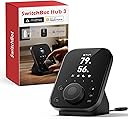
🎛️ Elevate your smart home game with tactile control and total device harmony!
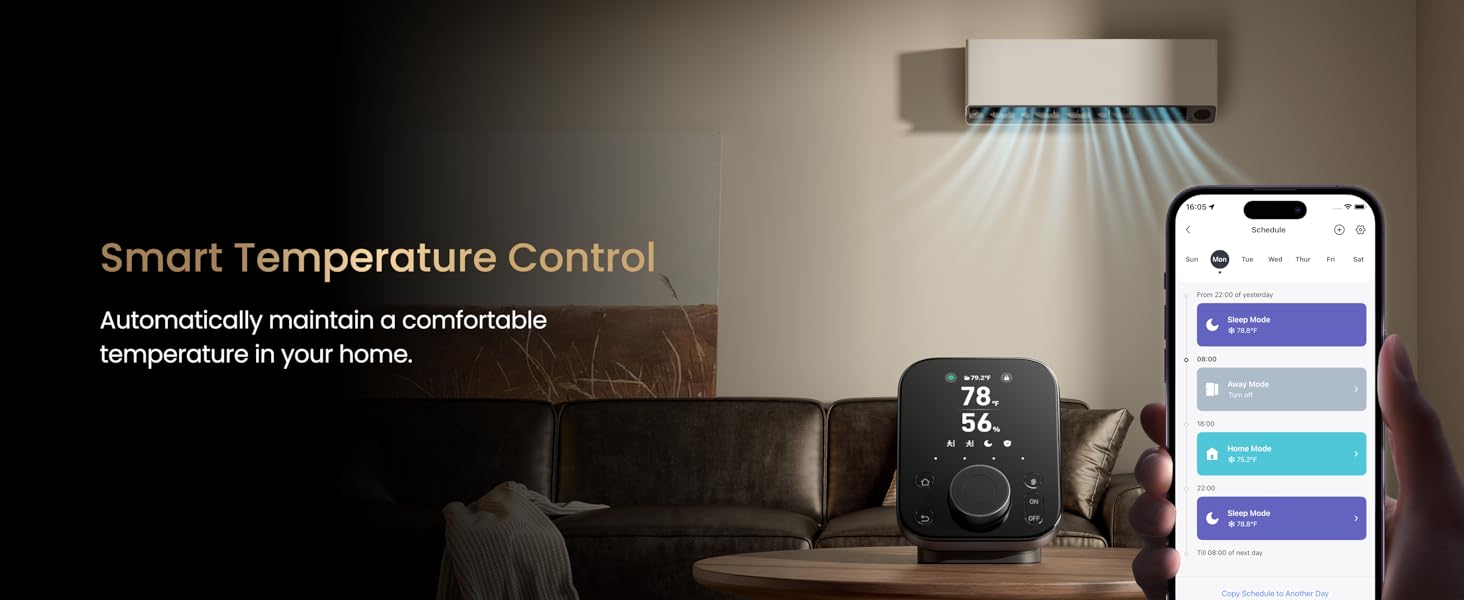
SwitchBot Hub 3 (3rd Gen) is a compact, versatile smart home hub featuring a 2.4" IPS touchscreen, high-precision temperature and humidity sensors, and a unique rotary knob with customizable buttons. It supports over 100,000 infrared devices, SwitchBot ecosystem products, and Matter-compatible gadgets, enabling seamless control via Alexa, Google, Apple Home, or the SwitchBot app. With a Bluetooth range of 200m and advanced automation triggers, it consolidates your smart home into one intuitive command center.


| ASIN | B0F5QKQ6PV |
| Best Sellers Rank | #26,658 in Tools & Home Improvement ( See Top 100 in Tools & Home Improvement ) #43 in Home Automation Hubs & Controllers |
| Customer Reviews | 4.0 4.0 out of 5 stars (314) |
| Date First Available | May 21, 2025 |
| Item Weight | 1.1 pounds |
| Item model number | W7202100 |
| Manufacturer | Wonderlabs |
| Product Dimensions | 3.7 x 1.5 x 4.96 inches |
M**E
This is a thumbs up product for sure.
My good experiences with other SwitchBot devices over the years encouraged me to try the SwitchBot Hub 3 for some extra functionality with a SwitchBot Lock Ultra Touch Combo that I purchased recently. What is really nice about this unit is that it does so many different things. I like having temperature displays and remote monitoring of temperature, but I also like the direct access programmable buttons on the unit… As it did in my case, if you have a use for one feature on the Hub 3, you will likely also find something else it can do for you, making it a great value at a reasonable price. The unit is well made and feels sturdy while also being compact and lightweight. I am finding more and more SwitchBot device solutions as they expand their already very broad ecosystem, and it is nice to consolidate devices into a single app. The Home Screen on the Hub 3 is customizable to display time, temp & humidity with the built in sensors or external sensors, the status of other SwitchBot devices, locks, etc. There are 4 programmable soft keys on the Hub 3, a rotary dial, and some fixed function keys for navigation. The screen can be dimmed or turned off and can be motion sensitive, if desired, to turn back on upon approach, which the operation and sensitivity of is programmable. The connection range from SwitchBot devices to the hub is impressive, as well as WiFi connectivity to the router. The Hub 3 will control infrared devices as well, for example, giving the ability to adjust stereo volume or channels from another room from within the app on a customizable screen. The range of the infrared emitter is excellent. This is an awesome feature that works really well. I am super happy with this setup, especially the programmable soft keys. I have a multi room garage where the lights are all plugged into outlets via extension cords that aren’t wall switch controlled. I have gotten around this in the past by using the SwitchBot app, which is excellent, to turn the lights on/off from the app. Now, I have several other better solutions. The Hub 3 mounts to the wall, on a table, or anywhere I like. The 4 soft keys available to control devices or directly enter into menus in the Hub 3 are incredibly handy. I programmed several soft buttons on the unit to operate all of the garage lights in tandem, so now I have a physical “switch” mounted on the wall at the entry door with no building wiring required. In addition, utilizing Scenes and Automations in the app to control the SwitchBot Switch (a plug in device that has a physical switch, an app controlled switch, and even monitors energy usage) I can have the garage lights turn on automatically when I activate the lock keypad or open the door. I have them programmed to turn off late at night if I forget. I need to stress the level of customization that is easily available in the app between the Hub 3, lock, lock keypad, Switches… and all of the SwitchBot devices. If you can follow the menus you will find many options, most with descriptions of what the option does and how it works. The app has many methods of customization and integration with home control systems from Apple, Google, Amazon, Matter, etc. The layout of the SwitchBot app is easy to work with and it is stable… this is important because so many good devices come with poorly designed and glitchy apps. If I find any issues I will report back, but at this point I am very satisfied with the solutions the product offered.
A**.
An upgrade worth the money
Definitely an upgrade from the Hub Mini, which I have used for about 4 years now. While incorporating all the old IR Blaster and BLE connection functions, you get the temp monitoring, as well as knob and button controls for quick changes to Switchbot gear without having to access the app. Also, the BLE connections seems to be stronger and more reliable than the old hub, which is nice as well. The Matter standard is nice, though I don't have many devices that rely on that yet. All in all, a worthy upgrade to the old app with significant new features--it's actually worth the money if you have added more Switchbot devices or moved to a larger home.
P**L
Very niche device
Overall, pretty neat but could definitely afford to be better for the price. It feels very cheaply made with thin plastic, something rattling around inside, and a control wheel that feels like it’s going to break off at the slightest touch. Everything works as it should so no complaints there. I got it primarily in preparation for some roller shades that I ordered but decided to play around and see what it was capable of. The setup of the sub devices and virtual buttons is very confusing. It’s not really clear what gets bridged where and depending on the intended use case, this might be worthless for you. I was able to program an IR remote for my TV and have it expose a virtual on/off switch to HomeKit and I made a scene that allows me voice control to turn on/off the TV and it automatically triggers my govee backlights to turn on with it. Siri on HomePod doesn’t seem to work with this scene and I am not sure why but it’s flawless on my iPhone. It also serves as an additional control for my apple tv, which I won’t ever use but it’s a novel idea. This sounds silly, but I appreciate that it serves as a simple clock. I have it across the room from my bed and it is the perfect size and brightness for me to roll over and see the time without fumbling for my phone. Not really sure what to do with all the remaining virtual buttons. TBD on how it functions with the roller shades. If you can grab this on sale, I say go for it. Update: Switchbot support was kind enough to reach out to me and take product improvement recommendations to pass along to their R&D folks.
P**R
Everything Just Works! Super Happy with the Hub 3
I don’t usually leave reviews, but the SwitchBot Hub 3 has really impressed me. From the moment I set it up, everything just worked. The app is super smooth and easy to use. I had the hub up and running in no time, and adding devices was a breeze. What I really like is that it has built-in temperature, humidity, and light sensors, which is great for automations. For example, I’ve got it set up to adjust lights depending on the brightness in the room, and it’s been super reliable. I’ve already added quite a few devices (you can connect up to 30, which is awesome), and I’ve had zero issues. Another big plus: it works with Matter, so I was able to connect everything to Apple Home without any complicated steps. Being able to control things through Siri has made life a lot easier. Overall, I’m really happy with it. Everything feels solid and well thought-out. No connection problems, no glitches, just a smooth smart home experience. Highly recommend if you’re looking to build out your setup. I was using the Hub 2 previously and I was able to transfer all my devices to Hub 3 in no time.
O**F
I primarily use Apple Home with an Apple TV as my hub, and the SwitchBot Hub 3 has truly taken my smart home setup to the next level. Thanks to this hub, I was able to connect my portable air conditioner to Apple Home. Before, I had to manually open the app every time I wanted to control it. Now, I can trigger it with simple shortcuts directly from the Apple Home app, which is way more convenient — especially in the summer when I want to cool down the house before getting home. One of the best features of the Hub 3 is its built-in sensors for temperature, humidity, and ambient light. These let me create custom automations, like automatically turning on the AC when it gets too hot. That’s especially important for me since I have a small dog at home, and I want to make sure he’s comfortable and safe during hot days while I’m away. I also have scenes set up to turn on lights when I arrive in the evening, making the home feel more welcoming. The Matter support makes integration with Apple Home incredibly easy and seamless — no complicated setup required. On top of that, I was able to connect several “non-smart” devices that use infrared remotes, like fans, lights, my soundbar, and more. Now I can control all of them with Siri or automate them based on time or conditions in the home. One thing I especially love about this new model is the ability to use physical buttons for triggering simple and efficient shortcuts. It’s incredibly satisfying to be able to quickly control devices or scenes with a tap, without always relying on voice commands or navigating apps. Overall, the Hub 3 has become a central piece of my smart home. It’s easy to install, works reliably, and adds smart functionality to so many older devices. I recommend it without hesitation and I’m more than satisfied with my purchase.
M**C
⭐⭐⭐⭐⭐ ¡El cerebro de tu casa ahora tiene mandos físicos! Una evolución brutal. El SwitchBot Hub 3 juega en otra liga. Ya no es solo un "puente" que escondes en una estantería; es un panel de control precioso que querrás tener a la vista y tocar. Por fin, domótica que puede usar toda la familia sin sacar el móvil. Lo que más me ha gustado: 🎛️ La Rueda de Control (Dial) y Botones Físicos: ¡GAME CHANGER! Esto es lo que marca la diferencia. Aparte de controlar todo desde la app o por voz, ahora tienes una rueda física y botones táctiles en el propio Hub. ¿Quieres subir el volumen de la tele? Gira la rueda. ¿Ajustar la temperatura del aire acondicionado? Gira la rueda. ¿Lanzar tu escena de "Buenas noches"? Toca uno de los 4 botones de acceso directo. Es súper intuitivo y perfecto para las visitas o para cuando no quieres gritarle a Alexa. 🌐 Matter y Puente Definitivo Sigue siendo el rey de la compatibilidad. Convierte todos tus dispositivos SwitchBot antiguos (los que van por Bluetooth) en dispositivos Matter. Esto significa que tus cortinas, cerraduras y sensores viejos aparecen mágicamente en Apple Home, Google Home o Assistant sin configuraciones extrañas. La estabilidad es roca sólida. 🌡️ Sensores "Pro" y Pantalla LCD La pantalla ya no es una matriz de puntos básica, es un LCD nítido que te da toda la información de un vistazo: temperatura, humedad, hora y estado de los dispositivos. Además, incluye un sensor de presencia (radar) mucho más preciso que los sensores de movimiento tradicionales, lo que permite automatizaciones súper rápidas (como encender la luz nada más entras en la habitación). 📺 Mando Universal Infrarrojos (IR) Mantiene la capacidad de controlar tus aparatos "viejos" (TV, Aire Acondicionado, Ventiladores) por infrarrojos, pero ahora con la ventaja de poder mapear esos controles a la rueda física. ¡Es como revivir tu mando a distancia pero vitaminado! Pequeños detalles a considerar: Precio: Es notablemente más caro que el Hub 2 o el Mini. Si solo quieres "conectar cosas a internet" y esconderlo detrás del sofá, quizás sea demasiado "premium" para ti. Este Hub es para lucirlo y usarlo. Tacto de la rueda: Aunque funciona genial, el "clic" de la rueda podría sentirse un pelín más robusto por el precio que tiene. No es malo, pero no es "Apple feeling". Conclusión final: El SwitchBot Hub 3 deja de ser un simple accesorio para convertirse en el centro de mando de tu hogar. La combinación de compatibilidad Matter con controles físicos reales es una idea brillante. Si quieres modernizar tu casa y que hasta tu abuela pueda controlar las luces o el aire acondicionado sin complicaciones, vale cada euro. Es el hub más completo del mercado ahora mismo.
L**T
Le SwitchBot Hub 3 est un excellent hub. Possédant la première version du hub SwitchBot, cette nouvelle version apporte de nombreuses nouveautés. Ce modèle va désormais bien au-delà d’un simple hub : - Il permet toujours de connecter l’ensemble de vos appareils SwitchBot, facilitant le contrôle à distance et la création de scénarios. - Le Hub 3 intègre un capteur de température, d’humidité et de luminosité. - L’infrarouge a été amélioré avec une portée étendue, ce qui vous permet de contrôler une large gamme d’appareils "non connectés" classiques (TV, climatiseurs, projecteurs, etc.) via l’application SwitchBot ou les assistants vocaux. Solution idéale pour rendre vos anciens appareils intelligents. - Le Bluetooth a également été ajouté, permettant notamment le contrôle de votre Google Chromecast. - Le Hub 3 est équipé d’un écran LED clair qui affiche des informations essentielles (température, humidité, état des serrures SwitchBot) et dispose de boutons tactiles personnalisables ainsi qu’une molette de contrôle. Cela permet un contrôle direct des appareils et des scénarios, sans toujours passer par le smartphone. C'est très pratique :) - Son design noir minimaliste lui permet de s’intégrer discrètement dans n’importe quel intérieur, que ce soit posé sur un meuble ou fixé au mur. - Enfin, le Hub 3 agit comme un pont Matter, permettant de connecter vos appareils SwitchBot à des écosystèmes comme HomeKit, Google Home et Home Assistant (que je vais bientôt tester :) ). Cela ouvre la porte à une intégration plus fluide et à un contrôle unifié, même avec des produits d’autres marques compatibles Matter. Si vous avez des produits SwitchBot, je vous recommande ce nouveau Hub 3, qui est simple à configurer, complet et efficace :)
A**N
Looks very sleek and has a wall-mounting option via screws or 3M adhesive. Alternatively, a nice stand for it to sit on a surface. Works very well, and is intuitive. It responds instantly and does what you press - whether that's shortcuts or menu options. The display is clearly readable from across the room. A twist of the dial can alter brightness of lights, or even open my curtains! It's great!
M**S
🙂 Allgemeiner Eindruck: Ich habe den SwitchBot Hub 3 gekauft, um mein Smart Home zu erweitern – vor allem wegen der Matter-Unterstützung, aber auch, weil mich das Display und die Sensorfunktionen neugierig gemacht haben. Und was soll ich sagen? Ich bin richtig positiv überrascht. Der Hub ersetzt bei mir gleich mehrere Geräte – Thermometer, Fernbedienung, App-Schalter und mehr – alles in einem kompakten und durchdachten Gerät. ✅ Was mir besonders gut gefällt: 🖥️ Tolles Display mit vielen Infos Ich sehe auf einen Blick die Raumtemperatur, Luftfeuchtigkeit, Wetterdaten mit Regenwarnung – und bei vorhandenen Zusatzgeräten sogar Tür‑ oder CO₂‑Status. Das Display ist hell, scharf und übersichtlich. 🔁 Intuitive Steuerung mit Drehregler & Tasten Ich liebe den Drehregler! Damit kann ich z. B. die Klimaanlagen-Temperatur direkt ändern – ganz ohne App. Die vier Fronttasten habe ich mit Szenen wie „Zuhause“, „Abwesend“ oder „Filmabend“ belegt – sehr praktisch in der täglichen Nutzung. 🌡️ Präzise Sensorik & langes Kabel Der Temperatursensor ist laut Hersteller genau (± 0,2 °C) – und dank des 2 m langen Kabels kann ich ihn genau dort platzieren, wo er wirklich Sinn macht. 🔊 Matter, Alexa, Google Home & IFTTT – alles dabei Ich nutze den Hub vor allem mit Google Home, und die Matter-Einbindung funktionierte bis jetzt sehr zuverlässig – viele Geräte lassen sich bereits problemlos steuern. Die Verbindung ist stabil, die Einrichtung schnell erledigt . 🔔 Feines Extra: Weckerfunktion Die integrierte Weckerfunktion mit eigenem Klingelton ist ein nettes Detail – bei uns landet der Hub so auch regelmäßig auf dem Nachttisch. ℹ️ Was man wissen sollte: 📶 Nur 2,4 GHz WLAN – kein 5 GHz Das sollte bei der Einrichtung beachtet werden – bei mir war die Verbindung schnell und stabil. 🔌 Erweiterbar mit Zusatzgeräten Geräte wie CO₂-Meter oder das Türschloss lassen sich in die Anzeige integrieren – so wächst der Hub elegant mit dem Smart Home mit. 🧩 Matter macht das Setup zukunftssicher Der Hub unterstützt Matter-Bridging für bis zu 30 Geräte – ideal, um dein Zuhause nahtlos mit Google Home und Co. zu verbinden . Für spezielle Einstellungen oder neuere Geräte nutze ich ergänzend die SwitchBot-App. ✨ Fazit: Der SwitchBot Hub 3 ist für mich ein echtes Smart‑Home‑Herzstück – übersichtlich, einfach zu bedienen und zukunftssicher. Besonders gefällt mir die Kombination aus Display, Tasten, Sensorik und Matter-Integration mit Google Home. Ich bin sehr zufrieden und würde ihn jederzeit wieder kaufen. Absolute Empfehlung für alle, die ihr Zuhause clever vernetzen wollen! 🏠📲🧩
Trustpilot
5 days ago
3 days ago