Desertcart purchases this item on your behalf and handles shipping, customs, and support to Vanuatu.
🎤 Own the stage, slide by slide—presentation mastery in your palm!
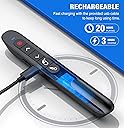
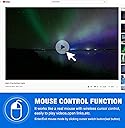
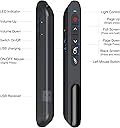
The DINOSTRIKE Wireless Presenter Remote is a versatile, rechargeable presentation tool featuring a bright red laser pointer visible up to 165 meters, a 164-foot RF wireless range for unrestricted movement, and an innovative air mouse function for precise cursor control. Compatible with Windows, Mac, Linux, and Android, it supports all major presentation software. Its ergonomic design includes a built-in USB receiver and clip for easy portability, powered by a 300mAh battery offering weeks of use per charge.


| Asin | B09F3C3PBH |
| Battery Types | AAA |
| Best Sellers Rank | 756,589 in Stationery & Office Supplies (See Top 100 in Stationery & Office Supplies) 699 in Presentation Pointers |
| Brand Name | DINOSTRIKE |
| Colour | black |
| Compatible Devices | Laptop |
| Controller Type | Button Control |
| Customer Reviews | 4.4 4.4 out of 5 stars (1,621) 4.4 out of 5 stars |
| Item Weight | 27 Grams |
| Manufacturer | Shenzhen Woqi Science & Technology Co., Ltd. |
| Manufacturer Part Number | TK701 |
| Maximum Number Of Supported Devices | 1 |
| Maximum Range | 164 Feet |
| Model Number | DM100 |
| Network Connectivity Technology | Radio Frequency |
| Number Of Batteries | 1 Lithium Polymer batteries required. (included) |
| Number Of Items | 1 |
| Product Features | Wireless |
| Upc | 721618322673 |
User
Great customer service for a great product
This is the second one I bought for teaching...my first one mysteriously disappeared when my students stopped liking the presentations.It works well all around the room. When I accidentally bent the USB/USBC connection, it would only work from a few feet away. I contacted the company and explained what happened. They promptly sent me a new clicker! They were very easy to deal with.I think the product is wonderful for my classroom and the company stands by their products.
User
جداً ممتاز
ممتاز جداً ويمكن استخدامه مع بوربوينت وملفات بي دي اف وبرامج اخرى كثيرةعيبه لا يمكن ربطه عن طريق بلوتوث لازم عن طريق الوصله المدمجه
User
Pretty decent.
If you're using this in a classroom, the presentation remote will function with the USB-C or USB-A side of the dongle connected to a newline Q series board. I have not tested it with a smart board. It works as stated with the other mentioned operating systems, but I didn't see these mentioned. Air mouse works great, but when the remote itself is on its way out and beginning to fail, the air mouse will act erratically and need to be reset. Range on the laser and the slide remote are both great. It doesn’t seem to be bothered by concrete walls of school buildings. It’s a bit expensive considering the fragility. Sometimes I get one that can take a couple of drops, and I’ve received some that will act wonky and give a blob for the laser point after a few drops. It’s pretty durable for what it is, and the warranty process is easy enough. They don’t always want to file a warranty claim, but mentioning a review, for better or worse, will get them to dispense a new one, even after you send them a video showing the problem and them denying it.A great pointer/air mouse/presenter, but I wish it was built a little bit better, and the warranty process was easier as these fail with some regularity even with perfect care.
User
جيد يفي بالغرض
جيد للتحكم عن بعد
User
A must for interactive presentations
Overall I’m impressed with the functionality and ease of this presentation remote. I create presentations that have a number of interactions included and this remote has helped me not be tied down to my computer. Here are my overall pros and cons of this tool:Pros- Charges quickly- Charge lasts 8+ hours with use- Simple set up, just plug and play- Great range- Air mouse feature allows interaction without being at computer- Compact size is easy to travel- Pocket clip (I can’t tell you how many times I’ve set my old remote down and forgot where it was)Cons- Air mouse speed, a touch on the fast side. I haven’t found a way to adjust- Slim design is not idea ergonomically to hold for extended timesThe pros definitely outweigh any cons, which really come down to preferences. If you deliver interactive presentations and don’t want to be tied down to your computer the entire time, this clicker is worth purchasing.
Trustpilot
3 weeks ago
3 weeks ago