Buy anything from 5,000+ international stores. One checkout price. No surprise fees. Join 2M+ shoppers on Desertcart.
Desertcart purchases this item on your behalf and handles shipping, customs, and support to Vanuatu.
🎮 Elevate Your Game with OLED Speed & Smart Power
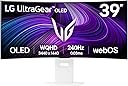
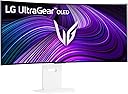
The LG 39GX90SA-W UltraGear is a 39-inch curved OLED gaming monitor featuring a 3440x1440 WQHD resolution with an immersive 800R curve. It boasts an ultra-fast 240Hz refresh rate and an ultra-low 0.03ms response time, ensuring smooth, lag-free gameplay. Equipped with NVIDIA G-SYNC compatibility and FreeSync Premium, it eliminates screen tearing. The monitor supports DisplayHDR True Black 400 with 1300-nit peak brightness for vivid visuals. Integrated webOS offers direct access to popular streaming services and cloud gaming platforms, making it a versatile smart display for both gaming and entertainment.


| ASIN | B0F15C7JL2 |
| Adaptive Sync | FreeSync Premium |
| Additional Features | Anti Glare Screen, Built-In Speakers, Curved, Dynamic Action Sync, Height Adjustment |
| Aspect Ratio | 21:9 |
| Brand | LG |
| Brightness | 275 |
| Built-In Media | Display Port Cable, HDMI Cable, Monitor, Power Cable, USB-C Cable |
| Color | White |
| Color Gamut | 98.5 |
| Connectivity Technology | DisplayPort, HDMI, USB Type C |
| Contrast Ratio | 1500000:1 |
| Customer Reviews | 4.2 4.2 out of 5 stars (362) |
| Display Resolution Maximum | 3440 x 1440 Pixels |
| Display Technology | OLED |
| Display Type | OLED |
| EU Spare Part Availability Duration | 2 Years |
| Hardware Connectivity | DisplayPort, HDMI, USB Type C |
| Has Color Screen | Yes |
| Item Dimensions D x W x H | 32.3D x 88.8W x 60.6H centimeters |
| Item Weight | 25.24 Pounds |
| Manufacturer | LG |
| Model Name | 39GX90SA-W.AUS |
| Model Number | 39GX90SA-W.AUS |
| Mounting Type | Wall Mount |
| Native Resolution | 3440x1440 |
| Number of Component Outputs | 3 |
| Picture Quality Enhancement Technology | DisplayHDR 400 TRUE BLACK, HDR10 |
| Pixel Pitch | 0.266 |
| Power Consumption | 67 Watts |
| Refresh Rate | 240 Hz |
| Resolution | QHD Ultra Wide 1440p |
| Response Time | 1 Milliseconds |
| Screen Finish | Matte |
| Screen Size | 39 Inches |
| Shape | Curved |
| Specific Uses For Product | Desktop, Entertainment, Gaming |
| Total Number of HDMI Ports | 2 |
| Total USB 3.0 Ports | 2 |
| Total Usb Ports | 3 |
| UPC | 195174115329 |
| Viewing Angle | 178 Degrees |
A**M
Great monitor, one small problem
Initially received the monitor with severe panel artifacts (second time experiencing this with LG). Almost returned it again, but Pixel Cleaning in the monitor settings fixed it completely. Works great now, but be aware of this issue before buying. For a premium LG monitor, it shouldn’t be like this out of the box.
M**A
Not 5K
The title image and description is not what it says. This is 2K not 5K its 3440 and its totally misleading.
M**E
WRONG description and images for model
This is NOT the 5k2k version of this monitor, like the images and description suggests. It is the older 1440p version. The model number is the only thing that is correct in the description and again matches the older model NOT the 5k2k version.
J**Y
Not 5K. Mistake in product description
It sais 45GX950SA-B in the product detail and on the picture it shows 5k but it's not the 5K model.
J**Z
The out of box settings are not great, google optimum settings for it. I upgraded from the asus pg32ucdm which is 4k qd oled and glossy. I was worried that this lg would not be as good, but it's really close to my asus after changing some settings. The ppi is a little less then the asus by like 15ppi, and its really not noticeable. For the minor trade offs, this lg is very immersive and I have not complaints with it. If you're upgrading from the previous lg 45 model which I also have or a lcd, this will be a huge upgrade for you. Keep in mind you need a beefy gpu, I run a 4090 and play Star citizen, bf6, cod, and racing games and can just barley max out the monitor on the highest settings.. I seen some reviews of people getting the wrong model or a used panel with hrs on it, but I ordered from amazon lg store and I got a brand new monitor. One thing to mention is when I first powered the monitor on and loaded into windows there was like vertical banding on the left and right of the screen that scared me. But with a little googling it's normal with a new panel and i just ran a pixel clean on the monitor. First run fixed it for me and the screen is perfect now. I never tried the dual mode as I dont see myself ever lowering the resolution for any of the games I play. If you're looking for one of the best gaming monitors, this one is it. The size to me is perfect along with the 800r curve. Makes you feel like you're in the game!
D**R
This monitor is freaking awesome! If you’ve seen the first Incredibles where Mr. Incredible sneaks into Syndrome’s Computer? This monitor feels like that. A Goliath monitor. It’s insanely spacious. The 5K2K resolution is beautiful. Colors are beautiful, bright, and accurate on that OLED display. It’s expensive, but worth it. I use the USB-C cable for my Mac, and the DisplayPort for my PC. All working seamlessly. This is definitely the monitor to get. Insanely smooth too with the high refresh rate.
N**7
Excelente opcion de Smart TV y monitor. Muy recomendado.
G**O
I've been using it for 4 months now and when I first set it up, it was stellar. The difference was incredible. It's very immersive and just a great screen. I'm not going to go into all the details that others do, but I'll highlight a few things: Pro: - It's big. The curvature is just about right if you're about 3 feet away. - The HDR is a nice change and very noticeable. - Refresh is fine - 165Hz is more than enough if you can push it there. - 2 HDMI, 1 DP, 1 USB-C is nice. - I get 165Hz with both DP 3M (what is now Green Jiss CABLE-54532587 (?)) and HDMI 2M (Ubluker UB222) cables from Amazon. - USB-C port provides power/video to a MacBook, if that's what you're using. - It's packed very well (and huge, as you would expect). Con: - Other reviews mention not coming out of sleep. I had the same issue. I just changed the settings to not go into deep sleep and it's been fine. - Would have preferred a different way to switch between inputs than pulling up the menu with that small nipple-like joystick. I imagine that it will eventually fail. - Firmware update is a mess to do. Don't know if I needed it or not but did it anyway (the sleep issue noted above). - The USB-A ports on the monitor are only fed by the USB-C input. Kinda disappointing. If you have a MacBook attached via USB-C but want those USB-A ports for a different machine, nope. - It's big (pro and con depending on your setup). I think the USB port thing is my biggest gripe. Would be nice to have the USB-C video but not have the USB-A hub/ports tied to that input. One more USB input for the hub with a toggle on which to use would have made it perfect. Anyway, overall, I can ignore the cons and say that this is an amazing monitor.
F**N
I got this curved monitor as a gift for myself on my birthday and I was surprised on how heavy the box was when I first got it. Unpacking and installing wasn't that hard except with the portion of getting the curved monitor onto it's stand. I recommend getting another person to assist you since It's fairly awkward balancing the monitor on your knee and chest while trying to get it onto the stand at the edge of a table. Once hooked up and going, I was surprised at how nice it was. It's my first time using a curved monitor so I'm still new to the real estate that you get with it. Paired with my old samsung monitors, I'm getting so much more space than before. Gaming with the monitor is also amazing as well. The FOV that you get in games is amazing and I'm able to see so much more around me than before. It really immerses yourself into the game. I'm really happy that I've looked into which monitor suits me the best because this one was truly amazing to use. I also like the fact that LG has a built in rest function for the monitor so that it auto turns off when it's not in use to prevent burn ins on the OLED. The monitor also has a built in scrubbing function where during some times that I have noticed some burn in from my desktop icons. You go to the settings and in the general setting there is an OLED image cleaning that removes it after a couple of minutes. I've been using this monitor for almost 2 months now and I'm still impressed day to day on how much it's able to do and I'm happy to get something that can finally express the potential of my PC.
Trustpilot
4 days ago
3 weeks ago