Buy anything from 5,000+ international stores. One checkout price. No surprise fees. Join 2M+ shoppers on Desertcart.
Desertcart purchases this item on your behalf and handles shipping, customs, and support to Vanuatu.
๐ Elevate your network game with unstoppable speed and security!
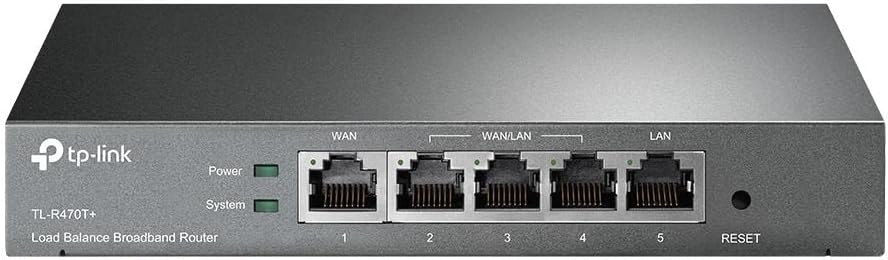
The TP-Link TL-R470T+ is a professional-grade business router featuring up to 4 WAN ports with advanced load balancing and WAN aggregation, ensuring maximum bandwidth and failover reliability. It offers robust security with ARP Inspection, DoS Defense, and URL filtering, alongside customizable QoS for optimized traffic management. Designed for small offices and internet cafes, its compact metal chassis combines durability with cost-effectiveness, making it a top choice for seamless, secure, and efficient broadband management.


| ASIN | B005SYQBN8 |
| Best Sellers Rank | #2,137 in Computers & Accessories ( See Top 100 in Computers & Accessories ) #32 in Routers (Computers & Accessories) |
| Box Contents | TL-R470T+, Power Cord, RJ-45 Ethernet Cable, Quick Installation Guide and Resource CD |
| Brand | TP-Link |
| Brand Name | TP-Link |
| Color | Black |
| Colour | Black |
| Compatible Devices | Laptop |
| Country of Origin | India |
| Current Rating | 0.6 Amps |
| Customer Reviews | 4.0 out of 5 stars 1,268 Reviews |
| Data Transfer Rate | 100 Megabits Per Second |
| Global Trade Identification Number | 00845973040390 |
| Importer Contact Information | TP-Link India Private Limited Office No.1, Tower 2, Level 2, Raiaskaran Tech Park, Andheri Kurla Road, M.V Road, Andheri East-400072 Contact: Toll Free 1800-209-4168, [email protected] |
| Interface | RJ45 |
| Item Dimensions L x W x H | 21.1L x 12.7W x 2.8H Centimeters |
| Item Type Name | Router |
| Item Weight Unit of Measure | 0.46 Kilograms |
| Manufacturer | TP-Link, TP-Link Systems Inc. 10 Mauchly, Irvine, CA 92618, USA or TP-Link India Private Limited Office No.1, Tower 2, Level 2, Raiaskaran Tech Park, Andheri Kurla Road, M.V Road, Andheri East-400072 |
| Manufacturer Contact Information | TP-Link Systems Inc. 10 Mauchly, Irvine, CA 92618, USA or TP-Link India Private Limited Office No.1, Tower 2, Level 2, Raiaskaran Tech Park, Andheri Kurla Road, M.V Road, Andheri East-400072 |
| Manufacturer Part Number | TL-R470T+ |
| Model Number | TL-R470T+ |
| Number of Ports | 5 |
| Packer Contact Information | Pacific Technology Private Limited Survey No, 57/3/55, 57/2/56, 57/1/57, Silver Industrial Estate, village Bhimpore, Nani Daman, daman Dadra and Nagar Haveli and Damn and Diu, India 396210 |
| Platform | iOS |
| Product Dimensions | 21.1L x 12.7W x 2.8H Centimeters |
| Switch Type | Managed |
| UPC | 041114900794 845973040390 731215288579 112840006903 191120009711 112040011455 191120100524 022746281727 |
| Unit Count | 1 Count |
| Voltage | 240 Volts |
N**I
Best Load Balancer / WAN Aggregator in this price range
What an absolute gem. As soon as you hold it in your hands it screams premium with all metallic chassis and heavy weight. Setup is simple and intuitive. You just need to select number of WAN ports you're gonna use, supply them with connection parameters and you are set. You can use this in many ways, Load Balancer across multiple WAN connection where you can specify how much traffic should go out of one connection over another (you can specify the ratio), as a hot standby device where secondary WAN only kicks in if first one goes down or WAN Aggregator (which I am using) where you can combine the bandwidth of all WAN connection you are using. Make sure to disable "Enable Application Optimized Routing" from Advanced -> Load Balance -> Configuration if you want to aggregate WAN bandwidth. I am using an Airtel DSL line with 16 Meg Down and 1 Meg UP and Excitel Cable connection with 20 Meg UP / Down. I am constantly getting 36 Meg Down / 21 Meg UP with this. There are few reviews online for this, however, I recommend one from Mr. Barnacules Nerdgasm :[...] . This is the one which made me buy this device. Totally recommend it
T**R
Works well with well balanced Dual WAN
First, I reall wished to buy a gigabit WAN router for future proofing but all ISPs commonly have a 100mbps max connection speed. My home of office LAN is all with gigabit Ethernet. This router is well made, solid metal build. Setup was a breeze. I'm using this with one static IP connection & the second with a PPPoE ISP. With load balancing that helps bandwidth aggregation. Works well without any packet loss. Recieved a newly made product dated April 2019 V6.0 but firmware updates ended until June 2018. Will post a follow up review a month later. Update: (June 2020) a year later..... Recently recieved a 2020 firmware update last month. Router has been very functional and link aggregation has been working great. I've been using Airtel xstream, ACT Fibernet & Excell broadband with different protocols each like DHCP, PPPoE & Static IP configurations. Only drawback is that the link speed limit is only 100mbps which isn't helpful for future use if I get a faster internet plan ( 50+40+40mbps currently). I can recommend this router for internet users who don't have current plans of not greater than 25-40mbps.
G**R
Perfecto for mini setup with 2 internet connections
Tp-link hasn't disappointed me, this router works perfect as I have two isp's airtel fiber and bsnl fiber, I have it on 2 WAN setup and load balancing configuration and also manage a FTP server and setup static ips for printers and machine servers to easily communicate, my only downside is I should have gone with 1gig router to accommodate the ip camera traffic, 177 cameras overwhelmed the network and had to create a separate network to maintain traffic.
H**R
Not recommended
Please make an informed decision while buying this...read between the lines...It only supports 100mbps lan ...so useless when you have high speed internet connections...The product info listed is also incomplete and the description given is also for another model. Go for the model with gigabit connections since most ISPs offer 150mbps at low costs
P**H
Its only 100mbps which is not mentioned in the description
The product is nice and setup was straightforward. However, it only supported 100mbps which was not mentioned anywhere in the product description. I have a 200mbps connection and hence this was not useful for me.
J**N
Cheapest and the best multiple wan router!
The devices works like charm with 2 Isp i got. I was worried my office vpn will give me an issue.. But fortunately its application based load balancer. So vpn stays on one isp. (I'm guessing). Haven't faced and disconnection issues yet. Anyone looking to have uninterrupted internet connection and double speed only on certain traffic. This is a perfect router. This is how I connected: Isp 1 + Isp2 > load balancer router > my old netgear wifi router> all devices. Setup will not be easy for layman. You need a bit of network understanding. However many youtube videos are available. Please keep in mind, this is not a wifi router. Update: VPN works on on default settings of the router, that is load balancing based on applications, if load balancing is set without any condition it doesn't work but rest of the internet works fine.. Hope this info helps!
M**S
Must have product to manage multiple connections
I was having multiple internet connections to work from home and be available online without any interruptions. Since the network providers I had was not completely stable I had to switch connections manually to find out which one is better. There were instances where both were not good. However tp-link load balancer was a game changer. Setting up the device was the easiest part and I just had to plug-in the cables on the right spot and everything works automatically. No set up or configuration required. The best part is that the device not only switch automatically to best network but is also combining the bandwidth from both the network connections.
G**R
Works for network balancing as intended
The device works with multiple networks as intended, but dns configurations settings are not working.
Trustpilot
2 weeks ago
2 months ago