

🚀 Elevate your data game with Synology DS1618+ — where speed meets scalability!
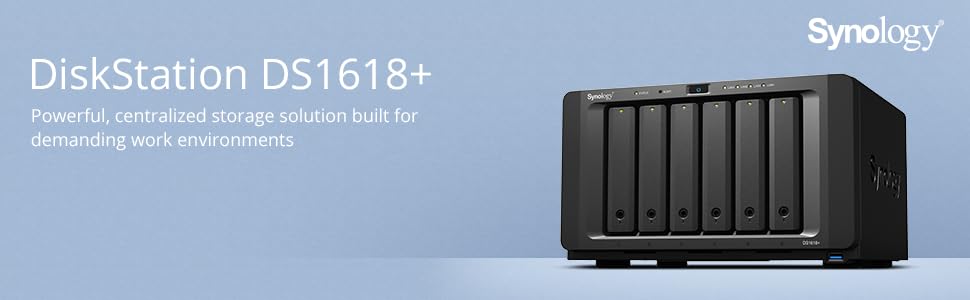
The Synology DS1618+ is a robust 6-bay NAS designed for SMBs and professionals demanding high-speed, scalable storage. Powered by a quad-core 2.1 GHz CPU and expandable DDR4 memory, it delivers over 1,550 MB/s read speeds and supports advanced data protection with Btrfs snapshots. With PCIe 3.0 for 10GbE upgrades and M.2 SSD caching, it future-proofs your network storage while simplifying data management.


| ASIN | B07CR8RZYY |
| Are Batteries Included | No |
| Best Sellers Rank | 205,199 in Computers & Accessories ( See Top 100 in Computers & Accessories ) 141 in Network Attached Storage (NAS) Enclosures |
| Brand | Synology |
| Colour | Black |
| Computer Memory Type | DDR4 SDRAM |
| Customer Reviews | 4.5 4.5 out of 5 stars (385) |
| Date First Available | 17 May 2018 |
| Guaranteed software updates until | unknown |
| Hardware Platform | Mac |
| Item Weight | 5.05 kg |
| Item model number | DS1618+ |
| Manufacturer | Synology America Corp |
| Processor Count | 1 |
| Product Dimensions | 28.19 x 23.6 x 16.61 cm; 5.05 kg |
| RAM Size | 4 GB |
J**D
Superb NAS Easy to use, fast, great flexible functionality.
I opted for the 8Gb version and have been very pleased with the item. The synology diskstation inerface is very user friendly and easy to use. The surveilance station interface for CCTV cameras is a great feature and adding cameras is easy. There are many apps that can be added from both synology and 3rd party vendors adding even more functionality. I have added a 10gb network card and has experienced superb throughput via my 10gb switch. Would recommend in a hearbeat.
T**8
Great unit and good support (but it did fail after 22 months!)
Had this unit for almost 2 years - fully populated with 12 WD Red 4Tb HDDs running 2 disc redundancy and a hot swap. Last week it failed - apparently showing failures on 9 of the 12 discs. Contacted Synology support in UK who were very helpful in giving us diagnostic tests to do. Concluded quickly that the MoBo had failed. We were able to drop the unit off in Bletchley one day and a replacement unit was couriered to us arriving the next day. We replaced all the old drives in order, switched on and held our breaths! Everything was completely fine - no reconfiguration was necessary and all drives are working fine with no data loss at all. Full marks to Synology tech support and for a seamless migration, but a tiny niggle over the fact that unit failed at all!
M**.
A great NAS box
What a great drive. Easy to set up and it just works. Lots of flexibility even on fan speed and hibernation. Only slight crit is that all the usb connections are on the back so unless you want to move the unit connection of USBs is by feel I would recommend to all. Especially good for serving media to Kodie or the like Mike
T**I
Great Product : Eureka Successful Migration from DS412+
I have two Ds412+ and decided to migrate to the DS2415+ for more capacity. Synology have kind provided their migration link (https://www.synology.com/en-us/knowledgebase/tutorials/484). I have successfully migrated to this new device with 4x 6TB RED drives over. The migration is time consuming and requiring patiences on my part to trust the Product to deliver while it does its magic in the background. Actual estimated downtime 3 hours, once the migration is over, updating the DSM and the reinstall all your packages quite painless using previous adminsration experience. I did not have access my documents folder for a over 24 hours until the background migration task is over. On completion my documents were available again. Lessons learnt, backup whatever is precious to you as insurance. I trusted Synology system to deliver and they did.
A**E
Extra memory a must
With extra memory this NAS works quite well. I still have a beef with all those developers trying to write web servers and databases. Given the state of art of software these days it should be very easy to set sites up and link them to databases. Synology provide you with the tools and then your are left to the idiosyncratic developers whims
T**G
it works!
It arrived a few days late but it works as it says. Doing a great job! 10TB used out of 14TB (it was diskless) on 24/7 as you would expect!
A**Y
Super easy to use file server
Great product, easy to setup, loads of features, works well with Amazon cloud backup. easy to expand
P**N
Excellent product
Bought this to replace my DS415play, The DS2415+ was an excellent product, easy to use, and drive bays and (less bright) light styles are far better that the older DS415. Now had three Diskstations over the years, great for my basic needs of a home media network, and connections to PC's and DLNA smart TV's. DSM is also a great OS. Although I use the Synology media server, I also installed Serviio which is better, and far fewer connection drop-offs to the TV's. But ended up selling the DS2415+ and reverting to the DS415, because even though the DS415 reported 99% capacity, whilst transferring my files I realised that it had only been 23% full, and decided that the DS2415 was a bit to chunky in the available location. I think a bug due to DScloud service hogging space, so take care if you are upgrading due to lack of space. (Check properties/size of each shared folder, don;t rely on DSM giving you a summary.)
M**E
I bought this to replace a 10-year-old super loud, power-hungry server in my basement. Absolutely brilliant product, works as advertised and I'm very happy. Shucked some cheap WD 10TB EasyStore drives for storage. I also replaced the fans with quieter Noctua units. I have 3 RAID 1 arrays using BTRFS: 2x SSDs for the Synology OS & VMs, 2x WD 10TB for media, and 2x WD 4TB for surveillance cold storage. Be warned; the Atom CPU in this model is not a great choice for running any serious Virtual Machines. I am running 2 Windows Server VMs: a domain controller and a Ubiquiti Controller. They're quite sluggish, but get the job done. I installed 32GB ECC Corsair RAM for 3 reasons: 1) dual-channel RAM runs faster 2) spare RAM for VMs 3) BTRFS requires ECC RAM to provide full data protection. BTRFS is about as close as you can get to 100% data protection right now but only if you use ECC RAM, and this is the cheapest Synology NAS with support for ECC. I tried Surveillance Station and found it to be under-powered and unreliable. The Atom CPU just isn't up to the task. However, as a NAS and very basic VM host it works wonderfully. I back up weekly to a WD 10TB EasyStore, and swap it out once a month with an identical off-site unit. Absolutely first class for keeping your data safe. Great job Synology!
D**O
Buona qualità, consigliato.
I**D
Les NAS Synology sont des produits très bien fabriqués, fiables, performants et parfaitement recommandable pour un usage privé et/ou professionnel. Le DSM pour le gérer en local ou à distance offre une interface agréable rendant la configuration et l'intégration de plugs-in facile. Associé à des disques Western Digital Red, c'est nickel. Excellente marque.
K**R
This NAS drive is awesome. The admin interface is easy to use. The device is very powerful and has massive storage capacity. I'm using it as a media server for movies, TV shows, and music (Emby) and e-books (Calibre). Installing the Emby media software was pretty straightforward. Getting the Calibre e-book manager set up was a little more complicated because I had to install the Docker container application first, then install and configure Calibre. Fortunately there are online tutorials that help with the installation and setup. I've currently got six 12 TB drives in the Synology, so I can double my storage by adding more drives. And if that's not enough there's an expansion unit that adds another 12 bays! But my first upgrade is going to be adding more memory. I set up a smaller media server for my daughter in law, using a Synology DS218+ with two 4 TB drives. If you're looking for a NAS with brains enough to do almost anything, you can't go wrong with Synology.
T**!
Das ist nun mein drittes Synology NAS. Nach einem 2-Bay und 4-Bay Synology NAS ist meine Wahl nun auf das 12-Bay Synology NAS DS2415+ gefallen, für maximale Zukunftssicherheit. Wenn die 12 Bays nicht ausreichen, kann man eine etwas günstigere Expansion Box mit weiteren 12 Bays dazukaufen. Das ich so ein treuer Synology-Kunde bin, hat seinen Grund: Ich bin sowohl von dem Betriebssystem, dem DiskStation Manager (DSM) mit der Windows-artigen Weboberfläche als auch von der Produktpflege begeistert. Seit 4 Jahren bekomme ich jährlich ein Update mit neuen sinnvollen Features für mein altes 411+. Free-Of-Charge und das auch noch nach 4 Jahren. Die Migration der Festplatten von 4- auf 12-Bays verlief wieder völlig problemlos (so wie schon die Migration von 2- auf 4-Bays). Nach ca. 15 Minuten war die Umstellung komplett: keine Probleme, keinen Datenverlust. Ich hatte vorher lediglich die Systemeinstellungen beim DS411+ gesichert, da ja der DSM neu installiert wird. Das hat "Apple-Niveau" im positiven Sinne. Es wird ja eigentlich immer ein Datenbackup empfohlen. Aber irgendwann sind die Datenmengen so groß, dass man sie einfach nicht mehr backuppen kann. Das Synology DS2415+ NAS wäre ja als reiner Fileserver völlig unterfordert, aber man kann dort ja Apps aus dem Synology Paketzentrum (App-Store) installieren. Die Apps sind natürlich speziell für das jeweilige Synology NAS angepasst, kostenfrei und "schlüsselfertig". Schon auf dem dem DS411+ (2GB Ram, Single-Core) hatte ich SVN, MariaDB und GIT aus dem Paket-Zentrum installiert. Mit dem DS2415+ will ich den kompletten Stack für die Java-Entwicklung dort laufen lassen: Atlassian JIRA (Bug-Tracker), Atlassian Confluence (Wiki), Atlassian Fisheye (SVN-Analyzer), Artifactory, Jenkins, SonarQube Deshalb hatte ich gleich den Speicher auf 6GB RAM erweitert. Wegen der Garantie habe ich einen original Synology-Riegel gekauft. Docker (seit DSM 5.2) ist eine leichtgewichtige Container-Virtualisierung mit einem zentralen Docker-Hub-Repository. Dort werden Zentral sog. Docker-Images angeboten. Das sind vorkonfigurierte, also "schlüsselfertige" Anwendungen, die man einfach über ein Kommando runterladen und starten kann. Docker selber kann über eine Web-GUI als auch über eine Shell über das "docker" Kommando benutzt werden. Ein JDK lässt sich dort zwar problemlos installieren. Allerdings unterstützt der DSM nur die 32 Bit (x86) Versionen von JDK 1.7. JDK 1.8 lässt sich dort aktuell nicht installieren. Das ist aber dann egal, wenn man ohnehin über Docker installiert. Docker-Images bringen sich ihr eigenes JDK mit, auch 64bit. Jetzt habe ich die obigen Anwendungen (SonarQube, Jira, Confluence, FishEye, Artifactory, Jenkins) über Docker installiert. Dank Docker ist das nun wirklich "kinderleicht". Natürlich sollte man wissen wie Docker funktioniert. Das Synology Docker nun als App im Paketzentrum anbietet, ist ein echter Geniestreich. Vor Docker war es gar nicht trivial, Anwendungen jenseits des Paketzentrums zu installieren. Softwareseitig mussten manuell etliche Modifikationen vorgenommen werden (Bootstrap installieren, etc.). Das ist jetzt nicht mehr notwendig. Ich muss ja immer wieder betonen wie gut die Synology-Software ist und wie problemlos sowohl Migrationen als auch der tägliche Betrieb sind. Neben den üblichen RAID-Modes (JBOD,0,1,2,5,5+Hotspare,6,10) gibt es auch noch das Synology Hybrid RAID. Da entscheidet die Software welcher RAID-Mode sinnvoll ist. Während bei den normalen RAID-Modes alle Platten gleich groß sein müssen, können beim Synology Hybrid RAID die Platten unterschiedlich groß sein. Das macht besonders dann Sinn wenn man z.B. sukzessiv Festplatten gegen Platten mit höherer Kapazität tauscht. Man muss sich jedoch beim SHR bei der Initialisierung festlegen, ob man eine oder zwei Platten Redundanz haben will. Nachträgliches konvertieren geht dann nicht mehr und man muss das Volume dann neu aufbauen. Wenn man jedoch explizit RAID 5 benutzt, kann man später auf RAID 6 migrieren. Ich habe das NAS über 4-Port-Link-Aggregation an den TP-Link TL-SG3424 angeschlossen. Über eine 1 GBit-Leitung habe ich max. Lese- und Schreibraten. Link-Aggregation macht erst dann wirklich Sinn, wenn mehrere Rechner auf das NAS zugreifen. Noch einen Tipp zu den verwendeten Festplatten. Ich würde niemals Monokulturen benutzen, also vier mal dasselbe Modell beim selben Händler kaufen (das gilt natürlich auch für spezielle NAS-Laufwerke). Dann ist die Wahrscheinlichkeit auch groß, dass sie dann alle ähnlich lang leben. Ich schätze hier Diversität und kaufe Kreuz und Quer. Verschiedene Hersteller und wenn es derselbe Hersteller ist, dann verschiedene Modelle. So kann man die Wahrscheinlichkeit eines "plötzlichen Massensterbens" minimieren. Abgesehen von den "state-of-the-art"Hardware-Features wie Hardware-Encryption, USB 3.0, 4*GBit-Ethernet mit Link-Aggregation, etc. es ist auch einfach ein sehr, sehr leises NAS und auch deutlich leiser als mein altes 411+. Im Gegensatz zu meinem DS411+ ist die CPU nämlich passive gekühlt und zwei große Gehäuselüfter sorgen für eine "ruhige" Kühlung. Auch kann man eine SSD als Cache hinzufügen. Es gibt für fast alle Aspekte (Filme, Backup, Musik, Fotos) des DSM eine App für Android und iOS. Ich kann jeden - der ein professionelles NAS sucht - Synology nur empfehlen! Und das gilt auch schon für die kleinere Modell ab 2-Bays. Alles andere ist Spielzeug.
Trustpilot
1 month ago
2 months ago