


🔌 Power, Switch, and Dominate Your Workspace Effortlessly!
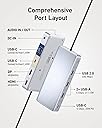
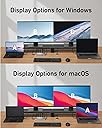
The Anker 554 USB-C Docking Station KVM Switch is a premium dual-laptop docking solution that supports seamless one-click switching, dual 4K monitor output via HDMI and DisplayPort, and simultaneous 100W charging. Designed for professionals juggling multiple devices, it offers versatile USB connectivity and reliable build quality, making it an essential hub for MacBooks, Windows laptops, iPads, and more.





| ASIN | B0C532J5JW |
| Amazon Bestseller | #173,546 in Computers ( See Top 100 in Computers ) #729 in Laptop Docking Stations |
| Batteries Included | No |
| Batteries Required | No |
| Brand | Anker |
| Color Name | gray |
| Compatible Devices | MacBook Pro, iPad |
| Customer Reviews | 4.0 4.0 out of 5 stars (162) |
| Date First Available | July 3, 2023 |
| Item Model Number | A83K1 |
| Item Weight | 0.62 Pounds |
| Item model number | A83K1 |
| Manufacturer | Anker |
| Material | Plastic |
| Operating System | ['Windows 10', 'Windows 7', 'macOS'] |
| Product Dimensions | 17 x 7.2 x 2.4 cm; 281.23 g |
| Size | For 2 Laptops |
| Special Features | KVM switch |
| Total Usb Ports | 6 |
B**L
It great, you just need to setup the keyboard/mouse wake up on your device. Charges both my laptops effortlessly, the butto is separate so you can stow away the wires in the back However, It came with a US plug rather than a UK plug, hence the 4 stars. You will need an adapter or alternative cable
A**R
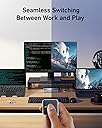
Before purchasing the Anker switch, I had tried a different one that was poor quality and didn’t work for me. The Anker KVM is a much better build quality, and works flawlessly for me. Set up was easy. I have two Lenovo laptops connected to one monitor and one Logitech wireless keyboard and mouse. Switching between the two laptops is super convenient and fast with the wired remote button. The Anker device has enough capacity to keep both laptops charged through their USB-C connections. The Logitech USB unifying receiver connects to a USB port on the front of the KVM device. Thr monitor is connected to the KVM with an HDMI cable. I only have minor complaint. The laptops don’t always wake up when I switch to them if they are idle for a while. I have to tap the actual laptop mouse pad to wake it. The issue may stem from the wireless keyboard and mouse rather than a design flaw with the switch. I have used the Anker KVM switch for about a month, and I am very satisfied with its performance and the convenience it provides.
V**L
Anker read my mind when creating this product. I have a personal laptop and a work one, both sharing same peripherals (keyboard, mouse, headset, 2 monitors). I previously had a nonbrand hub which did the job but was crashing a bit. This KVM is awesome, expensive yes, but works great!!! Just make sure both laptops have Thunderbolt support or USB 4/5, one monitor has DisplayPort and another HDMI, then you're set!
A**R
I am using it with a Macbook Pro (M2) and a Dell XPS 15 9570 and it has been going okay for my needs. My setup is with a single LG 34" ultrawide monitor connected via HDMI, with two Logitech wireless mice and a keyboard, all connected wireless via a single Logitech Bolt USB dongle. The second USB A port is connected to a webcam, and the remaining USB-A port is connected to a charging pod for my earbuds. I have one USB-C port free. I work with both laptops in clam-shell (lid closed) mode. Switching between the laptops works fine with all accessories getting picked up by both MacOS and Windows 11. I couldn't get the Macbook Pro to work until I allowed the USB dock to be connected via a notification in MacOS. After that things work except for the following issues: * I have to lift the Macbook Pro lid up to get the display to show on my external monitor, this is annoying but better than me having to unplug and plug the display cable from my previous Dell dock * Power delivery is not 100W, unless you have only one laptop connected to the KVM switch. This is actually mentioned in the product description, but I overlooked it. This makes Dell XPS 15 Windows 11 report "Weak charging stage, please check power charger" notification against the battery icon with a warning in the taskbar, and also will make the boot pause before Windows loads with a similar warning. I don't use the XPS for gaming or anything power hungry, and you could always just connect the power supply that came with the XPS. But other than, works great for me.
G**Y
Easy to set up and easy to use. The magnetic back on the switch is a handy feature - I just stick it to my monitor bezel. KVM ultrawide monitor, $500+. KVM dock, <$300 and I can use it with any monitor I like. I have an actual KVM monitor with a USB-C upstream port, and a USB-A upstream port + HDMI and I had to buy a separate USB-C dock with power and USB and HDMI to get the convenience of a "flick of a switch". This dock does it all easily.
Trustpilot
5 days ago
2 months ago