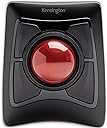
Desertcart purchases this item on your behalf and handles shipping, customs, and support to Vanuatu.
๐ฏ Master your workflow with precision and comfort โ the Expert Mouse that means business.
The Kensington Expert Mouseยฎ Wireless Trackball combines advanced DiamondEyeโข optical tracking with dual wireless connectivity (Bluetooth LE and 2.4GHz USB receiver) to deliver precise, cable-free control. Featuring 4 customizable buttons via KensingtonWorks software, an ergonomic ambidextrous design with detachable wrist rest, and a patented Scroll Ring, itโs engineered for professional productivity on Windows, Mac, and select ChromeOS devices. Backed by a 3-year warranty and 12-month battery life, itโs the ultimate tool for managers and creatives seeking comfort and efficiency.


| ASIN | B01936N73I |
| Are Batteries Included? | Yes |
| Are Batteries Required | Yes |
| Battery Average Life | 12 Months |
| Best Sellers Rank | #21,213 in Computers & Accessories ( See Top 100 in Computers & Accessories ) #4 in Trackballs |
| Brand | Kensington |
| Brand Name | Kensington |
| Button Quantity | 4 |
| Colour | Black |
| Compatible Devices | windows,pc,mac |
| Connectivity Technology | wireless |
| Country of Origin | China |
| Customer Reviews | 4.2 out of 5 stars 5,277 Reviews |
| Global Trade Identification Number | 00085896723592, 07802880611214 |
| Hand Orientation | Ambidextrous |
| Hardware Platform | Mac, PC |
| Importer Contact Information | Interface Connectronics Pvt Ltd, # 85, Unit # 3, First Floor V.V.Yoga Saurabha, S.C.Road, Yeshwanthpur, Bangalore, India 560022, Contact: +91-9739952969, [email protected] |
| Item Dimensions L x W | 25.4L x 8.9W Centimeters |
| Item Type Name | Trackball |
| Item Weight Unit of Measure | 1.35 Pounds |
| Manufacturer | ACCO Brands, ACCO Brands Asia Pte Ltd, 2 International Business Park Tower 2 #05-31/32, The Strategy, Singapore 609930, Contact: +65-67760195, [email protected] |
| Manufacturer Contact Information | ACCO Brands Asia Pte Ltd, 2 International Business Park Tower 2 #05-31/32, The Strategy, Singapore 609930, Contact: +65-67760195, [email protected] |
| Manufacturer Part Number | K72359WW |
| Model Number | K72359WW |
| Movement Detection | Trackball |
| Movement Detection Technology | Trackball |
| Network Connectivity Technology | wireless |
| Number of Batteries | 1 A batteries required. (included) |
| Number of Buttons | 4 |
| Operating System | Chrome OS, Mac OS 10.13 High Sierra, Windows 8 |
| Packer Contact Information | Interface Connectronics Pvt Ltd, # 85, Unit # 3, First Floor V.V.Yoga Saurabha, S.C.Road, Yeshwanthpur, Bangalore, India 560022, Contact: +91-9739952969, [email protected] |
| Power Source | usb powered |
| Product Features | Wireless |
| Special Feature | Wireless |
| Style Name | Modern |
| Theme | Video Game |
| UPC | 085896723592 |
| Unit Count | 1 Count |
| Warranty Description | Limited 3 year warranty |
Y**N
A comfortable trackball with many buttons
I enjoy using this trackball every day. It takes up space on my desk, but using this is fun and smooth. You need to get used to the buttons and moving around if you are new to a trackball mouse. There is a learning curve. I don't use all the four buttons yet. You can also assign shortcuts to combination of two buttons. The attached wristrest is also good. My hand doesn't feel tired using this trackball for longer hours.
N**R
MusicProduction and Mixing Mastering
Better for Music producers and Audio engineers
A**A
Good trackball, but cheap plastic
Their mac software is useless hence im using steermouse app to program it.. Mouse click feels cheap plastic. I was facing wrist issues with my earlier thumb trackball. So purchase this , even this started to give a bit of pain, but after a while hand got adjusted and pain vanished.
K**N
Best for Music Producer โค๏ธ
Great product after Using it you can't go back for normal mouse
P**.
Great seller
Great product and great seller . Made our exchange possible as well even in the warranty period
A**M
Works well, but pathetic build
Works like a charm, but the build quality is pathetic. Iโm rather surprised by the cheap plastic construction for a very premium-priced pointing device. The plastic enclosure and inserts have sharp edges, and the scroll ring wobbles and makes a grating noise. The only thing substantial is the trackball itself, and how smooth it feels to operate. Logitech trackballs are of much superior overall quality, and they provide comparable performance.
K**L
Too good
Expensive but good
A**R
No service in India
Try claiming warranty they wont support in India. think twice before ordering
U**Y
Came for the ergonomics, stayed for the productivity
Why, why did I wait to buy one of these it's beyond brilliant. First up let me explain, about 3 months before buying this I had a fall and broke my wrist, broke 2 bones and did some ligament damage - ouch, yes it's as painful as it sounds and if you take nothing else away from this review be careful with icy pavements. The healing from a broken wrist can take up to a year in some cases and a lot of pain ensues while thats happening, when I had a cast on for 6 weeks towards the end there was no discomfort hardly at all so in my head it's yay, cast off, back to normal, rock on. Er no, as the cast came off my reaction was mm ow ow OW OW! MOTHERFU.... that hurts, and so began a quest to find someting I could use comfortably and get my extremely bored arse back to work. So finally, the trackball itself, what can I say, silky smooth operation from the actual ball, being 55mm across it means you can control it with three fingers if needs be, the four buttons around the ball are totally customisable if you download a small application from Kensingtons website and you aren't limited to four functions either, you can add keys to each button so you get a different function if you press shift, or control, or alt or the win key so four individual functions on each of four buttons - that's a lot of shortcuts. In addition to this you can specify a set of shortcuts for each application, the combinations and permutations are mind boggling. There is also a scroll wheel right next to the ball and again it's customisable in terms of speed and direction and inertia which I tried but didn't like but it's worth looking at it to see if it works for you. There is of course the usual pointer speed control which using a super ultra wide high resolution monitor I have set quite high to quickly move around the huge screen area, that is fine but it's not the most precise method - however Kensington have thought of that too, you can set one of three keys to instantly and temporarily lower the pointer speed making precision a doddle, there is even a setting to lock the movement to just vertical or horizontal movement in a single axis and while this might not sound like the pinnacle of technology if say you have a bunch of tabs open in a browser or are going through a bunch of drop down menus in a professional application such as Photoshop or illustrator - which I do all day every day while doing actual work it just makes it even easier - hence quicker to use. It's just one more reason to like this trackball and why I will NEVER go back to using a mouse again - ever. Looking at one of the other reviews there was a criticism that you had to float your arm to use the trackball and it placed strain on your arm/wrist - well as this was the entire reason I'd been looking at things like this trackball to reduce just that and allow me to get back to work take a look at this... https://www.amazon.co.uk/gp/product/B0752MCX82/ref=ppx_yo_dt_b_asin_title_o04_s00?ie=UTF8&psc=1 It's basically a device that clamps to your desk and cradles your arm taking the weight and strain away from your arm - and crucially for me the wrist, a combination of that cradle and this trackball means I have a perfectly straight arm position from the elbow to fingertips and the sometimes unbearable pain of using a mouse - and i've tried 6, everything from gaming mice to really thin bluetooth mice to smaller sized mice, even a vertical mouse has gone, I can use this for hours with nothing more than the odd twinge - using a mouse all day I'd have to mainline so many painkillers it'd turn me into a zombie. Very seldom do I buy anything that makes a real improvement to my daily life but this is definitely one of those times and I don't like this trackball I love it.
B**N
J'adore
J'ai achetรฉ cette souris trackball, aprรจs avoir utilisรฉ pendant des annรฉes des souris ergonomiques classiques. J'avais avec celles-ci tout de mรชme quelques gรชnes ร l'usage. J'ai achetรฉ ce trackball aprรจs avoir lu les avis. Je ne suis vraiment pas dรฉรงue. C'est la souris la plus ergonomique que j'ai utilisรฉ. Aucune douleur, aucune gรชne. Elle est trรจs agrรฉable. Je ne pourrais clairement plus revenir en arriรจre.
D**R
A few flaws, but I'm a trackball convert anyway!
A trackball is nothing I would have considered in the past as most of my PC time is used for gaming and being able to do work has always just been a "bonus" of the platform. However, over the course of the wonderful year of 2020, I had to find solutions to working from home and purchased not just one, but two trackballs. I first started with Logitech's M570 (wireless) and followed it up a couple of months later with the Kensington Expert Wireless. Chances are that if you're seriously considering transitioning to a trackball, you are looking at exactly these two models or their wired siblings. Both solved a very simple problem of making the most of confined space. For my gaming and personal PC, I have a typical desk setup with a brick of a gaming mouse, but for the work laptop I lugged home with me, the idea was that it was a temporary thing and I'd be back in the office with a full desk in no time. Three quarters of a year later and the work machine is growing roots in an old TV table. I managed for a very long time as I was quite comfortable with simply using the built-in trackpad, but when they replaced my machine with a new one, I could no longer work without wanting to throw it out the window. The 'brilliant' minds that designed the new trackpad clearly never used one as they removed the physical buttons that bisected the pad and made the pad itself one giant button that would only right click if you used the very bottom right corner. So now I needed a mouse, but TV trays don't have the runway for effective mouse use. Enter the trackball. Since trackballs stay put, they can sit comfortably in a small space and you still have full use of your cursor. The second thing both trackballs solved was the right-click issue. While the M570 has more traditional placement of buttons like a regular mouse, the Kensington Expert (herein "Expert") has four fairly large buttons that can be tapped easily regardless of what hand position you take. Since the laptop's trackpad cut the right-click distance by 2/3rds and I live and die by context menus, I needed that functionality without feeling the need to break equipment. The above issues are solved by pretty much any trackball device available in the market today, so what it really comes down to aside from general reliability and longevity is preference. First off, while the M570 seems sturdy enough, the Expert feels like a tank. It has a fairly large footprint compared to the relatively mouse-sized M570, but the Expert also has a much larger ball (maybe three times bigger?) and is heavier and kept in place with rubber feet. As mentioned above, it has four large programmable buttons surrounding the trackball and a rubbery ridged wheel that provides you with your scrolling (compared to Kensington's Slimblade which has you twisting the ball in the socket to scroll instead). The Expert uses the bottom left button (by default) for left click and the bottom right for right click. Since the ball is finger operated as opposed to thumb-operated M570, you typically use your thumb and pinky to click and right-click respectively. It takes some getting used to, but it really becomes second nature pretty quickly. On top of that, you get two extra programmable button assignments by clicking the top two or the bottom two buttons together. Despite its wider footprint, the Expert has become my go-to device for work while the M570 has been repurposed for the media machine I have connected to my TV. While it comes with a very sturdy wrist pad to help with your ergonomics, since I sit higher than the Expert instead of level with it, I find it feels better without the pad attached. The larger ball is much easier to manipulate and makes more logistical sense than when using the thumb ball of the M570 and Kensington's software allows you to set up keyboard hotkeys to assist with accuracy. For example, I can hold the Ctrl key to drastically slow down the cursor (this is completely customizable) so I can select specific things or position the cursor with precision. For cleaning, the ball is held in the device by gravity only and can be easily lifted out without having to lift the base unit (and it's kinda fun to do that anyway). Underneath you'll have access to the sensor as well as the three beads or skates that the ball rides on. I don't find that the ball is a dust magnet, but normal use will see crud accumulate either on it or on the skates. It's easy to simply lift the ball and give everything a wipe down. There's only two things that I am nitpicky about when it comes to the Expert. First, the ball has a very high profile (exactly half of it is exposed) and while I find it very comfortable to use throughout the day and experience no wrist strain whatsoever, it would have been nice if the 'horizon' or the plane of the base unit was a bit higher and the ball sunk a bit lower (things addressed in the Slimblade). The second thing is that this thing puts itself to sleep, which is admittedly a good thing. However, you cannot wake it by rolling the ball or scrolling the wheel; you must click one of the buttons to wake the device from sleep, but the click is actually registered with the OS and is not thrown away. Therefore, unless you're expressly positioning your cursor safely when you go idle, then you need to be careful on what button you press to wake your device. Neither are dealbreakers, but I really find the registration of the wake input to be weird. Overall, I am very happy with both of my purchases, but the Expert won out as my day-to-day solution for work. I would never use the device for gaming (at least competitively), but its customizable configuration from speed to keystrokes with Kensington's lightweight software easily make it a power-user's device. It may be unintuitive at first, and I was always first in line to mock these devices, but I have completely turned around on them. I think wherever I go in my professional life, the Expert will come with me.
M**Y
Quality
An excellent piece of kit. I bought this a few weeks ago to replace ร failing trackpad and I am delighted with it in practice. I have been able to program the different functions of the Kensington trackball to fit perfectly with my workflow. Finally I got it at a very attractive price. Highly recommended.
J**N
The large ball makes this the best choice, period.
I have two of these, one for home use, and one at the office. Never going back to a mouse again. I have tried a couple of difference trackballs with smaller balls, they are nowhere near as good. Good points: - Very accurate thanks to the large ball. Any trackball takes some getting used to, but after a short period of adjustment, the accuracy is comparable to a regular mouse. - Lots of travel for my triple screen setup. Other trackballs were a PITA when having to move from left to right monitor. - Smooth! - Scroll wheel works very well after some use - Very comfortable, no more wrist twisting, do everything with just 3 fingers - Looks pretty good - Easy to clean It is not without its faults, but they are minor issues: - The scroll wheel is very scratchy initially. This mostly goes away after a couple of weeks of daily use though. Even then it could be little more smooth, maybe this is something Kensignton can improve in future models. - The trackball falls out if the device is not kept upright. Not normally an issue, just something to be cautious about. - Wireless is pointless for something that is clearly stationary and only uses battery (although the battery life is very good regardless, I've had these for months, no battery change yet). - Somewhat pricy although I paid more than Amazon sells them for now. It is definitely worth EUR 90 - The wrist wrest is a must. Ideally it would be one piece, as it is it comes off a bit too easily - Gunks up. Really need to clean with some tissue once a week to retain smoothness. Doesn't affect accuracy though, as a laser is used and the working is not mechanical. Overall I love this product and would recommend it to anybody using a desktop PC.
Trustpilot
3 days ago
2 weeks ago