⚡ Upgrade your rig, dominate your workflow — don’t get left behind!
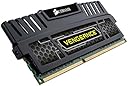
Corsair Vengeance 16GB (2x8GB) DDR3 1600MHz desktop memory delivers reliable, high-speed performance optimized for both Intel and AMD systems. Featuring dual-channel architecture, low 1.5V power consumption, and pre-configured XMP profiles, it ensures smooth multitasking and gaming. Trusted by professionals and enthusiasts alike, this kit comes with a limited lifetime warranty, making it a smart, durable upgrade for legacy DDR3 platforms.


| ASIN | B006EWUO22 |
| Additional Features | Lightweight |
| Best Sellers Rank | #490 in Computer Memory |
| Brand | Corsair |
| Column Address Strobe Latency | 9 |
| Compatible Devices | Desktop |
| Computer Memory Size | 16 GB |
| Customer Reviews | 4.8 out of 5 stars 5,558 Reviews |
| Data Transfer Rate | 1600 MHz |
| Form Factor | Desktop |
| Global Trade Identification Number | 00045556011124, 00843591012904, 08809321840959 |
| Item Part Number | CMZ16GX3M2A1600C10 |
| Item Weight | 0.07 Pounds |
| Manufacturer | Corsair |
| Memory Form Factor | DIMM |
| Memory Generation | DDR3 |
| Memory Speed | 1600 MHz |
| Mfr Part Number | CMZ16GX3M2A1600C10 |
| Model Name | Vengeance |
| Model Number | CMZ16GX3M2A1600C10 |
| Number of Pins | 240 |
| RAM Memory Technology | DDR3 |
| RAM Size | 16 GB |
| Special Feature | Lightweight |
| UPC | 132017585888 803982722621 843591012904 191120019376 655408076999 021111181303 151902980690 088020607508 045556011124 |
| Voltage | 1.5 Volts |
| Warranty Description | 2 year |
D**1
Random crash and lock ups CURED. CORSAIR IS THE VERY BEST!!!
Plugged it in, and it Fired right up, very fast speed profile without any input from me. It does XMP(Extreme Memory Profile), which was apparently already active when I went to BIOS to make sure the Motherboard recognized it. If your system utilizes it be sure to enable XMP is BIOS settings, it automatically chooses the best speed for the RAM. Here is a list of Modes XMP can do AUTOMATIC : XMP timings table CL-tRCD-tRP-tRAS-tRC-CR @ frequency (voltage) XMP #1 5.0-5-5-14-21-2T @ 444 MHz (1.500 Volts) XMP #2 6.0-6-6-16-25-2T @ 533 MHz (1.500 Volts) XMP #3 7.0-7-7-19-29-2T @ 622 MHz (1.500 Volts) XMP #4 8.0-8-8-22-33-2T @ 711 MHz (1.500 Volts) XMP #5 9.0-9-9-24-37-2T @ 800 MHz (1.500 Volts) XMP #6 10.0-9-9-24-37-2T @ 800 MHz (1.500 Volts) XMP #7 11.0-9-9-24-37-2T @ 800 MHz (1.500 Volts) ---------PRO TIP------ Having random crashes and or BLUE SCREEN OF DEATH?? You ran the built in Windows Memory checker (mdsched.exe)? Hit the Windows key + R to run. Nothing came up as bad... It is bad ram 9 times out of 10. Random crash and lock ups cured. There are faulty memory address in the RAM that will not always show up when tested, I have had this happen with new computers just as often as older ones. If you are looking at DDR3 your system is most likely a couple of years old, well you are in luck, this ram is dirt cheap compared to when it first came out. If you can swing it go for a twin Pack, get the full 32 Gigabyte package, that will breath new life into your system. Go to the CORSAIR website and put in your Spec's for your Motherboard it will tell you what you can use. What you do not know your Spec's? Get CPUID, it is free, and it lets you look under the hood so to speak and get full printable Spec's. This is great RAM, I run it in all of my systems, at home, and at work.
S**R
Corsair DDR3 memory
Update (10/28/15): It has now been three years since I installed two pairs of these memory modules in my home-built computer (4 DIMMS, for a total of 32 GB). The memory has operated flawlessly. I installed four of these memory modules in my new computer. They are working just fine. I ran a (self-repeating) memory test for over 24 hours prior to loading the operating system. Before you order memory modules, you should review the webpage and "User Guide" for your motherboard. I recently built a new computer using the ASUS Maximus V FORMULA LGA 1155 Intel Z77 Extended ATX DDR3 2800 PCIe 3.0 HDMI SupremeFX IV Audio Motherboard . The ASUS website (quite conveniently) provides a Qualified Vendor Lists (QVL) of compatible memory for this motherboard (although it may not be up-to-date for 8GB modules). Your motherboard's vendor may have a similar list. If you purchased a ready-built computer, then look on the manufacturer's website to verify that you are purchasing the correct memory. For example, if you purchased your computer from the biggest computer maker, then log-on to your account, enter the Service Tag number for your computer, and then find the memory requirements. Or, you could just call and ask. My computer's motherboard requires (1.5 volt) DDR3 dual in-line memory modules (DIMMs), installed in "matched sets" for "dual channel" function. My motherboard's "User Guide" recommends installing DIMMs from the same vendor, with the same CAS latency, and of the same version or date code (D/C). Because of this recommendations, and because these memory modules were ridiculously inexpensive when I bought them, I went ahead and installed the maximum memory of four 8 GB DIMMs (32 GB). You can buy this memory with one pair of DIMMs or two pairs of DIMMs: Corsair Vengeance 16GB (2x8GB) DDR3 1600 MHz (PC3 12800) Desktop Memory (CMZ16GX3M2A1600C10) or Corsair Vengeance 32GB (4x8GB) DDR3 1600 MHz (PC3 12800) Desktop Memory (CMZ32GX3M4X1600C10) . If you are interested in over-clocking memory, then you might want to research (1.5 volt) DDR3 DIMMs with higher clock ratings (i.e., 1866 MHz, 2000 MHz, 2133 MHz, and 2400 MHz). Naturally, I wanted the 2400 MHz memory; but I decided to try the much cheaper 1600 MHz memory first. Please note: If you are only installing two DIMMS, you may need to install them in only two specific slots on the mother board (i.e., you can't just install them in any two slots). Check the "User Guide" for your motherboard to ensure that you are inserting the DIMMs in the correct slots. Of course, if you fill all slots with "matching" DIMMs, this will not be a concern. No matter how much physical memory you install, your copy of the Windows operating system may limit how much memory your computer can use. The 32 bit versions of Windows can only address a maximum of 4 GB of memory, with only (about) 3.5 GB of that usable. Windows 64 bit memory limits: - Windows 8 Professional: 512 GB - Windows 8: 128 GB - Windows 7 Professional or Ultimate: 192 GB - Windows Vista Ultimate: 128 GB - Windows 7 or Windows Vista Home Premium: 16 GB - Windows 7 or Windows Vista Home Basic: 8 GB Lastly, I recommend that you run a memory test on your newly-installed memory. I used Memtest86+ (it's free). Extract the image (iso) file from the ZIP file, and then create a bootable CD by burning disc from image (do NOT copy the iso file to CD, burn disc from image). I ran this memory test prior to loading the operating system.
A**B
Worked Great
My journey into computer building began in 2012, and one of the standout components that contributed to my initial success was the Corsair Vengeance 16GB DDR3 Memory. This RAM module proved to be a stellar choice, providing consistent and reliable performance throughout the years. The 16GB capacity was more than sufficient for my needs at the time, ensuring smooth multitasking and efficient handling of various applications. The Corsair Vengeance series has truly stood the test of time, as this memory module worked flawlessly until I decided to upgrade my system. The build quality and performance exceeded my expectations, making it an ideal choice for a first computer build. If you're in the market for reliable DDR3 memory that has a proven track record of durability and performance, the Corsair Vengeance 16GB DDR3 Memory is a worthwhile investment, especially for those embarking on their first computer-building journey.
J**C
Excellent Product and Seller
This product has been the most beneficial item I have ever purchased. Love everything about it!! Everything stated on the features were true and I am so happy I found this seller. TY
J**N
Boosted Performance with Corsair Vengeance Blue Memory!
I recently upgraded my desktop with the Corsair Vengeance Blue 16GB (2x8 GB) DDR3 1600MHz memory, and the difference is remarkable. The installation was a breeze, and my system now runs smoother and faster. The sleek blue design adds a cool touch to my setup, and the performance is top-notch. Whether I'm multitasking or running resource-intensive applications, this memory handles it effortlessly. Corsair's reputation for reliability holds true with this memory kit. It's a fantastic upgrade for anyone looking to enhance their desktop's performance without breaking the bank. I highly recommend the Corsair Vengeance memory for a seamless and efficient computing experience!
M**Y
dell 3847 with 1060 3 gig
Bought these for a dell 3847 with gtx 1060 3 gig. This runs great and added style to my motherboard. I do editing and gaming so i needed more for my 3 yr old dell to keep up. I got this and it pushed the sands of time back at least another 3 to five years. While editing videos things where good with the help of the gtx 1060 3 gig card but when i upgraded the ram from the standard 8 gig green sticks to these 16 gig blue beauties i'm able to do 100% more moving videos at once. What a difference an extra 8 gigs made with these 16 gig sticks. For gaming i was able to max out dead or alive 6 without a stutter in sight . Dead or alive 6 is the most graphic demanding fighting game at this time even more than mortal combat 11. Note i'm also using a gtx 1060 gig GPU. I disconnected the 1060 and just used this sticks standard and it tripled the performance of my Intel i 5 4460 integrated APU (CPU combined with GPU). So if your looking to boost your standard system this is a good place to start. Dead or alive 6 with integrated graphics with the regular green 8 gig sticks got 8 to 12 frames per second (fps). Added these blue beauties dead or alive 6 got 18 to 25 Fps. Also i had to drop the settings of dead or alive 6 to their lowest without the 1060. that's just a side note for gamers who are trying to stay in the game with what you have but the money isn't their. Ok know when i first put these 16 gig sticks in the start up was slow took about 3 minutes. Tried google and bing start up was slow. I watched a youtube video and it was good but etchy. I restarted my pc and it was twice as fast as with the normal sticks i open some tabs and watched some youtube videos, Played some video games and open my editing software and worked o some projects and that's when the performance picked up. So when you put this 16 gigs in let the system boot all the way on then let it run for about five to 10 minutes then restart your system and you should be good. Last note make sure your pc is PC3 12800 I bought the wrong type at first. I recommand this DDR3 16 gig sticks for anybody looking to push the sands of time back of their ddr 3 pc.
U**K
Wicked fast memory for a great new build!
Memory can be a tricky thing to figure out!... do I need this one or that one? whats the difference between A, B and C? This one has the right speed and format, but will it work? Yeah, those are all the questions that I had in my head too!! WORD OF ADVICE here... check two places. 1. Check the website of the memory manufacturer to validate the proper memory BY SPECIFIC PART NUMBER to the motherboard that you will be using it on!! 2. Check the website of the motherboard manufacturer for valid, tested memory BY SPECIFIC PART NUMBER of the memory that you want to use. Thats how I ended up with these Corsair Vengance sticks (note, the part number below is for the RED, but as you can see in the pics, I got a pair of black and a pair of red). The memory screams and per monitors and logs, have had no memory errors or paging errors. No bios, setup or stability issues. No clock issues either. The memory looks great in the system, even though when the box is in my cabinet you normally cant see anything but the front. Awesome buy! The build sheet is below: Case: Corsair Carbide 300R Black - http://www.amazon.com/gp/product/B006I2H0YS CPU: Intel i7-4790 - http://www.amazon.com/gp/product/B00J56YSLM CPU Cooler: Cooler Master 212 EVO - http://www.amazon.com/gp/product/B005O65JXI MotherBoard: ASUS Sabertooth Z97 Mk II - http://www.amazon.com/gp/product/B00K2R6E10 Additional Case Fan: Noctua NF-A14 PWM - http://www.amazon.com/gp/product/B00CP6QLY6 2x of Memory: Corsair Vengance DDR3 1600 (CMZGX3M2A1600C10R) - http://www.amazon.com/gp/product/B008E3M4QS Video: EVGA GeForce GTX760 ACX (02G-P4-2765-KR) http://www.amazon.com/dp/B00E0N49C8 WiFi NIC: Rosewill RNWD-N9003PCe - http://www.amazon.com/gp/product/B009VKON0S Power Supply (PSU): Corsair CX750 http://www.amazon.com/dp/B008RJZQSW Boot Drive (SSD for OS and Apps): Samsung EVO840 250GB http://www.amazon.com/dp/B00LMXBOP4 4x of Hard Drives (2 were re-used): WD Green 3TB http://www.amazon.com/gp/product/B004RORMF6 CD/DVD/BluRay Drive (reused): Pioneer BCD-207DBK http://www.amazon.com/dp/B00I47O7AK Additional Items: WiFi Router: TP-Link Archer C9 - http://www.amazon.com/gp/product/B00PDLRHFW Color Correction Tool: ColorMunki Display - http://www.amazon.com/gp/product/B0055MBQOM Monitors (re-used): 2x Acer 23" 16:9 (next thing to be updated)
C**S
Amazing
Is good product and performance
S**Y
Awesome, high quality, easy and quick install!
Very easy to install! Just put them in a restart your pc! It booted up quickly and runs smoothly! Went from 6 gb to 16gb! It's like day and night! Well worth the price! Ddr3 8gb x2 are starting to get expensive. These where a great price, quality is excellent, they didn't break the bank! Have an nice protection cover! They are awesome and work better them my previous purchase (different brand and company) and failed in a few days! Also had paid $60 more then these! The Corsair are very recommended!
�**�
Endlich PUBG in Ultra :) ---- Sehr guter DDR3 RAM
Ich hatte von beginn an extreme Probleme beim Spielen von PUBG. Trotz Einstellung der Grafik auf ein absolutes Minimum gab es permanent Lade und Performance Probleme. Häuser waren verbugt, oder erst gar nicht vorhanden.... Texturen sahen unterirdisch aus.... und wenn man dann doch einmal ein halbwegs vernünftiges Spiel (wenn man bei minimal Einstellungen der Grafik von Spielen reden kann), war es spätestens vorbei wenn es mal etwas Action gab. An dem Punkt dachte ich immer mein PC explodiert gleich..... Kurzerhand habe ich mir dieses RAM hier gekauft. Der Speicher wurde sofort erkannt und läuft bisher (seit 3 Wochen) sauber ohne jegliche Fehler. Die Handhabung bzw. der Einbau ist absolut easy. Einfach den alten RAM entfernen, kurzer etwas sauber machen (eingestaubt) und den neuen einsetzen. Das ganze läuft via Plug and Play. Was bedeutet, einbauen/anschließen und Spaß haben. Der PC arbeitet schneller, sämtliche Spiele laufen VIEEEL flüssiger und vor allem auch grafisch ansehnlicher. Vor allem bei PUBG konnte ich tatsächlich sämtliche Einstellungen auf Ultra stellen! Wahnsinn was etwas mehr Arbeitsspeicher (vorher 8GB) ausmachen kann. Auch im Benchmark den ich durchführte hat der RAM hervorragend abgeschnitten. Das Preis Leistungsverhältnis dieser Arbeitsspeicher ist absolut hervorragend !!!
A**H
Received items in good working condition.
Received my item in good working condition.
U**1
رامات بسعر مناسب
توصيل سريع ومنتج ممتاز
C**K
Dos módulos a buen precio.
Ya tenía unos dos módulos de 8 gigas cada uno, y se me quedaban corto para el uso de máquinas virtuales, así que decidí comprar otro kit, y todo correcto: son memorias de gran rendimiento cuyo diseño permite alargar la vida útil de estos componentes. Ideal para hacer Dual Channel, por lo que son geniales para dar el empujón necesario a nuestras máquinas. Las especificaciones son las siguientes: Memory Series Vengeance Memory Type DDR3 Package Memory Format DIMM Package Memory Pin 240 Performance Profile XMP SPD Latency 9-9-9-24 SPD Speed 1333MHz SPD Voltage 1.5V Speed Rating PC3-12800 (1600MHz) Tested Latency 10-10-10-27 Tested Speed 1600MHz Tested Voltage 1.5V
Trustpilot
1 month ago
5 days ago