Buy anything from 5,000+ international stores. One checkout price. No surprise fees. Join 2M+ shoppers on Desertcart.
Desertcart purchases this item on your behalf and handles shipping, customs, and support to Vanuatu.
🚀 Elevate your workspace with sleek style and powerhouse productivity!
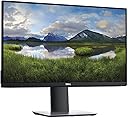
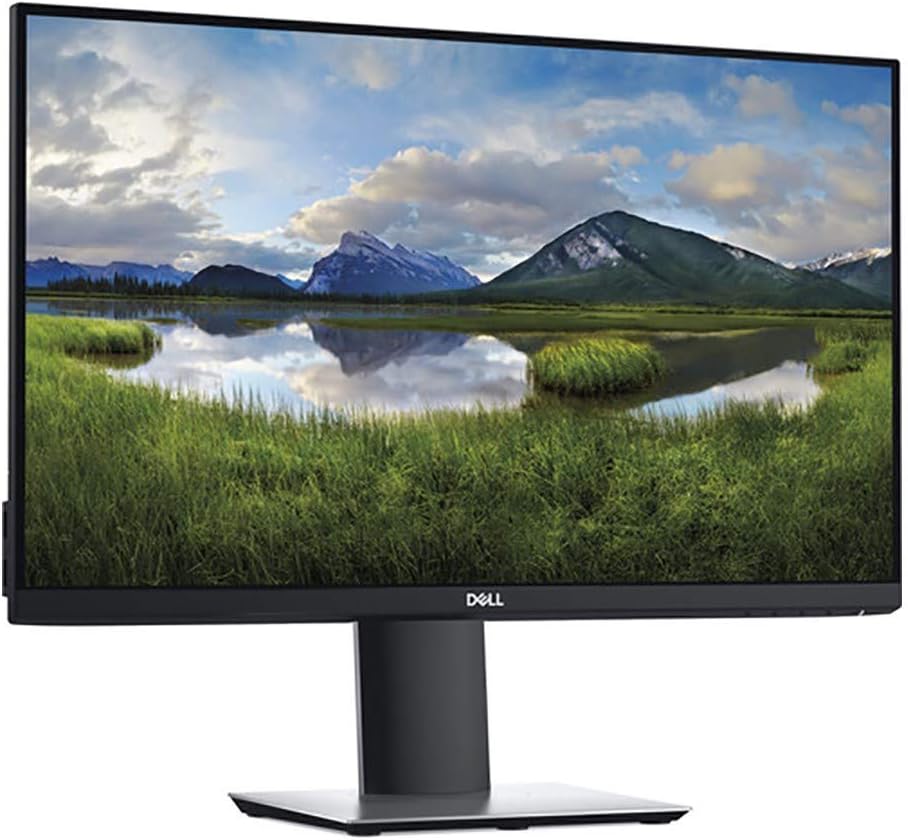
The Dell P2419H is a 24-inch Full HD (1920x1080) IPS monitor featuring a 60Hz refresh rate and 5ms response time. Designed for professionals, it boasts an ultrathin bezel for seamless multi-monitor setups, extensive connectivity including DisplayPort, HDMI, VGA, and 5 USB ports, plus a fully adjustable ergonomic stand. Certified for eye comfort with flicker-free and low blue light technology, it combines vibrant visuals with practical design, backed by a 3-year warranty.


| ASIN | B07F8XZN69 |
| Adaptive Sync | FreeSync |
| Aspect Ratio | 16:9 |
| Box Contents | Monitor panel, Stand riser and base, 1x Power cable. 1x Power adapter 1x HDMI 1.4 cable, Quick setup guide Safety, Environmental, and Regulatory Information |
| Brand Name | Dell |
| Colour | black |
| Contrast Ratio | 1000:1 |
| Customer Reviews | 4.7 4.7 out of 5 stars (9,785) |
| Display Technology | LCD |
| Display Type | LED |
| EU Spare Part Availability Duration | 2 Years |
| Global Trade Identification Number | 00884116305569, 05397184092392 |
| Hardware Connectivity | DisplayPort, HDMI, VGA |
| Has Color Screen | Yes |
| Image Brightness | 250 cm |
| Is Electric | Yes |
| Item Dimensions D x W x H | 6.5D x 21.3W x 14H centimetres |
| Item Type Name | Computer Monitor |
| Item Weight | 3.26 kg |
| Manufacturer | Dell |
| Maximum Display Resolution | 1920 x 1080 Pixels |
| Model Name | Dell 24 Monitor P2419H |
| Model Number | P2419H |
| Mounting Type | Wall Mount |
| Native Resolution | 1920x1080 |
| Network Connectivity Technology | HDMI, VGA, DisplayPort |
| Picture Quality Enhancement Technology | LED backlighting |
| Pixel Pitch | 0.276 |
| Power Consumption Size | 40 Watts |
| Product Features | Enhanced Performance |
| Product Warranty | 3 Years |
| Refresh Rate | 60 Hz |
| Resolution | FHD 1080p |
| Response Time | 5 Milliseconds |
| Screen Finish Type | default_no_selection_value |
| Screen Size | 24 Inches |
| Series Number | 24 |
| Shape | rectangular |
| Specific Uses For Product | Business, Multimedia, Personal |
| Total HDMI Port | 1 |
| Total USB 2.0 Ports | 2 |
| Total USB 3.0 Ports | 3 |
| Total USB Ports | 5 |
| Total Video Out Ports | 1 |
| UPC | 884116305569 884116366201 |
| Unit Count | 1.0 count |
| Viewing Angle | 178 Degrees |
| Voltage | 240 Volts |
| Warranty Type | Limited Warranty |
J**H
Good quality monitor so far (first impression only)
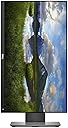
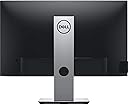
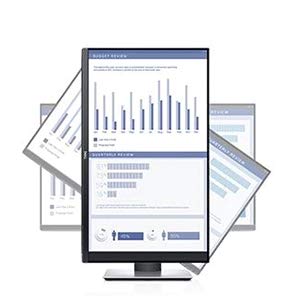
Out of the box... Contents include: • The monitor & stand parts (easy to assemble, screwdrivers weren't needed) • UK 3-pin power cable/plug (C13 IEC fitting in monitor side, cable approx 120cm long) • 1 display-port to display-port cable (170cm long end to end) • 1 USB type A (PC end) to USB 3.0 type B cable (approx same length as display port cable), • Installation and help chart (one side of A4) and safety guide Political: • Made in China Ports (same as description obviously): • Power cable connection IEC C14 • 1 DisplayPort • 1 HDMI (although HDMI can carry sound, this monitor does not have built in speakers or a headphones port) • 1 VGA • 1 USB 3.0 Type B (connects to PC for extending your USB ports only, this is not a touch screen) • 4 USB type As (for connecting more peripherals,. 2 at the back and 2 at the left side) Packaging: • Sometimes people do complain about monitors having dead pixels or backlight bleeding on arrival, so in case you're wondering, they don't use bubble wrap or polystyrene protection, instead they use cardboard folded into protective shapes, but the monitor does feel solid and good quality and as you'll see from my first impression below the monitor worked perfectly. First impressions... Very good monitor, good crisp image and backlight looks even across entire screen. The good Lord has ensured I received a unit with no dead pixels so this is a very beautiful monitor. I've rotated my monitor portrait, you can rotate it either clockwise or anticlockwise whichever is more suitable for where you want the cable and buttons to face, (rotating it may make the side USB ports impractically positioned). You have to change orientation in your PC display settings, it does not automatically match the rotation of the monitor (this is standard). The screen face has a flat design that is not inset behind a frame which makes it look a bit more modern and the screen is closer to the edge, useful if you are connecting multiple displays. Although I'm not using the USB port extension (I positioned monitor too far away and have enough on my PC) I did test it, able to connect my mouse and also charge/tether my phone through it so first impressions seems it's as good as the USB ports in the PC itself. Although the pictures don't show this, the hole in the stand is for threading your cables through, with minimal stretching when rotating the display. As well as rotating landscape/portrait (z-axis) you can also adjust the vertical height and rotate slightly up or down (around x-axis), and the stand arm rotates at the base, (around the y axis). UPDATE (after a couple of months of usage, I intend to buy another one) Still works fine after a few months of using the product, no issues. I have the monitor next to my TV which is the main screen, the colours are slightly more vibrant/bright on my TV (games and pictures look more colourful on my TV), although discerning shades of colour is better on the Dell monitor (because my TV doesn't always show distinctions between lighter/darker colours very well). I'm soon going to buy another one of this monitor to replace my TV which is now starting to show dead blotches on the screen and it's spreading, some sort of LCD leprosy.
P**0
A Fantastic Monitor Dell’s P2219H – Impressed. BUY ONE. (Height Adjustable – Awesome!)
After being left rather disappointed with monitors from LG and Samsung, I took the plunge and decided to buy Dell’s P2219H monitor. My desk is quite shallow and so I opted for the 19 inch version, If I had a deeper desk the 24” model would have been more ideal. In most cases 24” monitors seem to be the go to size for most monitors. Its just a shame my desk cannot accommodate this size. Anyway, the main reasons why I decided to go for this model is the lovely stand and full height and tilt adjustability. Most monitors in this size and price range do not have height adjustment. This is what I really needed. The refresh rate was only 60hz, I would have loved it to be alot higher although it wouldn’t really be a deal breaker. The bezel less design was also a nice bonus too. I placed the order and it came within a couple days. Thanks Amazon. Upon opening the box it looked well packaged, it was a good sign. I picked up the base and height adjustable stand, really well made and the quality was fantastic. Assembly was easy with only 2 screws to attach the main base. It then clips into the rear of the monitor. As this point you don’t even need to handle the monitor yet as it is still facing down in the box. Well thought out packaging. Well done Dell. Once the stand was attached you can now pick up the whole monitor. Not too heavy and feels like a great bit of kit. Input options are plentiful, even serving the older VGA input which alot of people still use. HDMI and display port are there. It also has 4 USB-A ports scattered at the rear and left hand side of the monitor. Great feature as it act as a USB hub for your desk minimising the clutter and cabling. I connected the monitor up to my Thunderbolt dock and connected via my 2020 8th Gen Carbon x1. The monitor will primary be used as an extension to my laptop. It fired up straight away, fantastic sharp picture. Very smooth image. It’s no gaming monitor, but for general browsing/office and viewing videos I don’t think you can get a better monitor for the features. It can also rotate to portrait, perfect for viewing documents like spec sheets or even for coding if you’re a programmer. Backlight bleed was very minimal but there is alot of IPS glow which I understand can’t be avoided with this type of panel. Ultra thin bezels, an array of video input options and that all important height adjustability. It doesn’t take too much depth from your desk and overall a nice good looking modern monitor. Finally, a perfect upgrade to my aging Dell E198WPV 19” monitor. I am so impressed by this monitor Highly recommended.
R**I
Fantastic versatile monitor!
Fantastic monitor! Some highlights for me are: - Quick and easy to assemble - Excellent picture quality - No reflections from the nearby window - Stays stable on my desk - Ability to move it up and down - this allows me to place my laptop below my monitor and use both screens when the extra monitor is at the highest possible level - Ability to tilt it sideways (useful when I read something in Word) - Sleek and modern design - Doesn’t take up much space - Auto power off mode which turns it black like my laptop The only downside I found is that there isn’t an HDMI cable included, so I had to buy a separate one to connect it to my laptop. I know that it’s difficult to predict what ports users have on the other end, but I think HDMI is pretty standard... Instead there were two other cables included which I don’t use... A cable is included to provide me with the option to use the 2 USB ports on the side of the screen. I tried using it in the first week, but I found it impractical because sometimes I disconnect my laptop from the screen and in this case I can’t use the wireless mouse and keyboard I have. Also, it’s one less cable to plug and unplug each time! I just don’t think it’s worth the hassle of using the screen ports (2) just so I have 1 extra port... Overall, I would recommend this monitor!
L**D
Oyun dışında her şey için kullanabilirsiniz. 2. monitör olarak kullanıyorum ve Yazılım, Tasarım, Döküman yazma için çok iyi.
B**_
Works perfectly. It came with 2 cables (charging + hdmi)
P**M
I had been using Dell's P2419H monitor in office for a few months before pandemic forced work from home started. I always really liked that monitor. So, with no end in sight for work from home, I finally decided to buy the smaller P2219H for home use. Agreed it doesn't give a very dynamic colour gamut, but it is extremely versatile due to multiple options to adjust the screen. You can tilt, swivel and do height adjustment. The monitor is sturdy and build quality is very good as well. For professional use it provides a very good HD resolution which is quite ideal for multitasking. There are multiple built-in options to adjust screen colours/brightness which I find very handy. During day time, I prefer screen to be on brighter side and during evening/night time I prefer softer colours and brightness. I can switch between them in a couple of buttom clicks on monitor. I have been watching some movies, series and youtube videos as well on this monitor. They looks quite good. But gaming-wise it is a little underwhelming for sure. Since, my primary purpose of using this monitor is for professional purpose, I am quite happy with it.
G**N
Excellent service from Steve at PC Line! There was an issue with one of the screen not working correctly, and he organised a return label and shipped another one next business day. Very much appreciated. Highly recommend this supplier.
J**.
Avevo bisogno di monitor che si adattasse ad una configurazione particolare della mia postazione PC e, dopo varie ricerche, ho scelto questo modello della DELL, imbattibile per qualità/prezzo (140€ trasporto incluso). Consegna di Amazon 5 gg prima di quella pattuita nell'ordine, quindi si confermano i migliori nel ramo logistica, anni luce avanti rispetto alla media dei negozi on-line. TOP!
Trustpilot
2 weeks ago
3 days ago