🔥 Elevate your workspace with LG’s 27" 4K HDR powerhouse!
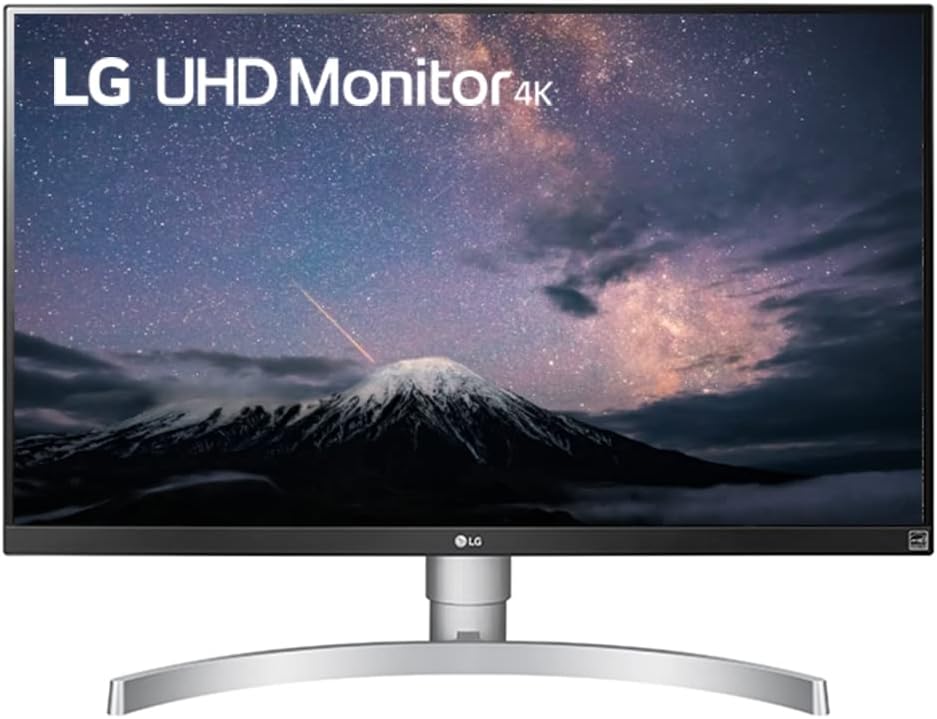
The LG 27UL650-W is a 27-inch 4K UHD IPS monitor featuring a 3840x2160 resolution, VESA DisplayHDR 400 certification, and 99% sRGB color gamut for exceptional color accuracy. It includes Radeon FreeSync technology for smooth gaming and video playback, a sleek 3-side virtually borderless design, and factory calibration for professional-grade visuals. Ideal for professionals and gamers seeking vibrant HDR content and crisp detail in a stylish white chassis.


| ASIN | B07MKT2BNB |
| Best Sellers Rank | #174,720 in Electronics ( See Top 100 in Electronics ) #3,350 in Computer Monitors |
| Brand | LG |
| Color | White |
| Customer Reviews | 4.4 4.4 out of 5 stars (1,274) |
| Date First Available | December 26, 2018 |
| Item Dimensions LxWxH | 24.1 x 9.1 x 22.3 inches |
| Item Weight | 13.64 pounds |
| Item model number | 27UL650-W |
| Manufacturer | LG Electronics |
| Max Screen Resolution | 3840 x 2160 Pixels |
| Product Dimensions | 24.1 x 9.1 x 22.3 inches |
| Screen Resolution | 3840x2160 |
| Series | 27UL650-W |
| Standing screen display size | 27 Inches |
D**D
The 2019 LG 27UL650-W is a Beautiful 4K HDR Monitor and a Good Value for the Price!
27UL650-W is the 2019 model and not “(2018)” as is currently reported in the title’s description. I was blown away by the picture of a less expensive 2018 4K HDR LG 27UK600-W that was sitting next to several other non-HDR monitors (displaying non-HDR content) in a local BB store. A quick google search led me to this slightly better 2019 LG model 27UL650-W. One website that does a lot of reviews on TVs rated (in Nov. 2018) the 2018 LG 27UK650 as “…the best 4k monitor that we've tested so far”. That 2018 model is currently $449 list price at LG's website. While, the 3x more expensive Acer Predator X27 ($1,799 current Amazon price) was reviewed as the best monitor for HDR. This review is at the rtings website titled, “5 Best 4k Monitors - Winter 2019” (title of article is obviously incorrect and should be 2018). While they give the 2018 27UK650-W comparatively higher ratings, they also report a few disadvantages compared to the Predator X27 (like Local Dimming [none on the 2018 LG], HDR Peak Brightness and HDR Color Gamut not being quite as good as the more expensive Acer Predator X27). Denwereview.com also reviews the Predator X27 along with 2 other 27in 4K HDR monitors with 1000 nits brightness, which are currently slightly more expensive than the Predator by about $79-$100 (article: Best 4K HDR Gaming Monitor for Xbox One X, PS4 Pro and PC [2019]). But having said all that, the 2019 LG 27UL650-W looks beautiful, HDR content looks beautiful and is a great value for the price. I don’t think the 2019 LG 27UL650-W has local dimming either (not mentioned in specs at lg website) or how it compares to the Predator X27, but at $549.99 I’m extremely happy. If I was going to be looking at HDR content all the time (which I’m not), the Predator may be worth the price, but this LG gives me what I need and HDR content looks incredible. I got mine a couple days ago and it looked fantastic out of the box. LG says these are factory calibrated and provides a “Color Calibration Factory Report”. I don’t believe the 2018 model was factory calibrated. The default picture mode is Custom, and looks pretty good when viewing LG (& other’s) 4K HDR video demos at YouTube… but when I found the “HDR Effect” picture mode, I was even more blown away by the astonishing details and colors! This monitor comes with 11 picture modes. I’ve gone into all of them and it appears that other than brightness, the picture adjustments settings are disabled for all modes except Custom. As far I can tell, only the Custom picture mode has completely adjustable/calibratable settings. Not sure how I feel about that but I probably won’t use any other modes than Custom and HDR Effect. Picture modes are: Custom, Vivid, HDR Effect, Reader (?low blue light for night-time reading??), Cinema, FPS, RTS, Color Weakness, EBU, REC709 and SMPTE-C. *** April 7, 2017 Edit: If you are getting a monitor specifically for its HDR capability, check out: displayhdr.org/certified-products/. The site lists VESA certified monitors. Currently, there are VESA 400 (low end, less expensive), 600 and 1000 (high end, more expensive). *** A warning: be extremely careful when pulling the monitor out of it's box. The side and top edges are very thin (1mm?) and you don’t want to potentially damage the screen by wrapping your finger tips around on the screen when lifting it out of the box. Included in the box are a 1.5 m (4’ 10.5”) DisplayPort cable and an HDMI cable I didn't measure. Wish the DP cable was a little longer. I needed 6’ and purchased a different manufacturer’s DP cable and oddly got the message “(Caution) Make Sure to Use Supplied Input Cables” when booting or logging in (with the option to “Do Not Display Again” as the default selection). When I googled that message, I didn’t find anything other information than to just select “do not display again”. Everything is working perfect, so I’m not sure why that message popped up. The supplied disk (with manuals, driver, and 2 apps) asks that you set your default Web browser to Internet Explorer (it didn’t work properly with my default Firefox browser). If you don’t want to change your default browser, just open Internet Explorer and copy the URL from your default browser to the Internet Explorer browser. Two apps come with the monitor: an OnScreen Control and a Dual Controller. If you’re like me, you’ll want to pin the OnScreen Control to your taskbar if only for quick easy access to different Picture Modes and brightness. And don’t bother to install the Dual Controller app unless you have 2 computers and want the monitor to show both of the computer screens. To get maximum color experience with this monitor, go into your graphics card’s Control Panel and, if possible, increase the Output Color Depth setting from 8 bpc (8 bits [of color] per [R/G/B] channel; or a 16.7 million color palette) to 10 bpc (1.07 billion colors). Bottom line, this will increase the number of colors and overall color accuracy. However, I don’t think (*NO EXPERT HERE*) that increasing your setting above 10 bpc will do anything as this monitor’s maximum Color Depth is 1.07B colors. Note: This doesn’t do anything for applications, photos, or videos that don’t support content higher than 8 bpc. And one of the following videos reports that the YouTube videos are compressed to 8 bpc, so it may not help with content there either. For more information about color depth, take a look at a couple YouTube videos: “Color Depth: 10-Bit vs 8-Bit in Under 5 Minutes” and/or “8 bit vs 10 bit Color: What's the Difference?” According to rtings.com: “…it matters [in] HDR content like HDR video games or HDR UHD [4K] movies. [It] won’t matter for regular Blu-ray movies, SDR video game or desktop environment content displayed from a Windows PC. Those are limited to 8-bit color.” And I don’t know if this is true as I don’t see it in the lg.com specs, but according to a couple review sites, this monitor is 10-bit (8-bit +FCR [Frame Rate Control]), which is not true 10-bit color, but is still better than 8-bit. No complaints with this monitor... My only complaint is how 4K resolution is handled in Window 7 (hopefully Win10 is better?). 4K photos and videos are incredible, but everything else is tiny! And as far as I can tell, the only fix is to go into Screen Resolution (R click on a blank portion of the desktop) and click on “Make text and other items larger or smaller” and increase the setting from 100% to 150%. Some applications/fonts still look weird (different than my previous 1920x1200 Dell monitor), but are more tolerable.
E**R
What more could you want?!?!
I stepped up from 3 Dell Ultrasharp 1080p monitors and a 1440p 2k Dell UltraSharp monitors and I'm just in disbelief how bad I apparently had it before. I used to have a lot of eye strain staring at the monitor for a long period of time and I don't know the technical details as to how the EyeCare technology works other than they call it flicker free tech, but the image is definitely more polished and the 4k is absolutely incredible/outstanding! The color accuracy is mind boggling as well. I always knew my ultra sharps were off-white/discolored and no setting that it offered could correct the color inaccuracy. Not to say they weren't a cut above the rest as I have seen worse monitors in my lifetime, but the whites on this monitor are ACTUALLY white and the colors just pop off the screen. Text is the BIGGEST and most noticeable difference. Everything is so crisp and clear it makes doing work on the computer enjoyable. I feel like I have a completely different computer now the change is so drastic. The only "con" I guess I would say is that not every application is optimized for 4k so you find that some applications have SUPER small font and I can't find a way to fix that even with increasing the screen display percentage through Windows 10. It's not the end of the world and I'm sure 10 years from now, every application will be updated to accommodate for the latest in technology. This monitor is a no brainer! I have a triple monitor setup now with them connected to an RTX 2070 Super graphics card so you will need a good graphics card to handle this many pixels. Oh and this was a surprise....it COMES WITH a Display Port and HDMI cable! Usually you always have to pay extra for these cables so that was a really nice touch and appreciated! Also, the mount is fantastic...you can make micro adjustments to the height to make sure that all of the monitors are perfectly aligned (I have OCD). The base is metal so it is very sturdy! I'm just flabbergasted with how amazing the quality is, and I am blessed/thankful to report that all three came in perfect condition with no defects. If you are wondering about taking the plunge....I wouldn't even think twice about it....this is a no brainer...I have had so many different brands of monitors in my day and nothing really struck me as being "amazing" or great. Dell Ultrasharp was probably about as close as it got to being acceptable. Macs always had the best of the best monitors with their 5k Retina displays and this is about as close as one can get to that level of quality and resolution!
T**Y
An excellent monitor, with some dead pixels.
Great picture, accurate color, great black levels if with some ips glow. (which is totally unavoidable and not a defect) Unfortunately mine had multiple dead pixels so I returned it. I might buy it again later just as it is a VERY good monitor with solid, "true" hdr performance; hdr 400 doesn't clip any hdr detail, it's just not bright enough to blow your socks off exactly like hdr 600 and 1000 panels can and the feature is still a huge draw for me on this panel.
V**O
Se trata de un monitor 4k, con una calidad asombrosa. Viene con un soporte, que es estable pero ocupa mucho. Lo he puesto sobre un soporte de amazon basic para 2 monitores y queda muy bien. De esta forma deja libre por completo la mesa. No puedo decir nada de los juegos, si decir, que lo uso para realización de páginas web y programación y los colores se ven realmente bien, no cansa la vista y la definición es increíble. Tengo ahora esta de 27 pulgadas y otra de 24 antigua que solo es full hd. Se nota mucho las diferencias y recomiendo si vas a trabajar profesionalmente este monitor. Tiene para hdmi y display port. De momento solo lo he probado con hdmi. En la parte de atrás, de color blanco, he leído muchas críticas, pues bien, es el plástico de todos los monitores, pero en blanco, ni más ni menos. Solo tiene un botón, para apagar, encender, configurar brillo, etc y es genial, super intuitivo, sin mirar guías lo configuré y es una gozada. Es un botón joystick pequeño. No tiene bordes, bueno, 1cm, abajo 2cm. Es realmente fino.
S**L
I bought this in a lightning deal for 29k, The gync compatability is awesome I have no screen bleeding, usually it occurs when haven't handle it better. Gaming in this monitor is best Good for editing photos and creating content The people who need gaming and content creating monitor this is the one you need to buy it Picture quality is also. Very good, you can feel the real beauty when you see it in visual. No camera can capture its quality including mine 'lol'. I have used it around 6 month no. Issues were found till now
E**E
For office use and aging eyes 4k monitors are a treat. Currently use 4 LG 27" monitors - pair at home and a pair at the office with Win-10 Surface Pro. For the money I find the monitors to be of good value. Picture quality is excellent. Lots of connection options. Product quality across the four screens has been consistently flawless. The 'C'-shaped base takes up a bit of room when compared to my Dells which use a compact square base. The other issue, which is not unique to LG, is matching the different cable specification, Displayport versions and refresh frequencies. To run dual monitors off a Surface docking station the frequency has to set a 30Hz while the Dell docking station supports dual monitors at 60Hz. Go figure. The LG27UL650 also works on MacPro M-chip without a hitch.
E**R
El calidad de imagen me encantó, el monitor es discreto y elegante. Yo lo recomiendo pero viendo algunas reviews por internet se que el precio es más barato de lo que se anuncia en esta publicación
C**S
Comprei para conectar com meu macbook, a qualidade da tela é mais próxima que já vi da tela retina do macbook pro, para quem esta pensando em comprar para usar como segunda tela pode ir sem medo.
Trustpilot
5 days ago
1 month ago