🎉 Elevate Your Viewing Experience with LG's OLED Magic!
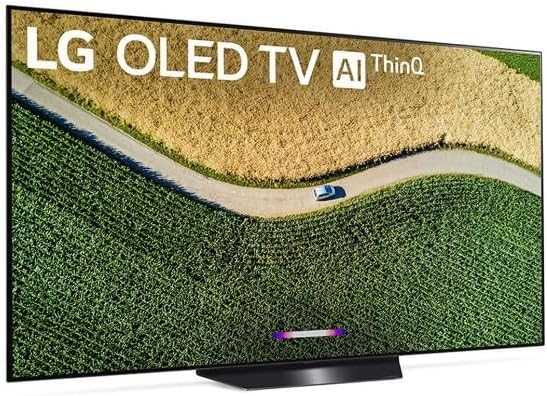
The LG OLED55B9PUA B9 Series 55" 4K Ultra HD Smart OLED TV (2019) combines cutting-edge technology with stunning design. Featuring a 55-inch OLED display, AI-powered sound, and seamless smart home integration, this TV is perfect for any modern living space. With a refresh rate of 120Hz and low power consumption, it delivers an exceptional viewing experience while being eco-friendly.


| ASIN | B07RMSJT4J |
| Additional Features | Flat |
| Antenna Location | Home Viewing |
| Aspect Ratio | 16:9 |
| Audio Input | HDMI, Optical, RCA, USB |
| Audio Output Mode | Surround, Multi-Channel |
| Base Depth | 1.8 Inches |
| Best Sellers Rank | #805,990 in Electronics ( See Top 100 in Electronics ) #345 in OLED TVs |
| Bluetooth Version | 5.0 |
| Brand | LG |
| Built-In Media | User Manual |
| Color | Black |
| Compatible Devices | Gaming Console, Laptop, Smartphone, Tablet, Streaming Device |
| Connectivity Technology | Wi-Fi |
| Connector Type | Ethernet, HDMI, Optical, RCA, USB |
| Content Sharing Direction | Mobile to TV |
| Contrast Ratio | High |
| Control Method | Voice |
| Controller Type | amazon_alexa, google_assistant, vera |
| Customer Reviews | 4.6 out of 5 stars 473 Reviews |
| Display Backlight Technology | Self-Luminous |
| Display Refresh Rate in Hertz | 120 |
| Display Size Class | 55 Inches |
| Display Technology | OLED |
| Global Trade Identification Number | 00719192626409 |
| HDR Format Supported | Dolby Vision, HDR10, HLG |
| Hardware Interface | USB |
| Integrated Surround Sound Format | Dolby Atmos |
| Internet Applications | Browser, YouTube |
| Item Dimensions D x W x H | 9.7"D x 48.4"W x 29.2"H |
| Item Weight | 44 Pounds |
| Item Weight Without Stand | 41.7 Pounds |
| Line Voltage | 110 VAC 60 Hz |
| Manufacturer | LG |
| Mfr Part Number | OLED55B9PUA |
| Model Name | LG OLED B9 55 |
| Model Number | LG OLED 55" B9 |
| Model Series | B9 Series |
| Model Year | 2019 |
| Motion Enhancement Technology | AI-based Motion Enhancement |
| Mounting Type | Table Mount, Wall Mount |
| Number of Audio Channels | 5.1 |
| Number of Component Inputs | 7 |
| Number of Component Outputs | 4 |
| Number of Composite-Video Inputs | 1 |
| Operating System | WebOS |
| Picture Quality Enhancement Technology | LG a7 Gen 2 Intelligent Processor, Dolby Vision, Dolby Atmos |
| Power Consumption | 109.3 Watts |
| Refresh Rate | 120 |
| Remote Control Technology | Infrared |
| Remote Required Battery Size | AA |
| Resolution | 4K |
| Screen Finish | smooth |
| Screen Size | 55 Inches |
| Signal Format | ATSC, Clear QAM |
| Size | 55 in |
| Smart Home Compatibility | Smart Home Compatible |
| Speaker Description | Dolby Atmos, 40W (20W Woofer) Output Power |
| Special Feature | Flat |
| Specific Uses For Product | Home Viewing |
| Total Audio Out Ports | 2 |
| Total DVI Ports | 2 |
| Total Number of HDMI Ports | 4 |
| Total USB 3.0 Ports | 3 |
| Total Usb Ports | 3 |
| Tuner Type | ATSC |
| UPC | 719192626409 |
| Unit Count | 1.0 Count |
| VESA Mount Standard | 300 x 200 mm |
| Video Encoding | H.264, MPEG-2 |
| Warranty Type | Limited |
| Water Resistance Level | Not Water Resistant |
| Wattage | 109.3 watts |
| Wireless Technology | Bluetooth |
C**T
Excellent tv for everything
Picked up this tv to replace a TCL 55r615 with terrible dse effect. Luckily this tv doesn't have dse from what I can tell. The picture is bright, clean and deep. It does however show some signs of gradient so if that annoys you then the C9 should be a better choice. For gaming, this thing just feels good to game on. Noticed the levels that were giving me problems before in Super Mario Maker 2 are easier now. Zelda looked a lot softer then I remembered on my other tv but playing a little with settings should fix that. It still looked and played really great. The screen offers vrr on xbox and this should carry over to future consoles. One thing worth noting, this tv does not support (officially) Nvidia Gsync so if you're a pc gamer look at the c9. I am a pc gamer but I didn't hear about the Gsync thing until after ordering the tv. Lucky for me I don't intend to use the tv as a pc monitor. Out the box the presets are good and I only found myself having to disable power saving features, and setting temperature (for instance cool to warm). Sound seems pretty solid though I only tested it during setup. If you need heavy duty sound then you'll want a sound system or bar. If I had on complaint about the tv it's the remote. I find the pointer on the remote annoying to use. You can override it by pretty a direction on the remote but it's still finds its way back to the pointer often enough to be annoying. Will say the pointer does work well and its something I think I'll get used to along the way. Very happy with this tv and it's pretty much everything I hoped for. Gaming on it is fluid and responsive. Contrast makes the image "pop" and the colors are deep and full. Would recommend it if you're looking to get an entry oled set.
J**.
Superb picture, difficult g sync setup
I bought this for the g sync capability to use with my RTX2080ti. After hours of fiddling with Nvidia settings, I "think" g sync is working. Here's the story. First installed new tv firmware and Nvidia drivers. The Nvidia g sync settings showed up and all is set easily, no hassle. Just make sure deep color and game instant response modes are set to on in the tv. Also don't forget to set windows display setting's game in hdr mode, it will reset to off a few times cuz microsoft windows... Now, Nvidia settings is confusing. So you have to set in 3d settings global settings vertical sync to on. Then in the programs settings for individual games to have vertical sync off. This configuration will allow g sync to work smoothly on this tv. If your fps is out of the range of g sync (40-60 & 40-120 depending on resolution), it will stutter as expected. Another thing I noticed. Even when you set the 3d settings for games to use highest available refresh rate. Setting resolution in game to 2560x1440 does not trigger the game to use 120hz, only 60hz. Only way to get around this for me was changing windows resolution to 2560x1440 120hz before I launch the game and only in borderless windowed mode will I get 120hz in game. Then while in game I can ALT ENTER to switch to fullscreen mode and it keeps my 120hz. This is the case with Doom 2016, I think some games asks windows for highest refresh rate and not Nvidia/monitor adapter. One star off for gaming setup. After hours of screwing around to get it right. Man.. oled is pleasing to the eye, you don't just get orange color, you get neon orange, it just glows and comes to life in Doom. Windows does HDR, but keep your expectations down as your wallpaper is probably not HDR and may look meh.
W**L
Hella expensive...Hella worth it
I wanted to buy this TV for a very long time. Every time I went to any tech store I would always casually walk by the TV section just to look at this TV. So, I finally pulled the trigger. The picture (and viewing angle) are incredible. The picture on the TV looks the same wether you are looking right at it or way off to the side. The contrast is incredible. I have the TV set up in a room with a rather large window and I have no issues seeing the picture when its sunny outside (glare and brightness). The speakers on this TV are easily the best TV speakers I have heard. The high range is crisp and has a solid mid-range. This wont compete with a sound bar and sub/full home theater set-up, but it'll get the job done. I also have an xbox one x and the 4k gameplay is unreal, combine that with the stark contrast the OLED panel provides and it is unparalleled. As far as burn-in goes... LG has software added in that will play a "screen-saver" of sorts to avoid this. Which is perfect if you play spotify/amazon music/fill in the blank from your TV. In sum, there is no doubt this TV is 2-3x more expensive than other TV's.... but it really is that much better. If you view purchasing a TV as an investment then this is one to make. PS: Once you watch this TV you will not want to watch anything on any other TV....
J**R
Love this TV - worth the extra money to go OLED
Pros Awesome picture quality. And at 65", stunning. All the latest apps The screen saver kicks in within a reasonable amount of time and I don't worry about 'burn in' (except the screen saver doesn't work for other inputs...why??) Super thin screen - literally 2 quarters thick edge-on (except where the plugs and electronics are on the back) Doesn't collect dust like most TVs (no/less positively charged particles?) I like the 3.5mm jack on the back as I have a splitter on it, with one going to external speakers and one going to an Avantree aptX Low Latency Wireless Transmitter and Receiver Set (this is really nice to keep others in the house from hearing the TV, after bed or otherwise, as I just power off the external speakers when I want to go that route) Cons - The screen saver does not engage with the Tivo I have plugged into the HDMI port, so if you pause 'live TV' or pause anything else pipped through the Tivo you do run the risk of burn-in if you're not careful. - The remote could be better. Since it is sensitive to motion, just bumping it causes the cursor to pop up on the screen. I don't see a way to add a delay or disable the cursor. The layout and button functions need to be improved.
E**E
The best new TV!
We went back and forth quite a bit, since we've always been fans of Samsung TVs and pretty much thought we would always stick to that brand. However, after a decent amount of research, we were extremely excited about the new technology of the QLED TV by LG. It is amazing! The picture is bright, clear, and the movement (whether the shot is simply panning from one angle to another) or there are some objects being thrown or shot in the air, the picture is really impressive and looks completely different from other TVs. Even animated shows are so much brighter and richer in color. We love this TV. Obviously, the one big drawback to these TVs according to other reviews is burn in, but it's too early to tell. I will say we are avoiding leaving the DVR on pause too long and things like that to help with logenvity.
M**.
Complicated set up with no instructions.
Setting up TV to use is complicated and the instructions are horrible. If you are not tech savvy, line up some help. Also set is heavy, get some help. There are many steps necessary to make this system work as you wish it would and as stated the instructions don't help. You will need to use online help or you will spend many hours of clicking this and that, going in endless loops. Advertisement said it came with 1 year of Disney +, maybe, can't figure out how to tell. I asked Amazon and the customer service said they didn't know. After 3 days though I have the unit working good enoug for me and it is spectacular. The picture quality is amazing, the sound is very good, might get a sound bar later but for now it is good enough. The seller AAAA got the TV here on time and it was not damaged.
J**N
Super quality
Wonderful image, bright and clear corner to corner. The native sound is better than the sound from the sound bar we had installed, first time that has happened in a TV in my lifetime. It takes a while to get used to the optical remote, but you do. The only complaint is that the built-in browser really isn't ready for prime time; poor typing interface, doesn't scroll on the screen properly once you get to a web site. If this were a hundred point scale I would give the TV a 96 because of that. But a wonderful TV.
M**L
This TV Is Legit
This TV is awesome! The picture is amazing, even without messing with the settings. The smart features are great as well. I would have liked to get the 77', but my wife thought it would be too big. Anytime i have had company over they remark on how crisp and nice the picture is compared to theirs (no joke). Great investment since i had my last flat screen for 10 years. I've been a Samsung guy, but did my do diligence and LG got me. Well done.
A**R
OLED + PC = gaming heaven
After playing on 1080p IPS, 4K TN and 35” ultrawide LCDs panels there was always something wrong. It was like, you want high refresh rate? Then you don’t have the image quality of 4K. You want 4K and 100hz? Here it is, Ultrawide for you. BUT, you have glowing effect anyway. I’m tired of the glowing effect. OLED B9 65” offers the best image quality VS LCD and you get G-SYNC 40-60fps for 4K@60hz and low input lag and low motion Blur and a TV. You can use 1440p @120hz but I like “real” HDR 4K 4:4:4 even at 60hz. HDR games, movies and even Windows looks amazing. I play for hours in a row and don’t worry about burn in. The panel have options to avoid this build in wallpaper transitions, screen shifting, logo brightness, pixel Refresher maintenance and if you add your windows screen saver it will protect your panel from static images. In a simple way, don’t abuse the panel and if you walk away turn off the tv. For browsing, I resize or move the windows like normal from time to time. I use the automatic task bar hiding so is not there all the time. I play PUBG, Star Citizen, league of legends, tomb raider, The Witcher, etc. This LG OLED B9 is the friend of a high end PC and IMO gives the best gaming experience right now. If the HDMI 2.1 allows the option of 4K @120hz with future GPUs it will be even more amazing. The big one for LCD QLED Samsung is better brightness than OLED but it has this glowing effect than I can’t take anymore. No matter how many dimming zones they put, there is glowing. So is not an option for me. Also more expensive than B9. Since my room is not that big and no big windows I feel like the extra brightness is not needed for me. The conclusion for my experience is, gaming monitors are good but looks like garbage aside of the OLED.
B**I
Great PQ right out of the box.
Loving the OLED picture...coming from a plasma. Eventually I'll have it ISF calibrated but for now I'm using dark room ISF factory setting. Much like plasma, OLED technology is best suited for rooms with veiled light emission. The 4k picture is stunning streaming films from Netflix or Cineplex rentals...even Ignite HD content is terrific.
B**0
Great TV
I have this in a darkened room, and it looks fantastic. The picture is really crisp and the colours are great. I don't use the smart features or the sound, so can't comment on them.
J**C
Excellent TV and Amazon Pay Installments
We love this TV. We're not tech nerds, so I know nothing about all this intricate details, but movies and TV look awesome. The smart features and pairing work great as well. The only thing annoying is the led indicator is red when you turn the TV on of off and the start up rate can be a tad slow, so it's hard to tell if it's on or off sometimes. Also the remote is top heavy and oddly shaped so it's been dropped a lot. The best part was Amazon Pay offer - pay installments over 5 months, with no interest! which we took advantage of and was the main reason we purchased this TV here instead of BestBuy. In 5 months it is paid off and we didn't have to feel the full burn of putting out $3k upfront.
D**K
Wall mount pattern might be an issue for some
This TV is beautiful and the blacks are amazingly dark. I was watching in a dark room and when the screen fades to black for the credits of a movie, I thought the TV had turned off. It is incredible. The only reason I didn't give it 5 stars is because the mounting pattern on the back seems like it was for a smaller TV. While it is a VESA standard (300mm x 200mm), it didn't fit onto my wall mount because my mounting arms could not come narrow enough to mount to the TV. I had to make an adapter plate to make it fit. Also, the mounting pattern on the TV is very low and this might cause issues for some people with existing wall mounts. The manual shows them in the middle of the back but they are in the lower third section. Since I was making an adapter plate, I made sure there wouldn't be a problem. In the end, a flawless display experience.
Trustpilot
3 weeks ago
2 weeks ago