Some deliveries may take a little longer than usual due to regional shipping conditions.

DOWNLOAD THE APP


Customer Services
Copyright © 2025 Desertcart Holdings Limited
DOWNLOAD THE APP

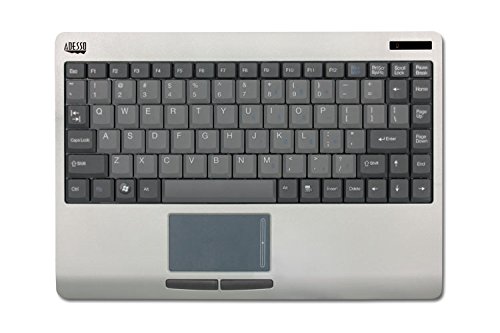
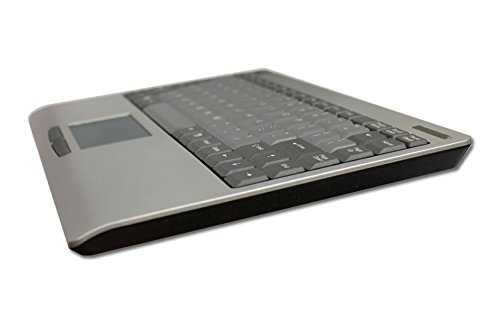
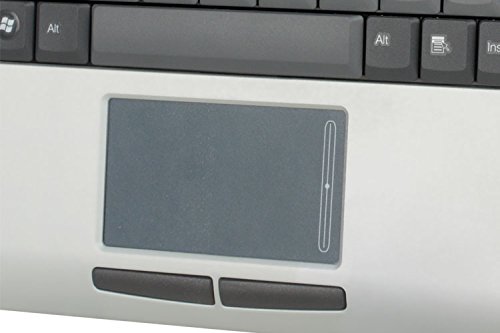
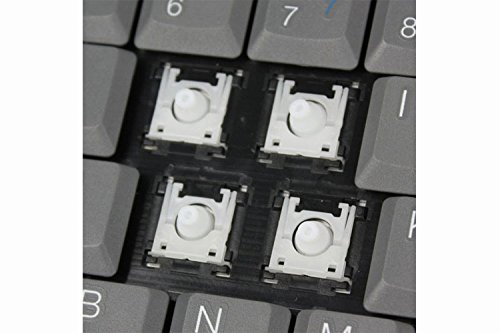
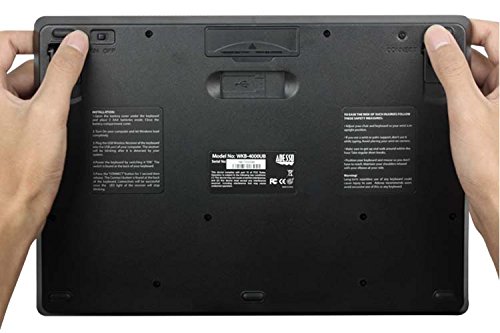
💻 Elevate Your Workspace with Effortless Control!
The Adesso WKB-4000US is a cutting-edge 2.4 GHz RF wireless mini keyboard featuring a scissor-switch 87-key layout, designed for optimal performance and convenience. With a range of 30 feet, a magnetic receiver holder, and energy-saving features, this keyboard is perfect for modern professionals seeking efficiency and style.
B**E
Simply the BEST!
What is one more review amongst the nearly 300 already written? I love it so much, I feel compelled to tell you MY experiences. This unit has totally changed the way I use my computer. I have never had one single item facilitate my life as much as this keyboard. I am using it now BTW. It is a part of a network I have to admit.My HP Envy 17 sits atop a cooler and never moves except when I travel. An HDMI cord connects it to my Pioneer Elite 50 inch plasma panel. All my printers and peripherals are plugged in and never need be disturbed. A Logitech universal remote allows me to switch from satellite to my computer with one touch. Sorry for the details, but it goes to context of usage.ALL my work is done using the ADESSO. I spilled a cup of soup on my first one and I found out it wasn't water proof. Oh well. I bought a less expensive wireless keyboard in the spirit of saving a few dollars. That lasted all of one day when I used Amazon's EZ return policy. I promptly bought another ADESSO. I use my ADESSO reclining in my bed to give you the rest of the scenario.What I like/love about the ADESSO:1)The mouse pad is CENTRALLY located. I absolutely hated the right hand location of the cheaper unit I bought. The central lower location is perfect on the ADESSO2)The scrolling function with a single finger is far easier to use than any other I have tried. I use it all the time. Even my near $2K HP does not have that function. I dare say I like the ADESSO mouse pad much better overall. The action is smooth and seamless.3)Light weight. It is light as a feather and apparently has nothing to do with sturdiness. I have dropped it countless times with no damage what so ever.4) Key stroke action is as good as any key board In have ever used.5) Set up is incredibly easy...REALLY easy.6)It does not scorch your lap or chest like a quad core 17 inch lap top. Zero heat is emitted.7)Battery life is quite long. I use my ADESSO for hours daily. Battery life at that rate is 3 weeks or more. Only 2 small AAA's.CONS:1) No light for caps lock. Not exactly a deal killer here. :)2) Not waterproof. Few keyboards are.Buy this unit. Hook up your lap top to your HDTV hopefully with a HDMI cord. And enjoy! I dont think there is a better unit available at any price.
S**S
Great concept, flawed
I got this so we could control the HTPC from our bed. It is very light weight, has very good typing feedback (for a rubber dome), and doesn't have range or connectivity issues.- It will not wake windows 7 from sleep correctly. It is not a problem with just this particular keyboard, but all wireless keyboards AFIAK. This is a HUGE flaw and I almost considered returning it after this finding.- The key layout is not acceptable to me. The function key is where control should be, making the commonly used control +tab, w, and t awkward. Shift, tab, and control should all go along the left side so your fingers can easily find them. How often do I need to engage the (sad excuse for a) number pad? One more thing. The function key ONLY enables the number pad. There are no other functions. Why not get rid of the function key and replace it with a number lock key?- The touchpad is very dumb. I assumed that the scroll feature would work as it does on laptops, where if you move up and down on the rightmost side it would automagically know that you want to scroll. Not so, instead the right side of the touchpad is a permanent scroll bar. Go anywhere near it during normal operation, and it likes to scroll. You learn to use only the left side of the touchpad, but still very lame.- I think it shipped with nearly dead batteries. The first set only lasted a few days.Basically, the marketing department designed this by committee. They turned a great concept brought to them by some insightful manager or engineer, and came out with something that isn't quite right.
B**0
Not as pictured, trouble with touchpad
This is a combo review of both the old and new versions of the Adesso WKB-4000US. Adesso released a newer version of this keyboard without updating the model number (not sure when). Note that many reviews of this keyboard here and elsewhere are actually speaking of the old version.How To Tell Them ApartThe old version of this keyboard, which I bought about 6 years ago, takes 4 AAA batteries and has Windows keys on both the left and right, while the new version takes 2 AAA batteries and has a Windows key only on the left. Currently, Amazon pictures the old version even though they are selling the new version, so don't trust the picture. [UPDATE July 2014: I reported the incorrect image and Amazon has updated it to the new version, so the pic is now correct.]Old Version OverviewI really like the old version of this keyboard. To me it is the ideal HTPC/TV keyboard/touchpad, very responsive and perfect size. It has survived falls onto a hard floor. The only issue I have had is that after years of heavy use, the mouse buttons eventually became somewhat unresponsive, due to dented plastic underneath where it contacts the switch (a common problem in cheaper aging mice). Also, a couple of the keys always needed a little extra punch (not so in the new version).New Version OverviewWhile Adesso improved some things in the new version, their new touchpad is not as good, which ruined a great keyboard.KeyboardsKey construction is very similar, basically a nice laptop scissor keyboard. You can write a book on it. The new version feels a bit tighter and quieter and slightly higher quality, but that could be because of wear on the old one I have. Key layout has changed though. The Insert and Delete keys are now to the left of the left-arrow key. There is no longer a Windows key on the right. Except for the odd placement of the Insert and Delete keys, the key layout mostly works well. No big changes here.The old version, the keyboard will go to sleep after 10 minutes. I press the Shift key to wake it or to make sure it's awake, and it responds quickly. The new keyboard never really goes to sleep. Even after sitting for hours you can pick it up and start typing.TouchpadsThe old version has an excellent touchpad with scrollbar on the right and two buttons. It has tap-to-click - that's about all, but I like the driverless simplicity (Linux user). It is a super responsive touchpad and scrollbar in real-time. The only difficulty is that it's easy to brush it and move the cursor accidentally. Eventually I learned to keep my hands away from the pad as I'm typing.The new version uses Adesso's new, rough touchpad plastic (also on another Adesso keyboard I tried), which has a coarse feel, and is less responsive. It is somehow sluggish or less in contact with your finger, especially the scroll bar on the right. The new one also has more acceleration, which is a bit welcome, yet hard to control. Comparing new to old touchpads there is just no comparison - the old one WORKS, the new one is a source of frustration and delay (and I used it for a week to adjust). I did manage to use it reasonably with some training and troubleshooting, but it's a weakness.I also had strange problems with the new touchpad. What lies beneath the keyboard seems to affect the touchpad. When it is resting on a carpet or couch, the touchpad's scrollbar always stops responding, and I must use only the tip of my finger to track. Tracking becomes erratic. If placed on my lap or a desk (on the rubber feet), or held in the air, this problem with the touchpad is gone. Long story short, when it is resting on the arm of the couch, I can't scroll and its hard to track. (It took me quite awhile to figure out what was causing this.)The mouse buttons on the new version are smaller and easier to press - an improvement there. Kind of clunky on the old version, although they did work mostly for years until the switches wore down.In the new version, a tap in the scrollbar performs a right-click. Not as handy as I expected, as it tends to happen accidentally.Also, jfyi, the new touchpad plastic that Adesso uses, I found to become unresponsive to cold fingers on another keyboard. I'm not able to test it on this keyboard because it's summer now. But the old version never had that problem.I have decided to return this new version because of its touchpad. I could live with it but it had a sluggish scrollbar and isn't as responsive and controllable. I just didn't like it enough, especially compared to the older version, which is a pleasure to use and has quick scrolling. To compare, with the old version, I just move my finger up and down on the scrollbar and it responds. On the new version, there's a lot of brushing involved, while it occasionally ignores some of the brushes. It takes a subtle touch to use the scrollbar well, and I find the lack of responsiveness frustrating.RFThe old version just used "RF", whereas the new version specifies 2.4 GHz and has a smaller dongle. Reception is about the same in both - both work well within about 10 feet, but I had problems with both around 25 feet. The keyboard on the new version seems slightly more quick and responsive, but both work reliably for continuous typing. Rarely do I ever lose a keypress on either - almost 100% reliable. The old version becomes less responsive when batteries get low (a month or so with daily use). The new version has a little plastic window that looks like it contains lights, maybe a low battery indicator, but I've never seen anything there (no response to caps lock).BuildThe durability of the old version impressed me, and the new version has a more firm build, and doesn't creak like the old one. (Adesso builds stuff well from what I've seen, comparable to Logitech in quality.) Both versions are about the same in weight. The new version has an on/off switch, which is handy but not critical, as auto power-off works well. Due to its groove along the bottom, the old version is easier to pick up and hold. Both have feet that pop up if needed, plus rubber feet. The new version has a storage spot for the dongle.OverallI'll take the old version of this keyboard any day over the new version. But if they hadn't turned the touchpad into a lower quality device, their other improvements were mostly welcome. I preferred the old key layout over the new as well. In my view, poor engineering choices by Adesso here. And update your model number when you change things! This is a completely different model.
Trustpilot
5 days ago
3 days ago