Some deliveries may take a little longer than usual due to regional shipping conditions.

DOWNLOAD THE APP


Customer Services
Copyright © 2025 Desertcart Holdings Limited
DOWNLOAD THE APP

📸 Backup Bliss: Charge, Secure, and Free Your Phone’s Memory!
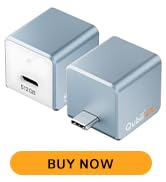
The MAKTAR Qubii Duo is a sleek, MFi-certified USB-A auto backup drive designed for iPhone, iPad, and Android Type-C devices. It automatically backs up photos, videos, contacts, and social media content to a microSD card (up to 2TB) while charging your device, eliminating the need for manual backups or costly cloud subscriptions. Featuring a one-click microSD lock for privacy and 30% faster transfer speeds, Qubii Duo offers a seamless, secure, and subscription-free storage solution compatible across multiple devices.




| ASIN | B07PYNC2RN |
| Additional Features | Lightweight |
| Best Sellers Rank | #84,975 in Computers ( See Top 100 in Computers ) #959 in USB Flash Drives |
| Brand | MAKTAR |
| Built-In Media | cable |
| Color | USB C White |
| Colour | USB C White |
| Compatible Devices | Laptop, Mobile, Tablet, iPad Pro (12.9-inch), iPad Pro (9.7-inch), iPad Air 2, iPad mini 4, iPad Air (3rd gen. or later), iPad mini 4, iPad mini (5th gen.), iPad (5th gen. or later), iPhone 14, iPhone 14 Plus, iPhone 14 Pro, iPhone 14 Pro Max, iPhone 13 mini, iPhone 13, iPhone 13 Pro, iPhone 13 Pro Max, iPhone SE (3rd generation), iPhone 12 mini, iPhone 12, iPhone 12 Pro, iPhone 12 Pro Max, iPhone… |
| Compatible devices | Laptop, Mobile, Tablet, iPad Pro (12.9-inch), iPad Pro (9.7-inch), iPad Air 2, iPad mini 4, iPad Air (3rd gen. or later), iPad mini 4, iPad mini (5th gen.), iPad (5th gen. or later), iPhone 14, iPhone 14 Plus, iPhone 14 Pro, iPhone 14 Pro Max, iPhone 13 mini, iPhone 13, iPhone 13 Pro, iPhone 13 Pro Max, iPhone SE (3rd generation), iPhone 12 mini, iPhone 12, iPhone 12 Pro, iPhone 12 Pro Max, iPhone 11, iPhone 11 Pro, iPhone 11 Pro Max, iPhone XR, iPhone XS, iPhone XS Max, iPhone X, iPhone SE (2nd generation), iPhone 8, iPhone 8 Plus, iPhone 7, iPhone 7 Plus, iPhone 6s, iPhone 6s Plus, iPhone SE (1st generation) Compatible devices Laptop, Mobile, Tablet, iPad Pro (12.9-inch), iPad Pro (9.7-inch), iPad Air 2, iPad mini 4, iPad Air (3rd gen. or later), iPad mini 4, iPad mini (5th gen.), iPad (5th gen. or later), iPhone 14, iPhone 14 Plus, iPhone 14 Pro, iPhone 14 Pro Max, iPhone 13 mini, iPhone 13, iPhone 13 Pro, iPhone 13 Pro Max, iPhone SE (3rd generation), iPhone 12 mini, iPhone 12, iPhone 12 Pro, iPhone 12 Pro Max, iPhone 11, iPhone 11 Pro, iPhone 11 Pro Max, iPhone XR, iPhone XS, iPhone XS Max, iPhone X, iPhone SE (2nd generation), iPhone 8, iPhone 8 Plus, iPhone 7, iPhone 7 Plus, iPhone 6s, iPhone 6s Plus, iPhone SE (1st generation) See more |
| Connectivity Technology | USB |
| Connectivity technology | USB |
| Customer Reviews | 4.1 out of 5 stars 2,528 Reviews |
| Hardware Interface | USB |
| Manufacturer | MAKTAR |
| Media Type | microSD |
| Media type | microSD |
| Model Name | MKPQC-W |
| Operating System | iOS, Android |
| Special features | Lightweight |
| Unit Count | 1.0 Count |
C**T
Tolles Teil mit dem wirklich jeder klarkommen kann
Ich hatte schon länger nach einer einfachen Möglichkeit gesucht, unabhängig vom Computer, die Fotos vom iPhone zu sichern. Das war sogar der Grund, dass ich mir meinen ersten Raspi gekauft habe. In der Zeitschrift “ct” war ein Projekt beschrieben mit dem das möglich sein sollte. Ich habe es aber nach vielen vergeblichen Versuchen aufgegeben. Dann habe ich durch Zufall den Qubii Pro hier in Angebot gesehen. Bis auf diesen Farbton sah erst mal alles gut aus. Nach etwas Suchen im Web, gefiel mir Qubii immer besser. Gleich eine große SD Karte mit bestellt, und dann wenige Tage später den ersten Sicherungslauf gestartet. Wenn man mal davon absieht, das 17.000 Bilder zu sichern schon eine ganze Weile dauert, hat das problemlos funktioniert. Auch das Mobiltelefon meiner Frau habe ich direkt gesichert. Aber die hatte auch nicht deutlich weniger Bilder 🙈 In der Doku steht das nich so klar verständlich, dass man quasi unbegrenzt viele Mobiltelefone sichern kann. Für jedes Telefon wird ein eigenes Verzeichnis auf der SD Karte angelegt. So kommen sich die Daten nicht in die Quere. Über die App hat man dann Zugriff auf die Bilddaten aller Mobiltelefone. Zu erwähnen ist vielleicht noch, das Qubii auch Kontakte sichern möchte - das kann man aber ablehnen. Mir war nicht klar, ob nicht diese Kontakte anders verwendet werden könnten. Was wirklich schlecht dokumentiert ist, sind die Unterschiede der verschiedenen Qubii Varianten. Das ist mit tatsächlich bis heute nicht komplett klar. Das Gerät ist in Verbindung mit der App wirklich extrem leicht zu bedienen. Einzige Voraussetzung ist, dass das genutzte USB Kabel nicht zu lang ist. Das ist mir bei einem weitern Sicherungsversuch passiert. Es bricht bei zu langen (2m) USB Kabeln ständig die Verbindung zum Qubii ab. Ein normales 60 cm Kabel geht aber super gut.
C**5
Works a treat
Easy to use, should be a bonus in storage solutions.
P**O
Works Perfectly
I always have trouble uploading photos to my computer. This works great and is easy to use. It captured all my photos without missing a single one. I like that it does not produce doubles when you go back to load again. I would recommend double checking your computer after the upload to be sure all were transferred because Microsoft is quirky (no fault of this device). Glad I bought it!
J**C
Just works, brilliant
Install the app, plug this in via your preferred charging method and in time fully backs up all your photos and contacts, once a full backup is done it will then only do whatever is new rather than all your photos again. Using sandisk extreme cards and they work a treat. Really clever little gadget, recommended for anyone for peace of mind of having all those precious memories saved elsewhere.
R**.
Excellent way to store photos
I was running out of space on my phone and did not want to purchase more. This way of storing photos is easy and convenient. Well worth the purchase and ease of use. Just plug in your phone and start charging. Photos are saved and your phone gets charged.
Trustpilot
2 weeks ago
2 months ago