We remain fully operational. Our teams are working around the clock to ensure your deliveries continue safely.

DOWNLOAD THE APP


Customer Services
Copyright © 2025 Desertcart Holdings Limited
DOWNLOAD THE APP


🚀 Tiny Titan: Power, Portability & Precision in One Mini PC
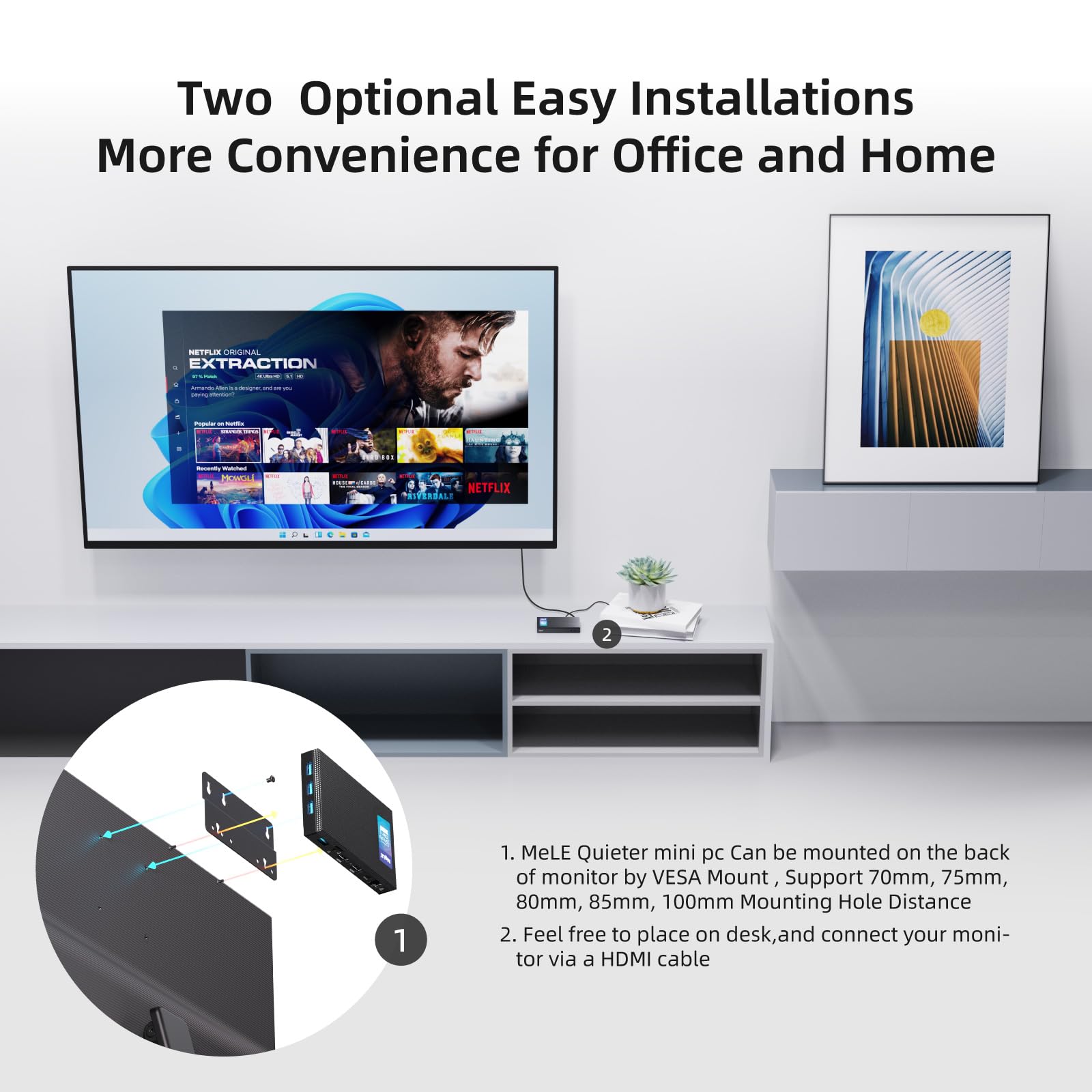
The MeLE Quieter3Q is a fanless, ultra-compact mini PC powered by an Intel Celeron N5105 quad-core processor with turbo speeds up to 2.9GHz. It comes pre-installed with Windows 11 Pro and supports Linux OS, making it ideal for professionals and developers. Featuring dual-band WiFi 5, Gigabit Ethernet, 8GB LPDDR4x RAM, 128GB eMMC storage with expandable NVMe M.2 SSD support, and dual 4K HDMI outputs, this silent powerhouse fits in your pocket and mounts discreetly behind monitors for a clutter-free workspace.


| ASIN | B09XB5SPJT |
| Are Batteries Included | Yes |
| Average Battery Life (in hours) | 4 years |
| Batteries | 1 CR2032 batteries required. (included) |
| Best Sellers Rank | 43,339 in Computers & Accessories ( See Top 100 in Computers & Accessories ) 313 in Desktop PCs |
| Brand | MeLE |
| Colour | N5105/8GB+128GB |
| Computer Memory Type | DDR4 SDRAM |
| Connectivity Type | GB |
| Customer Reviews | 4.2 4.2 out of 5 stars (77) |
| Date First Available | 18 April 2022 |
| Form Factor | Small Form Factor |
| Graphics Card Description | Integrated |
| Graphics Card Interface | Integrated |
| Graphics Chipset Brand | Intel |
| Graphics Coprocessor | Intel® UHD Graphics |
| Graphics RAM Type | DDR4 SDRAM |
| Guaranteed software updates until | unknown |
| Hard Disk Description | Embedded Multi Media Card |
| Hard Disk Rotational Speed | 1 |
| Hard Drive Interface | USB 3.0 |
| Hard Drive Size | 128 GB |
| Hardware Platform | Linux, PC |
| Item Weight | 222 g |
| Item model number | Quieter 3Q 81E |
| Lithium Battery Energy Content | 0.66 Watt Hours |
| Lithium Battery Packaging | Batteries packed with equipment |
| Lithium Battery Voltage | 3 Volts |
| Lithium Battery Weight | 0.06 Grams |
| Manufacturer | MeLE Technologies (Shenzhen) Co., Ltd. |
| Maximum Memory Supported | 8 GB |
| Memory Clock Speed | 2933 MHz |
| Memory Technology | LPDDR4 |
| Number Of Lithium Ion Cells | 1 |
| Number of Ethernet Ports | 1 |
| Number of HDMI Ports | 2 |
| Number of Lithium Metal Cells | 1 |
| Number of Microphone Ports | 1 |
| Number of USB 3.0 Ports | 4 |
| Operating System | Windows 11 Pro |
| Optical Drive Type | None |
| Power Source | DC |
| Processor Brand | Intel |
| Processor Count | 4 |
| Processor Socket | BGA1388 |
| Processor Speed | 2 GHz |
| Processor Type | Celeron |
| Product Dimensions | 6.4 x 15.51 x 10.89 cm; 222.26 g |
| RAM Size | 8 GB |
| Resolution | 4096x2160 Pixels |
| Screen Resolution | 3840 x 2160 |
| Series | MeLE Fanless Mini PC Quieter |
| Voltage | 3 Volts (DC) |
| Wattage | 8 watts |
| Wireless Type | 802.11ax |
S**T
Excellent Docker server!
Initially bought the 3Q 128GB version to replace multiple Raspberry Pi "servers" that I was running with a view to migrating everything to Docker on the 3Q. I put a 1TB WD Blue NVME drive in the 3Q and ignored the embedded 128GB eMMC. Not interested in the Windows 11 that was on it as shipped I installed Debian and Docker and now this one tiny PC runs my whole house. DNS, DHCP, Smarthome services, Smartphone reporting with Influx and Grafana, ad blocking, network tunneling, and anything else I can think of to put on it! Nothing that requires a lot of processing grunt as they aren't the most powerful devices but, it runs perfectly and keeps cool averaging 35C. But it is in the cool environment of my garage. I put so much on the 3Q I realised it was a critical single point of failure for my house so I got the slightly newer 3C as well during the recent sales as a backup device. The price point of these is now, I think, too high. The original 3Q I got for £210 and it's now up around £280! The 3C is nicer because you don't have to rely on the dedicated USB C 12v power supply that comes with the PC and can use a standard USB C power supply that supports PD. Apart from that the 3C is almost identical. As a small, low power consumption home server running Linux this can't be beaten and for anyone running lots of Raspberry Pi's like I was, I can't recommend this enough as a single device replacement. I now have four redundant Raspberry Pi 4s I think I might be able to make some money on to offset some of my Quieter PC investment! 🙂
J**L
Blows your mind!
It's about the size of an old cassette tape and it runs rings around every PC I ever owned. It fits on the back of a monitor so keeps your work area free. It runs windows 11 pro, which is sleek and fast. It has a lot of power for running multiple apps, but is quite happy running YouTube at 4k, if that's your thing. It plays Xbox games too. Buy it, be blown away when it is delivered to your door and you see how small it is, be blown away when you see what it can do. Be blown away at the price. Highly recommended.
R**A
Well made, capable & robust but...
It is much better made than most of the cheaper mini pcs, with an aluminium case and a decent on/off switch. I also like that it has 4 usb sockets (as well as 2 hdmi which I don't use). I use it for astrophotography & it comfortably runs all the software I use such as sky atlas, sequencing, guiding etc but I really don't like how fussy the power management is. I like to have everything running from a small powerbox mounted on the scope feeding 12v power to various equipment to avoid a lot of dangling cables but so far I've been unable to get my Mele to run from this & it keeps switching off. Part of the problem I think is that it has a usb c socket but it can't accept cables with PD emulation in them which most of the usbc cables seem to have. Mele empasises that you must use their power supply but the cable they provide is quite short. If Mele improved this then it would deserve 4 or 5 stars.
R**S
Rubbish
I brought this a while ago I have used it 4 times and it packed up.
C**Y
So close
I bought this to use a media box to be connected to the TV and it is very close to what I wanted. Unfortunately there are 2 issues with my unit 1, 50% of the time the PC doesn't recognize any audio hardware hardware when turned on. This is fixed most of the time by restarting it. The second issue is the GPU can't really handle 4k YouTube playback and always downgrades from 4k down to 480p
S**R
Silent, tiny, powerful, cheap.
So far, it works perfectly. The case gets very, very hot - hopefully it will not effect the lifespan of this tiny computer. Incredible value.
P**T
Excellent silent computer
The main reason I bought this was because it was silent and I wanted to maybe run Node Red or Homeassistant on it instead of the hard to find Raspberry PIs. It comes with Windows 11 and is easy to get up and running although if you want to re-install the Window OS on another drive M.2 NVME maybe then there is a problem with the manufacturers website link to the windows image as it doesn't exist on their server, I tried contactng them but with no response so be aware of this although I assume a standard windows install should work? I added a 500GB M.2 NVME drive and added the latest Ubuntu and it happily dual boots into either windows or Ubuntu and seems quite quick for it's size and the fact it's fanless. The top cover does get quite warm when you are driving the processor hard but not enough to burn you. Overall I'm impressed with the quality and speed of this little device.
I**S
On the initial boot, it was running hot from installing updates and installing applications. Definitely hot to the touch at around 70-80 C. After that, went to bios to underclock it since I didn't need all that performance. Clock to base 1.8 and turbo to 2.4. Now runs at about 55C when it's busy. Still performs well even at the new clocks and uses less power than originally configured out of the box. There's M.2 NVMe slot (no sata support) inside if you want more storage or want to switch to that as the primary boot device instead of the built-in 128 emmc storage. No ram upgrade, but 8GB should be adequate for most uses for devices at this specification. Oh, and there's an sdcard slot, so more storage expansion.
E**H
Cela fait un moment que je recherche un Raspberry pi4 8Go pour upgrader mon setup astrophoto, mais il n'est jamais disponible et à des prix de malade. Alors je commençais à regarder du côté de l'Asiair de ZWO qui est ni plus ni moins qu'un Raspberry mais là aussi les prix sont fous Après avoir fouillé je suis tombé sur ce mini pc fanless qui en plus d'avoir de la gouache et de la ram était relativement abordable. Quand je dis de la gouache c'est qu'il plus puissant qu'un Pi4 et en plus il a un espace de stockage suffisant pour mon utilisation. Livré avec Win11 d'origine, j'ai installé tout les outils nécessaires au pilotage de mon télescope ainsi que les caméras de guidage et d'imagerie. Et là je suis bluffé Avec tout les logiciels qui tournent (Nina, sharpcap, phd2, Stellarium) plus la capture des images de la caméra + la vidéo de la cam de suivi, ce mini pc ne bronche pas. Les gros avantages pour moi : - 4 Port usb3 - Alimentation 12v 2a (moins qu'un pi4) - hyper léger En revanche un point négatif, mais il fallait s'en douté, ca chauffe fort, le boitier monte à 65°c. Pour les prises d'images cet hiver pas de problème mais en ce moment avec la chaleur de l'été j'espère qu'il va tenir Donc si comme moi vous voulais automatiser vos prises de vue et monitoré votre système bien au chaud à la maison sans attendre de trouver un Pi4, je vous le recommande, il est top
J**A
Den blir snabbt väldigt varm men det får man väl ta för att slippa fläkt. Vore bra om man kunde köpa till någon typ av värmeavledning, kylflens.
F**.
I bought the MeLE Quieter3Q (N5105 processor, 8GB RAM and 128 GB eMMC drive) to control my astrophotography gear: telescope mount, 12v power distribution box/USB hub, DSLR camera and guide camera. I installed N.I.N.A., PHD2, Stellarium, Sharp Cap, several ASCOM drivers and an application to control the power distribution box/USB hub. I also installed helpful application like Google, Notepad++ and 7-Zip, but to keep overall performance high, I kept software installations to a minimum. And to that end, I did make changes to the stock configuration: 1. I added a 2 TB NVMe drive 2. Then I reinstalled Windows 11 Pro to the NVMe drive 3. Next, I made the NVMe drive the boot device 4. And finally, I formatted the eMMC drive to use as extra storage After slogging through the required Windows updates, the PC boots very quickly from the NVMe drive and worth the added expense of an NVMe drive. But it would have been nice to buy a unit that had an NVMe pre-installed as the Windows boot drive to save me the time and hassle of doing this work myself. So far, there have been no issues and all software has worked as expected. I can use RDP or Google Remote Desktop to access the PC remotely over Wi-Fi and control the entire photographic session. This PC is used to control the equipment and software needed to capture images of deep sky objects, but it is not used to process those images into the final product as this requires significantly more CPU and memory horsepower than the Quieter3Q possesses. These were my critical criteria when selecting a mini-PC: small form factor, light weight, recent CPU generation, good storage options and the ability to be powered from a 12v power source. Relative to my use case, here are my pros and cons… Pros: - Small footprint (important for telescope mounting) - Light Weight (important for telescope balancing) - Newer CPU generation - Expandable storage via an NVMe drive - 12v power supply requirement - No moving parts so it’s totally quiet, and more importantly, there are no vibrations transferred to the telescope or cameras - Can be mounted to the back of a monitor for a clean desktop, or to a telescope mounting plate Cons: - No ability to upgrade memory - Limited storage configurations direct from MeLE, such as a preinstalled NVMe drive - Gets a little warm since there is no fan, but not a big issue for me - A little pricey when the cost of an NVMe drive is added, but this is optional Overall, I am very happy with the MeLE Quieter3Q and for my astrophotography use case, it fits the bill perfectly.
S**S
Ich hab den Mele 3Q N5105 nun über ein halbes Jahr in Betrieb und kann nur gutes berichten. Der mini PC fungiert bei mir als Linux Server auf dem neben private Cloud auch eine Heimautomatisierung läuft. Da er keinen Lüfter besitzt ist er komplett lautlos. Davor hatte ich einen anderen mini PC, der ebenfalls keine Lüfter hatte. Das Problem bei dem vorhergehenden mini PC war, dass die passive Kühlung nur aus einer Metallplatte bestand, welche die CPU nicht wirklich kühlen konnte. Beim Mele ist das Gehäuse aus Aluminium. Dazu hat er eine besondere Oberfläche, die leicht porös ist und damit eine sehr große Kühlfläche bietet. Dadurch ist die passiv Kühlung besonders leistungsfähig. Durch die verbesserte Kühlung kann er die CPU Frequenz via TurboBoost deutlich länger auf Max halten. Ein weiterer Pluspunkt ist der Stromverbrauch. Für die Heimautomatisierung habe ich zuvor zusätzlich noch einen Raspberry Pi benutzt. Der Mele benötigt aber kaum mehr Strom als der Raspi. Er gönnt sich im Leerlauf um die 6W (ohne WLAN und USB Geräte), bei Vollast liegt er bei ca 12W. Als Speicher für die private Cloud habe ich zusätzlich eine M.2 NVMe verbaut. Die funktioniert mit voller Geschwindigkeit absolut ohne Probleme. Die Wärme der NVMe wird über ein Wärmeleitpad an das Gehäuse abgegeben. Damit bleibt auch die NVMe schön kühl. In den über 6 Monaten lief er absolut stabil. Bei vielen mini PCs mit Intel Celeron N5105 ist das Bios beschnitten, sprich man kann praktisch nichts einstellen. Bei dem Mele 3Q kann man so ziemlich alles einstellen was das Bios hergibt. Dass ein N5105 auch für den Desktopbetrieb funktioniert und Windows oder einen Linux Desktop Environment befeuern kann muss man hier nicht extra sagen. Es gibt auch diverse Testvideos zum Mele und seiner Leistung im Netz. Bei den Tests werden aber keine Langzeiterfahrungen geteilt. Aufgrund meiner Erfahrungen haben sich diverse Bekannte ebenfalls den Mele 3Q geholt und sind genauso begeistert wie ich. Aus meiner Sicht verdient der Mele 3Q nicht nur 5 Sterne sondern noch ein ganz großes Plus dazu.
Trustpilot
5 days ago
2 weeks ago