We remain fully operational. Our teams are working around the clock to ensure your deliveries continue safely.

DOWNLOAD THE APP


Customer Services
Copyright © 2025 Desertcart Holdings Limited
DOWNLOAD THE APP


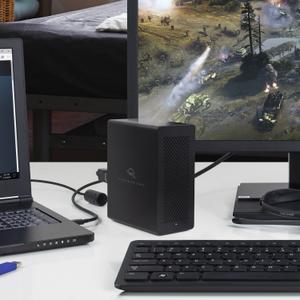
⚡ Unlock lightning-fast storage with the ultimate 4-drive Thunderbolt 3 enclosure!
The OWC Express 4M2 is a premium aluminum enclosure designed to house four NVMe SSDs, delivering speeds up to 2800MB/s via dual Thunderbolt 3 ports. Perfect for professionals needing portable, high-capacity, and reliable RAID storage compatible with both Mac and Windows systems, it combines cutting-edge performance with a lightweight, durable design and includes a 1-year limited warranty.


| Material | Aluminum |
| Compatible Devices | Laptop |
| Hard Disk Form Factor | 2.5 Inches |
| Max Number of Supported Devices | 4 |
| Global Trade Identification Number | 00810586030090 |
| Manufacturer | Other World Computing |
| UPC | 810586030090 |
| Item model number | OWCTB3EX4M2SL |
| Item Weight | 3.72 pounds |
| Product Dimensions | 4.72 x 12.2 x 7.87 inches |
| Item Dimensions LxWxH | 4.72 x 12.2 x 7.87 inches |
| ASIN | B07G5MHBW1 |
| Is Discontinued By Manufacturer | No |
| Date First Available | August 3, 2018 |
A**N
Working Great for Editing 4k & 6k Footage
So far this has been working fabulously for me. Yes the fan is too loud but overall performance of the enclosure itself with the way I have it configured as been perfect for me.I am using this as my primary RAID for video production. Mainly editing 4k and 6k .BRAW 8:1 footage - usually @ 23.97fps, but sometimes 60fps as well. I’m currently on the 2023 version of Premiere with Mac OS Ventura. This things screams. Tested with the BlackMagic Disk Speed Test app I’m getting just over 2900 MB/s.I’ve loaded it up with 4x 2tb Samsung 970 EVO Plus’s and built as a RAID 0 using Mac OS Ventura’s Disk Utility and formatted as GUID APFS. I did not want to be bound to OWC’s SoftRAID software because I need this to occasionally move to different Macs and I don’t want to rely on a 3rd party piece of software to access my data.Getting 4 fast M.2’s and doing a RAID 0 is the key to getting the enclosure’s advertised speed. I see many people make the mistake of only putting one or two drives in, or doing a RAID 1 on 4 drives. I knew this going into it and already had most of the M.2’s on hand so it wasn’t an issue for me, but something for everyone to keep in mind.I’ve tested the daisy chaining ability out by connecting a USB-C monitor that has a keyboard and mouse KVM’d to it and the Mac sees everything and I cannot detect any r/w performance hits when using it. I have not tested the display port on this yet.Power-wise the enclosure automatically powers down overall, once my Mac has turned off. I say “overall” because the fan and front LED turns off and the M.2’s do not generate any more heat so I assume they are off. But the blue LEDs inside are still lit.Speaking of heat. The M.2’s generate a ton of heat. And as many of you probably know by now, the fan is pretty loud. To that end, I decided to take the advice of other users online and purchased low profile copper heat sinks for them. I also changed out the very loud 12v 60mmx15mm fan with a 24v one. Because the enclosures is only providing 12 V to that fan, it spins at half speed. That has cut down the sound issues considerably and seems to keep air moving well. The unit feels cooler than it was before the fan and heatsink upgrade.For those of you who would like to do the same.This is the fan (its a tad smaller at 10mm thick”:https://a.co/d/8IbOUmLThe fan needs a 2-3 pin adapter:https://a.co/d/gzv6xqDAnd the heat sinks:https://a.co/d/7fW4Whh
T**N
Works well but need RAID 0
In order to get the advertised speeds, you will need to run 4 drives at RAID 0. I chose to not get SoftRaid and just use apple disk utility to set up the Raid as it's more reliable imo.I'm using 4x Samsung 990 Pro 2 TBs, overkill for this for sure, but again I wanted something reliable and they weren't too much more expensive than 980 pros.My real complaint is the fan, it's noisy. If you're working in a noise-sensitive environment you'll hear it and you'll hate it. Since I planned to put low profile 2mm heatsinks on all 4 drives, I decided to use a 92mmx15 slim noctua fan I had laying around. The size is perfect to cover all 4 drives so that they would be cooled equally, I used a low-noise adapter since the fan basically runs at full speed. I used some rubber mounts that came with my noctua and just position it so that the fan doesn't touch any surface and it wouldn't move about when using the enclosure vertically or horizontally.This is an expensive piece of kit, but compared to others on the market, this has the best build quality. Just wish they include a quieter, bigger fan and allow more space for larger nvme heatsinks.
C**F
Fast, Quiet and Compact Professional Image Drive
I am a full time professional photographer and have had many RAID arrays over the years. I've only had this one for a month but so far it has been great. Also the fastest and quietest to date. It has 5X the read speed and 3X the write speed of my LaCie 2Big Dock RAID 0 and this one I have set up as RAID 5 (slower than RAID 0, all else being equal.) Both using Thunderbolt 3. I have 4- 4TB Crucial P3 Plus NVMe SSD sticks installed. I have it connected with Thunderbolt 3 on my M1 Mac Mini so no bottleneck with the connection.A few reviewers complained about fan noise. That has not been my experience. It is barely audible, even with no other sounds going on in my studio. Of course this is subjective and it's possible there is a variance on quality or brand of fan used by OWC.I held off using all SSD drives in an array because of the high cost but NVMe SSD's have come down enough that it is perfectly feasible, especially for pro use. It was only a few hundred bucks more than my LaCie with rotational drives which are much slower, far less reliable and much noisier.I bought the version with SoftRAID which I feel is worth the extra $130 or so. It monitors everything and will tell you if a drive is about to fail though not much of a concern with SSD. I mainly got it to be able to set up a RAID 5 which you can't do with Apple's Disk Utility. If you're going to use RAID 0 you could probably get by without SoftRAID.I have found OWC tech support to be good. You can actually talk to a person on the phone which is more than I can say for most companies. I do test out and weigh a company's tech support before buying gear. A big reason why I use Apple products. Support from LaCie (now Seagate) has sucked! So I am relieved that OWC has live agents to help and the two or three I've talked to so far have been knowledgeable.Based on one month of use, I do recommend the 4M2 with SoftRAID. I have had good experiences with OWC, but this is my only purchase from them in the past few years. So ask me in a year!
Trustpilot
2 months ago
1 month ago