Desert Online General Trading LLC
Dubai, United Arab Emirates
Desert Online General Trading LLC
Dubai, United Arab Emirates


🔧 Build It Your Way: The Keyboard of Your Dreams Awaits!
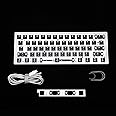
The YMDK GH60 GK61 RGB Hot Swap Mechanical Keyboard DIY kit includes a fully programmable PCB, a durable CNC aluminum case, and all necessary components for assembly. With support for 16.8 million RGB colors and a user-friendly hot swap feature, this kit allows you to customize your typing experience without the hassle of soldering.
R**N
Software Guide
The keyboard itself is great, it has a very solid build quality even though it's plastic. There's really not much to complain about. The RGB is clean and vibrant and the rubber pads stop it from moving around. The only complaint I could give would be the stock stabilizers in mine are not great, but they're easy to take out and replace and/or lube. Also, this was my first somewhat custom board, and somehow I did not realize how important dedicated arrow keys are for me, but that is just personal preference. With this layout you're still gaining a much smaller form factor than a TKL without the hassle of a non-standard layout, so this will be ideal for a lot of people. I was originally going to take off a star for the software, but after a lot of experimenting, I actually believe there is actually a ton of functionality that I originally thought was impossible. It is certainly not ideal and hopefully will continue to get more improvements, but I do not believe it deserves to lose a full star.For reference, I am currently using version 6.0.0.36. I'm not sure if I can link it here so a simple google search for "GK61 software" and you should easily be able to find the latest version. The website is not in English, but it's very easy to tell what version of the software you are downloading.The primary thing that confused me forever with the software is that the different "layers," as the software calls it, are not really function layers, they are actually profiles so I am going to be referring to them as such. To rebind the ACTUAL function layer, you simply click on the virtual function key in any profile, and then you can set it however you want. (There are a ton of options for adding media controls, modifier keys + another key, profile modifier keys, etc. pretty much anything you could want.) I have not tried macros but you should be able to do them. Unfortunately, the function key itself cannot be rebound. I heard you are able to add another key as a function key, but I cannot find out how to do that. If you want another key to act as a function key, you easily make a key that switches to another profile when held, so you can rebind that profile to act as a function layer. I am not sure what the "Driver 1" profile is for, but definitely avoid it, it completely ruins animated RGB effects and it seems to have no real functionality that isn't already on the other profiles. (Edit: heard from a video that this is for saving profiles to the pc, I'm still not really sure why you'd want to use it.) You won't really be able to use that profile separately anymore, but I doubt most people will need more than one profile. The keyboard will remember the whole setup including the effect it was left on between computers. When you go to rebind a key, (which can only be done on profile 1-3, not on the default profile) it is called a "function" in the software, but it actually just means that is what the key will be bound to when you are using that profile (remember, called "layer" in the software).Adding RGB effects is also something that took me awhile to figure out. I do not believe you can add different RGB effects to different profiles, instead you go to the standard profile and you're given to option to replace 5 of the 10 RGB options you can cycle through by default. These will then be the same on all profiles. To create custom effects, you can go to the LE Files at the top and create your own effect. Once created, just add it to the standard profile and you'll be able to cycle to it.Overall this keyboard is a really affordable hotswap board and a lot of people will be perfectly happy without even installing the software. Spending any more money than this is really only going to get you different materials, so this seems like the perfect price point for those who want a premium board at a great price. I'd highly recommend this board to a keyboard beginner or veteran alike, aside from the software learning curve and a non-remappable function key, I don't think there is anything to be disappointed about. And the great thing about hotswappable boards is even if you don't end up liking your switch or keycap choice, you can switch them to your heart's content! I do not yet own a bluetooth variant of this board, but I'm definitely looking to pick up a GK64 which is almost the same board that has dedicated arrow keys with the downside of being a non-standard layout. If it's the same quality as wired I would have to say it'll be one of the best bluetooth boards out there.
N**O
Absolutely Perfect.
[EDIT 8/8/2021]: as ive dove deeper and deeper into the custom mech hobby, i can assure you there are better first boards out there. I was happy with this board and still am, but i have found a few flaws that really changed how i see it now. The first flaw. The GK61 PCB doesn't support via, and it doesn't let you reprogram the FN key position in the software. Not only that, but the plate mount stabilizers aren't great, even when tuned. I would recommend a hotswap board that supports SCREW IN stabilizers, as you have a better chance of having those sound better when compared to plate mount. I have since thrown in durock koalas for the alphas + number row and durock l7s for the mods and spacebar, and i dont see myself using this bored that often anymore. Its not bad, but you can do better for the amount of money youre spending. I honestly wouldn't even be that upset if instead of a gk61 pcb this came with something that was qmk / via compatable. Overall a decent board, but there are better options.-----------------------------------------------------------------------------------------------------------------------Original reviewI bought the coffee aluminum chassis, and i dont think i could be more happy. I absolutely love how this came out, and i love the fact this comes with a PCB and plate, although i think the plate could be a tad bit better. I installed some foam inside, although i dont really notice a difference as it was pretty thin. One thing i noticed while building was the plate felt kind of rough, and almost felt like it would cut me at times. Thankfully it didnt, but it was unsettling. Another thing i saw when assembling this. The plate flexes a lot in the corners when youre pressing switches down. Before you say anything, yes, i double checked and made sure my standoffs were screwed in tight, so i was very surprised to see the plate bending as i put in my box jades. One more thing, this isnt really a flaw though, just something i noticed. The plate isnt too small for the chassis, rather it just leaves maybe a millimeter or 2 on each side of it, leaving this somewhat noticeable gap between the plate and chassis. Other than that, i am very happy with this purchase, and i will probably continue to make poor financial decisions related to keyboards.
Trustpilot
2 months ago
2 months ago