
DOWNLOAD THE APP



Desert Online General Trading LLC
Warehouse # 7, 4th Street, Umm Ramool, Dubai, 30183, Dubai
DOWNLOAD THE APP
Desert Online General Trading LLC
Warehouse # 7, 4th Street, Umm Ramool, Dubai, 30183, Dubai

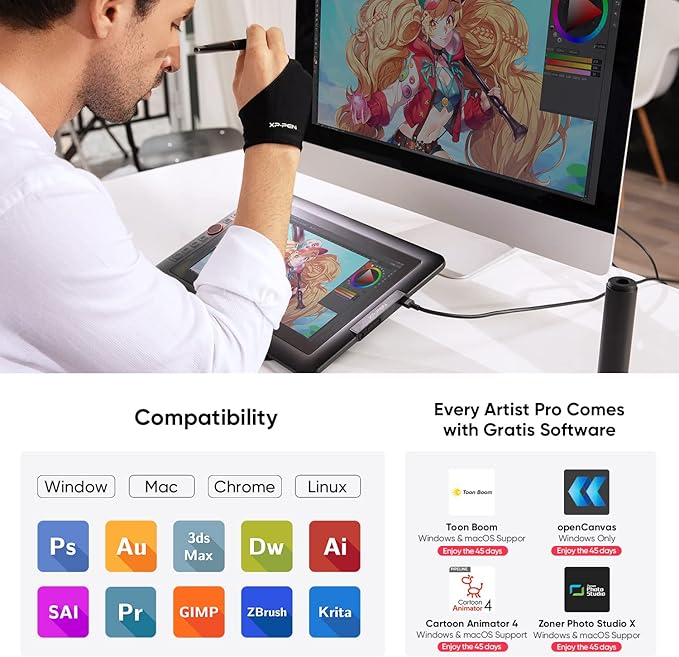


🎨 Elevate Your Artistry — Where Precision Meets Portability
The XP-PEN Artist 13.3 Pro is a sleek, portable drawing tablet featuring a 13.3-inch fully laminated Full HD display with exceptional color accuracy (88% NTSC, Adobe RGB≥91%). Equipped with an 8192-level pressure-sensitive stylus and 60° tilt support, it offers natural, paper-like drawing experiences. Its innovative red roulette dial and 8 customizable shortcut keys streamline your workflow. Compatible with Windows and Mac OS, it supports all major creative software and includes free OpenCanvas 7 software, making it the perfect tool for professional digital artists on the go.


| Brand | XP-Pen |
| Product Dimensions | 25 x 39.04 x 0.25 cm; 2 kg |
| Item model number | Artist 13.3Pro |
| Manufacturer | XP-PEN |
| Series | Artist 13.3Pro |
| Colour | Black |
| Standing screen display size | 13.3 Inches |
| Screen Resolution | 1920x1080 |
| Voltage | 5 Volts |
| Operating System | Windows 10/8/7 et Mac OS X 10.10 (et versions supérieures) |
| Are Batteries Included | No |
| Item Weight | 2 kg |
| Guaranteed software updates until | unknown |
D**I
Solid product
So this would be my first display/pen and I got it at 20% off (stock pre-order). Absolute bargain, pen accuracy is great, pen feels good to use, screen looks amazing. buttons feel good. If i could afford it I would recommend the 16pro but this one is will do fine for a casual user like me. Also desk space is a thing, I like to keep it ready to go. only 4 stars because there seems to be a recurring issue with the function keys not saving or I have heard of them unsetting while in use. However export the calibration file and save it as a work around for now. I will edit if i find more info on the issue or if anything develops but at the moment I can recommend this.
J**S
Decent tablet but had really bad lag for me
The overall tablet itself is pretty decent, unfortunately at the time of writing this i have been having nothing but issue with graphics tablets from different makes. this one is no different, it arrived seeming okay. however upon using it i noticed a really bad lag with the pen, that made it almost impossible for me to draw fine details as the pen would not move fast enough. as someone who draws very zoomed out a lot of the time this was a huge deal for me and made it unusable. basically felt like maximum stabilizer was on all the time. i tried on multiple programs. even uninstalled driver and the issue still persisted. i ended up returning it. if you are used to stabilizers on drawing programs i feel like this would be not an issue. however if you like to draw very fast, there is a chance you could get one with bad lag like i did. other than the the tablet itself is decent.
K**D
Great tablet but faulty stylus
This tablet is amazing for the price, works beautifully with clip studio paint. No noticeable parallax and pressure sensitivity is great, feels natural. Colour seems accurate and no issues installing drivers. Just make sure there’s no trace of old Wacom/Huron/etc drivers on your system before installing. I did have an issue with my stylus, but after discussing the issue with the seller a replacement was sent out. Took a little while to get here but that’s understandable with the current times! No problems now and I couldn’t be happier. (EDIT: I’ve encountered the same issue with the replacement pen, I will amend my review if the issue is resolved.)
J**M
Major lag issues
When it's working, this tablet is amazing. But for some reason, I have recently been dealing with major lag issues, to the point that im not even enjoying drawing anymore because it's so frustrating. Now I'm planning on getting an iPad to replace this tablet. Please if their is a fex let me know ASAP.
R**K
Really good for beginners
This is a his starter drawing tablet. I do run into some accuracy issue from time to time.
K**T
I’ve drawn digitally for 8 years now and this is my first screentablet and I love it so much! It works so well!! ❤️❤️❤️
P**O
perfeito, só tive algumas dificuldades para montar
L**A
E' la mia prima tavoletta grafica con schermo, quindi non ho termini di paragone con altre, ma posso dire che funziona molto bene! Utilizzata con WIN10 sia collegata ad un notebook che al PC fisso. Configurata in pochi minuti. Consiglio di scaricare i driver dal sito XP-Pen per il vostro sistema operativo e di riavviare il computer. Lo schermo della tavoletta può essere impostato come duplicato dello schermo principale o come estensione del desktop. Risposta alla pressione perfetta. Lo schermo è delle giuste dimensioni (io ho preso la versione 13.3pollici). Non ingombrante nè troppo piccolo. L'area di lavoro è poco più piccola di un foglio A4. Comodissima la rotella di ZOOM ed i tasti funzione a lato (tutti personalizzabili con le funzioni preferite tramite il software di gestione). Il pennino ha la base di appoggio (penna passiva non necessita di batterie) e 8 punte di ricambio (oltre alla punta già installata). Ottimo il guantino da indossare per non sporcare lo schermo mentre si disegna. In dotazione c'è anche una base per sostenere la tavoletta inclinata per chi lo preferisce. Ottima luminosità. Utilizzata per ora con Illustrator e Photoshop. Nessun problema.
T**A
Vorteile: - Sehr präziser Stift mit vielen Druckstufen - Display mit guten Farben und Blickwinkeln - 8 belegbare Shortkeys für schnelleres Arbeiten - Solide Verarbeitung und kompakte Bauform Fazit nach 3 Wochen Nutzung: Für digitales Zeichnen absolut empfehlenswert. Preis-Leistung ist top und die Arbeit geht deutlich schneller und angenehmer. Tipp: Wenn Ihr nach der Anschaffung nicht weiter Geld für teure Zeichen Programme ausgeben wollt kann ich „Krita“ empfehlen.
P**Y
ça marche super bien, ça fait plus de 3ans que je l’utilise, penser a bien prendre une protection pour l'écran, et selon votre ordi, il faut prend un hub usb/hdmi
Trustpilot
4 days ago
2 months ago