


🚀 Upgrade your desktop with 5X 10Gbps USB power — because speed waits for no one!
The FebSmart FS-A5-Pro is a PCIe x4 expansion card that adds five USB 3.1 GEN2 Type-A ports to desktops and workstations, delivering up to 10Gbps per port with a shared 16Gbps bandwidth. Featuring built-in self-powered technology, it supplies up to 75W total power without extra cables, supports plug-and-play on modern OSes, and includes a heat sink for reliable high-speed performance.
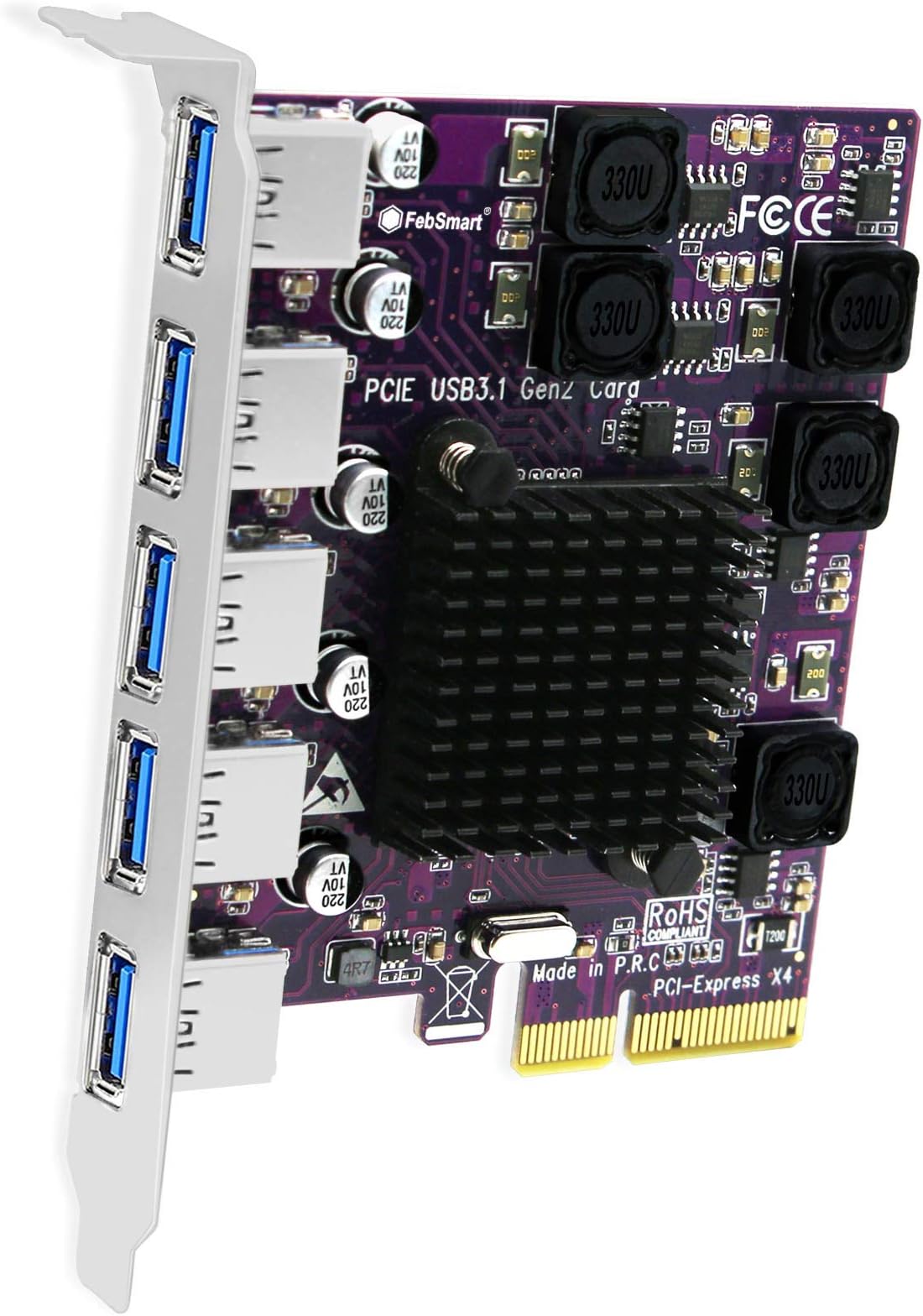


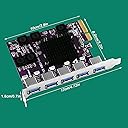

| Brand | FebSmart |
| Series | PCIE X4 Interface to 5X 10Gbps USB-A Ports Expansion Card |
| Item model number | FS-A5-Pro |
| Operating System | Windows 11, 10, 8.x, 7 (32/64), Windows Server 2008, 2012, 2012R2, 2016, 2019, 2022.Linux and MAC OS. |
| Item Weight | 3.46 ounces |
| Product Dimensions | 4.72 x 3.2 x 0.71 inches |
| Item Dimensions LxWxH | 4.72 x 3.2 x 0.71 inches |
| Color | Matte Purple |
| Manufacturer | FebSmart Co,.Ltd |
| ASIN | B08F3S1VM8 |
| Date First Available | August 1, 2020 |
M**.
NOT USB 3.2, and NOT PCIe x4
I got this card for my backup server -- an HP DL140 G3 -- which had no USB3 ports. I have a ZFS array hooked up to this machine using several USB drives, so there would definitely be a lot of throughput to these drives. This machine has PCIe, but it's only PCIe v1.0 -- so it was important to get a card that used more PCIe lanes to make up for the older/slower PCIe bus. I went with this card specifically because both the pictures and the description indicated that it was a PCIe x4 card, and it seemed to be the cheapest PCIe x4 card out there -- x8 and x16 cards do exist, but they all seem to be much more expensive.Installation was relatively painless -- it's a Linux machine, and the LInux kernel recognized it right off the bat. It's been in the machine for almost a day now and no issues have cropped up. (Not even any warnings/device resets from the kernel!)However...immediately after installing the card, I ran a "sudo lspci -vv" on the machine to see how it identified itself (output at the bottom of this post). Two issues immediately stood out: - It identifies itself as a PCIe x2 card, not a PCIe x4 - It identifies itself as a USB 3.1 host controller, not USB 3.2.The "USB 3.1 not USB 3.2" part isn't that big of a deal to me -- since I'm not even sure the drives I have hooked up even support USB 3.2. However, the "PCIe x2 not PCIe x4" part irks me -- as that basically means that I'll only get half of the bandwidth that I expected to out of this card. And, this seems to be consistent with one of the other reviewers who installed it into his Mac and got similar data out of the System Information app.For what it is, however, it seems to be working just fine -- I am seeing an improvement over my previous PCIe x1 card. I just wish it was it had actually been an x4 card.Below is the output from lspci (cropped to just show the info for this card). Notice the "LnkCap" line shows "Speed 8GT/s, Width x2" -- which means it's capable of PCIe v3.0 speeds, but only capable of using 2 PCIe lanes. The "LnkSta" line shows "Speed 2.5GT/s (downgraded), Width x2 (ok)", which means that it's using PCIe v1.0 speeds (since that's what my machine supports), and that it's actually using 2 PCIe lanes.10:00.0 USB controller: ASMedia Technology Inc. ASM2142 USB 3.1 Host Controller (prog-if 30 [XHCI]) Subsystem: ASMedia Technology Inc. ASM2142 USB 3.1 Host Controller Control: I/O- Mem+ BusMaster+ SpecCycle- MemWINV- VGASnoop- ParErr+ Stepping- SERR+ FastB2B- DisINTx+ Status: Cap+ 66MHz- UDF- FastB2B- ParErr- DEVSEL=fast >TAbort- <TAbort- <MAbort- >SERR- <PERR- INTx- Latency: 0, Cache Line Size: 64 bytes Interrupt: pin A routed to IRQ 16 Region 0: Memory at dfb00000 (64-bit, non-prefetchable) [size=32K] Capabilities: [50] MSI: Enable- Count=1/8 Maskable- 64bit+ Address: 0000000000000000 Data: 0000 Capabilities: [68] MSI-X: Enable+ Count=8 Masked- Vector table: BAR=0 offset=00002000 PBA: BAR=0 offset=00002080 Capabilities: [78] Power Management version 3 Flags: PMEClk- DSI- D1- D2- AuxCurrent=55mA PME(D0+,D1-,D2-,D3hot-,D3cold-) Status: D0 NoSoftRst+ PME-Enable- DSel=0 DScale=0 PME+ Capabilities: [80] Express (v2) Legacy Endpoint, MSI 00 DevCap: MaxPayload 512 bytes, PhantFunc 0, Latency L0s <64ns, L1 <2us ExtTag+ AttnBtn- AttnInd- PwrInd- RBE+ FLReset- DevCtl: CorrErr- NonFatalErr- FatalErr- UnsupReq- RlxdOrd+ ExtTag+ PhantFunc- AuxPwr- NoSnoop+ MaxPayload 128 bytes, MaxReadReq 512 bytes DevSta: CorrErr+ NonFatalErr- FatalErr- UnsupReq+ AuxPwr+ TransPend- LnkCap: Port #0, Speed 8GT/s, Width x2, ASPM L0s L1, Exit Latency L0s <2us, L1 unlimited ClockPM- Surprise- LLActRep- BwNot- ASPMOptComp+ LnkCtl: ASPM Disabled; RCB 64 bytes Disabled- CommClk+ ExtSynch- ClockPM- AutWidDis- BWInt- AutBWInt- LnkSta: Speed 2.5GT/s (downgraded), Width x2 (ok) TrErr- Train- SlotClk+ DLActive- BWMgmt- ABWMgmt- DevCap2: Completion Timeout: Not Supported, TimeoutDis-, NROPrPrP-, LTR+ 10BitTagComp-, 10BitTagReq-, OBFF Not Supported, ExtFmt-, EETLPPrefix- EmergencyPowerReduction Not Supported, EmergencyPowerReductionInit- FRS- AtomicOpsCap: 32bit- 64bit- 128bitCAS- DevCtl2: Completion Timeout: 50us to 50ms, TimeoutDis-, LTR-, OBFF Disabled AtomicOpsCtl: ReqEn- LnkCtl2: Target Link Speed: 8GT/s, EnterCompliance- SpeedDis- Transmit Margin: Normal Operating Range, EnterModifiedCompliance- ComplianceSOS- Compliance De-emphasis: -6dB LnkSta2: Current De-emphasis Level: -6dB, EqualizationComplete-, EqualizationPhase1- EqualizationPhase2-, EqualizationPhase3-, LinkEqualizationRequest- Capabilities: [100 v1] Advanced Error Reporting UESta: DLP- SDES- TLP- FCP- CmpltTO- CmpltAbrt- UnxCmplt- RxOF- MalfTLP- ECRC- UnsupReq- ACSViol- UEMsk: DLP- SDES- TLP- FCP- CmpltTO- CmpltAbrt- UnxCmplt- RxOF- MalfTLP- ECRC- UnsupReq- ACSViol- UESvrt: DLP+ SDES+ TLP- FCP+ CmpltTO- CmpltAbrt- UnxCmplt- RxOF+ MalfTLP+ ECRC- UnsupReq- ACSViol- CESta: RxErr- BadTLP- BadDLLP- Rollover- Timeout- AdvNonFatalErr- CEMsk: RxErr- BadTLP- BadDLLP- Rollover- Timeout- AdvNonFatalErr+ AERCap: First Error Pointer: 00, ECRCGenCap+ ECRCGenEn- ECRCChkCap- ECRCChkEn- MultHdrRecCap- MultHdrRecEn- TLPPfxPres- HdrLogCap- HeaderLog: 00000000 00000000 00000000 00000000 Capabilities: [200 v1] Secondary PCI Express LnkCtl3: LnkEquIntrruptEn-, PerformEqu- LaneErrStat: 0 Capabilities: [300 v1] Latency Tolerance Reporting Max snoop latency: 0ns Max no snoop latency: 0ns Kernel driver in use: xhci_hcd
M**Y
This is a 3.1 Card, but the headline says 3.2????
This is false advertisement. What is going on here?
G**E
DOA
It was easy to install but after my first restart with it in. The card it wouldn’t detect anymore. Also, it didn’t work perfectly, it would only read some of my usb products. My Camlink wouldn’t detect on it.
D**S
Fantastic USB expansion card for the price
The media could not be loaded. I am moving on from my old Z87 Asus Sabertooth i7 4770K rig. It has served me well since I built it in 2014. I am putting it storage and will use it later for a plex sever. It’s a great board, but it’s old. One of the issues for me is the board only has 4 USB 3.0 ports on the rear panel and 2 mid board that are for the case front. No USB 3.2. Back in March of this year i took care of that by buying this expansion card. It went into an unused pcie x16 slot. I’m running windows 10 64 bit pro and my machine picked it up after I booted back up. All the ports work just fine. To test the speed I used a Samsung Bar Plus 256 GB USB 3.1 flash drive formatted to exfat. I ran winsat disk -drive from CMD. As you can see in my screen shots, the speeds are impressive. 4 of the ports hit speeds from 167 to 163 mb/s on the disk sequencial 64.0 read and around 135 on the disk sequenctial 64.0 write. The 5th port hit 159 read and 135 write. I used the same flash drive on one of the boards rear 3.0 port. That speed was 151 on the rear and 105 on the write. You can see the difference in speeds from 3.0 and 3.2.Don’t hesitate on picking up this card if you need more high speed ports and you have an appropriate available pcie slot.
O**R
For those that are stuck on the 3.1 Gen 2 vs 3.2 Gen 2 labeling well...
According to the information available they are one in the same. If you are looking for the 20Gbps rates then you need to now find a "USB 3.2 Gen 2x2" card instead of the "USB 3.2 Gen 2" (10Gbps). See image of an article frm CNET that summarizes this.Somewhere along the line in 2019 it was decided to rename the standards to "make it easier" but I don't think that was the result (yet).Here’s how it all breaks down:* USB 3.2 Gen 1: originally known as USB 3.0, and previously renamed to USB 3.1 Gen 1. It’s the original USB 3.0 specification, and it can transfer data at up to 5Gbps.* USB 3.2 Gen 2: Previously known as USB 3.1, and then later as USB 3.1 Gen 2. It offers speeds at up to 10Gbps.* USB 3.2 Gen 2x2: formally known as USB 3.2, it’s the newest and fastest spec, promising speeds at up to 20Gbps (by using two lanes of 10Gbps at once).
D**Y
Out of the box linux support, but power issues
I got this for an older desktop, used from Amazon. It worked out of the box in Linux, and Windows 10. However, as I started adding devices, stability dropped. Linux kernel logs indicated it was not getting enough power and it would shut down the expansion card until a reboot (did some other weird stuff if it was before the OS was loaded). The culprit for me was a large capacity USB thumb drive. As soon as I put that in the powered hub (which is using one of the ports on the this card) my issues went away. My last 2 port 3.1 card I used previously was powered by the power supply; I think they should have done that with this card!That said, it does well with 3.1 Gen2 for 2 USB NVME external enclosures in a software RAID (no additional power), one powered external PATA drive, and a large, powered hub. Speeds are what I would expect for 3.1 Gen2.
B**N
Nice card; not quite perfect
The card installed easily in my 2020 Mac Pro running 10.12.6. OSX recognized it immediately and it works as advertised, no software/driver problems or hoop jumping.The one issue I have with it is that the card is too short for the PCI mechanical retainer to lock it in, and is insufficiently secure underneath the mac card retainer that screws down on top of the card's metal connector housing, so you have to be VERY careful plugging in USB cables or you could unseat the card.
Trustpilot
5 days ago
1 day ago