
DOWNLOAD THE APP


Customer Services
Copyright © 2025 Desertcart Holdings Limited
DOWNLOAD THE APP

🌿 Stay ahead of the drought curve with smart watering that works while you don’t!
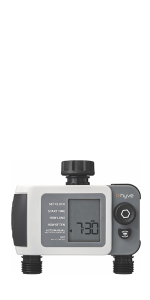
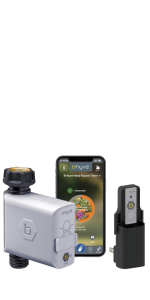
The Orbit 24639 B-hyve XD is a 4-port smart hose watering timer featuring Wi-Fi and Bluetooth connectivity for seamless remote control. It leverages hyper-local weather data and drought conditions to optimize watering schedules automatically. With an IPX-5 waterproof design and EPA WaterSense certification, it ensures durable, eco-friendly irrigation tailored to your garden’s unique needs.










| ASIN | B09KJZKVNS |
| Assembly required | No |
| Batteries required | Yes |
| Best Sellers Rank | #1,871 in Patio, Lawn & Garden ( See Top 100 in Patio, Lawn & Garden ) #5 in Watering Timers |
| Brand | Orbit |
| Color | Gray |
| Customer Reviews | 4.2 4.2 out of 5 stars (2,689) |
| Global Trade Identification Number | 00046878246393 |
| Item Weight | 2.2 pounds |
| Item model number | 24639 |
| Manufacturer | Orbit |
| Material | Plastic |
| Number of settings | 5 |
| Product Dimensions | 9.75"D x 10.38"W x 4.62"H |
| Screen Size | 10.38 Inches |
| Smart Home Compatibility | Smart Home Compatible |
| UPC | 046878246393 |
L**R
Reliable so far
I have a DIY sprinkler set up at my house with 4 zones set up on my hose faucet. I’ve had several 4-zone hose timers in the past and they usually fail after a season or so. So far, this one has held up. I like the app functionality with the timer, as well. It’s pretty intuitive and has been reliable so far. I didn’t get the WiFi hub but I just walk up close to the hose timer and it usually accesses the timer just fine that way. I can even sync up while being inside the house and the timer being just on the outside wall. Hoping it continues to remain reliable over time. I will update this review if there are reliability issues down the road.
J**N
Reliable smart timer that easy to use
This 4-port Orbit timer is excellent. Setup was quick, it linked to the hub right away, and it has never missed a single scheduled watering. I like that it tracks water usage and lets me fine-tune each zone exactly how I want it. The app is simple to use, programming is flexible, and the build quality feels solid. For the features and reliability, it’s a very good value.
M**W
Pretty good product, amazing customer service
I picked up two of these four port timers to set up irrigation in my backyard for over 40 trees. I live in Arizona so not only is irrigation important, but one day without can do serious damage to a young tree if something happens to the system. For the most part I have been very happy with these timers. I access them most often using the Bluetooth option from just inside my home. I do not have or use the hub, I don't find it necessary. Here's where their customer service comes into play. The only issue I've had with these timers is that they have occasionally frozen up. The one on my east faucet has frozen four times, the one on my west faucet has frozen once. When I say Frozen I mean stuck on the same screen, the timer is not activating when it's programmed, I cannot connect to it with my phone via Bluetooth. After the first occurrence of this, which I didn't notice for 3 days so my new row of fig trees took a major hit, I realized that I would be able to tell it was frozen because I could not connect via Bluetooth. If I slip the batteries out, wait 5 seconds then slip them back in the unit will work fine again for the most part. This was a real drag but it seemed like something I could work with since I have the Bluetooth application. The problem is that with Arizona's 100° plus temperatures if it freezes up for the day then I have one zone on the east side that really gets hit hard because it's all young rooted cuttings. While the rest of my yard looks fantastic, that one zone looks like it was just planted because it's been hit by system freezes four times and keeps being set back. So I reached out to their customer service using the chat option on their website. Orbits customer service was fantastic! (To be clear, I reached out to the manufacturer not to Amazon.) The agent was very friendly and for the most part knew what I was saying. He continued to come back to questions about the app, like that was the cause of the problem, but I believe that's because they have to ask a bunch of very specific questions before they can honor the warranty. I was on chat with them for about 20 minutes. I did not give them the model number because it was still in use and I didn't want to take my system apart and read it from the bottom of the unit. This was not an issue. He just asked me to hop on Amazon and send them a screenshot of my purchase 4 months ago. Which was easy enough. I did not ask for a refund. I did not ask for a replacement. I was simply reaching out to them to let them know that there is an issue with their timers. Especially since I never let either of my timers get below 80% battery life. I'm pretty neurotic about that. After a pleasant 20 minute conversation with their customer service I ended the chat with a warranty code for the orbit websites so that I could go on and order two replacement units ( under warranty replacement ) at no charge to myself. No shipping charge, no cheap little hidden charges like that, just 2 valid replacements at no cost. This has been an overall positive experience and I wouldn't hesitate to pick up their products again. As far as issues go, this is something I can work with if it happens on a new issues as long as I stay on top of checking everyday. Which is a little annoying but not the end of the world. I have otherwise had no issues. They're constructed well and for the most part function great. Other than that one issue. (I did attach several pictures to show the difference between the zones. All of these were planted in May and they were all rooted cuttings that were about 8 in tall. The first two pictures are of fig bushes on the west side that have not had as many issues. They have multiple canes and stand close to 5ft tall already. The next two pictures of the smaller trees are from the zone that got hit from the timer freezing up. Obviously, they should be much bigger going into this time of year. They stand at about 1.5ft tall currently. But, I didn't actually lose any and they should make up for lost time next spring.)
P**R
Pretty Good B-Hyve
Not sure what other users problems are but for me it has been a pleasant experience. I bought the wifi version that comes with a wifi gen 2 hub. The only issue that I faced was the mesh washer. That washer needs to be redesigned. I used a standard rubber washer and on top of it used the mesh washer to stop the leak. The B-Hyve 4-port wifi smart hose watering system timer gives you the option of either using the wifi or the bluetooth feature. Most of the time the wifi signal outside the house is pretty weak so you can’t blame Orbit for not connecting to the wifi. Try connecting the unit first inside the home and if it works then it’s good. Overall I am happy with the performance.
N**D
Attention to Detail/Manual/QA... basically absent
I guess I got lucky with my single tap bluetooth/wifi faucet controllers. That luck ran out with the 4 port XD. A big part of the problem is Orbit HATE you. There's really no excuse for why their documentation is so bad, other than they truly despise you, the user. As a first example, the manual for the B-Hyve XD Bluetooth Hose Faucet Timer has a components diagram on page 1. Absolutely nowhere do they bother to show where the battery drawer is. The very next instruction is, "Insert two AA (1.5V) batteries (not included) and replace the tray." So what tray would that be? They couldn't be bothered to show you, anywhere, in their documentation. If you try pulling on the black rubbery parts, that might be a tray seal, you'll damage it. You're supposed to guess that the tray is the thing hidden on the back. In their defense, they did use two point text, yes, it's really that small, inside a recess, to label "1.5V AA Alkaline Batters Only" if you tilt it to the light just right, and have perfect vision. Otherwise, absolutely, and I do mean absolutely, no effort whatsoever was made. Then you get to pairing. Oh, who am I kidding. They made so little effort there, it's a crapshoot as to whether you'll ever pair it to anything. I got it in a bundle with the wifi hub v2. Well, I say that. They tossed some bits in a box, shrugged, and called it good. Amazingly, the XD's manual makes zero mention whatsoever of WiFi and the Gen 2 Hub makes zero mention of how to set anything up, other than to use the app. Not wholly true, they do say to press the B-hyve button to put it in pairing mode, where it will flash every five seconds. Except, turns out, it doesn't. In the app... which was apparently designed by the same people who wrote the manual, good luck finding anything much. If you eventually find your way to My B-Hyve, then Devices, then you might find the + button. Upon clicking it... It manages to find the XD. At which point it goes to a Connecting Bluetooth screen and fails out. The only way to get past that is to go to the Off menu on the XD and hold it for five seconds to reset it. Then, suddenly, everything connects. Except you're now in Bluetooth connection and none of those web features you bought it for work. And there's slightly less than zero mention about how to get it on to wifi. As far as I can tell, you were supposed to connect the hub first. So go hunt for Remove Device, as you're repeating everything all over again. Oh, except adding the hub also fails on the add to WiFi network. But if you quit the app and reopen it, it comes back saying it did connect, it was just kidding with that crashed screen. Awesome. So now we can connect the XD. Not so fast! It does now offer a connect to wifi option. Except, even sitting next to the Gen 2 hub, it tells you they're too far apart. Quit the app and reopen it and, as if by magic, it claims they found each other. Except they didn't. If you try connecting via WiFi and telling it to manually water, nothing happens. Disconnect WiFi and change to Bluetooth and nothing happens. Reset the XD and the bluetooth connects and now you can manually water, getting a loud clunk as it switches. Back to WiFi and it's given up. And, the whole time, the Devices screen tells you everything's happily connected. Even if you unplug the Gen 2 hub from power, it'll still tell you everything's happily connected. Their app is deep, deep garbage. To go along with their awful manuals. Their products sometimes work, sometimes don't, but the app has no useful tools to help you figure out why, regularly lies about status, and the manual's so brief as to be of absolutely zero use. Sorry Orbit, but you've failed to hit the bar of "utterly lazy" and managed to plow straight into We Despise Our Customers territory. Fire all of your app folks. Fire your manual writers. Then put the device in front of people unaffiliated with your company, watch the misery they go through, then build and app and write manuals that explain all of the many, many, many problems you confront users with.
G**D
Works Great 👍 on Bluetooth I will be purchasing the hub at a later date .
P**N
Works well. Needs a wifi hub to connection without Bluetooth. Also very "hard" stops and starts. Program on app confusing. Zone D doesn't correspond to outlet 4. Need to use program 4. Once worked out it works 100% though.
M**D
جيد وتم ربطة في الهاتف وتستطيع مشاهدة الأوقات وكميات الماء وقيد التجربة للعمر الافتراضي للجهاز
J**H
Sold in Australia by amazon.au but USA items sent to Australia not suitable for australian plumbing.
R**.
Péssimo. Produto veio com defeito. Uma das 4 saídas não funciona. E pra completar, para devolver o produto, a Amazon só me reembolsa cerca de 50%. Decepção total.
Trustpilot
3 weeks ago
1 month ago