Desert Online General Trading LLC
Dubai, United Arab Emirates
Desert Online General Trading LLC
Dubai, United Arab Emirates


🎤 Present Like a Pro with AMERTEERAMERTEER!
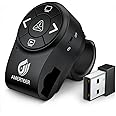
The AMERTEERAMERTEER Wireless Presentation Clicker is designed for professionals who demand efficiency and style. With a unique finger ring design, this clicker offers a comfortable grip and easy access to its five buttons. It features a powerful red laser pointer, a wireless range of up to 100 meters, and a rechargeable battery, making it perfect for engaging presentations. Compatible with various software and operating systems, this clicker is the ultimate tool for any presenter.


| Color | Black |
| Button Quantity | 5 |
| Controller Type | Button Control |
| Supported Battery Types | Lithium-Ion Polymer |
| Maximum Range | 100 Meters |
| Compatible Devices | Laptop |
| Connectivity Technology | USB |
| Special Features | Ergonomic |
| Maximum Number of Supported Devices | 1 |
L**O
Works well with Chrome OS, including both PowerPoint for Android and PowerPoint Online (Office 365)
I use both Windows and Chrome OS computers, and needed a presenter that would support BT and Chrome OS, at least the basic functions of going both forward and backward in PowerPoint or PDF viewers.I have already encountered USB dongle-based clickers in the past that were not compatible with chromebooks. This was rather awkward given that the chromebook is my preferred travel / presentation computer for conferences and exhibitions, because it boots quickly at all times, does not get unresponsive for elongated periods of time precisely when you need it to work, or doesn't start installing updates when you need to present or show video samples...I did not look at high-end presenters from Logitech (for which Chrome OS support is a documented feature), because their extra functions (like accessing hyperlinks or highlighting areas on TV/monitor screens) are only supported on Windows and Mac OS (you need to install special software), and are useless for Chrome OS devices.USB dongle-only devices are not optimal for notebooks and chromebooks in particular, because most chromebooks only have USB-C ports, and I did not want to use extra adapters where possible.Pairing the device (using BT) was quick and uneventful. While additional buttons, like Play (the one at the bottom) did not work consistently, I have at least verified the following:1. Both BACK and FORWARD buttons worked reliably in PowerPoint for Android installed on my chromebook. These are the only ones really needed for presenting.2. Both BACK and FORWARD buttons worked reliably in PowerPoint Online (from Office 365) on my chromebook (in the built-in Chrome browser).3. The Blank Screen (upper) button worked reliably in PowerPoint for Android, but did not work in PowerPoint Online (Office 365). A nice extra feature at the end of the presentation, even though it's not too important.4. The Play button did not work in any PowerPoint versions on my chromebook. This is not a big deal, you can always start the presentation using the computer keyboard or its trackpad.5. For PDF files both BACK and FORWARD buttons worked as expected ONLY when using the OneDrive PDF viewer. The built-in PDF viewer as well as Adobe Acrobat for Android simply ignored them for some unknown reason.6. The device itself is compact enough and convenient to use, with a logical layout (Next slide = Right button; Previous slide = Left button). Some other reviewers complained about counter-intuitive button functions for vertical orientations used in similar devices (Next slide = Bottom button; Previous slide = Top button).At the moment I cannot say anything about the clicker's reliability or how well it holds charge... At this price point I would rate it as a good universal product that works (at least when it comes to presenting basics, i.e. scrolling to the next or previous slide/page) with all operating systems, including the Chrome OS so dear to my heart.
D**R
Exceptional Presentation Remote!
Took a chance and purchased when there were only two posted reviews (positive) - without knowing the brand, loving the form factor, and hoping the low price point wasn't a negative indication of quality. That said, I have been extremely pleased with the remote!Requirements were small form factor (stumbled on this 'ring'; was just looking for palm sized), bright laser (minor preference to red over green), rechargeable (Li-ion; absolutely no NiCad) with Micro USB charger preferred (consistency with other device chargers), RF dongle (over BT), tactile feedback (distinguishable buttons), and a black screen button (with previous/next).When the remote arrived, I was disappointed to find it powered ON, but was able to confirm it worked as desired on the existing battery. Curious as to battery life, I began using it 'as is' without charging. With 1.5 weeks to my presentation time (last minute approval), I practiced at least 15 hrs. with the remote (a 40-minute presentation), which included me accidentally leaving it on overnight once and practicing aiming the laser for maybe five or ten minutes (along with distracting the cats with it for another five minutes). The night before presenting, I charged it, as I couldn't gauge the battery life and wasn't going to risk it dying. I was pleasantly surprised to find a strong blue LED light indicating the charging, but even more so when it turned off after maybe ten minutes on my phone charger.The remote performed exceptionally during my presentation at a conference. There was no signal interruption (though I remained 2-10' from the receiver plugged directly into my laptop), no unintentional slippage on the middle finger of either hand (fidgeted some by rotating it back and forth on the fingers), and a consistent laser beam when I need it (projector screen; largely washed out on my laptop screen in practicing).I don't often leave reviews, but wanted to make sure I came back to highlight this remote the best I could. The presentation was my first formal one (more than 5-10 minutes and requiring PowerPoint), but I have submitted for other talks this year and plan to continue in the upcoming years. I've already strongly recommended this to another coworker who frequently presents and love the compact form along with the quality clamshell case. On the rare chance that either of us should encounter undesirable issues with the remote, I will provide an update here. Enjoy!
S**.
Delicate internal components, but manufacturer will replace easily
Was very excited to use this when I ordered my first one, but the charging port broke on the first day when I tried to unplug it. I placed an order for a new one since it's relatively inexpensive and usually returning items is a pain, but upon seeing my original review, the seller contacted me about refund for my original order. I appreciated that! I now have a functioning clicker and it works great, fits snugly on my finger and laser pointer is very handy. Only thing is that it would be nice if it would automatically change the slides even if I'm not actively in PPT, but I guess you can't have it all! I was happy with the customer service I received by Amerteer.
L**S
5 stars after 3 years, my favorite out of 4-5 "clickers"
I purchased this about 3 years ago. I bought several "clickers" at the same time. This was most comfortable to use. I'm a little scatterbrained, but I don't lose this because it's so comfortable, and the carrying case is good-looking and convenient. It's more comfortable than other finger-attached presenters, perhaps a better fit. You can actually begin the presentation from a distance, which is NOT a function on other devices in this price range. It's like it was designed to support a presenter (I'm a teacher) who wants to engage the audience, not lose them while fiddling with the laptop.
A**R
buen producto
excelente Producto
Trustpilot
1 week ago
2 weeks ago