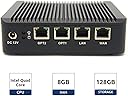
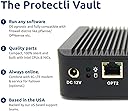
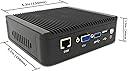


| Standing screen display size | 1.4 Inches |
| Processor | 1.91 GHz intel_atom |
| RAM | 8 GB DDR4 |
| Hard Drive | 128 GB SSD |
| Chipset Brand | Intel |
| Card Description | Dedicated |
| Brand | Protectli |
| Series | FW4A-0-8-128 |
| Item model number | FW108120 |
| Hardware Platform | PC |
| Operating System | Linux |
| Item Weight | 2 pounds |
| Product Dimensions | 5.25 x 5 x 1.5 inches |
| Item Dimensions LxWxH | 5.25 x 5 x 1.5 inches |
| Processor Brand | Intel |
| Number of Processors | 4 |
| Computer Memory Type | SODIMM |
| Flash Memory Size | 128 GB |
| Hard Drive Interface | Solid State |
| Voltage | 12 Volts |
| Batteries | 1 CR2 batteries required. |
D**D
Fast, secure, reliable and priced right.
I would give this item 10 stars if I could, it's an excellent product. This is a solid firewall with everything you'll need to secure your network. Lots of great features, and very easy to add snort service. Very reliable, have not encountered any hardware issues after 6 months of service.Very easy to update and very easy to administer. You will need to have a good understanding of firewalls to make use of all the features, but won't need to dig into a CLI reference book to make either simple or complex changes. This firewall has many features of firewalls costing thousands of dollars at a price comparable with SOHO equipment. The large SSD drive ensures I have more than enough space for all the logs the firewall services produce.With all the announcements from vendors like D-Link, Netgear, asus, etc. it's nice to know my firewall is not full of remotely executable holes that will never be fixed like so many other firewalls.If you are a tech savvy user looking for a higher quality firewall and router, this is perfect for you. If you are a network administrator looking for an inexpensive firewall at your home that has most of the features you use on a daily basis (vlan's, zones for separating interfaces, IDS and gateway AV) this is the firewall for you. If you are not comfortable with network terminology and unsure of how complicated it is to use pfsense, take a little bit of time to read the docs. The firewall wizards can help you setup many advanced features with relative ease.
E**V
Awesome pfSense Appliance
So far, this appliance has been great. It's small, and fits into a 1U shelf. I got this to replace an old business PC that was running pfSense.The unit sits in a 1U rack in my basement. Ambient is temp controlled at ~21C and the unit normally runs 46-48C depending on workload. It's a small home network with ~10 devices (synology NAS, Plex server, 3 PCs, 2 Fire TVs, phones, and other random devices). I used my old AC router as an access point and it connected directly via cat6 so I could place it in the center of the house.The main reason I bought this is for the AES-NI, since upcoming releases of pfSense will require it at some point, and because I use a VPN service and wanted to run the client on the router. I can saturate my internet connection (100Mbps) and run Suricata simultaneously with some decent headroom (~60% CPU). I haven't done through testing on it, just hooked everything up, started the VPN and Suricata and started pumping traffic though on both the VPN and LAN interface, and it handled it like a champ.There's 4GB of RAM which is overkill for most (although Suricata should have, and I think requires 4 GB), and a 32GB ssd which is either overkill or not enough depending on application. It seems quite an unusual number as you only really need 1GB for the base install, 8GB if you want to install a ton of packages with headroom, but you would want more for caching (~100-250GB, or even more depending on application). So 32GB is an odd choice here...The unit overall runs well on little power (10-15W), is silent (although I don't care since it's in the basement), is powerful enough to run a 100Mbps VPN and Suricata simultaneously, and is quite compact. It doesn't come with WiFi, but you easily use a cheap or old consumer router as an access point (or buy an access point) so that you run some CAT6 and place it where it will work best.I would absolutely recommend this for a home or small business router if you're looking for something more serious than a consumer router and are at least generally familiar with pfSense. You get all of the power of pfSense in a tiny, low power package. If you are looking to just get started with pfSense, just use an old PC with 2 NICs, play with it, and learn what it can do. If you want to start getting some serious hardware without spending twice the price or more, this unit rocks.
A**E
Solid, powerful, quiet
This has worked great for me, and I'd highly recommend it as an embedded network appliance at the price point. I've tried it with both pfSense on FreeBSD and Ubuntu Server on Linux, and all hardware seems to work natively without any rough corners or weird drivers.Since I imagine most people are going to use this as a network appliance and not generally have a display connected to it, the serial COM port (and included RJ45 to DB12 cable) is a fantastic benefit that you rarely see in consumer network hardware. It gives full access to the device's BIOS setup interface and most OSs' boot consoles, and makes setup and network troubleshooting far easier than the traditional approach of repurposing a keyboard and monitor, or the embedded router hell of resetting and praying for a default network configuration. I was able to install and configure pfSense from scratch without connecting a display or keyboard. Ubuntu required video to do initial setup, but could be configured to support the serial console shortly thereafter.The chassis build quality is solid, all the ports are flush and well aligned, and access to the DIMM slot, two mSATA slots, and SIM slot (still unsupported in the US? See the Q&A section) are accessible under the bottom panel with four screws. There are pre-drilled and grommeted holes for installing antenna, though the options for equipping this device with wireless hardware are somewhat limited, so you may want to look elsewhere if homebrewing a WAP is part of your plan - the only officially supported wireless card is a USB based 802.11a/b/g only device.It comes with a bracket for hanging this off of a standard monitor VESA mount, but since it's so ill equipped to drive a modern display, I can't anticipate that this would be useful. I can see no reason why you couldn't use it as a wall mount bracket, though, as this device would probably be pretty well suited for hiding in a network closet somewhere.The link, activity, and HDD LEDs are all clustered on what I would vaguely consider to be the "back" of the device - the side with the DC in and network ports, where one is likely to have the most wires plugged in. This makes it mildly inconvenient and ugly to position the device where these LEDs are actually visible, but whether this is something you'd even want to do is mostly a matter of preference.
Trustpilot
5 days ago
2 weeks ago