Buy anything from 5,000+ international stores. One checkout price. No surprise fees. Join 2M+ shoppers on Desertcart.
Desertcart purchases this item on your behalf and handles shipping, customs, and support to Vanuatu.
📱 Own the moment, stay connected, and never miss a beat with Lumia 830!
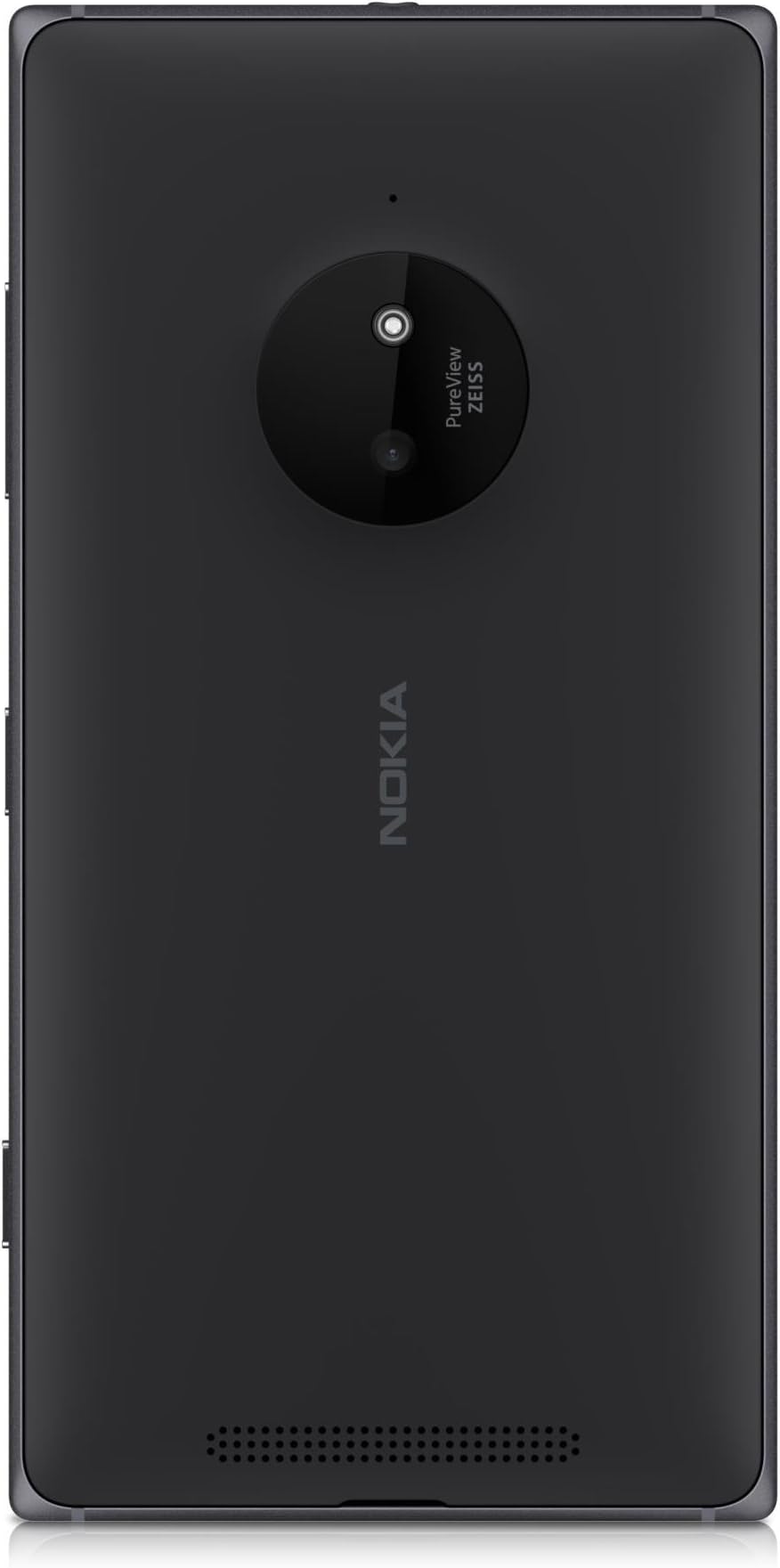
The Nokia Lumia 830 is a stylish 5-inch SIM-free smartphone featuring a Snapdragon 400 quad-core processor, 16GB internal storage expandable via MicroSD up to 128GB, and a 10MP PureView camera with Zeiss optics and optical image stabilization. It offers 15 hours of talk time, LTE connectivity, and integrates seamlessly with Microsoft OneDrive for cloud syncing. Designed for professionals who value reliable performance, quality photography, and smooth social sharing, the Lumia 830 combines a premium metal-polycarbonate design with Windows OS and Live Tiles for a personalized user experience.
| ASIN | B00NOZLUFM |
| Aspect Ratio | 16:9 |
| Battery Average Life | 15 Hours |
| Battery Average Life Talk Time | 15 Hours |
| Battery Description | Lithium Ion |
| Best Sellers Rank | 82,990 in Electronics & Photo ( See Top 100 in Electronics & Photo ) 3,044 in SIM-Free & Unlocked Mobile Phones |
| Biometric Security Feature | Fingerprint Recognition |
| Box Contents | [Inferred] USB cable, Stereo jack connector, Touch screen protector |
| Brand | Nokia |
| Brand Name | Nokia |
| CPU model | Snapdragon |
| CPU speed | 1.2 GHz |
| Camera Description | Rear, 10 MP, Zeiss, 4x zoom, autofocus, LED flash |
| Camera Flash Type | LED |
| Cellular Technology | 3G;4G;LTE;HSDPA;GPRS;EDGE;Wi-Fi |
| Colour | Black |
| Compatible Devices | B00H9VDUKA |
| Connector Type | Either Micro USB or USB Type C |
| Customer Reviews | 3.4 out of 5 stars 109 Reviews |
| Digital Zoom | 4 x |
| Display Pixel Density | 441 Pixels Per Inch (PPI) |
| Display Type | OLED or AMOLED |
| Flash Memory Supported Size Maximum | 16 GB |
| Form Factor | Smartphone |
| Frame Rate | 30 fps |
| GPS Geotagging Functionality | True |
| Headphones Jack | 3.5 mm |
| Human Interface Types | Microphone, Touchscreen |
| Item Dimensions | 9 x 70 x 139 millimetres |
| Item Weight | 150 Grams |
| Manufacturer | Nokia |
| Maximum Display Resolution | 720 x 1280 |
| Memory Storage Capacity | 128 GB |
| Memory storage capacity | 128 GB |
| Model Series | Lumia |
| Model Year | 2014 |
| Network Connectivity Technology | USB, Wi-Fi |
| Number of Front Cameras | 1 |
| Number of Rear Facing Cameras | 1 |
| Operating System | Windows |
| Operating system | Windows |
| Optical Sensor Resolution | 10 MP |
| Phone Talk Time | 15 Hours |
| Processor Series | Snapdragon |
| Processor Speed | 1.2 GHz |
| Product Features | GPS, camera, e-mail, face_detection, flash, front_camera, mp3_ringtones, quad_core_processor, radio, stereo_jack_connector, touchscreen, usb, wifi |
| RAM Memory Installed | 16 GB |
| RAM memory installed size | 16 GB |
| Rear Facing Camera Photo Sensor Resolution | 10 MP |
| Resolution | 1080p |
| SIM Card Slot Count | Single SIM |
| Screen Size | 5 Inches |
| Shooting Modes | [BASIC] |
| Sim Card Size | Nano |
| Specific Uses For Product | Productivity, Communication, Multimedia |
| Supported Satellite Navigation System | GPS |
| Video Capture Resolution | 1080p |
| Water Resistance Level | Not Water Resistant |
| Wireless Network Technology | GSM, LTE |
| Wireless Provider | Unlocked |
T**W
Just Love It.
Though this review is from mainly from my Lumia 930, the features apps and functions are still available on 830. I bought this phone for my family member who wanted to try a W8P and loves music. For this price you get a premium like phone that surpasses every other phone at a similar price range, and can hold its own against higher price range phones. The resolution, though lower then 930, still displays an amazingly sharp image, actually I never even noticed its 720p: Colours are vibrant, image/display look sharp, brightness is excellent without washout, contrast is excellent (please not you can adjust the display to you liking in display setting). The 830's OS/UI remains brilliant and fluid on touch with a great sense of feeling of control. The build, while not 930, is still very well built and feels good in the hand (though a little slippery). Its not a weighty phone, feels very light in the hand (personally I prefer phones with some weight like 920, 930, 1520). The amazing thing is! I'm actually starting to prefer this over my 930. Even though 930 has some better features(build, camera resolution, display, faster processors, extra ram); but in-reality I haven't noticed any difference that bothers me: The 830 display is excellent, camera is excellent though lower res, speed on loading apps;/internet is speedy, feels good. For every day use the 830 is fluid, fast, efficient, has good looks - It really is great for its price! Yet the 830 also has its own advantage over the 930: Glance screen is now back, expandable memory up 120GB(I do recommend using a fast card such as the Samsung Pro), a removable battery... Amazing for its price! Though the below review is mostly originally from my 930 review. The features, apps, functions are still available and work on the 830. Unique simplicity and modern is best to describe this phone. Good build that comes with a quality 10mp camera, with fluid and very elegant OS. The touch screen is the best I've used that can be used with ease even with gloves on. The sound is excellent. With W8.1 now having 'Swip' keyboard which is accurate and a faster way of typing with a bit practice . Apps are plenty, with less bloatware apps compared with Android/iOS where many apps do the same thing, but still W8P still has all the popular apps: Facebook, What's App, Netflix, BBCiplayer, 4oD, Spotify, Viber, Instagrams...etc; The store continues to add new apps with some excellent Nokia apps already built into the Lumia. Bing apps are great too: News, Weather, Sport, Fitness & Health, Travel, Food are all very clean and polished looking and very easy to navigate. Standard lockscreen is informative - this can be further altered and customised using the Lockmix app. NFC is built in and can be useful(Use Nokia apps for writing NFC tags - I use it for Nokia Mixradio to go to a 3 different chosen artist radio mix and then send it to a NFC speaker, also cab number on with tag on home phone if ever needed), you can also use it with NFC devices from speakers, tags, payment, mirroring phone on your tv. Accessories from Nokia like the wireless speakers has a 15hr charge where you can send you music by Bluetooth/NFC, speaker wireless phone charger allows you to listen to your music while charging the phone, and tags where you attach them to personal items eg: keys, bags, phones, bike, lap-tops, tablets, phones..etc; so if you forget them or leave them behind your Lumia can be set to alert you, and can be tracked if lost by using the phone...Updates now seem to arrive quicker from MS with other feature/improvement updates also coming at a faster rate. Contra(Speech assistance + info-cards)is here now, but even with the now already standard W8P voice assistance(not Contra)does a good job by doing the usual speech commands: Call, note, search, msg, open app; but can also, for certain apps, do certain things a little more extra compared to google/siri eg, say "Flixster top ten": It will show top cinema movies playing, . Tell 'Wikipedia' search "Star Trek" it will give info about your search request from the app and read the first part to you!. Tell Go To "-Insert Name/Place-" the app take you to those addresses if in your contacts: Simply double press the Search-Key and press See More to see what apps can be used in this way (you may have to open some apps first for voice to attach itself): Here are some apps that can be used - Calculator Toolbox, Go To, Wikipidia, Hey Dj, WP Central, Shazam, Foursquare, Facebook(MS), Flixster, Domino's Pizza, Nokia MixRadio, Voice Butler, UCBrowser, Earth Time..etc. With Windows 10 update in 2015 to come. 830 already comes with the 8.1 Denim update, with the camera update to follow soon. Lumia phones do have the ability to have your txt msg's read out to you (it will ask you first - just answer after the beep)which can be handy (go into Settings and then Speech). Another nice feature is pressing the Search-Key by a quick press for web/music/info or long press for Cortana. Rooms/Groups/People Hub on W8Ps allows easy quick access plus communication to who ever you put in them. This allowing grouping individuals together or who you choose for sharing or sending photos/videos, txts/chats, contacts, emails. Pins is another unique feature that allows you to pin most things to the screen such as apps, articles from the web, individual notes, sport/news/app pages, albums/artist address/map/route(s), page from web, photos, contact(s), group(s)..etc; all for later or just keep them there for quick access for when you want/need them - or do like I do just stick them all in W8.1 folders and label the folder Catch-up so you can read, listen to music, comeback to notes, reminders etc; all in one place for when need them,. Another simple but very useful function for people with/around children is 'Kids Corner'. Simply swipe right from lockscreen, put in code, which will now not allow a child to enter any other part of the phone except those apps you put in 'Kids Corner'. For travellers there's Nokia HERE Maps/Transit/Drive - also maps/directions can be used off-line too. Just download the map before you go!..TIP: In Nokie HERE Maps you can pin the app Places to the screen(It like more closer local Local Scout). Better still get HERE Explore Beta(now replaced with improved CityLens): This is where City Lens, Local Scout, Places all come together in one place and which actually more useful and accurate with your surroundings, plus better options (I think Nokia will drop City Lens, Local Scout, Places and use Explore - which does make sense). The phone seems suited for business users too as W8P' come with Office which can also be connected to mobile Office365 for setting up Office documents, with also Office Lens to capture pictures of whiteboards, documents, photos and then share them or just save them onto OneNote. Also Skype is also part of the phone that can be used for 'Facetime' and group chats as well as cheap calls abroad. Onedrive gives you plenty of free cloud storage, and with blackberry messenger soon to be released for W8P's too. Combine all this and with Lumia's smooth OS operation group/people hubs, live tiles, and the ease of use and to navigate really helps for people who do need a phone with a business use edge...Not forgetting all those XboxOne owners, there's 'Smartglass'. Entertainment from movies/sport/music/games can be beamed/shared on your Lumia screen. Smartglass can also be used to navigate and control functions on XboxOne too as well as be used to send msgs to Xbox friend lists, invite people for gaming, control apps on the console..etc. Experiencing Lumia WP8 is really different and does shine in areas above Android and Apple, and that's coming from a well used Android user(used SG1 and SG3, now using Xperia Z2 as my contract upgrade phone, bought a 2nd hand Lumia 920, and got the 930 recently. Have used iPhone too as my partner has it. While WP8 may still miss some functions from Android or iOS - but its vice versa on Android and iOS too. Its the new kid on the block, new OS, so just remember iOS and Android when they started - it took ages to reach what we have now! But it seems MS have caught-up faster, is listening to users, and pushing ahead in updates and quality. Looks feels and operates like a premium modern phone too. A few excellent Lumia apps that might interest you: PLEASE NOTE SOME APPS BY NOKIA MIGHT BE UNDER MISCROSFT, ALSO 'HERE' IS FOR TRAVEL APPS - JUST TYPE 'HERE' FOR 'HERE EXPLORE BETA' TOO! *ALBUM RELEASES (keep track/updates of all your fav artists new releases and the option to buy them directly from digitally from XB store or physical digital from Amazon) *1#TOOLKIT (all tools and conversions in one place and cam pin individual to screen) *627.AM (alarm, notes, weather on one rotating tile) *CALCULATER TOOLBOX (all the variety of different calculators in one place) *CHRONOAS CALENDAR (great informative and customizable calendar) *CONNECTIVITY (info on battery, data roaming, remaining hours, network, Wi-Fi/Bluetooth/gps/data/setting toggle on/off all on one tile) *CAR DASH (if your driving you need this with easy access to contacts, home address, destination, music(can use voice commands), weather info, apps, on/off switch for data/Wi-Fi/rotation lock/bluetooth) *GMaps+ (for all those who need Google Maps) *Go To (just say Go To and name - you will be directed there) *LOCKMIX (excellent for various info/rotating photos you can put on your lockscreen *myTube (Youtube but better) *MUSIC+(free music streaming) *NOKIA MIXRADIO(excellent app for a vast selection of music with on and offline listening options. Keeps you updates with artist you like) *(NOKIA) HERE EXPLORE BETA (Excellent all in one local places and interests with HERE Maps integration - on market app type HERE to find it!) *NOKIA APPS FOLDER (put apps eg:Video apps, Music apps, Note apps in one sizable tile) *NOKIA STORYTELLER (shows you where photos where taken, timeline, story video, favs, photo folders) *NOKIA JOBLENS (jobs around your area) *NOKIA PHOTOBEAMER (Excellent in sending photos/video to any device that is web compatible. On device eg: Tv, PC, Tablet, Console..etc; type www.photobeamer.com, open app and simply choose what you want from camera and then scan device screen. Simple!!) *NOKIA EXPLORE BETA (everything around you - shops, restaurants/take aways, atm/banks, hospitals..etc. This app seems much better then Local Scout) - THIS APP HAS NOW BEEN REPLACED BY CITYLENS! *NOKIA NFC WRITER *NOKIA SENSIE (keep track of where you been with places and time by walking, running, or been stationary or idle. Does not use battery life too amazingly!) *POUCH (save web pages to read later when no network is available) *OYSTER BUDDY (informative app and great for glance at your oyster credit on tile) *SKINERY THEMES also START PERFECT (great for simply adding a spacer between tiles or customizing tiles - use your imagination and you can have some cool looking tiles and screens to suit yourself) *TRANSPARECY TILES (does what it says) *UCBrowser (excellent for downloading from web and browser too - use this on my Xperia Z2 too, though W8P is better designed) *BING - Food & Health, Fitness(great for counting steps), News, Weather, Finance, Sport *WEBAPPS- Find web pages in apps form, then pin them if wanted. *WINDOWS PHONE CENTRAL (all the latest news and info for Windows Phone) Hotels 4D, Hey DJ, Flixster, EasyNotes, Earth Time, Artist Info, iFixit, Some great accessories for Lumia phones: http://www.nokia.com/gb-en/accessories/speakers/ http://www.nokia.com/gb-en/accessories/accessory/ws-2/ http://www.nokia.com/gb-en/accessories/accessory/dc-19/ This is really cool from the demo I've seen - soon to be released MS Lumia Screen Share. http://www.microsoft.com/en-gb/mobile/accessory/hd-10/#RecommendedDevicesWidget CAMERA HINTS: *Using Nokia Camera then viewing the photo(s)and pressing edit will take you to Nokia Creative Studio app. This will allow you to edit photos manually with a variety of options. Using MS-Camera or going into Photos app will allow an option when of different apps can be chosen to edit(depending what can be used) and also quick fix. *Pressing date on photo app will bring up a month/year list. *You can use MS or Nokia camera as default by going into setting/application/photo+camera. *In Nokia camera go to settings where you can set Capture Living Images/Play Living Images - this will show CLI in Nokia Storyteller *Nokia Camera - you can use one finger going up/down or left/right to zoom in/out. No need to us pinch screen method. PHONE OPTIONS *DISPLAY: Adjust default brightness level for Low, Medium, High setting - go into Settings/Display then Brightness Profile and adjust each scale bar. You can also do Colour Adjust in same setting. *SPEECH: For the phone to read out your incoming txt msgs or not, and also allows you answer or not, or ignore (please wait for bleep when answering). Go into Settings/Speech/Read incoming text messages (choose option). *DEVICE HUB: This is found in Settings/Systems near bottom - Can be pinned to screen from here (Good when having NFC/Bluetooth synced or to see devices already synced) Do check this phone feature Nokia videos introduction - some cool interesting features: http://www.trylumiaphone.com/#en-GB BACKGROUND APP ON/OFF: For saving battery simply switch off apps that don't really need to be running the background or notifications. Go to Settings, under System go to Battery Saver, then Usage - tap top option to choose. SCREEN MIRRORING - If you have the MS Lumia screen mirroring device, you can either use the NFC plate simple by touching your phone on it wherever you left the plate(can be left anywhere as its uses no wires or battery) or can go into setting, go to Project My Screen. Really handy device. UPADATE 8.1 25/09/14 *You can now make Windows live folders to put apps in. The folder and app tiles can be re-sized both folder and apps inside folder, Hint: Creating a Windows folder you can then put Nokia App folder with apps in them, into Windows folders. This allows you to create folders within a folder. To name Windows folder just long press top bar. You can also put Pins(fav music albums/genres/songs or web pages or anything else you can pin to screen)into folders and resize them. *Music Tile now is live when playing music. System is smoother in places. *Cortana is now added - but not quiet ready! Please note certain apps may need to be open for Contrana to recognize. UK/USA have different app recognition at moment. *Apps Corner - Only share the apps you wish on your phone: Go into Settings, Apps Corner(choose apps), press ON on next to Action Centre, choose apps and then press Right Key. To disable it keep power key pressed, then swipe right when prompted
T**R
Disappointed. Not up to par.
I am very disappointed with this phone. I have had Nokias before and always been pleased with them. And I wanted a Windows phone because I'm used to them and like the interface. However I have had no end of trouble with this. It started out doing odd, inconsistent things, too numerous to go into, but extremely irritating. I requested a return, but the seller asked me to try doing a factory reset, which I did. To be fair, this did resolve many of the issues, however it was still very sluggish in operation, taking 20 seconds or so to open apps. I was prepared to put up with this, reluctantly, for the sake of sticking with Windows (and yes, I did the upgrade to W10 so it was as up to date as possible). The final straw came though when my email suddenly stopped working. Mails were coming through - it was pinging and showing the number of new messages on the home screen, but when I tried to open the email app it just returned straight to the home screen. I have checked the settings, although nothing should have changed. I took it into my local helpful phone shop and they could find nothing. As a last resort I did another reset. Still made no difference. So it is going back, and I have decided that sadly, everyone seems to be right when they say Windows phones have had their day. It seems they are not being supported or developed the same way Android are. So my next phone will be an Android. It's a shame, but if Microsoft don't up their game more people will follow suit. RIP Windows phones.
H**S
Great phone, I love it - but it may be a bit confusing at first to new Windows Phone users.
I have had this phone now for 6 months and I absolutely love it. I've had iPhones before (a 3GS and 4) and also an android (Sony Xperia Z) so I was a bit reluctant to make the big jump to a Windows Phone. But I am not disappointed! The battery is good, which was very important for me as the Xperia Z's battery was terrible. The interface is great, you can pin almost anything to the home screen. The live tiles are something unique and different too. The phone feels good quality, but I do agree that the back plastic cover is sometimes a pain to fit back onto the phone. Although, this is not a problem for me as a removable and replaceable battery is something not a lot of phones have these days. The camera is also good with lots of features for those who like it complicated and integrated auto upload to OneDrive, etc, but has an auto mode so you can snap away. The apps - this is the only feature holding back the Windows phone. The built in Windows/Microsoft apps are brilliant. However, there is still a lack of the latest third party apps. I don't find this a problem though as the third party apps are catching up quite quickly and I like the excitement of something new in the store. I am very happy with the price I paid for the phone, I bought it when there was an offer of a free wireless charger and Bluetooth speaker. Since then I have seen offers of a free fitbit with qualifying purchases and Microsoft are still bringing new offers. It is much cheaper than the previous iPhones and Xperia Z I had saved up and paid almost £500 for. The phone is well supported with 8.1 factory fitted and Windows phone 10 coming shortly (the technical previews are available). I would recommend that potential customers look up the Windows phone interface on YouTube and check the availability of their favourite apps in the browser version of the Windows phone store so they won't be disappointed. I would also like to point out some great features the phone has like a dedicated camera button, double tap to wake and glance screen as well as Cortana. Lots of people say that Cortana drains the battery on Windows phones but it doesn't on this one. It isn't as good as Google's version, but it is definitely comparable and getting better. The only gripe I had with it was not being able to use the do not disturb feature when you disable Cortana. However, the only reason I wanted this is because I was worried about the battery which I now know is unaffected by Cortana being always enabled. When you search for something in IE it goes through Cortana's interface which is very confusing at first but I quickly got used to it. But - don't be worried because this can be avoided by using a third party browser like UC browser from the store (free). Over all I am very happy with the phone, I do highly recommend it as a cheap, reliable and well built phone. 5 stars.
H**R
Much much better than android
Had been using Android but eventually the irritation got too much. This is my first time with a Windows phone This phone looks nice, good build quality and works well. The screen is attractive and user-friendly. At first I had horrendous problems getting it to connect to a network and then to the internet, but fortunately the problems were all solved by installing the required updates. Since then it has been trouble free. I like it.
M**E
A good phone hindered by poor software
A good phone and one of the better Windows Phones out there. Unfortunately, its poor system software has led to no end of trouble - the most notable issue is with the capacitive touch buttons (back, search, home screen) responding intermittently and inconsistently, while the camera simply failed to function two days after the phone was initialised. Not even a soft or hard rest fixed the problem, and this is an issue with quite a few WP phones (unreliable camera, buggy software, unresponsive touchscreen buttons). If you want a WP, then get this, but be prepared for potential performance issues.
M**N
A very capable swansong for the Nokia brand
This Lumia model will almost certainly be the last one to bear the Nokia brand as the mobile phone section of Nokia is now owned by Microsoft, and I've heard that all future Lumia models will bear the Microsoft brand name and not the Nokia name. In a nutshell, this phone hits the sweet spot of features vs. price and I've been delighted with this phone in the (nearly a) month since I bought it. Whilst the phone's specifications aren't at the very top of the Lumia class, all the right features are included and of high enough spec. to make the 830 a very capable and versatile "all rounder" phone - and at a much lower price than the Lumia 930. I would have liked to buy the Lumia 930 but bought the 830 instead for two reasons: 1) The 930 has no memory expansion slot which the 830 has (up to 128gB). 2) the battery is not replaceable in the 930 but is in the 830. And whilst the 930 has more memory & internal storage space, a faster processor and arguably a better screen, the 830 has a very clear and perfectly acceptable screen of the same size as the 930. In all other areas the 830 comes very close to the 930 specification-wise, it's no slouch and easily has enough memory and storage space to be able to run the upcoming Windows Phone 10 operating system. As well as being a very capable smartphone running Windows Phone 8.1 (Denim), it's great for use as a mobile phone (obviously!) it's a very capable MP3 player, it gives any competent hand-held GPS unit a run for its money (e.g. the Garmin Etrex series) and with the right software (priced at £3.49) will provide just about the same amount of information. Oh, and with a decent rear 10mP camera (with LED flash) and a passable 0.9mP front camera for selfies and Skype, the 830 makes for a very usable still and movie camera too. The built-in wireless charging works well too, and whilst slower than wired charging with the supplied charger (AC-50) it isn't much slower - around 75% as fast. This may vary depending on whether you use a protective case and which model, but mine is inside a substantial leather case and it charges just fine through the protective case which I bought via Amazon (ASIN B00OM02L42). Battery life I would say is about average: I can get around 10 hours out of a full charge whilst listening to music and using GPS recording software concurrently and continuously which isn't bad but not fantastic either. It's difficult to find real fault with anything on this phone, but to be a fair review I must mention the only two niggles I have - and they're minor - which are: 1) whilst the bevelled edges of the screen look good, they make applying a screen protector a nightmare - especially getting it to adhere properly at the sides. 2) The 830 takes a nano sim card rather than the micro sim card that just about every other Lumia phone takes. I guess this was done to try and woo members the iPhone 5/6 brigade over to Microsoft! It's a problem that's easily overcome though as most phone service providers (except EE if you order it online) will ship you a replacement nano sim card free of charge should you need it. In summary: a very capable Windows Phone with excellent features for the price. Recommended. Update 06/10/15: Having used the phone for recording some train sounds at various galas with the app Audio Recorder Pro,I can confirm the sound quality is astounding! The 830 will record at 96khz 16 bit stereo with no difficulty. Listening to these recordings through headphones sounds just like I'm there! On this phone I've made the best quality recordings I've ever done in my 50 years of using recording equipment. Cue one happy camper!
R**D
One Star
S***e phone.
V**T
Had to send it back
Wanted a windows phone to replace my old Nokia 530. windows phone. However with the 850 I could not get it to find my wfi. It just kept telling me to try again. As I could not get it to work I had to return it. Have decided to stick with my old phone which I love and have had no trouble with it.
J**N
Remate bueno de Windows phone
Fue bonito mientras duró. Si se compra a precio de batería extraíble -o un poco más- como es el caso, merece la pena. Además, cámara Zeiss buenecita y reproductor de audio razonable. Por lo demás, ya no vale la pena invertir en móviles Microsoft, a menos que se sea coleccionista empedernido. Y el 31 de diciembre, clausuran definitivamente el kiosco de lo que pudo ser el mejor sistema operativo móvil, si la gente no fuera como es.
C**N
très bien mais notice en anglais
très bien pour ceux qui comme moi ont des équipements Microsoft car la synchronisation permet de récupérer l'ensemble des données, fichiers, photos de l'ancien téléphone malgré le la mise en place d'une nouvelle carte Nano sim. Cet appareil fonctionne avec une nano.sim
S**K
Kleine Mogelpackung
Der Artikel kam sehr schnell nach der Bestellungsaufgabe an. + Der Packungsinhalt entsprach nicht dem Angebot : Lumia Black ist nicht Lumia silber/green.Das hätte ich auch woanders bekommen können. - Ich habe mich aber mit einem schwarzen Rückcover (Originalartikel bei e-bay) anderwärtig beholfen. Sieht echt gut aus. Sollte Microsoft mal drüber nachdenken. Die inneren Werte. Das Lumia arbeitet schnell die Anzeige arbeitet flüssig ohne daß das Gerät warm wird. Die Datenverbindungen sind im vergleich zu meinem alten Smartphone deutlich stabiler. Die Kamera 10MP von Zeiss verwendet in der Lumia Kamera App effektiv 8MP für die Bilddarstellung.Die Fotos machen auch auf größeren Wiedergabegeräten (Laptop) einen scharfen farbtreuen Eindruck. Der Musikplayer klingt über Kopfhörer recht ordentlich. Das Gerät vermittelt optisch und haptisch (anfassen :-) ) einen sehr wertigen Eindruck. Die Akkulaufzeit läßt allerdings etwas zu wünschen übrig. Die individuellen Vor -und Nachteile von WP8.1 zu Android muß jeder für sich abwägen. Großes Plus: Akku kann gewechselt und der Speicher (16GB) mit micro sd auf 128GB erweitert werden
M**D
El mejor
Es equiparable a los móviles más prestigiosos del mercado, pero con un precio imbatible. Nokia siempre lo hace bien.
P**B
Nokia lumia 830
Lo store di Windows non è più disponibile, non solo non si riesce ad aggiornare a Windows 10 ma non si possono neanche istallare applicazioni da internet. Si può solo usare per telefonare e messaggiare ( no whatsapp perché non è più supportato). Va giusto bene come telefono di scorta da usare giusto in caso di emergenza. Peccato perché come telefono di per se non era male, è molto leggero e esteticamente anche carino. Onestamente non ho ancora deciso se renderlo o metterlo in un cassetto per eventuali usi futuri , l’unica consolazione è che l’ho acquistato usato e quindi il costo è stato molto contenuto (€ 34,00)
Trustpilot
1 day ago
1 month ago