
DOWNLOAD THE APP


Customer Services
Copyright © 2025 Desertcart Holdings Limited
DOWNLOAD THE APP
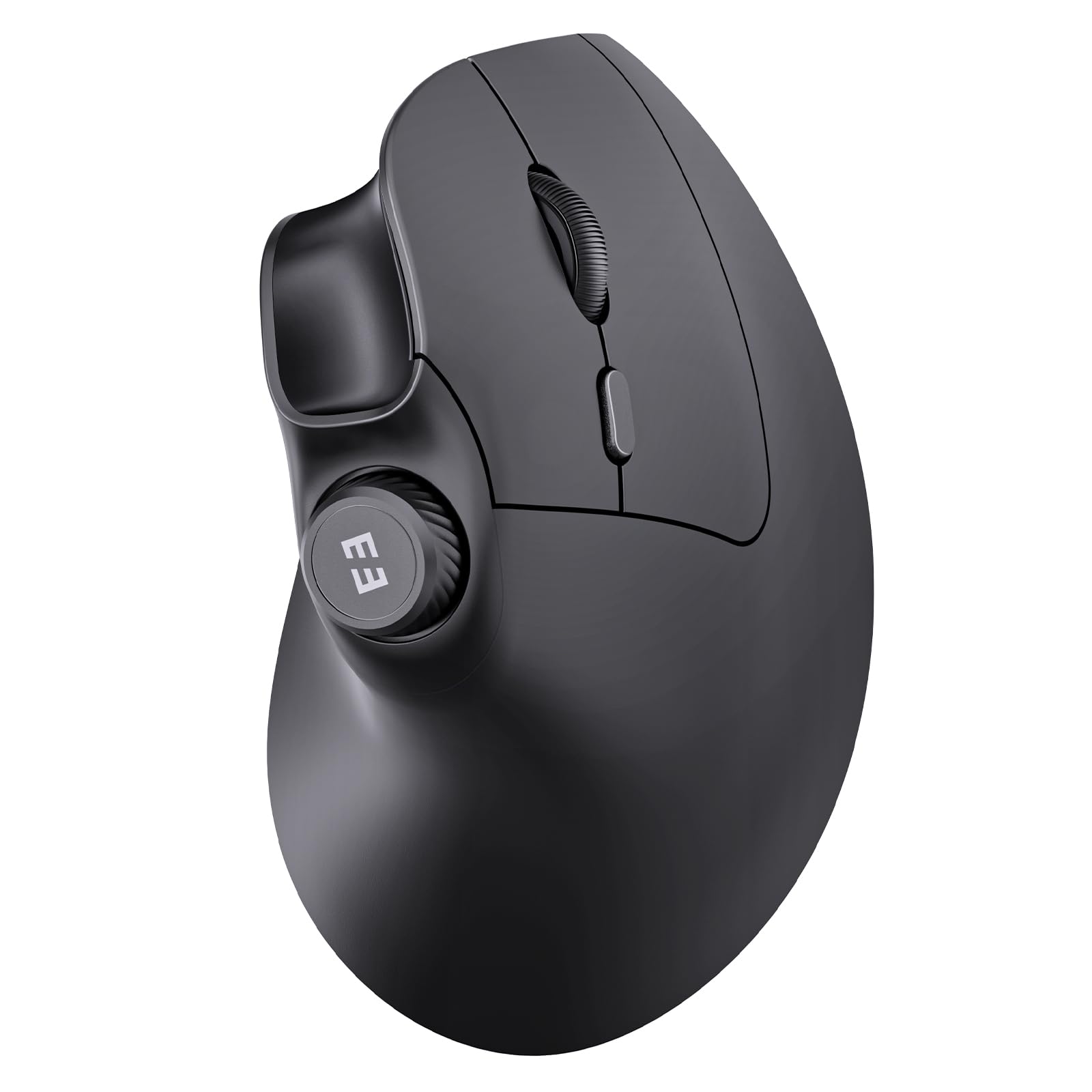
🖱️ Elevate your workspace comfort and control—because your wrist deserves the upgrade!
The seenda MOU-302 is a rechargeable, Bluetooth vertical ergonomic mouse designed for professionals seeking comfort and efficiency. It features a natural handshake grip to reduce wrist strain, supports 3-device simultaneous connectivity (2.4G USB + 2 Bluetooth), offers adjustable DPI settings (1000/1600/2400) for precise control, and includes a built-in volume knob for seamless media management. With up to 2 months of battery life per charge and wide OS compatibility, it’s the ultimate tool for hybrid workers, creatives, and multitaskers aiming to boost productivity while minimizing discomfort.


| ASIN | B0DM8KRK37 |
| Additional Features | Ergonomic Design, Volume Control |
| Antenna Location | Office |
| Are Batteries Included | Yes |
| Are Batteries Required | Yes |
| Battery Average Life | 2 months |
| Best Sellers Rank | #52 in Computer Mice |
| Brand | seenda |
| Button Quantity | 7 |
| Color | Black |
| Compatible Devices | Computer, Laptop, Desktop, PC, Notebook, Tablet, MacBook Pro, MacBook Air, iPad, iPhone |
| Connectivity Technology | Bluetooth, USB |
| Customer Reviews | 4.6 out of 5 stars 1,118 Reviews |
| Enclosure Material | Plastic |
| Hand Orientation | Right |
| Item Weight | 0.18 Kilograms |
| Manufacturer | seenda |
| Model Name | MOU-302 |
| Model Number | MOU-302 |
| Mouse Maximum Sensitivity | 2400 Dots per Inch |
| Movement Detection | Optical |
| Movement Detection Technology | Optical |
| Number of Batteries | 1 Lithium Ion batteries required. (included) |
| Number of Buttons | 7 |
| Operating System | Windows, Mac os, Android, Ios, Linux |
| Power Source | Battery Powered |
| Range | 10 meters |
| Special Feature | Ergonomic Design, Volume Control |
| Warranty Description | 2 year Manufacturer |
N**I
A great ergo mouse, sturdy and easy to get used to
This is my first ergonomic mouse. If anything happens to it I would just repurchase this mouse again! I really really like it, I never realized how uncomfortable using a traditional mouse and/or laptop touchpad was until I started using this mouse, and on occasion switched to my touchpad because I was sitting in bed. My hand cramps and wrist pain are completely gone, I really didn't think it was because of my lack of ergonomic equipment but you really appreciate it once you've got it. The volume button on the mouse is really convenient, and its really quiet, which I prefer. I've accidentally chucked this thing across the room, with it landing on the hard wood floor and still surviving. Not only is it great for the price, but its pretty sturdy too! The battery is also a plus, I've only recharged it once in the two or three months ive owned it with every day use. In terms of the size, I think its pretty comfortable for my hands. I have the hands of a kid, and its not too big which can sometimes make things uncomfortable with TV remotes or gaming controllers, but no issues with this mouse. Luv it :-)!
T**L
A Smart Upgrade: Seenda’s Ergonomic Mouse Impresses
As someone who has relied on a traditional wireless mouse for years, I approached the Seenda Ergonomic Mouse with cautious curiosity. I was interested in exploring ergonomic options, but unsure how significant the difference would be. To my surprise, this device made an immediate and positive impression. The mouse is impressively quiet and highly responsive, gliding effortlessly even on a standard desk surface—so much so that I’ve done away with my mousepad altogether. Its ergonomic design provides a natural hand position, which enhances comfort during extended use, especially when browsing or working online. One of the standout features is the inclusion of forward and backward navigation buttons, which streamline web browsing. Additionally, the conveniently placed voice control button on the top of the device adds a modern, user-friendly touch. That said, there are a couple of areas for improvement. While the rechargeable battery is convenient, the mouse does not offer an option for traditional batteries. Furthermore, it appears to lack a clearly visible low battery indicator, which could potentially lead to unexpected downtime. However, I have yet to experience any battery-related issues during use. Overall, the Seenda Ergonomic Mouse is a well-designed and enjoyable tool that significantly enhances the computing experience. It delivers on comfort, functionality, and performance—earning it a strong 4.8 out of 5 in my review.
L**E
good fit, fun color!
Nice and lightweight. Takes a little getting used to, but helped relieve my back pain from my mouse use. It was comfortable in my hand and the main buttons are quiet- no loud clicking! Still working well after multiple months.
D**A
Very nice and comfortable!
I have carpel tunnel syndrome in both hands, and using a regular mouse hurts my hand. My friend told me to buy an ergonomic mouse, so I said sure. I've never used an ergonomic mouse before or one that is turned on the side like this one. However, I bought this one because of its high ratings. I love this mouse! It's comfortable, easy to use, and has high quality. The color is great too for all of you pink lovers. It comes with a USB cord to charge the mouse. All you need to do to charge it is to attach the cord to your mouse and to your laptop and let it charge. You can also use the mouse while charging it. I read someone else’s review. They said that if the mouse isn’t working or communicating for whatever reason, you can still use it with its USB cord, and the mouse still words. It looks like the company put a lot of thought into making this device, and it’s well worth the cost. I'm glad I bought this; my hands don't hurt anymore, and it’s super unique. When I started using this mouse, it took a little time to get used to using it on its side. I couldn’t fully wrap my hand around it, but I’m getting more used to it and it feels great on my hand. The thumb buttons are for going back to the previous page you were on, or going forward to the next page. The button on the very top of the mouse is for the volume. You can also press it down, but I honestly don’t remember what that part is for. The other side of it is the left and right clicks with the scroll wheel. There’s another button above the scroll wheel also called the DPI button that allows you to quickly adjust the mouse sensitivity. You will also find the charging port on the lower part of the mouse where it divides, and there are several other buttons and the USB receiver on under the mouse for connecting the mouse t to your computer. A user manual comes with this device that guides you through the setup. Shipping was on time and packaged nicely. I give this a 5/5 and recommend this product.
C**K
Excellent mouse, except for 1 thing
This mouse was already charged and ready to go right out of the box. The receiver is kept in a convenient slot in the bottom of the mouse, which I appreciate as it shouldn't get lost when I'm not using it. It has wireless and BT capability as well as the wire. I connected it to a docking station, and it worked great. I had never used a vertical mouse before and it was weird at first, but once I got used to it, I could notice a big difference in how my wrist felt, and I like using it. It's lightweight and very responsive. The buttons are quiet but have a tactile click so you know you pressed it. The one problem I had which is the reason I only gave 4 stars is that it is made of slick plastic that's hard to grip. In fairness I hardly saw any mice when I was shopping that did have a rubber or silicone grip, but on a vertical mouse it seems like that should be standard as I notice it's more difficult to use because of it. I put some grip tape on it where my thumb goes and on the buttons and a few other spots, and that helped a lot, but now my pretty purple mouse has black rectangles on it and that is definitely not as aesthetically pleasing. Also I had to buy the grip tape which cost me an extra $6.00 just to use it comfortably. I'm very happy with the performance and ergonomic comfort of this mouse, but I hope the company will consider adding some rubber or silicone in the thumb area and under/on the buttons on the other side. There are some raised dots in the thumb area that look nice but do nothing to help the grip.
C**N
Cute and Functional
What sold me on this mouse was that I can connect it to three devices at once (two bluetooth channels and a USB dongle) and switch between them with one button on the bottom of the mouse. I like the funky colors and an ergonomic mouse is truly the move, feels more natural than a normal mouse honestly. The on mouse volume control is also pretty handy, and it's stayed at 100% charged since the day I got it last month. Don't sleep on this mouse if you need to navigate between multiple computers!
M**U
Quiet AF, adorable, responsive - glides!
OMG this mouse is flipping amazing! I haven't used ergonomic before but immediately feel it is more comfortable and natural to hold a mouse like this. It is a bit big-seeming, at first, but actually has a narrow profile. I love how this model came in so many adorable color combos! It glides smoothly across the mouse pad. USB works fine, bluetooth has 0 lagging. The clicks are SO WONDERFULLY QUIET!! If you have a baby or don't want to bother coworkers, this is a great pick for near-silence. Seems sturdy and quality. The scroller and volume controls are responsive. I have not tried the forward/back buttons by the thumb rest yet but, assume they are also good. This is my favorite buy from Cyber Monday!
B**Z
Large hands, cute color way
I really needed to find a mouse that could fit my hands and wouldn’t hurt after a while. I deal with psoriatic arthritis so having joint and hand pain is not something I’m willing to deal with on the day to day. Plus I have pretty big hands for a lady. From the tip of my ring finger to the base of my wrist is 7.5 inches. I was so pleased with this mouse actually fitting my hand and feeling so freaking comfortable. It’s hard to find cute color way for larger mouses and I love the look and feel of this one. The nob on top is for volume control which I like but I wish there was a way to customize it to maybe zoom in or something else. Over all I’m very happy with this purchase. ALSO Make sure to take the protective film off the white pads on the bottom. Makes the mouse glide so easily on my desk it feels so smooth.
Trustpilot
5 days ago
2 weeks ago